# JSON
The JavaScript Object Notation (JSON) is a common way of describing data that is used for data interchange and as an input and output format for programs. A quick description of JSON's structure, along with railroad diagrams of the syntax, can be found [here](https://www.json.org/json-en.html).
JSON is an international standard defined by [ECMA-404: The JSON data interchange syntax](https://www.ecma-international.org/publications-and-standards/standards/ecma-404/). **Trivet** implements a parser compliant with the Second Edition from December of 2017.
> An example of creating a JSON parser "from scratch" using **Trivet** is given in [JSON Example](example_json.md).
## Parsing
The next JSON value in the stream can be parsed to create a `trivet::parsers::json::JSON` structure. To do this, make a new instance of `trivet::parsers::JSONParser` and then use its `parse_value_ws()` method. The JSON parser terminates when it reaches the end of the value and has consumed any trailing whitespace, or when an error is encountered.
Here is a short example that parses a JSON object and extracts and prints the `"name"` element, if found. If the value is not an object, or if `"name"` is not found, it prints nothing.
```rust,ignore
{{#include ../../examples/book_cookbook_json_names.rs}}
```
```bash
```
The following is a longer example that demonstrates parsing JSON in a stream of other things, and also using the "unstandard" JSON parsing method.
```rust,ignore
{{#include ../../examples/book_cookbook_things.rs}}
```
The input to this should look like the following.
```text
integer: 7 float: 0.54 string:"Is this a \N{dagger} I see before me?"
// Comments are handled by default. Note that the following is not valid JSON.
json: {
// JSON does not allow referencing Unicode code points by name.
"dagger" : "\N{dagger}",
// JSON does not allow underscores in numbers.
"value" : 21_000
// JSON certainly does not allow comments!
}
```
Running the code with this input yields the following output.
```text
Got integer: 7
Got float: 0.54
Got string: Is this a † I see before me\?
Got JSON:
{
"value": 21000,
"dagger": "†"
}
```
Note that JSON has its own standards for numbers and strings, and by default `JSONParser` uses them. You can ignore this and use the number and string parsers you have defined in your `Parser` instance with the (intentionally awkwardly named) `parse_value_unstandard_ws()`.
## Compliance and Performance
How good is **Trivet**'s JSON parser? The parser is tested with the [JSONTestSuite](https://github.com/nst/JSONTestSuite) and correctly accepts or rejects every test case (using `parse_value_ws()`) and does not time out on any of them. In short, it is pretty good. According to [loc](https://github.com/cgag/loc) the JSON parser in **Trivet** consists of just 490 source lines of code (ignoring comments and blank lines). Find it in `src/parsers/json.rs` in the distribution.
Is it fast? Well, compared to many JSON parsers, yes. Compared to a JSON parser like [simdjson](https://simdjson.org/), absolutely not. If you want to parse JSON absurdly fast, use that.
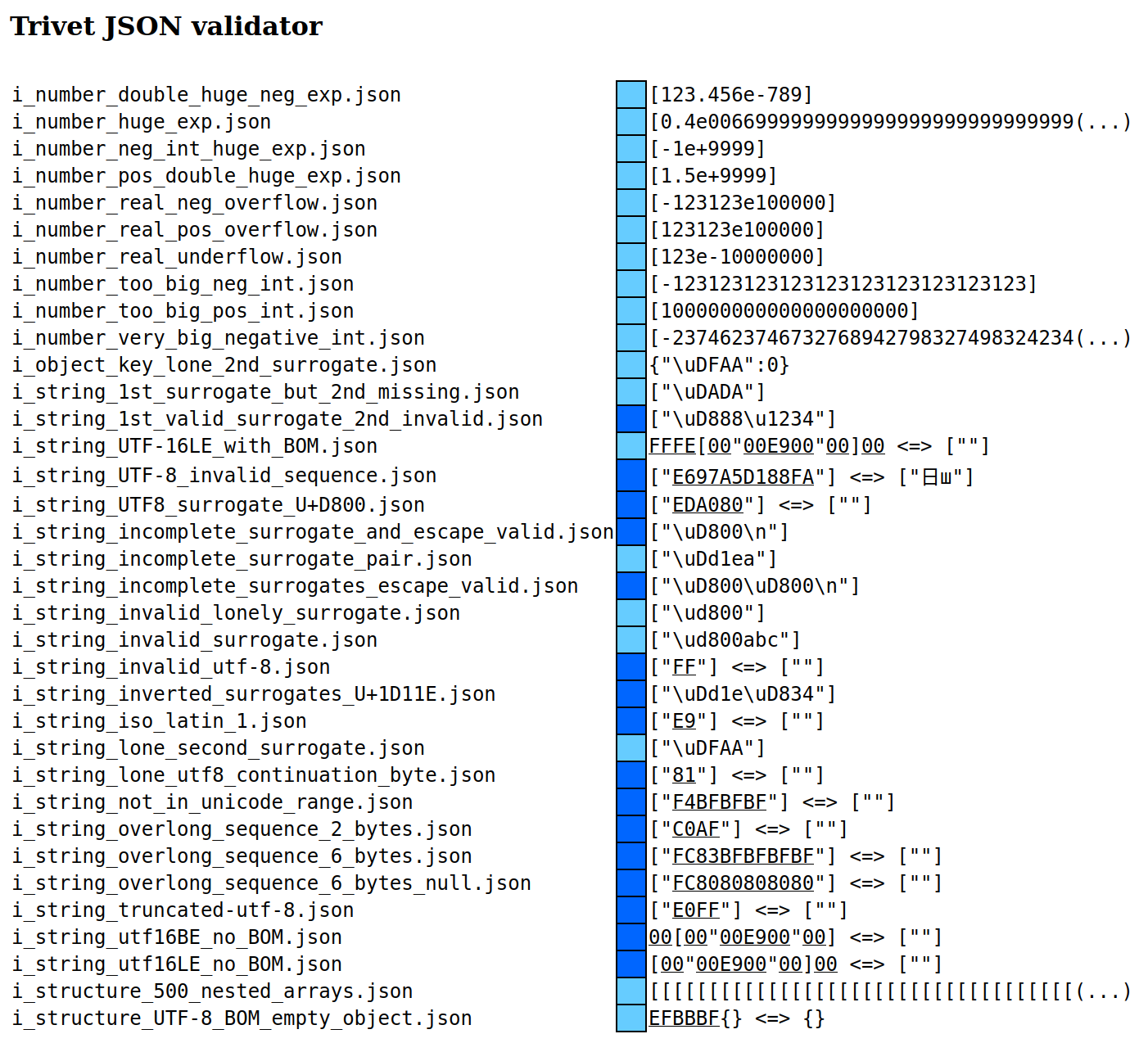
The result of running the JSONTestSuite for `json_validator.rs` (found in examples) is as follows.[^jv] The parser handles _all_ defined test cases correctly, so those are omitted. The ones listed below are specifically those for which the correct handling is undefined. Dark blue indicates that the parser rejected the case, while light blue indicates that the parser accepted the case.