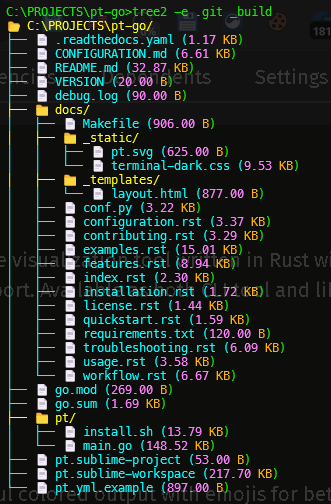
# Tree2 Usage Examples
## Basic Examples
### 1. Show current directory
```bash
tree2
```
### 2. Show specific directory
```bash
tree2 /path/to/project
tree2 ~/Documents
```
### 3. Copy output to clipboard
```bash
tree2 -c
tree2 --clipboard /path/to/project
```
---
## Ignore File Examples
### 4. Use only .gitignore
```bash
tree2 -i .gitignore
```
### 5. Use multiple specific ignore files
```bash
tree2 -i .gitignore .dockerignore
tree2 -i .gitignore .npmignore .eslintignore
```
### 6. Use custom ignore file
```bash
tree2 -i .myignore
tree2 -i .customignore .gitignore
```
### 7. Use all default ignore files (default behavior)
```bash
tree2 # Loads .gitignore, .dockerignore, .pt, and all other common ignore files
# Also hides .git, .svn, and other system folders by default
```
### 8. Show system folders (.git, .svn, etc.)
```bash
tree2 -a # Show everything including .git folder
tree2 --all # Same as above
```
---
## Exception Pattern Examples
### Wildcard Patterns
#### 8. Keep all .log files
```bash
tree2 -e "*.log"
```
#### 9. Keep all files starting with "test_"
```bash
tree2 -e "test_*"
```
#### 10. Keep multiple patterns
```bash
tree2 -e "*.log" "*.tmp" "debug_*"
```
#### 11. Keep files with pattern in middle
```bash
tree2 -e "*_backup.*"
tree2 -e "*important*"
```
#### 12. Single character wildcard
```bash
tree2 -e "?.txt" # a.txt, b.txt, but not ab.txt
tree2 -e "test?.log" # test1.log, test2.log, but not test12.log
```
### Exact Match Patterns
#### 13. Keep specific folder
```bash
tree2 -e "node_modules"
tree2 -e "target"
```
#### 14. Keep specific file
```bash
tree2 -e ".env"
tree2 -e "config.json"
```
### Regex Patterns
#### 15. Keep files ending with numbers
```bash
tree2 -e "regex:.*\d+$"
# Matches: file1, test2, data123
```
#### 16. Keep Rust test files
```bash
tree2 -e "regex:^test.*\.rs$"
# Matches: test_main.rs, test_utils.rs
```
#### 17. Keep files starting with debug or test
```bash
```bash
tree2 -e "regex:^.+\.(rs|py|js|go)$"
# Matches: main.rs, app.py, script.js, server.go
```
---
## Combined Examples
### 20. Use .gitignore but keep all logs
```bash
tree2 -i .gitignore -e "*.log"
```
### 21. Use multiple ignore files with exception
```bash
tree2 -i .gitignore .dockerignore -e "*.md"
```
### 22. Manual exclude + exception
```bash
tree2 --exclude target build -e "target/release/important"
```
### 23. Multiple exceptions with different types
```bash
tree2 -e "*.log" ".env" "regex:^test.*"
```
### 24. Complex real-world example
```bash
# Use only .gitignore and .dockerignore
# Keep all .md files and test files
# Keep specific config folder
tree2 -i .gitignore .dockerignore \
-e "*.md" \
-e "regex:^test.*" \
-e "config"
```
---
## Project-Specific Examples
### 25. Rust Project
```bash
# Show tree but keep Cargo.lock and important debug files
tree2 -e "Cargo.lock" "regex:target/debug/important.*"
```
### 26. Node.js Project
```bash
# Use .gitignore and .npmignore, but keep package-lock.json
tree2 -i .gitignore .npmignore -e "package-lock.json"
```
### 27. Python Project
```bash
# Keep all test files and __init__.py files
tree2 -e "regex:test_.*\.py$" "regex:.*__init__\.py$"
```
### 28. Docker Project
```bash
# Use .dockerignore but keep all Dockerfile variants
tree2 -i .dockerignore -e "Dockerfile*"
```
---
## Advanced Scenarios
### 29. Documentation Project
```bash
# Keep all markdown and image files
tree2 -e "*.md" "*.png" "*.jpg" "*.gif"
```
### 30. Monorepo
```bash
# Keep all package.json files across the monorepo
tree2 -e "regex:.*/package\.json$"
```
### 31. Build Artifacts
```bash
# Show everything including ignored files in target/release
tree2 -e "target/release/*"
```
### 32. Configuration Files
```bash
# Keep all config files regardless of ignore
tree2 -e "*.config.js" "*.config.json" ".env*"
```
### 33. Source Code Only
```bash
# Keep only source code files, ignore everything else
tree2 -e "regex:.*\.(rs|js|py|go|java|cpp|c|h)$"
```
---
## Real-World Use Cases
### 34. Code Review
```bash
# Show tree with only relevant source files for review
tree2 -i .gitignore -e "*.rs" "*.toml" "*.md"
```
### 35. Documentation Generation
```bash
# Copy tree structure to clipboard for documentation
tree2 -c -e "*.md" "*.txt"
```
### 36. Backup Verification
```bash
# Show tree but keep all backup files to verify
tree2 -e "*_backup*" "*backup*" "*.bak"
```
### 37. CI/CD Debugging
```bash
# Show what would be included in Docker build
tree2 -i .dockerignore
```
### 38. Security Audit
```bash
# Check for sensitive files even if they're ignored
tree2 -e ".env*" "*.key" "*.pem" "secrets*"
```
---
## Tips and Tricks
### Combining with other tools
#### 39. Count files
```bash
#### 40. Find large files
```bash
```
#### 41. Save to file
```bash
tree2 > project_structure.txt
tree2 -e "*.rs" > rust_files.txt
```
#### 42. Search in output
```bash
```
### Creating .pt file
#### 43. Quick .pt creation
```bash
cat > .pt << EOF
# Custom ignores for this project
*.tmp
*.cache
local_settings.json
dev_notes/
EOF
```
#### 44. Copy from .gitignore
```bash
cp .gitignore .pt
echo "# Additional ignores for tree2" >> .pt
echo "*.local" >> .pt
```
---
## Error Handling
### 45. Permission denied handling
```bash
# tree2 automatically shows "🔒 [Permission Denied]" for restricted folders
tree2 /root # Will show accessible parts and mark denied areas
```
### 46. Invalid regex warning
```bash
# Invalid regex patterns will show a warning but continue
tree2 -e "regex:[invalid(regex"
# Warning: Invalid regex '[invalid(regex': ...
```
---
## Performance Tips
### 47. Large directories
```bash
# Exclude large directories first
tree2 --exclude node_modules target vendor
```
### 48. Network drives
```bash
# Use ignore files to skip unnecessary network folders
tree2 -i .gitignore /mnt/network_share
```