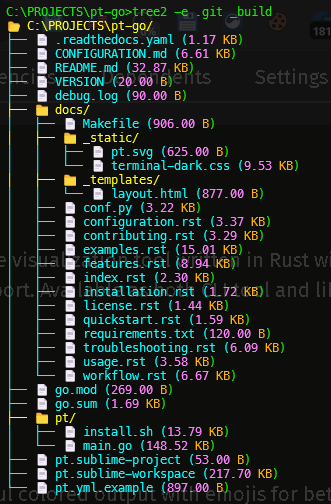
# Tree2
A high-performance directory tree visualization tool written in Rust with colors, emojis, and gitignore support. Available as both CLI tool and library crate.
<p align="center">
<img src="https://raw.githubusercontent.com/cumulus13/tree2/master/tree2.png" alt="Tree2">
</p>
## 🎦 Demo
<div align="center">
<a href="https://youtu.be/1BrUiQWi47Y">
<img src="https://i.ytimg.com/an_webp/1BrUiQWi47Y/mqdefault_6s.webp?du=3000&sqp=CLzY-skG&rs=AOn4CLAfcZjbkZ_1Zw1Yn-fAFJuaUKa88w" alt="How to use mks - tree2 -pt" style="width:100%;">
</a>
<br>
<a href="https://youtu.be/1BrUiQWi47Y">Demo</a>
</div>
## Features
- 🎨 **Colorful Output**: Beautiful colored output with emojis for better visualization
- 📊 **File Sizes**: Human-readable file sizes with color-coded values
- 🔒 **Permission Handling**: Gracefully handles permission denied errors
- 📋 **Exclusion Support**: Supports `.gitignore` files and custom exclude patterns (exact match only)
- 📋 **Clipboard Support**: Copy tree output directly to clipboard with `-c` flag
- ⚡ **Blazing Fast**: Optimized Rust implementation for maximum performance
- 📦 **Library & CLI**: Available as both command-line tool and Rust library
- 🦀 **Memory Safe**: Rust's safety guarantees ensure reliability
- 💻 **Cross-Platform**: Works on Windows, macOS, and Linux
## Color Scheme
- **Folders**: Bright Yellow (#FFFF00) with 📁 emoji
- **Files**: Bright Cyan (#00FFFF) with 📄 emoji
- **Size Values**: Light magenta (#FF80FF) - White on red background if size is 0
- **Size Units**: Orange (#FFB380)
- **Permission Denied**: White on red background with 🔒 emoji
## Installation
### Method 1: Install from crates.io
```bash
cargo install tree2
```
### Method 2: Install from source
```bash
git clone https://github.com/cumulus13/tree2
cd tree2
cargo install --path .
```
### Method 3: Build and run directly
```bash
git clone https://github.com/cumulus13/tree2
cd tree2
cargo run --release -- [options]
```
## Usage
### Basic Usage
```bash
# Show current directory tree
tree2
# Show specific directory
tree2 /path/to/directory
# Copy output to clipboard
tree2 -c
# Show version info
tree2 -V
```
### Command Line Options
```
Usage: tree2 [OPTIONS] [PATH]
Arguments:
[PATH] Target directory [default: .]
Options:
-e, --exclude <EXCLUDE>... Exclude directories/files (exact match only)
-c, --clipboard Copy result to clipboard
-V, --version Print version information
-h, --help Print help
```
### Options Details
| `-e` | `--exclude` | Exclude specific directories/files (exact match only, multiple values supported) |
| `-c` | `--clipboard` | Copy tree output to clipboard (without ANSI colors) |
| `-V` | `--version` | Show version, author, and repository information |
| `-h` | `--help` | Display help message |
### Important: Exact Match Exclusion
The `-e` flag uses **exact match only**. This means:
- `-e .git` will exclude **only** `.git` folder
- `-e .git` will **NOT** exclude `.github` folder
- Each exclusion must match the exact name
### With Exclusions
```bash
# Exclude single pattern
tree2 -e target
# Exclude multiple patterns (space-separated)
tree2 -e target .git node_modules
# Exclude multiple patterns (multiple -e flags)
tree2 -e target -e .git -e node_modules
# With clipboard
tree2 -e target -e .git -c
```
### Examples
```bash
# Typical Rust project directory
tree2 -e target -e .git
# Python project
tree2 -e __pycache__ -e .venv -e dist
# Node.js project
tree2 -e node_modules -e dist -e .next
# With clipboard for sharing
tree2 -e target -e node_modules -c
# Specific path with exclusions
tree2 /path/to/project -e target -e .git
```
Usage: tree2 [OPTIONS] [PATH]
Arguments:
[PATH] [default: .]
Options:
-e, --exclude [<EXCLUDE>...] Exclude directories/files (exact match only)
-c, --clipboard Copy result to clipboard
-V, --version Print version information
-h, --help Print help
```
## Output Example
```
📂 /home/user/project/
├── 📁 src/
│ ├── 📄 main.rs (12.45 KB)
│ └── 📄 lib.rs (0.00 B)
├── 📁 tests/
│ └── 📄 integration_test.rs (2.10 KB)
├── 📄 Cargo.toml (1.20 KB)
├── 📄 README.md (4.50 KB)
└── 🔒 [Permission Denied]
```
### Clipboard Output
When using `-c` flag, the output copied to clipboard is **plain text without ANSI color codes**, making it perfect for:
- Pasting into documentation
- Sharing in emails or chat
- Including in Markdown files
- Code reviews and discussions
## Library Usage
Add to your `Cargo.toml`:
```toml
[dependencies]
tree2 = "0.1.0"
```
### Basic Example
```rust
use tree2::TreeBuilder;
fn main() {
let tree = TreeBuilder::new()
.path(".")
.excludes(vec!["target", ".git"])
.build();
tree.print();
}
```
### Advanced Example
```rust
use tree2::{TreeBuilder, TreeConfig};
fn main() {
let config = TreeConfig {
path: ".".into(),
excludes: vec!["target".into(), ".git".into(), "node_modules".into()],
show_hidden: false,
max_depth: Some(5),
};
let tree = TreeBuilder::from_config(config).build();
tree.print();
// Or get the output as string
let output = tree.to_string();
println!("{}", output);
}
```
## Dependencies
```toml
[dependencies]
clap = { version = "4.5", features = ["derive"] }
dunce = "1.0"
cli-clipboard = "0.4"
clap-version-flag = "1.0.5"
```
## Building from Source
### Prerequisites
- Rust 1.60 or higher
- Cargo
### Build Steps
```bash
git clone https://github.com/cumulus13/tree2
cd tree2
# Debug build
cargo build
# Release build
cargo build --release
# Run tests
cargo test
# Run with arguments
cargo run --release -- -e target -c
```
## Performance
The Rust version is optimized for performance:
- Zero-cost abstractions
- Minimal memory allocations
- Efficient directory traversal
- Fast pattern matching with HashSet
- Optimized sorting algorithms
## Key Improvements in Latest Version
### 🔧 Fixed: Exact Match Exclusion
Previously, `-e .git` would also exclude `.github` and `.gitignore`. Now it uses **exact match only**:
```rust
// Old (incorrect): .git excludes .github too
entry.starts_with(ex) // ❌
// New (correct): exact match only
excludes.contains(entry) // ✅
```
### 📋 New: Clipboard Support
Copy tree output with `-c` flag:
- Automatic ANSI color stripping
- Plain text output for universal compatibility
- Success/error feedback messages
## Contributing
We welcome contributions! Please see our [Contributing Guide](CONTRIBUTING.md) for details.
1. Fork the repository
2. Create your feature branch (`git checkout -b feature/amazing-feature`)
3. Commit your changes (`git commit -m 'Add some amazing feature'`)
4. Push to the branch (`git push origin feature/amazing-feature`)
5. Open a Pull Request
## License
This project is licensed under the MIT License - see the LICENSE file for details.
## Author
**Hadi Cahyadi**
- Email: cumulus13@gmail.com
- GitHub: [cumulus13](https://github.com/cumulus13)
[](https://www.buymeacoffee.com/cumulus13)
[](https://ko-fi.com/cumulus13)
[Support me on Patreon](https://www.patreon.com/cumulus13)
## Support
If you encounter any issues or have questions:
1. Check the [Issues](https://github.com/cumulus13/tree2/issues) page
2. Create a new issue with detailed description
3. Contact: cumulus13@gmail.com
4. Documentation: [docs.rs/tree2](https://docs.rs/tree2)
## Changelog
### v1.0.9
- ✅ Fixed exact match exclusion (`.git` no longer excludes `.github`)
- ✨ Added clipboard support with `-c` flag
- 📝 Improved version info with `-V` flag
- 🎨 Better color scheme with true color support
- ⚡ Performance optimizations
---
**Enjoy blazing-fast directory visualization with Tree2 Rust!** 🚀🦀