# Changelog

All notable changes to this project will be documented in this file.

## [1.0.12] - 2025-02-05

### 🐛 Critical Bug Fixes

#### Wildcard Pattern Matching in Ignore Files
- **Fixed:** Patterns from ignore files (`.gitignore`, `.pt`, etc.) were not being matched correctly
- **Issue:** `*.exe` in `.gitignore` was not excluding `tree2.exe` because it was doing exact string match instead of wildcard matching
- **Solution:** Updated `should_exclude()` to properly handle wildcard patterns (`*` and `?`) from ignore files
- **Impact:** All wildcard patterns in ignore files now work correctly

**Before (BROKEN):**
```bash
# .gitignore contains: *.exe
tree2
# Output: tree2.exe still shows (WRONG)
```

**After (FIXED):**
```bash
# .gitignore contains: *.exe
tree2
# Output: tree2.exe is excluded (CORRECT)
```

#### Tree Connector Logic
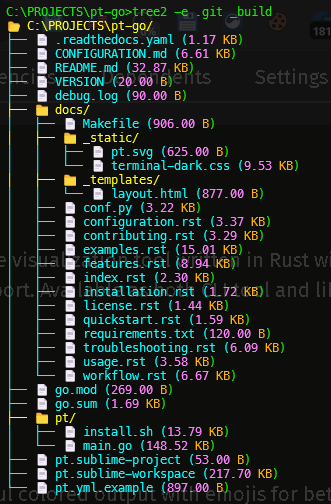
- **Fixed:** Tree connectors (`├──` vs `└──`) were incorrect when files were excluded
- **Issue:** When entries were skipped due to exclusion, the connector calculation used the wrong index
- **Solution:** Filter entries first, then calculate connectors based on filtered list
- **Impact:** Tree structure now displays correctly with proper connectors

### ✨ New Features

#### Default System Folder Exclusion
- **Added:** System folders are now hidden by default
- **Hidden by default:** `.git`, `.svn`, `.hg`, `.bzr`, `_darcs`, `CVS`, `.DS_Store`, `Thumbs.db`, `desktop.ini`
- **New flag:** `-a, --all` to show these folders when needed
- **Rationale:** Most users don't want to see version control or system folders in their tree output

**Usage:**
```bash
tree2           # Hides .git and other system folders
tree2 -a        # Shows everything including .git
tree2 --all     # Same as above
```

### 📚 Documentation
- Added TROUBLESHOOTING.md with detailed debugging guide
- Updated README with wildcard pattern explanation
- Added default exclusions documentation

## [1.0.10] - 2025-02-05

### 🎉 Major Features Added

#### Multiple Ignore Files Support
- Added automatic support for all common ignore files:
  - `.gitignore`
  - `.dockerignore`
  - `.npmignore`
  - `.eslintignore`
  - `.prettierignore`
  - `.hgignore`
  - `.terraformignore`
  - `.helmignore`
  - `.gcloudignore`
  - `.cfignore`
  - `.slugignore`
  - `.pt` (default custom ignore file)

#### Selective Ignore File Usage
- Added `-i` / `--ignore-file` flag to specify which ignore files to use
- By default, all ignore files are loaded
- Users can now choose specific ignore files: `tree2 -i .gitignore .dockerignore`

#### Exception Patterns
- Added `-e` / `--exception` flag to exclude patterns from being ignored
- Supports three pattern types:
  1. **Wildcard patterns**: `*.log`, `test_*`, `*_backup.*`
  2. **Exact match**: `node_modules`, `.env`
  3. **Regex patterns**: `regex:.*\d+$`, `regex:^test.*\.rs$`

#### Pattern Matching Implementation
- Implemented custom wildcard matcher for `*` and `?` patterns
- Integrated regex support with `regex:` prefix
- Smart pattern detection (auto-detects wildcards vs exact match)

### 🔧 Technical Improvements

- Added `Pattern` enum for flexible pattern matching
- Implemented `wildcard_match` function with recursive matching
- Enhanced `should_exclude` function to support exception patterns
- Added `load_all_ignore_files` function for multi-file loading
- Improved error handling for invalid regex patterns

### 📚 Documentation

- Comprehensive README with usage examples
- Added pattern matching examples
- Documented all command-line options
- Created example `.pt` file
- Added CHANGELOG

### 🐛 Bug Fixes

- Fixed issue where entries would be excluded even with exception patterns
- Improved pattern matching accuracy

## [1.0.9] - 2025-11-22

### Initial Features

- Beautiful colored output with emojis
- Folder visualization with yellow color
- File visualization with cyan color
- Human-readable file sizes
- .gitignore support
- Copy to clipboard support
- Permission denied handling
- 24-bit true color support

---

## Migration Guide from 1.x to 2.0

### Breaking Changes
None - all 1.x functionality is preserved

### New Usage Patterns

#### Before (1.x):
```bash
tree2                    # Only respects .gitignore
tree2 --exclude target   # Manual exclusion
```

#### After (2.0):
```bash
tree2                              # Respects ALL ignore files + .pt
tree2 -i .gitignore               # Only use .gitignore
tree2 -e "*.log"                  # Keep .log files even if ignored
tree2 -i .gitignore -e "test_*"   # Combine both features
```

### Recommended Workflow

1. Create a `.pt` file in your project root for project-specific ignores
2. Let tree2 automatically use all ignore files
3. Use `-e` to add exceptions when needed
4. Use `-i` to limit to specific ignore files if you want more control

Example `.pt` file:
```
# Project-specific ignores
*.tmp
.cache/
local_config.json
```

Then simply run:
```bash
tree2              # Uses .gitignore, .dockerignore, .pt, etc.
tree2 -e "*.tmp"   # Keep .tmp files this time
```