
Torudo

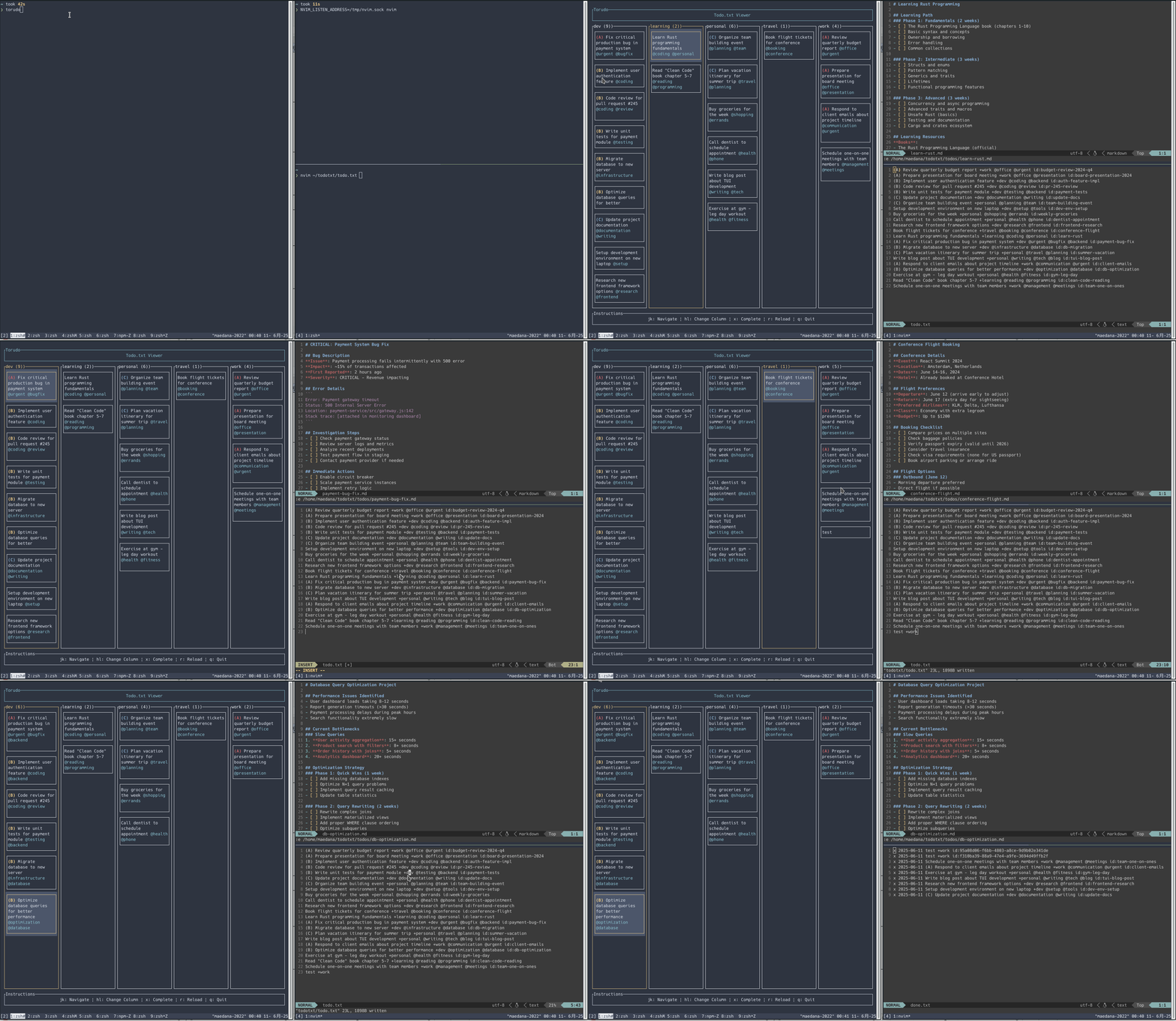
A terminal-based todo.txt viewer and manager written in Rust with TUI interface.
Features
- Project-based column view with priority sorting
- Pick layout (Todo mode,
vto toggle): groups todos into(A)/High/Low/No Energycolumns for GTD next-action pickup; composes with thenenergy/time filter - GTD modes (Inbox, Todo, Waiting, Ref, Someday) switchable with
Tab/Shift+Tab - Vimium-like
fjump: pressfto overlay short labels on every visible card and jump selection with one keystroke - External capture via
torudo inbox add "..."— add items to the inbox from scripts, launchers, or editor bindings without the TUI running - Vim integration and real-time file watching
- URL detection (🔗) and browser open (
o) - Self-update via GitHub Releases (
torudo update) - crmux / Claude Code integration
Demo
Installation
Quick install
|
Set TORUDO_VERSION to install a specific release instead of the latest one:
| TORUDO_VERSION=v0.17.0
From crates.io
Build from source
Configuration
Command Line Options
--todotxt-dir <PATH>: Directory containing your todo.txt file (default:~/todotxt, fallback:TODOTXT_DIRenv var)--nvim-listen <PATH>: Neovim socket path set bynvim --listen(default:/tmp/nvim.sock, fallback:NVIM_LISTEN_ADDRESSenv var)
Usage
First Time Setup
When you run Torudo for the first time, it will check for the required directory and files:
- If
~/todotxtdirectory doesn't exist, it will ask permission to create it - If
todo.txtdoesn't exist, it will ask permission to create an empty file - If you decline either creation, the application will exit
This ensures you have control over where your todo files are stored.
Basic Usage
# Run torudo (looks for todo.txt in $TODOTXT_DIR or ~/todotxt)
# Specify todotxt directory
# Run with debug mode for detailed logging
# Specify Neovim socket path
Working with Items from Outside the TUI
Everything torudo holds is reachable from the CLI without the TUI running, which makes it usable from launchers, shell scripts, editor keybindings, and agents.
The CLI splits along one line: a mode is a place, so add and list name one (<mode> is inbox, todo, waiting, ref, or someday). An item is a thing, and its id: is unique across the files, so set, link, complete, promote and show take just the id and find the mode themselves. reopen is the exception that takes --to, because there the mode is the destination: the item is in done.txt, and nothing records which file it left.
# Capture a new task into the inbox
# Pipe the output through jq to grab the generated id
|
# Preserve an explicit id (otherwise a UUID is generated)
# List a mode — plain todo.txt lines, or JSON for scripting
# Fold each item's detail md (todos/{id}.md) into the JSON as an "md" field (--json required)
# Set GTD tags on an item (--time short|medium|long, --energy low|high)
# Make an item recur on completion (see "Recurring Items" below)
# Stop an item recurring
# Set the priority (a-e, uppercase also works)
# Clear the priority
# Push an item out to a date (t:) — until then it sorts last and renders dimmed
# Give it a deadline (due:)
# Drop the threshold, or the deadline — none is case-insensitive here and above
# Attach a URL to an item that already exists — the TUI opens line URLs with `o`
# Attach several at once, drop one, or swap one for another in a single write
# Move an item to another mode
# Complete an item — moves it to done.txt with today's date (Todo / Waiting only)
# A recurring item also gets a "recurrence" field with the next occurrence's id/dates
# Look at the archive, and undo a completion (back into todo unless --to says otherwise)
# Search titles, +project / @context tags, and detail-md content across every mode
# (done.txt is never included)
# Take the detail md of every hit along with it
# Print one item by id as JSON with its detail md, from whatever mode holds it (done.txt included)
# Move the running TUI's cursor onto an item — the TUI must already be running
# Chain them: jump straight to the first search hit
| |
add, set, and promote print the resulting item as JSON in the same format as torudo current; set and promote exit non-zero on an unknown id. When a TUI session is running, the file watcher picks up the change and the affected tab updates automatically.
search matches case-insensitively against the item's title, its +project and @context tags, and the body of its detail md; key:value tags such as id: and time: are not searched. The matched field reports where the query landed — title (title or tags), md, or both.
--with-md on <mode> list, done list, and search adds each item's raw detail md as an md field. It requires --json and is rejected at the argument boundary without it, since a raw md body has no place in the one-line output. An item whose todos/{id}.md is missing — or that has no id: — carries no md key at all rather than a null one, so check for the key. It is opt-in because a whole mode's worth of md bodies is a lot of output when all you wanted was an id; add, set, promote, complete, and reopen include md unconditionally, as they always have. done list --with-md works too: completing an item leaves its detail md in place.
torudo show <id> is the single-item read. It looks the id up across every GTD mode and then done.txt, and prints that one item as JSON with its detail md and a mode field naming where it was found (done for something already completed); an id that is in both a mode file and the archive is reported under the mode it can still be acted on from. The md is always included, so there is no --with-md to pass, and an unknown id exits non-zero. Unlike focus, show only reads files: it needs no running TUI and it honours --todotxt-dir.
search is a stateless CLI command; focus is not — it talks to a running TUI over its RPC socket and moves the cursor there, switching modes and clearing the Now filter automatically if the item is hidden. With no TUI running it prints torudo is not running and exits non-zero. Because the target is whichever session holds the socket, focus ignores --todotxt-dir and acts on the directory that TUI was started with.
Driving torudo from Claude Code
This repository ships an Agent Skill that lets Claude Code run the
above for you in plain language — "add buy milk to my inbox", "make it short and low energy,
then move it to todo", or a bare URL, in which case Claude resolves a readable title (using a
host-specific CLI when one exists, otherwise fetching the page) and confirms the line before
adding it. The skill is written to answer to Japanese phrasings as well. It also writes the - [ ] checklist in todos/{id}.md for an item, and can start
work on a task — creating the git worktree, opening a terminal tab there, and launching a
Claude session for it. That last part additionally needs
git-wt and herdr; without them the
capture and triage parts still work.
# Install globally
Or copy skills/torudo/SKILL.md to ~/.claude/skills/torudo/SKILL.md by hand.
Updating
# Check for updates
# Update to latest version
# Force re-download
Keyboard Controls
Press ? in the TUI or run torudo -h to see all keyboard shortcuts.
Todo.txt Format
Torudo supports the standard todo.txt format:
(A) Call Mom +family @phone
x 2024-01-15 2024-01-10 (B) Review quarterly report +work @office
(C) Buy groceries +personal @errands
Learn Rust programming +learning @coding id:abc123
Features supported:
- Priority levels:
(A)through(E) - Completion status:
xprefix with completion date - Creation date:
YYYY-MM-DDformat - Projects:
+project_name - Contexts:
@context_name - Unique IDs:
id:unique_identifier(automatically added if missing) - Key/value tags:
key:valuepairs (e.g.t:2026-05-30,due:2026-06-01) are parsed into a dedicated field; URLs in the description are not misdetected as tags - Recurring completion:
rec:1w/rec:+1m— completing the item spawns its next occurrence automatically (see "Recurring Items" below)
Todo Sorting
Todos are automatically sorted within each project column using the following priority:
- Priority level: (A) items first, then (B), and so on down to (E)
- File line number: Within the same priority level, todos maintain their original file order
This ensures high-priority items are always visible at the top while preserving your intended ordering for items of the same priority.
Display Features
- Threshold dates (
t:YYYY-MM-DD): future items sort to bottom and render dimmed; set or clear one withtorudo set <id> --threshold - Overdue highlighting (
due:YYYY-MM-DD): items past due render with a red border - Detail md preview (Todo / Waiting tabs): top 3 unchecked
- [ ]fromtodos/{id}.mdshown inline on each card - Detail md badge (Todo / Waiting tabs): right-aligned
{done}/{total} {elapsed}(e.g.2/7 5m) on each card; updates live - Recurrence chip:
↻1w/↻+1mnext to the GTD chips whenrec:is set and its pattern parses - Dynamic text wrap with per-item height calculation
Recurring Items
Add rec:<pattern> to an item to spawn its next occurrence automatically when you complete it. A pattern is <count><unit>, where unit is d (day), w (week), m (month), or y (year) — e.g. rec:1w, rec:2m. Prefixing the pattern with + switches what it counts from:
rec:1w(no+) — the next occurrence is due one week after the day you actually complete it. Good for "water the plants": however late you are, the next round starts fresh from today.rec:+1m(with+) — the next occurrence is due one month after the item's originaldue:date, ignoring how late you completed it. Good for "pay rent": the schedule stays fixed even if you complete it a few days late.
A strict (+) pattern that has fallen a long way behind catches up in one go: the pattern is applied repeatedly until the next date lands after the day you completed it, so completing a due:2025-01-01 rec:+1m item on 2026-08-15 gives you 2026-09-01 rather than 2025-02-01. You never have to complete an item nineteen times to work off a backlog, and the schedule still lines up with the original day of the month. (This is a deliberate departure from topydo, which only ever advances one period.)
To stop an item repeating, clear the tag with torudo set <id> --rec none.
Completing a recurring item still moves the original line to done.txt as usual, and also appends a new line to the same mode file: a fresh id:, today as the creation date, t:/due: shifted by the pattern (the gap between them is preserved), and everything else — priority, +project, @context, rec:, time:, energy: — carried over unchanged. If the item has a todos/{id}.md detail file, it is copied to the new id with every - [x] checkbox reset to - [ ] (so a written-out procedure survives, just unchecked) and the frontmatter's branch: line dropped (cwd: is kept). An invalid rec: value never blocks completion — it just skips creating a next occurrence and reports why, both on the TUI status line and (for torudo complete) as a warning on stderr.
Vim Integration
If you have Neovim running with a socket, Torudo can automatically open todo detail files when navigating. Each todo item can have an associated markdown file in $TODOTXT_DIR/todos/{id}.md.
Todo Detail Frontmatter
Todo detail files (todos/{id}.md) support YAML frontmatter with a cwd field to specify the working directory for clp/cli claude launch:
cwd: /home/user/src/my-project
The cwd field is required for clp/cli — an error is shown if it is not set.
File Structure
Torudo keeps one todo.txt-format file per GTD mode plus a done.txt archive. Each file holds plain todo.txt lines; todos/{id}.md holds optional long-form detail for individual items.
~/todotxt/
├── inbox.txt         # Inbox — capture target (also `torudo inbox add`)
├── todo.txt          # Todo / Next actions (`x` completes here)
├── waiting.txt       # Waiting for (`x` also completes here)
├── ref.txt           # Reference material
├── someday.txt       # Someday / maybe
├── done.txt          # Archive of items completed from todo.txt
└── todos/            # Individual todo detail files
    ├── abc123.md
    └── def456.md
Only todo.txt is created at first launch; the other mode files are created lazily the first time something lands in them (e.g. via the s send-to prefix or torudo inbox add). Completing an item with x works in Todo and Waiting modes (completed items are moved to done.txt); to complete an item from Inbox / Ref / Someday, send it to Todo first with st.
If you prefer the classic todo.txt / done.txt workflow, just stay in Todo mode and ignore the other tabs — none of the GTD mode files are created until you write to them, and every existing key (x, hjkl, o, …) behaves exactly as before. GTD is opt-in, not required.
Development
Running in Development
# With debug mode
Running Tests
Code Quality
Roadmap
Ideas that are on the table but not yet implemented. Order does not imply priority.
- Show PR status for todos linked to a git working tree (new frontmatter field pointing at the working tree path)
torudo w syncsubcommand: when invoked from inside a git working tree, automatically fill the currently selected todo's frontmatter with that path (no more hand-editing)
License
This project is licensed under the MIT License - see the LICENSE file for details.
Contributing
- Fork the repository
- Create a feature branch
- Make your changes
- Run tests and linting
- Submit a pull request