---
title: Quick Examples
description: Get started quickly with common batch processing patterns
sidebar:
order: 4
---
import { Card, CardGrid, Tabs, TabItem, Aside, Code } from '@astrojs/starlight/components';
# Quick Examples
Jump right in with these ready-to-use examples covering the most common batch processing scenarios.
## 5-Minute Quick Start
### Simple CSV to JSON Transformation
The most basic batch job: read CSV, transform data, write JSON.
```rust
use spring_batch_rs::core::job::JobBuilder;
use spring_batch_rs::core::step::StepBuilder;
use spring_batch_rs::item::csv::CsvItemReaderBuilder;
use spring_batch_rs::item::json::JsonItemWriterBuilder;
use serde::{Deserialize, Serialize};
#[derive(Debug, Deserialize, Serialize)]
struct User {
id: u32,
name: String,
email: String,
}
fn main() -> Result<(), Box<dyn std::error::Error>> {
// 1. Create CSV reader
let reader = CsvItemReaderBuilder::<User>::new()
.has_headers(true)
.from_path("users.csv")?;
// 2. Create JSON writer
let writer = JsonItemWriterBuilder::<User>::new()
.from_path("users.json")?;
// 3. Build step
let step = StepBuilder::new("csv-to-json")
.chunk(100)
.reader(&reader)
.writer(&writer)
.build();
// 4. Build and run job
let job = JobBuilder::new()
.start(&step)
.build();
let execution = job.run()?;
println!("✓ Processed {} users", execution.read_count);
Ok(())
}
```
**Input (users.csv):**
```csv
id,name,email
1,Alice Smith,alice@example.com
2,Bob Jones,bob@example.com
3,Carol White,carol@example.com
```
**Output (users.json):**
```json
[
{"id": 1, "name": "Alice Smith", "email": "alice@example.com"},
{"id": 2, "name": "Bob Jones", "email": "bob@example.com"},
{"id": 3, "name": "Carol White", "email": "carol@example.com"}
]
```
## Common Patterns
<CardGrid>
<Card title="Data Transformation" icon="puzzle">
Read from one format, transform, write to another
</Card>
<Card title="Data Validation" icon="approve-check">
Filter and validate records during processing
</Card>
<Card title="Database Migration" icon="seti:db">
Move data between different database systems
</Card>
<Card title="File Operations" icon="document">
Compress, encrypt, or transfer files
</Card>
</CardGrid>
## Pattern 1: Data Transformation with Business Logic
Transform and enrich data during processing.
```rust
use spring_batch_rs::core::item::ItemProcessor;
use spring_batch_rs::BatchError;
use serde::{Deserialize, Serialize};
#[derive(Debug, Deserialize)]
struct RawOrder {
order_id: u32,
customer_name: String,
items: String, // Comma-separated
total: f64,
}
#[derive(Debug, Serialize)]
struct ProcessedOrder {
order_id: u32,
customer_name: String,
items: Vec<String>,
total: f64,
tax: f64,
grand_total: f64,
status: String,
}
struct OrderProcessor {
tax_rate: f64,
}
impl ItemProcessor<RawOrder, ProcessedOrder> for OrderProcessor {
fn process(&self, order: RawOrder) -> ItemProcessorResult<ProcessedOrder> {
// Parse items
let items: Vec<String> = order.items
.split(',')
.map(|s| s.trim().to_string())
.collect();
// Calculate tax
let tax = order.total * self.tax_rate;
let grand_total = order.total + tax;
// Determine status
let status = if grand_total > 1000.0 {
"high-value".to_string()
} else {
"standard".to_string()
};
Ok(Some(ProcessedOrder {
order_id: order.order_id,
customer_name: order.customer_name,
items,
total: order.total,
tax,
grand_total,
status,
}))
}
}
// Usage
fn build_order_processing_step() -> Step {
let reader = CsvItemReaderBuilder::<RawOrder>::new()
.has_headers(true)
.from_path("raw_orders.csv")?;
let processor = OrderProcessor { tax_rate: 0.08 };
let writer = JsonItemWriterBuilder::<ProcessedOrder>::new()
.from_path("processed_orders.json")?;
StepBuilder::new("process-orders")
.chunk(50)
.reader(&reader)
.processor(&processor)
.writer(&writer)
.build()
}
```
## Pattern 2: Data Validation and Filtering
Filter out invalid records and collect errors.
```rust
use spring_batch_rs::core::item::ItemProcessor;
use spring_batch_rs::BatchError;
use regex::Regex;
#[derive(Debug, Clone, Deserialize, Serialize)]
struct Contact {
name: String,
email: String,
phone: String,
}
struct ContactValidator {
email_regex: Regex,
error_log: Arc<Mutex<Vec<String>>>,
}
impl ContactValidator {
fn new() -> Self {
Self {
email_regex: Regex::new(r"^[a-zA-Z0-9._%+-]+@[a-zA-Z0-9.-]+\.[a-zA-Z]{2,}$").unwrap(),
error_log: Arc::new(Mutex::new(Vec::new())),
}
}
fn validate_email(&self, email: &str) -> bool {
self.email_regex.is_match(email)
}
fn validate_phone(&self, phone: &str) -> bool {
phone.len() >= 10 && phone.chars().all(|c| c.is_numeric() || c == '-')
}
fn log_error(&self, message: String) {
self.error_log.lock().unwrap().push(message);
}
}
impl ItemProcessor<Contact, Contact> for ContactValidator {
fn process(&self, contact: Contact) -> ItemProcessorResult<Contact> {
// Validate name
if contact.name.trim().is_empty() {
self.log_error(format!("Empty name for email: {}", contact.email));
return Ok(None); // Filter out
}
// Validate email
if !self.validate_email(&contact.email) {
self.log_error(format!("Invalid email: {}", contact.email));
return Ok(None);
}
// Validate phone
if !self.validate_phone(&contact.phone) {
self.log_error(format!("Invalid phone for {}: {}", contact.name, contact.phone));
return Ok(None);
}
// All validations passed
Ok(Some(contact))
}
}
// Usage with error reporting
fn process_contacts() -> Result<(), Box<dyn std::error::Error>> {
let validator = ContactValidator::new();
let error_log = validator.error_log.clone();
let reader = CsvItemReaderBuilder::<Contact>::new()
.has_headers(true)
.from_path("contacts.csv")?;
let writer = CsvItemWriterBuilder::<Contact>::new()
.has_headers(true)
.from_path("valid_contacts.csv")?;
let step = StepBuilder::new("validate-contacts")
.chunk(100)
.reader(&reader)
.processor(&validator)
.writer(&writer)
.build();
step.execute()?;
// Report errors
let errors = error_log.lock().unwrap();
println!("Validation complete:");
println!(" Valid contacts: {}", step.write_count);
println!(" Invalid contacts: {}", errors.len());
if !errors.is_empty() {
std::fs::write("validation_errors.log", errors.join("\n"))?;
println!(" Error log: validation_errors.log");
}
Ok(())
}
```
## Pattern 3: Database to Database Migration
Migrate data from PostgreSQL to MySQL with transformation.
<Tabs>
<TabItem label="Complete Example">
```rust
use spring_batch_rs::core::step::StepBuilder;
use spring_batch_rs::item::rdbc::RdbcItemReaderBuilder;
use spring_batch_rs::item::rdbc::RdbcItemWriterBuilder;
use sqlx::{PgPool, MySqlPool, FromRow};
use serde::{Deserialize, Serialize};
#[derive(Debug, FromRow, Deserialize, Serialize)]
struct LegacyUser {
user_id: i32,
username: String,
email: String,
created_at: chrono::NaiveDateTime,
}
#[derive(Debug, Serialize)]
struct ModernUser {
id: i32,
username: String,
email: String,
created_timestamp: i64,
migrated_at: i64,
}
struct UserMigrationProcessor;
impl ItemProcessor<LegacyUser, ModernUser> for UserMigrationProcessor {
fn process(&self, legacy: LegacyUser) -> ItemProcessorResult<ModernUser> {
Ok(Some(ModernUser {
id: legacy.user_id,
username: legacy.username,
email: legacy.email,
created_timestamp: legacy.created_at.timestamp(),
migrated_at: chrono::Utc::now().timestamp(),
}))
}
}
async fn migrate_users() -> Result<(), Box<dyn std::error::Error>> {
// Connect to source database (PostgreSQL)
let pg_pool = PgPool::connect("postgresql://localhost/legacy_db").await?;
// Connect to target database (MySQL)
let mysql_pool = MySqlPool::connect("mysql://localhost/modern_db").await?;
// Create reader
let reader = RdbcItemReaderBuilder::<LegacyUser>::new()
.connection_pool(pg_pool)
.query("SELECT user_id, username, email, created_at FROM users ORDER BY user_id")
.page_size(500)
.build()?;
// Create processor
let processor = UserMigrationProcessor;
// Create writer
let writer = RdbcItemWriterBuilder::<ModernUser>::new()
.connection_pool(mysql_pool)
.sql("INSERT INTO users (id, username, email, created_timestamp, migrated_at) VALUES (?, ?, ?, ?, ?)")
.build()?;
// Build and execute step
let step = StepBuilder::new("migrate-users")
.chunk(500)
.reader(&reader)
.processor(&processor)
.writer(&writer)
.build();
let execution = step.execute()?;
println!("Migrated {} users", execution.read_count);
Ok(())
}
```
</TabItem>
<TabItem label="With Error Handling">
```rust
async fn migrate_users_with_fault_tolerance() -> Result<(), Box<dyn std::error::Error>> {
let pg_pool = PgPool::connect("postgresql://localhost/legacy_db").await?;
let mysql_pool = MySqlPool::connect("mysql://localhost/modern_db").await?;
let reader = RdbcItemReaderBuilder::<LegacyUser>::new()
.connection_pool(pg_pool)
.query("SELECT user_id, username, email, created_at FROM users ORDER BY user_id")
.page_size(500)
.build()?;
let processor = UserMigrationProcessor;
let writer = RdbcItemWriterBuilder::<ModernUser>::new()
.connection_pool(mysql_pool)
.sql("INSERT INTO users (id, username, email, created_timestamp, migrated_at) VALUES (?, ?, ?, ?, ?)")
.build()?;
let step = StepBuilder::new("migrate-users")
.chunk(500)
.reader(&reader)
.processor(&processor)
.writer(&writer)
.skip_limit(100) // Skip up to 100 problematic records
.retry_limit(3) // Retry transient failures
.build();
let execution = step.execute()?;
println!("Migration summary:");
println!(" Total read: {}", execution.read_count);
println!(" Migrated: {}", execution.write_count);
println!(" Skipped: {}", execution.skip_count);
println!(" Failed: {}", execution.read_count - execution.write_count - execution.skip_count);
Ok(())
}
```
</TabItem>
</Tabs>
## Pattern 4: File Compression Tasklet
Compress files using a tasklet for non-data operations.
```rust
use spring_batch_rs::core::step::{Tasklet, StepExecution, RepeatStatus};
use spring_batch_rs::BatchError;
use std::fs::File;
use std::io::{Read, Write};
use zip::write::FileOptions;
struct ZipCompressionTasklet {
source_dir: String,
output_file: String,
compression_level: u32,
}
impl Tasklet for ZipCompressionTasklet {
fn execute(&self, step_execution: &StepExecution) -> Result<RepeatStatus, BatchError> {
println!("Starting compression: {}", self.source_dir);
let file = File::create(&self.output_file)
.map_err(|e| BatchError::IoError(e))?;
let mut zip = zip::ZipWriter::new(file);
let options = FileOptions::default()
.compression_method(zip::CompressionMethod::Deflated)
.compression_level(Some(self.compression_level));
let mut file_count = 0;
let mut total_size = 0u64;
for entry in std::fs::read_dir(&self.source_dir)? {
let entry = entry?;
let path = entry.path();
if path.is_file() {
let file_name = path.file_name()
.ok_or_else(|| BatchError::ProcessingError("Invalid filename".into()))?
.to_string_lossy()
.to_string();
// Add file to archive
zip.start_file(&file_name, options)?;
let mut file = File::open(&path)?;
let mut buffer = Vec::new();
file.read_to_end(&mut buffer)?;
total_size += buffer.len() as u64;
zip.write_all(&buffer)?;
file_count += 1;
println!(" Added: {} ({} bytes)", file_name, buffer.len());
}
}
zip.finish()?;
println!("Compression complete:");
println!(" Files: {}", file_count);
println!(" Total size: {} bytes", total_size);
println!(" Archive: {}", self.output_file);
Ok(RepeatStatus::Finished)
}
}
// Usage
fn build_compression_job() -> Job {
let compress = StepBuilder::new("compress-exports")
.tasklet(&ZipCompressionTasklet {
source_dir: "data/exports".to_string(),
output_file: "exports.zip".to_string(),
compression_level: 9,
})
.build();
JobBuilder::new()
.start(&compress)
.build()
}
```
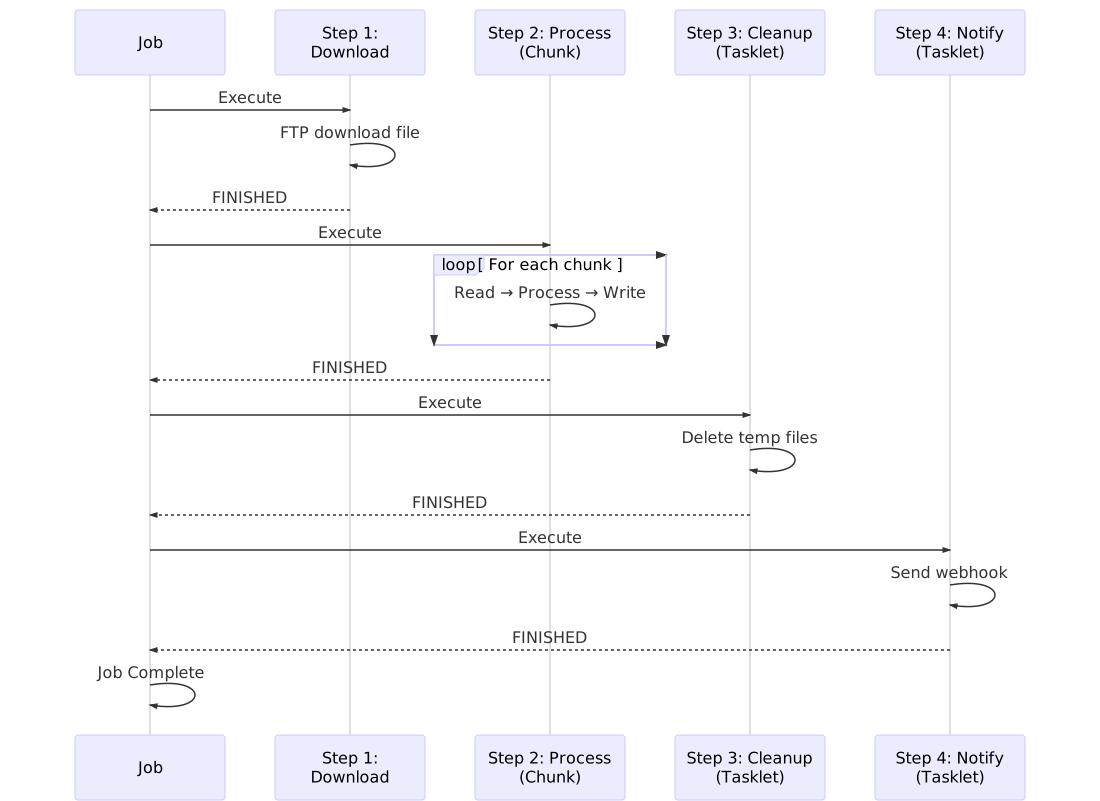
## Pattern 5: Multi-Step ETL Pipeline
Complete ETL workflow with download, process, and cleanup.
```rust
use spring_batch_rs::core::job::JobBuilder;
use spring_batch_rs::core::step::StepBuilder;
fn build_complete_etl_pipeline() -> Job {
// Step 1: Download data via FTP
let download_step = StepBuilder::new("download-data")
.tasklet(&FtpDownloadTasklet {
host: "ftp.example.com".to_string(),
username: "user".to_string(),
password: "pass".to_string(),
remote_file: "/data/sales.csv".to_string(),
local_file: "temp/sales.csv".to_string(),
})
.build();
// Step 2: Validate and transform data
let transform_step = StepBuilder::new("transform-sales")
.chunk(1000)
.reader(&CsvItemReaderBuilder::<SalesRecord>::new()
.has_headers(true)
.from_path("temp/sales.csv").unwrap())
.processor(&SalesDataTransformer)
.writer(&DatabaseWriter::new(pool.clone()))
.skip_limit(50)
.build();
// Step 3: Generate summary report
let report_step = StepBuilder::new("generate-report")
.tasklet(&ReportGeneratorTasklet {
database_pool: pool.clone(),
output_file: "reports/sales_summary.json".to_string(),
})
.build();
// Step 4: Cleanup temp files
let cleanup_step = StepBuilder::new("cleanup")
.tasklet(&CleanupTasklet {
directory: "temp/".to_string(),
pattern: "*.csv".to_string(),
})
.build();
// Step 5: Send notification
let notify_step = StepBuilder::new("notify")
.tasklet(&SlackNotificationTasklet {
webhook_url: env::var("SLACK_WEBHOOK_URL").unwrap(),
message: "ETL pipeline completed successfully".to_string(),
})
.build();
// Build complete job
JobBuilder::new()
.start(&download_step)
.next(&transform_step)
.next(&report_step)
.next(&cleanup_step)
.next(¬ify_step)
.build()
}
```
### Pipeline Execution Flow
```mermaid
graph LR
Download[1. Download<br/>FTP Data] --> Transform[2. Transform<br/>CSV to DB]
Transform --> Report[3. Report<br/>Generate Summary]
Report --> Cleanup[4. Cleanup<br/>Remove Temp Files]
Cleanup --> Notify[5. Notify<br/>Send Slack Message]
style Download fill:#3b82f6,color:#fff
style Transform fill:#10b981,color:#fff
style Report fill:#f59e0b,color:#fff
style Cleanup fill:#8b5cf6,color:#fff
style Notify fill:#ec4899,color:#fff
```
## Pattern 6: Real-Time Progress Tracking
Monitor batch job progress with callbacks.
```rust
use spring_batch_rs::core::step::StepListener;
use std::sync::Arc;
use std::sync::atomic::{AtomicUsize, Ordering};
struct ProgressTracker {
total_items: AtomicUsize,
processed_items: AtomicUsize,
start_time: std::time::Instant,
}
impl ProgressTracker {
fn new() -> Arc<Self> {
Arc::new(Self {
total_items: AtomicUsize::new(0),
processed_items: AtomicUsize::new(0),
start_time: std::time::Instant::now(),
})
}
fn update(&self, count: usize) {
let processed = self.processed_items.fetch_add(count, Ordering::SeqCst) + count;
let elapsed = self.start_time.elapsed().as_secs();
let rate = if elapsed > 0 {
processed / elapsed as usize
} else {
0
};
println!("Progress: {} items ({} items/sec)", processed, rate);
}
}
impl StepListener for ProgressTracker {
fn after_chunk(&self, chunk_size: usize) {
self.update(chunk_size);
}
fn before_step(&self, _: &StepExecution) {
println!("Starting batch processing...");
}
fn after_step(&self, execution: &StepExecution) {
let total_time = self.start_time.elapsed();
let items = self.processed_items.load(Ordering::SeqCst);
println!("Completed:");
println!(" Items: {}", items);
println!(" Time: {:?}", total_time);
println!(" Average rate: {} items/sec", items / total_time.as_secs() as usize);
}
}
// Usage
fn build_step_with_progress_tracking() -> Step {
let tracker = ProgressTracker::new();
StepBuilder::new("process-with-tracking")
.chunk(100)
.reader(&reader)
.processor(&processor)
.writer(&writer)
.listener(tracker)
.build()
}
```
## Performance Tips
<CardGrid>
<Card title="Optimize Chunk Size" icon="rocket">
**Start with 100**, measure throughput, adjust:
- Small items: increase to 500-1000
- Large items: decrease to 10-50
- Monitor memory usage
</Card>
<Card title="Use Fault Tolerance" icon="shield">
Set reasonable limits:
- `skip_limit(N)` for data quality issues
- `retry_limit(3)` for transient errors
- Log skipped items for review
</Card>
<Card title="Batch Database Operations" icon="seti:db">
- Use chunk sizes that match DB batch capabilities
- Disable auto-commit in transactions
- Use prepared statements
- Consider connection pooling
</Card>
<Card title="Monitor & Measure" icon="information">
- Add progress tracking listeners
- Log execution statistics
- Profile critical sections
- Track error rates
</Card>
</CardGrid>
<Aside type="tip">
**Pro Tip**: Use `RUST_LOG=debug` environment variable to see detailed execution logs:
```bash
RUST_LOG=debug cargo run
```
</Aside>
## Common Pitfalls to Avoid
| ❌ Don't Do This | ✅ Do This Instead |
|------------------|---------------------|
| Process millions of records in one chunk | Use chunk size 100-1000 |
| Ignore validation errors | Set skip_limit and log errors |
| Use tasklets for data processing | Use chunk processing with ItemReader |
| Hard-code file paths | Use configuration or env variables |
| Skip error handling | Use fault-tolerant patterns |
| Process everything in memory | Stream with readers/writers |
## Next Steps
Ready to dive deeper? Explore these topics:
- [Architecture](/architecture/) - Understand the framework design
- [Processing Models](/processing-models/) - Master chunk vs tasklet patterns
- [Error Handling](/error-handling/) - Build fault-tolerant pipelines
- [Examples](/examples/) - More comprehensive examples
- [Item Readers & Writers](/item-readers-writers/overview/) - Explore all I/O options