---
title: Processing Models
description: Understanding chunk-oriented vs tasklet processing patterns
sidebar:
order: 3
---
import { Card, CardGrid, Tabs, TabItem, Aside } from '@astrojs/starlight/components';
# Processing Models
Spring Batch RS supports two distinct processing models, each optimized for different use cases. Understanding when to use each pattern is crucial for building efficient batch applications.
## Overview
```mermaid
graph TB
subgraph "Chunk-Oriented Processing"
Read[Read Items<br/>One by One] --> Process[Process Items<br/>Transform/Validate]
Process --> Collect[Collect into Chunk]
Collect --> Write[Write Chunk<br/>Batch Operation]
Write --> Commit[Commit Transaction]
end
subgraph "Tasklet Processing"
Task[Execute Task] --> Complete[Complete or Continue]
Complete --> Done[Finished]
end
style Read fill:#3b82f6,color:#fff
style Write fill:#3b82f6,color:#fff
style Task fill:#10b981,color:#fff
style Commit fill:#f59e0b,color:#fff
```
## Chunk-Oriented Processing
### What is Chunk Processing?
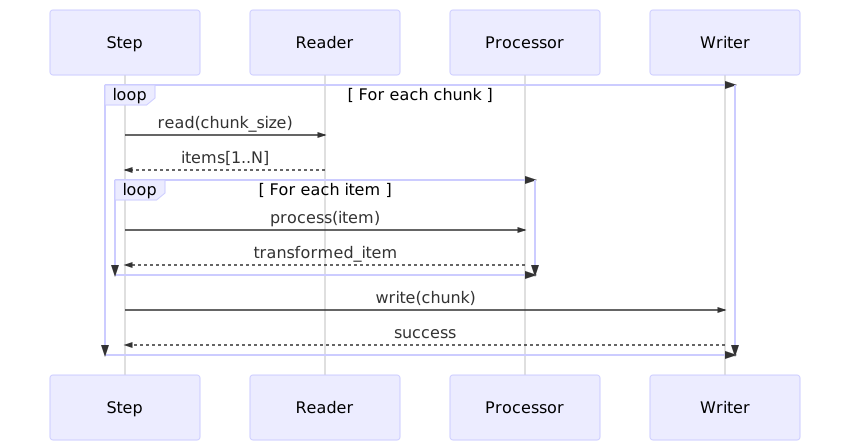
Chunk-oriented processing follows the **read-process-write** pattern, handling large datasets by breaking them into manageable chunks. This is the most common pattern for batch processing.
### Architecture
```mermaid
sequenceDiagram
participant Step
participant ItemReader
participant ItemProcessor
participant ItemWriter
participant Transaction
Step->>Transaction: Begin
loop For each chunk (size N)
loop Read N items
Step->>ItemReader: read()
ItemReader-->>Step: item
end
loop Process N items
Step->>ItemProcessor: process(item)
ItemProcessor-->>Step: transformed_item
end
Step->>ItemWriter: write(chunk)
ItemWriter-->>Step: success
Step->>Transaction: Commit
end
Step->>Transaction: Complete
```
### Basic Example
```rust
use spring_batch_rs::core::step::StepBuilder;
use spring_batch_rs::item::csv::CsvItemReaderBuilder;
use spring_batch_rs::item::json::JsonItemWriterBuilder;
use serde::{Deserialize, Serialize};
#[derive(Debug, Deserialize, Serialize)]
struct Customer {
id: u32,
name: String,
email: String,
status: String,
}
fn main() -> Result<(), Box<dyn std::error::Error>> {
// Create reader
let reader = CsvItemReaderBuilder::<Customer>::new()
.has_headers(true)
.from_path("customers.csv")?;
// Create processor (transform data)
let processor = |customer: Customer| -> Result<Option<Customer>, _> {
// Business logic: only active customers
if customer.status == "active" {
Ok(Some(customer))
} else {
Ok(None) // Filter out
}
};
// Create writer
let writer = JsonItemWriterBuilder::<Customer>::new()
.from_path("active_customers.json")?;
// Build step with chunk processing
let step = StepBuilder::new("process-customers")
.chunk(100) // Process 100 items at a time
.reader(&reader)
.processor(&processor)
.writer(&writer)
.build();
// Execute
let execution = step.execute()?;
println!("Processed {} items", execution.read_count);
Ok(())
}
```
### When to Use Chunk Processing
<CardGrid>
<Card title="✅ Perfect For" icon="approve-check">
- **Large Datasets**: Millions of records to process
- **ETL Operations**: Extract, Transform, Load workflows
- **Data Migration**: Moving data between systems
- **File Processing**: CSV, JSON, XML transformations
- **Database Operations**: Bulk inserts, updates
</Card>
<Card title="❌ Not Ideal For" icon="warning">
- **Single Operations**: One-time file compression
- **Non-data Tasks**: Network requests, cleanup
- **Streaming Data**: Real-time event processing
- **Complex Branching**: Dynamic workflow decisions
</Card>
</CardGrid>
### Chunk Size Optimization
```mermaid
graph LR
Small[Small Chunks<br/>10-50 items] --> SmallPros[✅ Lower memory<br/>✅ Better error isolation<br/>❌ More commits<br/>❌ Lower throughput]
Medium[Medium Chunks<br/>100-500 items] --> MediumPros[✅ Balanced performance<br/>✅ Good memory usage<br/>✅ Recommended default]
Large[Large Chunks<br/>1000+ items] --> LargePros[✅ Highest throughput<br/>✅ Fewer commits<br/>❌ High memory<br/>❌ Large rollback scope]
style Medium fill:#10b981,color:#fff
style Small fill:#f59e0b,color:#fff
style Large fill:#ef4444,color:#fff
```
### Advanced Chunk Example with Fault Tolerance
```rust
use spring_batch_rs::core::step::StepBuilder;
use spring_batch_rs::core::item::{ItemReader, ItemProcessor, ItemWriter};
use spring_batch_rs::BatchError;
#[derive(Debug, Clone)]
struct Order {
id: u32,
total: f64,
items: Vec<String>,
}
struct OrderValidator;
impl ItemProcessor<Order, Order> for OrderValidator {
fn process(&self, order: Order) -> ItemProcessorResult<Order> {
// Validate order
if order.total < 0.0 {
return Err(BatchError::ProcessingError(
format!("Invalid total for order {}", order.id)
));
}
if order.items.is_empty() {
return Err(BatchError::ProcessingError(
format!("Empty order {}", order.id)
));
}
Ok(Some(order))
}
}
fn build_fault_tolerant_step(
reader: impl ItemReader<Order>,
writer: impl ItemWriter<Order>,
) -> Step {
StepBuilder::new("process-orders")
.chunk(200)
.reader(&reader)
.processor(&OrderValidator)
.writer(&writer)
.skip_limit(10) // Skip up to 10 invalid orders
.retry_limit(3) // Retry failed items 3 times
.build()
}
```
### Memory Considerations
```mermaid
graph TB
subgraph "Memory Usage Pattern"
Input[Input Buffer<br/>chunk_size × item_size] --> Process[Processing Buffer<br/>chunk_size × item_size]
Process --> Output[Output Buffer<br/>chunk_size × item_size]
Output --> Total[Total Memory<br/>≈ 3 × chunk_size × item_size]
end
subgraph "Recommendations"
Small[Small Items<br/><1KB] --> SmallChunk[Use 500-1000 chunks]
Medium[Medium Items<br/>1-10KB] --> MediumChunk[Use 100-500 chunks]
Large[Large Items<br/>>10KB] --> LargeChunk[Use 10-100 chunks]
end
style Total fill:#f59e0b,color:#fff
style MediumChunk fill:#10b981,color:#fff
```
## Tasklet Processing
### What is a Tasklet?
A tasklet is a **single-task operation** that executes custom logic. Unlike chunk processing, it doesn't follow the read-process-write pattern. Tasklets are perfect for non-data-driven operations.
### Architecture
```mermaid
graph LR
Step[Step Execution] --> Tasklet[Tasklet.execute()]
Tasklet --> Logic{Custom Logic}
Logic --> Status{Return Status}
Status -->|FINISHED| Complete[Step Complete]
Status -->|CONTINUABLE| Repeat[Execute Again]
style Tasklet fill:#10b981,color:#fff
style Complete fill:#3b82f6,color:#fff
```
### Basic Example
```rust
use spring_batch_rs::core::step::{Tasklet, StepExecution, RepeatStatus};
use spring_batch_rs::core::step::StepBuilder;
use spring_batch_rs::BatchError;
use std::path::Path;
struct FileCompressionTasklet {
source_dir: String,
target_file: String,
}
impl Tasklet for FileCompressionTasklet {
fn execute(
&self,
step_execution: &StepExecution,
) -> Result<RepeatStatus, BatchError> {
println!("Compressing files from {}", self.source_dir);
// Custom compression logic
let files = std::fs::read_dir(&self.source_dir)?;
let mut archive = zip::ZipWriter::new(
std::fs::File::create(&self.target_file)?
);
for entry in files {
let entry = entry?;
let path = entry.path();
if path.is_file() {
let file_name = path.file_name()
.unwrap()
.to_string_lossy();
archive.start_file(file_name, Default::default())?;
let contents = std::fs::read(&path)?;
archive.write_all(&contents)?;
println!("Added: {}", file_name);
}
}
archive.finish()?;
println!("Created archive: {}", self.target_file);
Ok(RepeatStatus::Finished)
}
}
fn main() -> Result<(), Box<dyn std::error::Error>> {
let tasklet = FileCompressionTasklet {
source_dir: "data/exports".to_string(),
target_file: "archive.zip".to_string(),
};
let step = StepBuilder::new("compress-files")
.tasklet(&tasklet)
.build();
step.execute()?;
Ok(())
}
```
### When to Use Tasklets
<CardGrid>
<Card title="✅ Perfect For" icon="approve-check">
- **File Operations**: Compression, encryption, transfer
- **Network Tasks**: FTP uploads, API calls
- **Database Maintenance**: Cleanup, vacuum, optimize
- **System Operations**: Directory creation, cleanup
- **Pre/Post Processing**: Setup and teardown tasks
</Card>
<Card title="❌ Not Ideal For" icon="warning">
- **Large Datasets**: Use chunk processing instead
- **Item Transformation**: Use ItemProcessor
- **Streaming Data**: Use readers/writers
- **Transaction Per Item**: Use chunk processing
</Card>
</CardGrid>
### Common Tasklet Patterns
<Tabs>
<TabItem label="File Transfer">
```rust
use spring_batch_rs::core::step::{Tasklet, StepExecution, RepeatStatus};
use spring_batch_rs::BatchError;
struct FtpUploadTasklet {
local_path: String,
remote_path: String,
host: String,
}
impl Tasklet for FtpUploadTasklet {
fn execute(&self, _: &StepExecution) -> Result<RepeatStatus, BatchError> {
println!("Uploading {} to {}", self.local_path, self.remote_path);
// FTP connection and upload logic
let mut ftp = ftp::FtpStream::connect(&self.host)?;
ftp.login("user", "password")?;
let file = std::fs::File::open(&self.local_path)?;
let mut reader = std::io::BufReader::new(file);
ftp.put(&self.remote_path, &mut reader)?;
ftp.quit()?;
println!("Upload complete");
Ok(RepeatStatus::Finished)
}
}
```
</TabItem>
<TabItem label="Database Cleanup">
```rust
use spring_batch_rs::core::step::{Tasklet, StepExecution, RepeatStatus};
use spring_batch_rs::BatchError;
use sqlx::PgPool;
struct DatabaseCleanupTasklet {
pool: PgPool,
days_to_keep: i32,
}
impl Tasklet for DatabaseCleanupTasklet {
fn execute(&self, _: &StepExecution) -> Result<RepeatStatus, BatchError> {
let query = format!(
"DELETE FROM logs WHERE created_at < NOW() - INTERVAL '{} days'",
self.days_to_keep
);
let result = sqlx::query(&query)
.execute(&self.pool)
.await?;
println!("Deleted {} old log records", result.rows_affected());
Ok(RepeatStatus::Finished)
}
}
```
</TabItem>
<TabItem label="API Integration">
```rust
use spring_batch_rs::core::step::{Tasklet, StepExecution, RepeatStatus};
use spring_batch_rs::BatchError;
use reqwest;
struct NotificationTasklet {
webhook_url: String,
message: String,
}
impl Tasklet for NotificationTasklet {
fn execute(&self, execution: &StepExecution) -> Result<RepeatStatus, BatchError> {
let client = reqwest::blocking::Client::new();
let payload = serde_json::json!({
"step": execution.step_name,
"status": "completed",
"message": self.message,
"items_processed": execution.read_count,
});
let response = client
.post(&self.webhook_url)
.json(&payload)
.send()?;
if response.status().is_success() {
println!("Notification sent successfully");
Ok(RepeatStatus::Finished)
} else {
Err(BatchError::ProcessingError(
format!("Failed to send notification: {}", response.status())
))
}
}
}
```
</TabItem>
</Tabs>
### Repeatable Tasklets
Tasklets can return `RepeatStatus::CONTINUABLE` to execute multiple times:
```rust
use spring_batch_rs::core::step::{Tasklet, StepExecution, RepeatStatus};
use spring_batch_rs::BatchError;
use std::sync::atomic::{AtomicUsize, Ordering};
struct PagedApiTasklet {
api_url: String,
current_page: AtomicUsize,
total_pages: usize,
}
impl Tasklet for PagedApiTasklet {
fn execute(&self, _: &StepExecution) -> Result<RepeatStatus, BatchError> {
let page = self.current_page.fetch_add(1, Ordering::SeqCst);
if page >= self.total_pages {
return Ok(RepeatStatus::Finished);
}
// Fetch and process page
let url = format!("{}?page={}", self.api_url, page);
let response = reqwest::blocking::get(&url)?;
let data = response.json::<Vec<serde_json::Value>>()?;
println!("Processed page {}: {} items", page, data.len());
// Continue to next page
Ok(RepeatStatus::CONTINUABLE)
}
}
```
## Comparison: Chunk vs Tasklet
### Decision Matrix
| Criteria | Chunk Processing | Tasklet Processing |
|----------|------------------|-------------------|
| **Data Volume** | Large (1000s-millions) | Small or N/A |
| **Transaction Scope** | Per chunk | Entire task |
| **Memory Usage** | Controlled (chunk size) | Depends on task |
| **Error Handling** | Skip/retry per item | All or nothing |
| **Complexity** | Higher (3 components) | Lower (1 component) |
| **Throughput** | Very high | Task-dependent |
| **Best For** | ETL, migration | Utility tasks |
### Performance Comparison
```mermaid
graph TB
subgraph "100,000 Records Processing Time"
Chunk10[Chunk Size: 10<br/>Time: 120s<br/>Memory: Low]
Chunk100[Chunk Size: 100<br/>Time: 45s<br/>Memory: Medium]
Chunk1000[Chunk Size: 1000<br/>Time: 18s<br/>Memory: High]
Tasklet[Tasklet<br/>Time: 150s<br/>Memory: Very High]
end
style Chunk100 fill:#10b981,color:#fff
style Chunk1000 fill:#3b82f6,color:#fff
style Tasklet fill:#ef4444,color:#fff
```
<Aside type="tip">
**Rule of Thumb**: If your task processes individual items from a data source, use **chunk processing**. If it's a singular operation (compress, upload, cleanup), use a **tasklet**.
</Aside>
## Hybrid Approach: Combining Both
Real-world jobs often combine both patterns:
```rust
use spring_batch_rs::core::job::JobBuilder;
use spring_batch_rs::core::step::StepBuilder;
fn build_etl_job() -> Job {
// Step 1: Tasklet - Download file from FTP
let download_step = StepBuilder::new("download-data")
.tasklet(&FtpDownloadTasklet {
host: "ftp.example.com".to_string(),
remote_file: "data.csv".to_string(),
local_file: "temp/data.csv".to_string(),
})
.build();
// Step 2: Chunk - Process the data
let process_step = StepBuilder::new("process-data")
.chunk(500)
.reader(&csv_reader)
.processor(&data_transformer)
.writer(&database_writer)
.skip_limit(100)
.build();
// Step 3: Tasklet - Cleanup temp files
let cleanup_step = StepBuilder::new("cleanup")
.tasklet(&CleanupTasklet {
directory: "temp/".to_string(),
})
.build();
// Step 4: Tasklet - Send completion notification
let notify_step = StepBuilder::new("notify")
.tasklet(&NotificationTasklet {
webhook_url: "https://hooks.slack.com/...".to_string(),
message: "ETL job completed".to_string(),
})
.build();
JobBuilder::new()
.start(&download_step)
.next(&process_step)
.next(&cleanup_step)
.next(¬ify_step)
.build()
}
```
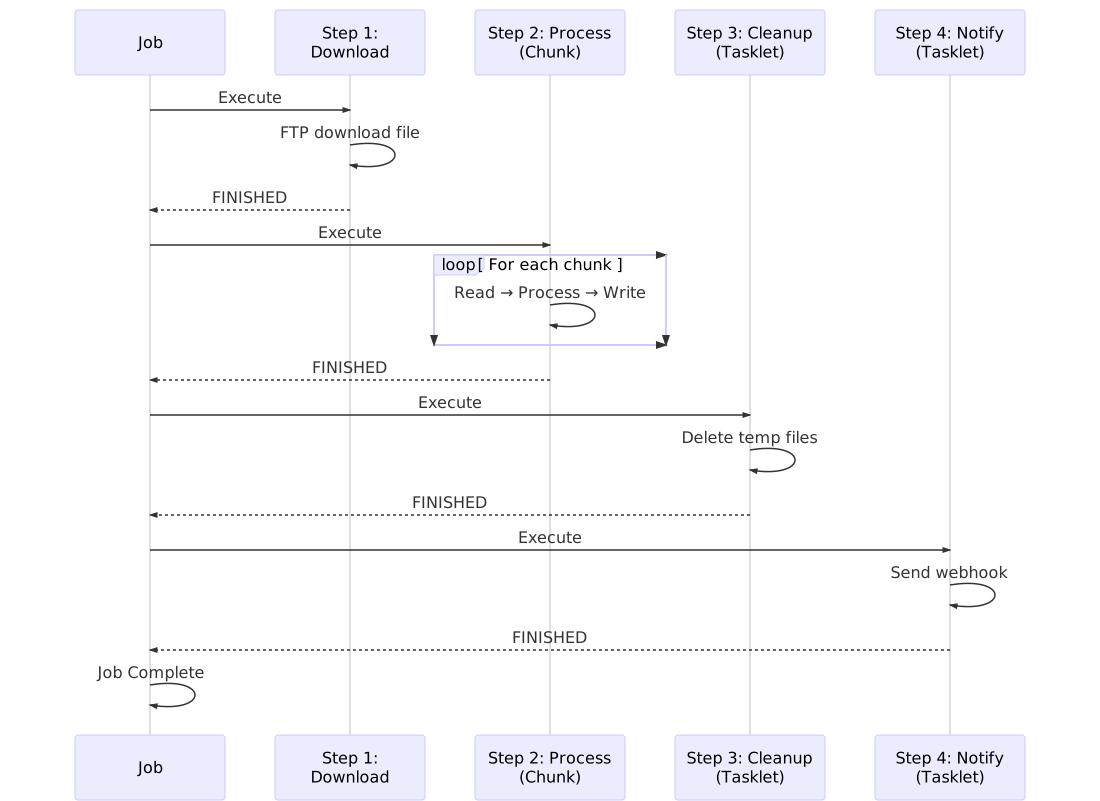
### Execution Flow
```mermaid
sequenceDiagram
participant Job
participant Download as Step 1: Download (Tasklet)
participant Process as Step 2: Process (Chunk)
participant Cleanup as Step 3: Cleanup (Tasklet)
participant Notify as Step 4: Notify (Tasklet)
Job->>Download: Execute
Download->>Download: FTP download file
Download-->>Job: FINISHED
Job->>Process: Execute
loop For each chunk
Process->>Process: Read → Process → Write
end
Process-->>Job: FINISHED
Job->>Cleanup: Execute
Cleanup->>Cleanup: Delete temp files
Cleanup-->>Job: FINISHED
Job->>Notify: Execute
Notify->>Notify: Send webhook
Notify-->>Job: FINISHED
Job->>Job: Job Complete
```
## Best Practices
<CardGrid>
<Card title="Chunk Processing" icon="rocket">
- Start with chunk size of 100, adjust based on metrics
- Monitor memory usage and adjust chunk size
- Use skip_limit for fault tolerance
- Keep processors stateless for parallelization
- Use appropriate transaction boundaries
</Card>
<Card title="Tasklet Processing" icon="setting">
- Keep tasklets focused on single responsibility
- Use for setup/teardown operations
- Handle errors explicitly
- Log progress for long-running tasks
- Return FINISHED when complete
</Card>
<Card title="Job Design" icon="puzzle">
- Use tasklets for pre/post processing
- Use chunks for data transformation
- Order steps logically (download → process → cleanup)
- Consider rollback scenarios
- Add monitoring and notifications
</Card>
</CardGrid>
## Next Steps
- [Error Handling](/error-handling/) - Implement robust fault tolerance
- [Examples](/examples/) - See complete working examples
- [Item Readers & Writers](/item-readers-writers/overview/) - Explore all I/O options