---
title: Getting Started
description: Learn how to build your first batch processing application with Spring Batch RS
sidebar:
  order: 2
---

import { Tabs, TabItem, Card, CardGrid, Code } from '@astrojs/starlight/components';

Welcome to Spring Batch RS! This guide will walk you through creating your first batch processing application in Rust.

## Prerequisites

Before you begin, ensure you have:

- **Rust 1.70+** installed ([Install Rust](https://rustup.rs/))
- Basic familiarity with Rust programming
- A text editor or IDE (VS Code with rust-analyzer recommended)

## Quick Start

### Step 1: Create a New Project

```bash
cargo new my-batch-app
cd my-batch-app
```

### Step 2: Add Dependencies

Add Spring Batch RS to your `Cargo.toml`:

```toml title="Cargo.toml"
[dependencies]
spring-batch-rs = { version = "0.3", features = ["csv", "json"] }
serde = { version = "1.0", features = ["derive"] }
```

### Step 3: Write Your First Batch Job

Create a simple CSV to JSON converter:

```rust title="src/main.rs"
use spring_batch_rs::{
    core::{job::JobBuilder, step::StepBuilder, item::PassThroughProcessor},
    item::{csv::CsvItemReaderBuilder, json::JsonItemWriterBuilder},
    BatchError,
};
use serde::{Deserialize, Serialize};

#[derive(Debug, Clone, Deserialize, Serialize)]
struct Product {
    id: u32,
    name: String,
    price: f64,
    category: String,
}

fn main() -> Result<(), BatchError> {
    // Sample CSV data
    let csv_data = r#"id,name,price,category
1,Laptop,999.99,Electronics
2,Coffee Mug,12.99,Kitchen
3,Notebook,5.99,Office
4,Wireless Mouse,29.99,Electronics"#;

    // Create CSV reader
    let reader = CsvItemReaderBuilder::<Product>::new()
        .has_headers(true)
        .from_reader(csv_data.as_bytes());

    // Create JSON writer
    let writer = JsonItemWriterBuilder::<Product>::new()
        .pretty_formatter(true)
        .from_path("products.json");

    // Create processor (pass-through in this case)
    let processor = PassThroughProcessor::<Product>::new();

    // Build the step
    let step = StepBuilder::new("csv-to-json-step")
        .chunk(10)
        .reader(&reader)
        .processor(&processor)
        .writer(&writer)
        .build();

    // Build and run the job
    let job = JobBuilder::new()
        .start(&step)
        .build();

    // Execute the job
    let result = job.run()?;

    println!("✅ Job completed successfully!");
    println!("📊 Processed {} steps", result.get_step_executions().len());

    Ok(())
}
```

### Step 4: Run Your Job

```bash
cargo run
```

You should see:

```
✅ Job completed successfully!
📊 Processed 1 steps
```

And a `products.json` file with your converted data!

## Understanding the Core Concepts

### The Job

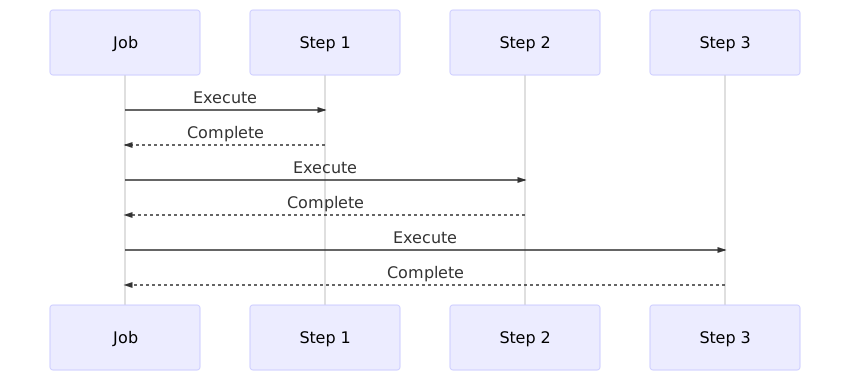
A **Job** is the top-level container for your entire batch process. It's composed of one or more **Steps** that execute sequentially.

```rust
let job = JobBuilder::new()
    .start(&step1)      // First step
    .next(&step2)       // Second step (optional)
    .next(&step3)       // Third step (optional)
    .build();
```

### The Step

A **Step** represents an independent phase of processing. There are two types:

<Tabs>
  <TabItem label="Chunk-Oriented" icon="document">
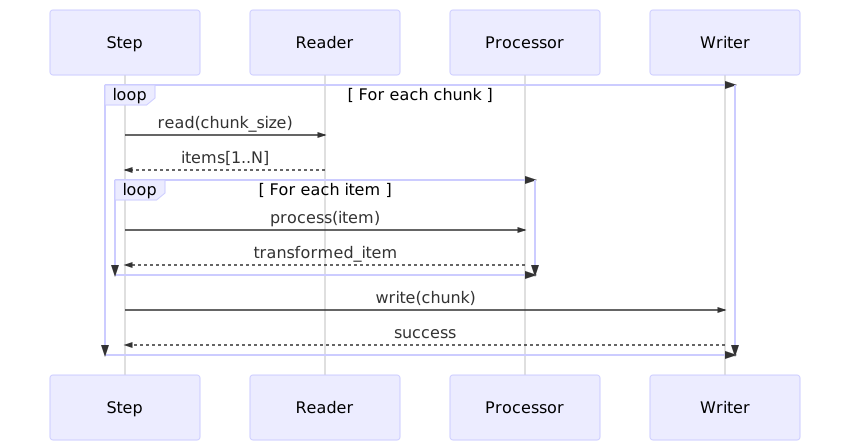
    Process large datasets in configurable chunks using the read-process-write pattern:

    ```rust
    let step = StepBuilder::new("process-data")
        .chunk(100)              // Process 100 items at a time
        .reader(&reader)         // Read data source
        .processor(&processor)   // Transform items
        .writer(&writer)         // Write results
        .build();
    ```
  </TabItem>

  <TabItem label="Tasklet" icon="setting">
    Execute a single task or operation:

    ```rust
    let step = StepBuilder::new("cleanup")
        .tasklet(&cleanup_tasklet)
        .build();
    ```
  </TabItem>
</Tabs>

### ItemReader

An **ItemReader** retrieves input data one item at a time from various sources.

<Tabs>
  <TabItem label="CSV" icon="document">
    ```rust
    use spring_batch_rs::item::csv::CsvItemReaderBuilder;

    let reader = CsvItemReaderBuilder::<Product>::new()
        .has_headers(true)
        .delimiter(b',')
        .from_path("products.csv")?;
    ```
  </TabItem>

  <TabItem label="JSON" icon="seti:json">
    ```rust
    use spring_batch_rs::item::json::JsonItemReaderBuilder;

    let reader = JsonItemReaderBuilder::<Product>::new()
        .from_path("products.json")?;
    ```
  </TabItem>

  <TabItem label="Database" icon="seti:db">
    ```rust
    use spring_batch_rs::item::orm::OrmItemReaderBuilder;
    use sea_orm::{Database, EntityTrait};

    let db = Database::connect("sqlite::memory:").await?;
    let query = ProductEntity::find();

    let reader = OrmItemReaderBuilder::new()
        .connection(&db)
        .query(query)
        .page_size(100)
        .build();
    ```
  </TabItem>
</Tabs>

### ItemProcessor

An **ItemProcessor** applies business logic to transform or filter items.

```rust
use spring_batch_rs::core::item::ItemProcessor;

struct PriceDiscountProcessor {
    discount_rate: f64,
}

impl ItemProcessor<Product, Product> for PriceDiscountProcessor {
    fn process(&self, item: Product) -> ItemProcessorResult<Product> {
        let mut product = item;

        // Apply discount
        product.price *= (1.0 - self.discount_rate);

        // Filter out items below minimum price
        if product.price < 5.0 {
            return Ok(None);  // Skip this item
        }

        Ok(Some(product))
    }
}

// Usage
let processor = PriceDiscountProcessor { discount_rate: 0.15 };
```

:::tip[Filtering Items]
Return `Ok(None)` from your processor to skip an item without counting it as an error.
:::

### ItemWriter

An **ItemWriter** outputs processed items to various destinations.

<Tabs>
  <TabItem label="JSON" icon="seti:json">
    ```rust
    use spring_batch_rs::item::json::JsonItemWriterBuilder;

    // Replace MyType with your actual output type
    let writer = JsonItemWriterBuilder::<MyType>::new()
        .pretty_formatter(true)
        .from_path("output.json");
    ```
  </TabItem>

  <TabItem label="CSV" icon="document">
    ```rust
    use spring_batch_rs::item::csv::CsvItemWriterBuilder;

    let writer = CsvItemWriterBuilder::new()
        .has_headers(true)
        .delimiter(b',')
        .from_path("output.csv")?;
    ```
  </TabItem>

  <TabItem label="Database" icon="seti:db">
    ```rust
    use spring_batch_rs::item::orm::OrmItemWriterBuilder;

    let writer = OrmItemWriterBuilder::new()
        .connection(&db)
        .build();
    ```
  </TabItem>
</Tabs>

## Complete Example: Data Processing Pipeline

Let's build a more sophisticated batch job that:
1. Reads products from CSV
2. Applies business rules and transformations
3. Filters invalid items
4. Writes to JSON

```rust title="src/main.rs"
use spring_batch_rs::{
    core::{job::JobBuilder, step::StepBuilder, item::ItemProcessor},
    item::{csv::CsvItemReaderBuilder, json::JsonItemWriterBuilder},
    BatchError,
};
use serde::{Deserialize, Serialize};

#[derive(Deserialize, Clone)]
struct RawProduct {
    id: u32,
    name: String,
    price: f64,
    category: String,
    stock: i32,
}

#[derive(Serialize)]
struct ProcessedProduct {
    id: u32,
    name: String,
    final_price: f64,
    category: String,
    stock_status: String,
    price_tier: String,
}

struct ProductProcessor;

impl ItemProcessor<RawProduct, ProcessedProduct> for ProductProcessor {
    fn process(&self, item: RawProduct) -> ItemProcessorResult<ProcessedProduct> {
        // Validate price
        if item.price <= 0.0 {
            return Ok(None); // Skip invalid items
        }

        // Apply category-specific discount
        let discount = match item.category.as_str() {
            "Electronics" => 0.15,
            "Kitchen" => 0.10,
            "Office" => 0.05,
            _ => 0.0,
        };

        let final_price = item.price * (1.0 - discount);

        // Determine stock status
        let stock_status = if item.stock == 0 {
            "Out of Stock"
        } else if item.stock < 10 {
            "Low Stock"
        } else {
            "In Stock"
        }.to_string();

        // Classify price tier
        let price_tier = if final_price < 20.0 {
            "Budget"
        } else if final_price < 100.0 {
            "Mid-Range"
        } else {
            "Premium"
        }.to_string();

        Ok(Some(ProcessedProduct {
            id: item.id,
            name: item.name,
            final_price,
            category: item.category,
            stock_status,
            price_tier,
        }))
    }
}

fn main() -> Result<(), BatchError> {
    // Create input file with sample data
    let csv_data = r#"id,name,price,category,stock
1,Laptop,999.99,Electronics,25
2,Coffee Mug,12.99,Kitchen,150
3,Notebook,5.99,Office,8
4,Wireless Mouse,29.99,Electronics,0
5,Desk Lamp,45.00,Office,50"#;

    let reader = CsvItemReaderBuilder::<RawProduct>::new()
        .has_headers(true)
        .from_reader(csv_data.as_bytes());

    let writer = JsonItemWriterBuilder::<ProcessedProduct>::new()
        .pretty_formatter(true)
        .from_path("processed_products.json");

    let processor = ProductProcessor;

    let step = StepBuilder::new("process-products")
        .chunk(10)
        .reader(&reader)
        .processor(&processor)
        .writer(&writer)
        .build();

    let job = JobBuilder::new()
        .start(&step)
        .build();

    job.run()?;

    println!("✅ Processing complete! Check processed_products.json");

    Ok(())
}
```

## Error Handling & Fault Tolerance

Spring Batch RS provides robust error handling with configurable skip limits:

```rust
let step = StepBuilder::new("fault-tolerant-step")
    .chunk(100)
    .reader(&reader)
    .processor(&processor)
    .writer(&writer)
    .skip_limit(10)  // Allow up to 10 errors before failing
    .build();
```

### Best Practices

<CardGrid>
  <Card title="Start Small" icon="rocket">
    Begin with small chunk sizes (10-100) and adjust based on your data and memory constraints
  </Card>
  <Card title="Validate Early" icon="approve-check">
    Perform validation in your processor to catch errors before writing
  </Card>
  <Card title="Use Skip Limits Wisely" icon="warning">
    Set appropriate skip limits based on acceptable data quality thresholds
  </Card>
  <Card title="Log Errors" icon="information">
    Implement custom error logging to track skipped items for later review
  </Card>
</CardGrid>

## Next Steps

Now that you understand the basics, explore more advanced features:

<CardGrid>
  <Card title="Processing Models" icon="document">
    Learn about chunk-oriented vs tasklet processing patterns

    [Read More →](/processing-models/)
  </Card>
  <Card title="Item Readers & Writers" icon="seti:db">
    Explore all available data sources and destinations

    [View Options →](/item-readers-writers/overview/)
  </Card>
  <Card title="Tasklets" icon="setting">
    Use tasklets for file operations, FTP transfers, and custom tasks

    [Learn About Tasklets →](/tasklets/overview/)
  </Card>
  <Card title="Examples" icon="open-book">
    Browse comprehensive examples for every feature

    [See Examples →](/examples/)
  </Card>
</CardGrid>

## Need Help?

- 📖 [API Documentation](https://docs.rs/spring-batch-rs) - Complete API reference
- 💬 [Discord](https://discord.gg/9FNhawNsG6) - Chat with the community
- 🐛 [GitHub Issues](https://github.com/sboussekeyt/spring-batch-rs/issues) - Report bugs or request features
- 💡 [Discussions](https://github.com/sboussekeyt/spring-batch-rs/discussions) - Ask questions

Happy batch processing! 🚀