
slick - async ZSH prompt



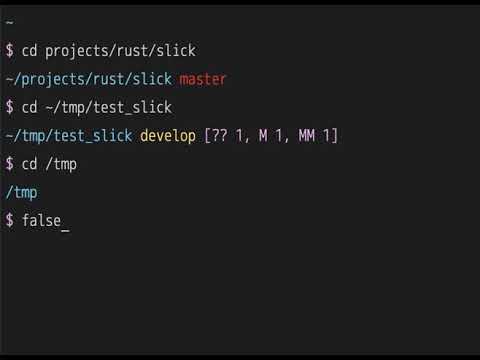
How to use
Install:
cargo install slick
To install cargo:
curl --proto '=https' --tlsv1.2 -sSf https://sh.rustup.rs | sh
If in Linux you may need install this:
apt install -y build-essential libssl-dev pkg-config
check your PATH $HOME/.cargo/bin/slick
Quick Test (Development)
For quick testing or development:
# Build and test
The load.zsh script automatically detects the slick binary and sets up the prompt.
Production Setup
Add this to your .zshrc or adapt load.zsh:
SLICK_PATH=/.cargo/bin/slick
🔤 Font Setup
Seeing boxes (□) instead of symbols? You need a Nerd Font.
Quick fix:
- Download a Nerd Font: https://www.nerdfonts.com/font-downloads
- Recommended: Monoid Nerd Font (clean, minimalist), JetBrainsMono Nerd Font, FiraCode Nerd Font
- Install the font on your system
- Configure your terminal to use it
- Restart terminal
Using Monoid Nerd Font? Works great with slick's minimalist design!
Don't want to install fonts? Use Unicode or ASCII alternatives:
# Unicode arrow
# or
# ASCII
Customizations
Slick can be customized using environment variables.
Quick Start
# Disable git fetch for faster prompts (removes ~500ms auth check on first run)
# Custom symbols
# Custom colors
# Toolbx marker
# Optional git branch prefix
All Environment Variables
General Settings
# Max command time to display (seconds)
# Enable git fetch (1=yes, 0=no)
# Hide git username (1=hide, 0=show)
# Non-breaking space character
# Compact previous prompt in scrollback (0=disable)
Prompt Symbols
# Main prompt symbol
# Vi command mode symbol
# Root user symbol
# Git ahead symbol
# Git behind symbol
# Git auth failed symbol
# Optional prefix before branch name, e.g. $'\ue0a0'
# Toolbx marker symbol
# DevPod marker symbol
Colors
# Colors can be named (red, blue, etc.) or numbers (0-255)
# Error message color
# DevPod marker color
# Directory path color
# Virtualenv/pyenv color
# Prompt symbol color
# Vi command mode color
# Root user color
# SSH session color
# Command time color
# Toolbx marker color
Git Colors
# Branch name color
# master/main branch color
# Git action (merge, rebase) color
# Modified files color
# Staged files color
# Remote status color
# Git username color
# Git auth failed color
If SLICK_PROMPT_GIT_BRANCH_SYMBOL is set, it is printed immediately before the branch name, for example main. In zsh, you can set it safely with export SLICK_PROMPT_GIT_BRANCH_SYMBOL=$'\ue0a0'. It uses the same color as the branch text: SLICK_PROMPT_GIT_MASTER_BRANCH_COLOR for main/master, and SLICK_PROMPT_GIT_BRANCH_COLOR for other branches.
PIPENV_ACTIVE_COLOR is still honored as a legacy fallback, but SLICK_PROMPT_PYTHON_ENV_COLOR is the preferred setting for Python environments.
Example Configurations
Minimal/Fast (no network calls)
# No git fetch
# Hide username
# Simple symbol
Colorful
Nerd Fonts (Monoid, JetBrainsMono, etc.)
⚠️ Requires a Nerd Font - Works great with Monoid Nerd Font, JetBrainsMono Nerd Font, FiraCode Nerd Font
# Example with Monoid Nerd Font or similar Nerd Fonts
# nf-oct-chevron_right
# nf-oct-chevron_left
# nf-fa-flash
# nf-fa-lock
# nf-md-arrow_up
# nf-md-arrow_down
Download Nerd Fonts: https://www.nerdfonts.com/
These symbols work with any Nerd Font (Monoid, JetBrainsMono, FiraCode, Hack, etc.)
See more examples in envrc.
Prompt Preview
Use the preview helper to render the prompt with simulated Toolbx, DevPod, and Python contexts while keeping your current SLICK_PROMPT_* settings:
Optional overrides let you tune the sample names and branch data:
SLICK_PREVIEW_BRANCH=main \
SLICK_PREVIEW_STATUS="M 2" \
SLICK_PREVIEW_TOOLBOX_NAME=toolbox \
SLICK_PREVIEW_DEVPOD_NAME=workspace \
SLICK_PREVIEW_PYTHON_ENV=.venv \
The helper lives at scripts/preview_prompt.zsh and uses print -P so the prompt colors render as they would in zsh.
Transient Prompt
By default, slick rewrites the prompt you just used into a compact single-line form when you press Enter. The live prompt stays rich while you type; only the scrollback version is compacted. The transient form includes an RFC 3339 timestamp plus the key context markers, path, branch, and prompt symbol while omitting noisier git status details.
Disable it if you prefer the old behavior:
Toolbx Detection
Slick detects when it is running inside Fedora Toolbx and shows the toolbox name before the path.
Example:
()
Configure the Toolbx marker:
# Default
# Default
DevPod Detection
Slick detects when DEVPOD is set and shows DEVPOD_WORKSPACE_ID before the path.
Example:
()
Configure the DevPod marker:
# Default
# Default
🔒 SSH Authentication Detection
Slick automatically detects when SSH remotes require authentication and displays a lock symbol (🔒).
How it works (Streaming Async Prompts):
- Instant display: Prompt shows immediately with cached auth status (from previous runs)
- Async update: If git fetch is enabled, auth check runs in background with 500ms grace period
- Smart cache: First run takes ~500ms to write cache, subsequent runs are instant with cached status
- Cache-based: Auth status is cached for 5 minutes in
~/.cache/slick/ - Non-blocking: Uses tokio for true async I/O - no delays, no hanging
- Smart timeout: Git fetch has 5-second timeout to prevent indefinite waits
Example:
# cd into repo with SSH remote requiring auth
# First time: ~500ms to check and write cache (shows auth_failed status)
# Subsequent prompts: instant 🔒 from cache (valid for 5 minutes)
# After cache expires (5 min): another ~500ms check to refresh cache
Two-phase rendering:
- Phase 1 (0ms): Display prompt immediately with all git info + cached auth status
- Phase 2 (async): Git status updates (~10-50ms), then git fetch checks auth (~500ms)
- Cache write: Auth status written to cache for next prompt
Configure the lock symbol:
# Default
# Default
See TEST_README.md for testing instructions.
Inspired by: