
slick - async ZSH prompt



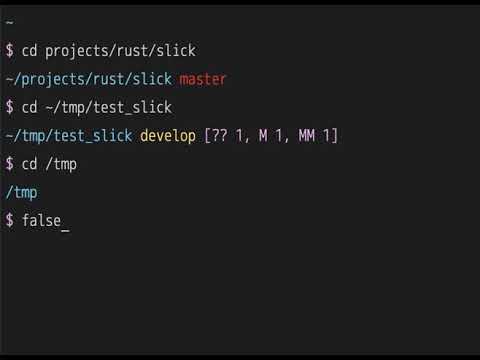
How to use
Install:
cargo install slick
To install cargo:
curl --proto '=https' --tlsv1.2 -sSf https://sh.rustup.rs | sh
If in Linux you may need install this:
apt install -y build-essential libssl-dev pkg-config
check your PATH $HOME/.cargo/bin/slick
Quick Test (Development)
For quick testing or development:
# Build and test
The load.zsh script automatically detects the slick binary and sets up the prompt.
Production Setup
Add this to your .zshrc:
# Load required modules
# Register hooks
# Register zle widgets
# Global variables
SLICK_PATH=/.cargo/bin/slick
🔤 Font Setup
Seeing boxes (□) instead of symbols? You need a Nerd Font.
Quick fix:
- Download a Nerd Font: https://www.nerdfonts.com/font-downloads
- Recommended: Monoid Nerd Font (clean, minimalist), JetBrainsMono Nerd Font, FiraCode Nerd Font
- Install the font on your system
- Configure your terminal to use it
- Restart terminal
Using Monoid Nerd Font? Works great with slick's minimalist design!
Don't want to install fonts? Use Unicode or ASCII alternatives:
# Unicode arrow
# or
# ASCII
Customizations
Slick can be customized using environment variables.
Quick Start
# Disable git fetch for faster prompts (removes ~500ms auth check on first run)
# Custom symbols
# Custom colors
# Toolbx marker
All Environment Variables
General Settings
# Max command time to display (seconds)
# Enable git fetch (1=yes, 0=no)
# Hide git username (1=hide, 0=show)
# Non-breaking space character
Prompt Symbols
# Main prompt symbol
# Vi command mode symbol
# Root user symbol
# Git ahead symbol
# Git behind symbol
# Git auth failed symbol
# Toolbx marker symbol
# DevPod marker symbol
Colors
# Colors can be named (red, blue, etc.) or numbers (0-255)
# Error message color
# DevPod marker color
# Directory path color
# Virtualenv/pyenv color
# Prompt symbol color
# Vi command mode color
# Root user color
# SSH session color
# Command time color
# Toolbx marker color
Git Colors
# Branch name color
# master/main branch color
# Git action (merge, rebase) color
# Modified files color
# Staged files color
# Remote status color
# Git username color
# Git auth failed color
PIPENV_ACTIVE_COLOR is still honored as a legacy fallback, but SLICK_PROMPT_PYTHON_ENV_COLOR is the preferred setting for Python environments.
Example Configurations
Minimal/Fast (no network calls)
# No git fetch
# Hide username
# Simple symbol
Colorful
Nerd Fonts (Monoid, JetBrainsMono, etc.)
⚠️ Requires a Nerd Font - Works great with Monoid Nerd Font, JetBrainsMono Nerd Font, FiraCode Nerd Font
# Example with Monoid Nerd Font or similar Nerd Fonts
# nf-oct-chevron_right
# nf-oct-chevron_left
# nf-fa-flash
# nf-fa-lock
# nf-md-arrow_up
# nf-md-arrow_down
Download Nerd Fonts: https://www.nerdfonts.com/
These symbols work with any Nerd Font (Monoid, JetBrainsMono, FiraCode, Hack, etc.)
See more examples in envrc.
🧰 Toolbx Detection
Slick detects when it is running inside Fedora Toolbx and shows the toolbox name before the path.
Example:
()
Configure the Toolbx marker:
# Default
# Default
DevPod Detection
Slick detects when DEVPOD is set and shows DEVPOD_WORKSPACE_ID before the path.
Example:
()
Configure the DevPod marker:
# Default
# Default
🔒 SSH Authentication Detection
Slick automatically detects when SSH remotes require authentication and displays a lock symbol (🔒).
How it works (Streaming Async Prompts):
- Instant display: Prompt shows immediately with cached auth status (from previous runs)
- Async update: If git fetch is enabled, auth check runs in background with 500ms grace period
- Smart cache: First run takes ~500ms to write cache, subsequent runs are instant with cached status
- Cache-based: Auth status is cached for 5 minutes in
~/.cache/slick/ - Non-blocking: Uses tokio for true async I/O - no delays, no hanging
- Smart timeout: Git fetch has 5-second timeout to prevent indefinite waits
Example:
# cd into repo with SSH remote requiring auth
# First time: ~500ms to check and write cache (shows auth_failed status)
# Subsequent prompts: instant 🔒 from cache (valid for 5 minutes)
# After cache expires (5 min): another ~500ms check to refresh cache
Two-phase rendering:
- Phase 1 (0ms): Display prompt immediately with all git info + cached auth status
- Phase 2 (async): Git status updates (~10-50ms), then git fetch checks auth (~500ms)
- Cache write: Auth status written to cache for next prompt
Configure the lock symbol:
# Default
# Default
See TEST_README.md for testing instructions.
Inspired by: