# Tutorial: a FreeMind mind-map viewer/editor
This guide builds a terminal mind-map app that loads a **FreeMind** `.mm` file
(the XML that FreeMind / Freeplane save), shows it in a
[`Mindmap`](crate::Mindmap) widget, and lets you navigate, fold, edit and save it.
The full, runnable source is [`examples/mindmap.rs`]; run it with
`cargo run --example mindmap` (optionally passing a `.mm` path). Here we walk
through the interesting parts.
[`examples/mindmap.rs`]: https://github.com/stricaud/gtcaca/blob/main/src/bindings/rust/gtcaca/examples/mindmap.rs
## 1. The widget and its nodes
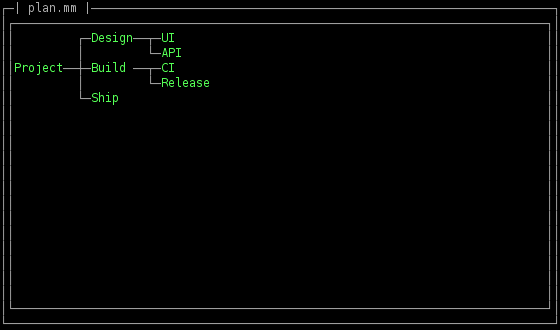
A [`Mindmap`](crate::Mindmap) owns a tree of text nodes laid out left to right.
You build it from the root outward and address nodes with the cheap
[`MmNode`](crate::MmNode) handle:
```rust,no_run
# use gtcaca::{Mindmap, Window};
# fn f(win: &Window) {
let mm = Mindmap::new(win, 0, 0, 78, 20);
let root = mm.root();
mm.set_text(root, "Project");
let design = mm.add_child(root, "Design");
mm.add_child(design, "UI");
mm.add_child(design, "API");
mm.select(design); // highlight a node
# }
```
[`MmNode`](crate::MmNode) exposes `text()`, `children()`, `is_folded()` and
`set_folded()`, so you can walk or serialise the tree yourself.
## 2. Parsing FreeMind XML
A `.mm` file is nested `<node TEXT="…">…</node>` elements. You don't need a full
XML parser: scan for node tags, track nesting with a stack, and build the tree
with `add_child`. `<node …/>` is a leaf; `</node>` pops the stack.
```rust,no_run
# use gtcaca::{Mindmap, MmNode};
# fn attr(_tag: &str, _name: &str) -> Option<String> { None }
# fn xml_decode(s: &str) -> String { s.into() }
fn load_mm(m: &Mindmap, xml: &str) {
m.clear(""); // start from a single empty root
let mut stack: Vec<MmNode> = Vec::new();
let mut got_root = false;
let mut rest = xml;
while let Some(i) = rest.find('<') {
rest = &rest[i..];
if let Some(after) = rest.strip_prefix("</node>") { stack.pop(); rest = after; continue; }
if rest.starts_with("<node") {
let Some(gt) = rest.find('>') else { break };
let tag = &rest[..gt];
let self_close = tag.ends_with('/');
let text = attr(tag, "TEXT").map(|t| xml_decode(&t)).unwrap_or_default();
let node = if !got_root {
got_root = true;
let r = m.root(); m.set_text(r, &text); r
} else {
let parent = stack.last().copied().unwrap_or_else(|| m.root());
m.add_child(parent, &text)
};
if attr(tag, "FOLDED").as_deref() == Some("true") { node.set_folded(true); }
if !self_close { stack.push(node); }
rest = &rest[gt + 1..];
continue;
}
rest = &rest[1..];
}
m.select(m.root());
}
```
(The example also decodes `&`/`&#xNN;` entities and reads the `TEXT`
attribute — see the source.)
## 3. Writing it back
The widget owns the tree; read it back through [`MmNode`](crate::MmNode) and emit
nested `<node>` elements, which round-trips with `load_mm`:
```rust
# use gtcaca::MmNode;
# fn xml_escape(s: &str) -> String { s.into() }
fn save_node(out: &mut String, node: MmNode, depth: usize) {
let pad = " ".repeat(depth);
let kids = node.children();
out.push_str(&format!("{pad}<node TEXT=\"{}\"", xml_escape(&node.text())));
if kids.is_empty() { out.push_str("/>\n"); return; }
out.push_str(">\n");
for k in kids { save_node(out, k, depth + 1); }
out.push_str(&format!("{pad}</node>\n"));
}
```
## 4. A minibuffer built from an Entry
To edit a node's text, focus an [`Entry`](crate::Entry) on the bottom row and
feed it keys until Enter (commit) or Esc (cancel):
```rust,no_run
# use gtcaca::{Gtcaca, Entry, Mindmap, MmNode, Widget, key};
# fn edit(ctx: &Gtcaca, win: &impl Widget, mm: &Mindmap, prompt: &Entry, node: MmNode) -> bool {
prompt.set_text(&node.text());
prompt.set_focus(true);
loop {
ctx.clear(); win.paint(); mm.paint(); prompt.paint(); ctx.flush();
let Some(k) = gtcaca::poll_key(-1) else { continue };
match k {
key::RETURN => { mm.set_text(node, &prompt.text()); prompt.set_focus(false); return true; }
key::ESCAPE => { prompt.set_focus(false); return false; }
_ => { prompt.send_key(k); } // the Entry does the editing
}
}
# }
```
## 5. The main loop
Navigation keys (arrows, Space to fold) go straight to the widget via
[`Widget::send_key`](crate::Widget::send_key); structural edits you handle
yourself:
```rust,no_run
# use gtcaca::{Gtcaca, Mindmap, MmNode, Widget, key};
# fn f(ctx: &Gtcaca, win: &impl Widget, mm: &Mindmap, edit: impl Fn(MmNode) -> bool) {
loop {
ctx.clear(); win.paint(); mm.paint(); ctx.flush();
let Some(k) = gtcaca::poll_key(-1) else { continue };
match k {
k if k == b'q' as i32 => break,
key::TAB => { // add a child, then edit it
let sel = mm.selected();
sel.set_folded(false);
let child = mm.add_child(sel, "");
mm.select(child);
edit(child);
}
key::RETURN => { // add a sibling
let n = mm.add_sibling(mm.selected(), "");
if !n.is_null() { mm.select(n); edit(n); }
}
key::DELETE => { // remove the subtree
let sel = mm.selected();
if !sel.as_ptr().eq(&mm.root().as_ptr()) { mm.delete(sel); }
}
_ => { mm.send_key(k); } // arrows + Space (fold)
}
}
# }
```
That's a complete FreeMind editor in a couple hundred lines — the widget does
the layout, folding and navigation; you supply load/save and the key bindings.


