
ComChan (Communication Channel)

A Blazingly Fast Serial Monitor for Embedded Systems and Serial Communication
Installation
Choose your preferred installation method:
From crates.io
[!NOTE] The easiest way to install ComChan is via
cargo install
# Install from source
Verify the installation:
From AUR
For Arch Linux users, ComChan is available in the AUR (thanks to orhun!):
# Using yay
# Using paru
From source
Build from source for the latest development version:
You can do either of the following
OR
# Clone from GitHub
# Build and run
CLI Usage
Blazingly Fast Minimal Serial Monitor with Plotting

Usage: comchan [OPTIONS]

Options:
      --completions <COMPLETIONS>     Generate Shell completions [possible values: bash, zsh, fish, elvish, power-shell, nu]
  -p, --port <PORT>                   Serial port to connect to
  -r, --baud <BAUD>                   Baud Rate of the Serial Monitor
  -d, --data-bits <DATA_BITS>
  -s, --stop-bits <STOP_BITS>
      --parity <PARITY>
      --flow-control <FLOW_CONTROL>
  -t, --timeout <TIMEOUT_MS>
      --reset-delay <RESET_DELAY_MS>
  -l, --log <LOG_FILE>                Log Serial data into a file
      --list-ports                    List all available ports
      --auto                          Auto-detect USB serial port
  -v, --verbose
      --plot                          Launch the serial plotter
      --plot-points <PLOT_POINTS>
  -c, --config <CONFIG_FILE>          Path to config file
      --generate-config
      --zephyr                        Enables Zephyr Shell mode
      --export-limit <EXPORT_LIMIT>   Max points to keep in memory for export per sensor
      --plot-title <PLOT_TITLE>       Set the plot title for the exported SVG file
      --simulate                      Simulate Serial Data with no need for hardware (Use for testing ComChan)
  -h, --help                          Print help
  -V, --version                       Print version
Common Commands
Basic Serial Monitor
Monitor serial output from your device:
# OR
Example:
Verbose Mode
Get detailed information about the serial connection (now uses local timestamps):
Log Mode
Save serial output to a log file:
Serial Plotter
Visualize sensor data in real-time, with optional SVG exports:
Want to export the plot?
Add a title and memory limit (Both are optional):
Automatically Detect Serial Ports
Let ComChan find your serial device automatically:
# With default baud rate (9600)
# With custom baud rate
Generate Shell Completions
Generate autocomplete scripts for your favorite shell (bash, zsh, fish,
elvish, power-shell, or nu):
Simulate Mode
Want to test ComChan or the Plotter without a physical microcontroller plugged in? Use simulate mode to generate mock sensor data!
Zephyr Shell Mode
If you are working with Zephyr RTOS, enable the dedicated Zephyr shell mode for a better interactive experience:
Use a Configuration File
You can use a configuration file instead of command-line flags:
# Generate default configuration file
This creates a config file at ~/.config/comchan/comchan.toml (or
%APPDATA%\comchan\comchan.toml on Windows).
Example Configuration:
# ComChan Configuration File
= "auto"
= 9600
= 8
= 1
= "none"
= "none"
= 500
= 1000
= false
= false
= 100
= false
= 1000000
= "Sensor Data"
= false
Features
Current Features ✅
- Read & Write Serial Data - Monitor incoming data and send commands to your device.
- Auto-Recovery & Graceful Exit - Automatically detects broken pipes and safely shuts down or reconnects when hardware is unplugged/replugged.
- Terminal-Based Serial Plotter - Visualize multiple sensor values in
real-time with automatic legends using the
--plotflag. - Export Plot to SVG - Save your visualized serial data as an SVG image, complete with custom plot titles and memory-safe export limits.
- Hardware Simulation - Test ComChan functionalities and plotting without
needing physical hardware connected (
--simulate). - Zephyr Shell Support - Dedicated mode for cleanly interacting with Zephyr RTOS shells.
- Shell Completions - Native tab-autocomplete support for Bash, Zsh, Fish, Elvish, PowerShell, and Nushell.
- Auto-Detect Serial Ports - Automatically find connected serial devices
(
--auto). - Configuration Files - Use
.tomlfiles instead of typing out long command-line flags every time. - Basic Logging & Local Timestamps - Save serial output to log files with accurate local time tracking.
- Control Codes - Send
CTRL+Lto clear the screen and nudge the device to redraw prompts natively.
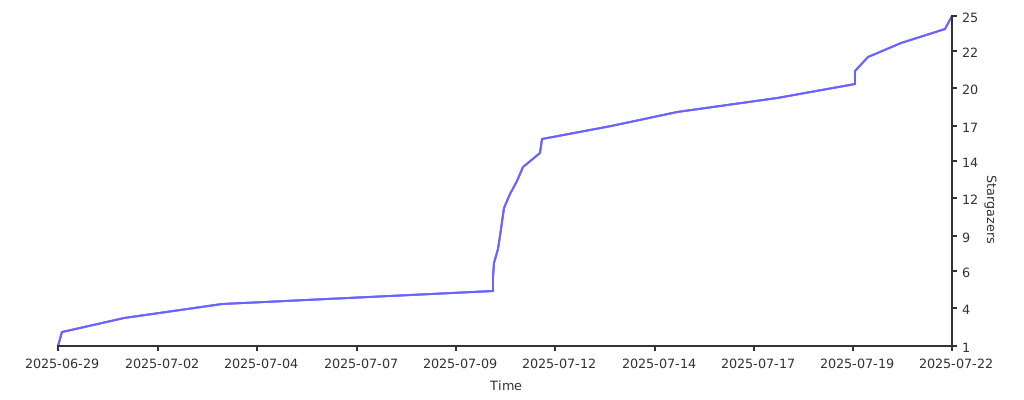
Stargazers over time (Graph)
🧠 (mostly) Brain made
This project was NOT vibe-coded BUT AI is still involved in some parts of it.
- Generating test code: Because it's something I always skip so I would rather have some AI generated tests than none at all.
- Micro-improvements: I have used AI as an advisor to improve some bits of code here and there. Big refactors or new features are done by my hand though.
Made with ❤️ by the ComChan Community