
zpl
Parse Zebra Programming Language (ZPL) and render labels locally to PNG, SVG or PDF. No printer or external rendering service is needed.
Quick start
Add the crate to your Cargo.toml:
[]
= "0.2"
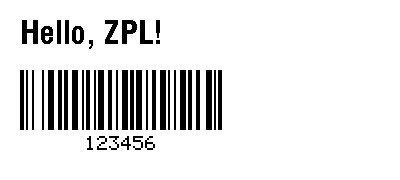
Render a 400 × 180-dot label with text and a Code 128 barcode:
use ;
Working with labels
render accepts ZPL bytes and returns a document containing one scene per label.
For input with multiple ^XA / ^XZ formats, iterate over document.labels and
encode each scene. Import the Adapter trait to use Png.encode, Svg.encode
or Pdf.encode; each returns a Vec<u8>. Use
Pdf.encode_pages(&document.labels) to combine all labels into one PDF, with
one page per scene in input order. Each PDF page uses its scene DPI to preserve
physical label size, including mixed sizes and resolutions. Text is represented
by glyph paths and is not searchable PDF text.
Coordinates and dimensions are in printer dots. ^PW and ^LL set the label
width and height; Options supplies defaults for dimensions and DPI.
Options::default() selects the ZD621 203-DPI compatibility profile. Other
profiles, including the strict SPECIFICATION profile, are available in
zpl::render::profiles.
The renderer supports a subset of ZPL. Unsupported rendering semantics return
errors; font approximations and other caveats appear in document.warnings.
Check warnings when printer fidelity matters. The separate zpl::parse module
preserves command bytes, including unknown commands and binary payloads; parsing
does not imply that a command can be rendered.
License
Licensed under the Open Software License 3.0.