
zpl
Parse Zebra Programming Language (ZPL) and render labels locally to PNG or SVG. No printer or external rendering service is needed.
Quick start
Add the crate to your Cargo.toml:
[]
= "0.1"
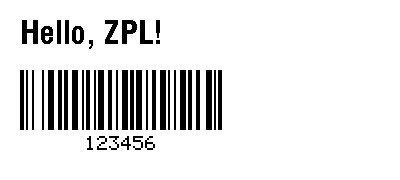
Render a 400 × 180-dot label with text and a Code 128 barcode:
use ;
Working with labels
render accepts ZPL bytes and returns a document containing one scene per label.
For input with multiple ^XA / ^XZ formats, iterate over document.labels and
encode each scene. Import the Adapter trait to use Png.encode or Svg.encode;
both return a Vec<u8>.
Coordinates and dimensions are in printer dots. ^PW and ^LL set the label
width and height; Options supplies defaults for dimensions and DPI.
Options::default() selects the ZD621 203-DPI compatibility profile. Other
profiles, including the strict SPECIFICATION profile, are available in
zpl::render::profiles.
The renderer supports a subset of ZPL. Unsupported rendering semantics return
errors; font approximations and other caveats appear in document.warnings.
Check warnings when printer fidelity matters. The separate zpl::parse module
preserves command bytes, including unknown commands and binary payloads; parsing
does not imply that a command can be rendered.
License
Licensed under the Open Software License 3.0.