# Zenthra
A high-performance, immediate-mode UI framework written in Rust. Zenthra is built from scratch with a custom GPU render pipeline, a flexible layout engine, and a widget system designed for speed and ergonomics.
🌐 **Website:** [zenthralabs.dev](https://zenthralabs.dev)
📖 **Documentation:** [zenthralabs.dev/products/zenthra/docs/](https://zenthralabs.dev/products/zenthra/docs/)
---
## Showcase
Here are some native applications built entirely with the Zenthra framework:
### Zenthra View (Native Image Viewer)
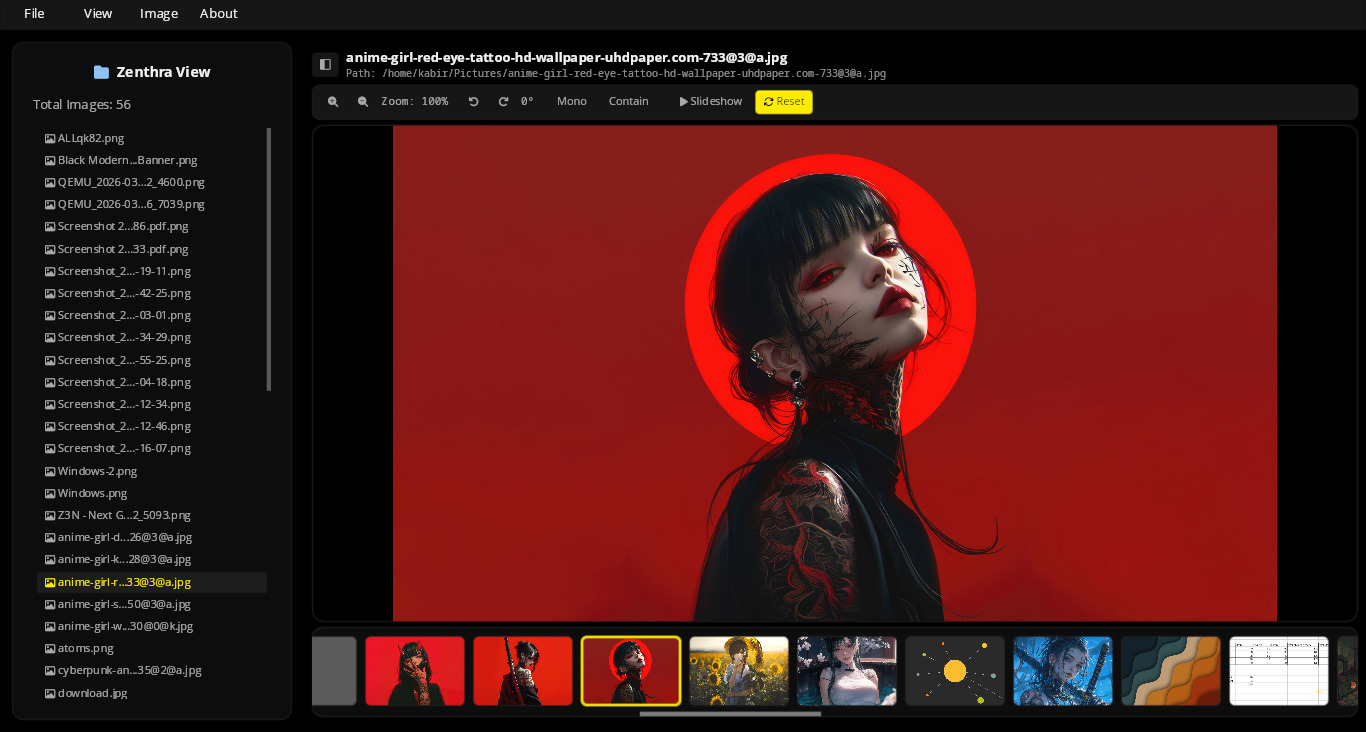
### ZenFile (Native File Manager)
<img src="https://raw.githubusercontent.com/kabirajpan/zenthra-v2/main/assets/zenfile.png" width="100%" />
<img src="https://raw.githubusercontent.com/kabirajpan/zenthra-v2/main/assets/zenfile_glassmorphis.png" width="49%" /> <img src="https://raw.githubusercontent.com/kabirajpan/zenthra-v2/main/assets/zenfile_glassmorphism2.png" width="49%" />
---
## Features
- **GPU-Accelerated Rendering** — Rect, text, and overlay draw commands sent directly to the GPU via WGPU.
- **Immediate-Mode API** — Rebuilds the UI each frame for instant state transitions and zero-synchronization overhead.
- **Flexible Layout Engine** — Row, Column, and Wrap layouts with alignment, padding, and gap support.
- **High-Performance Virtualization** — `LazyContainer` renders only visible items, handling millions of rows at a constant 60 FPS.
- **Premium Glassmorphism** — Built-in hardware-accelerated Dual-Pass Kawase blur, frosted grain overlays, and beveled specular edge highlights.
- **Extensible WGSL Shaders** — Dynamically load and run developer-registered fragment shaders on layout containers with ease.
- **Scrollable Containers** — Out-of-the-box scrollbar drag, mouse wheel, and trackpad gestures.
- **Text System** — Powered by [cosmic-text](https://github.com/pop-os/cosmic-text) with full shaping, bidirectional text, and font fallback.
- **Input Widgets** — Single-line `Input` and multi-line `TextArea` with cursor tracking, selection, and virtual scrolling.
---
## Understanding the Paradigm
### Immediate-Mode API
Zenthra uses an **Immediate-Mode** programming model (similar to `egui` or `Dear ImGui`). Instead of maintaining a persistent, memory-heavy tree of widgets (like the HTML DOM or traditional desktop toolkits), your application code describes the entire UI layout and behavior *every frame* in line with execution. This eliminates state-synchronization bugs and keeps your code simple and readable.
### Event-Driven vs. Continuous Rendering
While Zenthra's API is immediate-mode, its rendering loop is highly optimized:
- **Event-Driven (Default):** To save CPU/GPU resources and battery life, Zenthra sleeps when there is no activity. It only runs your UI functions and redraws the window when it receives a system event (e.g. mouse movement, clicks, keyboard input, or window resizing).
- **Continuous:** If you are running animations, transitions, or games, Zenthra can dynamically switch to continuous rendering to redraw the screen at your monitor's full refresh rate (60+ FPS).
---
## Quick Start
Add `zenthra` to your dependencies in `Cargo.toml`:
```toml
[dependencies]
zenthra = "0.2.0"
```
Create a minimal application in `src/main.rs`:
```rust
use zenthra::prelude::*;
fn main() {
App::new()
.title("My App")
.size(800, 600)
.with_ui(|ui| {
ui.text("Hello, Zenthra!")
.size(32.0)
.color(Color::WHITE)
.show();
})
.run();
}
```
---
## Examples
Run the built-in examples to see widgets and layouts in action:
```bash
# Basic window
cargo run --example hello
# Glassmorphism & layout tab panels
cargo run --example glassmorphism_demo
# Custom WGSL post-processing shaders
cargo run --example custom_shader_demo
# Standard containers
cargo run --example containers
```
---
## Widgets
| `container()` | Layout box with padding, background, corner radius, scrolling, and custom shaders |
| `lazy_container()` | Virtualized container — only renders visible items |
| `text()` | Styled text with font size, color, and paragraph alignment |
| `button()` | Interactive button with hover/active states |
| `input()` | Single-line text input field |
| `text_area()` | Multi-line text editor |
Full API reference can be found in [`docs/widget-guide.md`](docs/widget-guide.md).
---
## Architecture
See [`docs/architecture.md`](docs/architecture.md) for a detailed overview of the layout lifecycle, rendering pipelines, and state management.
---
## License
Apache 2.0 — see [LICENSE](LICENSE).