
velesdb-memory





-e8702a)
The explainable, local-first memory engine for AI agents — as a single MCP
server. Give your coding agent durable memory that never leaves your machine:
it remembers decisions, recalls them semantically, and — the differentiator —
connects them so it can answer why a decision was made, not just retrieve
look-alike text. That auditable why() recall trail is the kind of
traceability the EU AI Act
(enforceable from Aug 2026) asks of AI systems; running fully local, it helps
meet those data-residency and explainability expectations rather than claiming
certified compliance.
Release 0.11.1 (patch) — MCP tool parameters are now harness-proof on both wire directions. Real MCP client harnesses were observed serializing non-string arguments as JSON-encoded strings once their view of the advertised schema degraded —
save_working_context'sworkingobject arrived as an escaped JSON string and failed outright, silently losing session handoffs;recall_fusedrejected a stringifiedlimit/filterthe same way. Fixed on both sides: every top-level parameter now advertises a directtypein its schema, and a lenient deserializer accepts a JSON-encoded string fallback on every non-string parameter. Also in this release: Claude Desktop wiring is now fully automated on both installers (anmcp-remotestdio→HTTPS bridge entry written intoclaude_desktop_config.json, TLS verified strictly viaNODE_EXTRA_CA_CERTS— no manual proxy, noNODE_TLS_REJECT_UNAUTHORIZED=0) and CA-trust is verified after trusting instead of assumed. Published to the registries by thevelesdb-memory-v0.11.1tag, so the links below may briefly lag right after merge.velesdb-memoryships on crates.io and on the official MCP registry (io.github.cyberlife-coder/velesdb-memory, with 5 prebuilt.mcpbbundles: macOS arm64/x64, Linux arm64/x64, Windows x64). Bindings: Node@wiscale/velesdb-memory-node0.11.1 and Python invelesdb4.0.0 (memory API only — the context compiler is merged ondevelopbut the published 4.0.0 wheel predates it; it ships with a future PyPI release, until then Python agents reach it through the MCP server).cargo install velesdb-memoryinstalls the latest published release.
Bring your own reranker (Rust):
compile_context_rerankedhands the full fused candidate pool (vector + graph, pre-cutoff) to any [Reranker] you inject — a cross-encoder, an LLM judge — and its ordering decides which memories get compiled in. Never a default, and deliberately not on the wire: the shippedDeterministicRerankeris lexical, and a lexical second stage demotes exactly the zero-vocabulary-overlap evidence the graph walk rescues (both behaviours pinned by tests).recall_fused_rerankedis the same seam for plain recall.
Built on VelesDB's in-core Agent Memory SDK, which fuses three engines behind its memory tools:
| Tool | What it does | Engines |
|---|---|---|
remember |
store a fact, optionally linked + tagged with metadata, with an optional expiry (ttl_seconds); every fact is auto-stamped with today's date (_veles_date, a YYYYMMDD integer) unless you set it yourself, so temporal recall (recall_fused's date_field) works with zero setup — see Automatic dating |
Vector + Graph + ColumnStore |
recall |
semantic retrieval, optional exact-match metadata filter | Vector + ColumnStore |
relate |
create a typed edge between two memories | Graph |
recall_fused |
recall with graph-aware re-ranking (vector + typed links fused); date_field (e.g. the automatic _veles_date) also returns a chronological dated_context timeline + now anchor |
Vector + Graph |
recall_where |
recall filtered by typed column predicates (ranges, comparisons) | Vector + ColumnStore |
forget |
delete a memory | — |
why |
recall a decision + its connected subgraph (multi-hop) | Vector + Graph + ColumnStore |
feedback |
reinforce a recalled fact (useful/noise) — recall re-ranks by this learned confidence, so the memory improves with use without retraining |
Vector |
remember_extracted |
extract facts from raw text + auto-build the graph (opt-in backend) | Vector + Graph |
why is the wedge: it surfaces related memories (the PR, the ticket, the
benchmark) reachable through typed links even when they share no words with
your question — exactly what a pure vector search is blind to.
By design the server exposes memory semantics only — never raw database
capabilities (query, create_collection, upsert, traverse). See
License.
Automatic dating (_veles_date)
Every remember/remember_extracted call auto-stamps the fact's metadata with
_veles_date — today's date, read from the system clock, as a YYYYMMDD
integer — unless the caller already set that key, in which case it is
never overwritten. This used to be entirely the caller's job (write a numeric
date field yourself, e.g. ts/occurred_at, remember to keep it numeric);
now it's guaranteed by the server, with zero setup:
// no metadata at all — still gets a date
remember({ fact: "we chose parking_lot to avoid lock poisoning" })
// stored metadata: { "_veles_date": 20260723 }   (today, auto-stamped)

// recall_fused's date_field needs no caller-managed date field anymore
recall_fused({ query: "why parking_lot", date_field: "_veles_date" })
// → dated_context: "- [2026-07-23] we chose parking_lot ..."
//   now: "2026-07-23"
To date a fact retroactively (e.g. an incident that happened last month,
not today), set _veles_date explicitly in metadata — an explicit value is
always respected, never replaced:
remember({
  fact: "payment provider timeout set to 8s",
  metadata: { "_veles_date": 20260610 }   // when it actually happened
})
_veles_date behaves like ordinary metadata for every other purpose too — it
round-trips in recall/recall_where/recall_fused results and can be used
as a recall_where range filter ({ field: "_veles_date", op: "ge", value: 20260101 }) — it is the one metadata key namespaced under the internal
_veles_ prefix that a caller MAY still set and see; every other _veles_*
key stays fully reserved (rejected on write, stripped from every read).
See it (offline, one command)
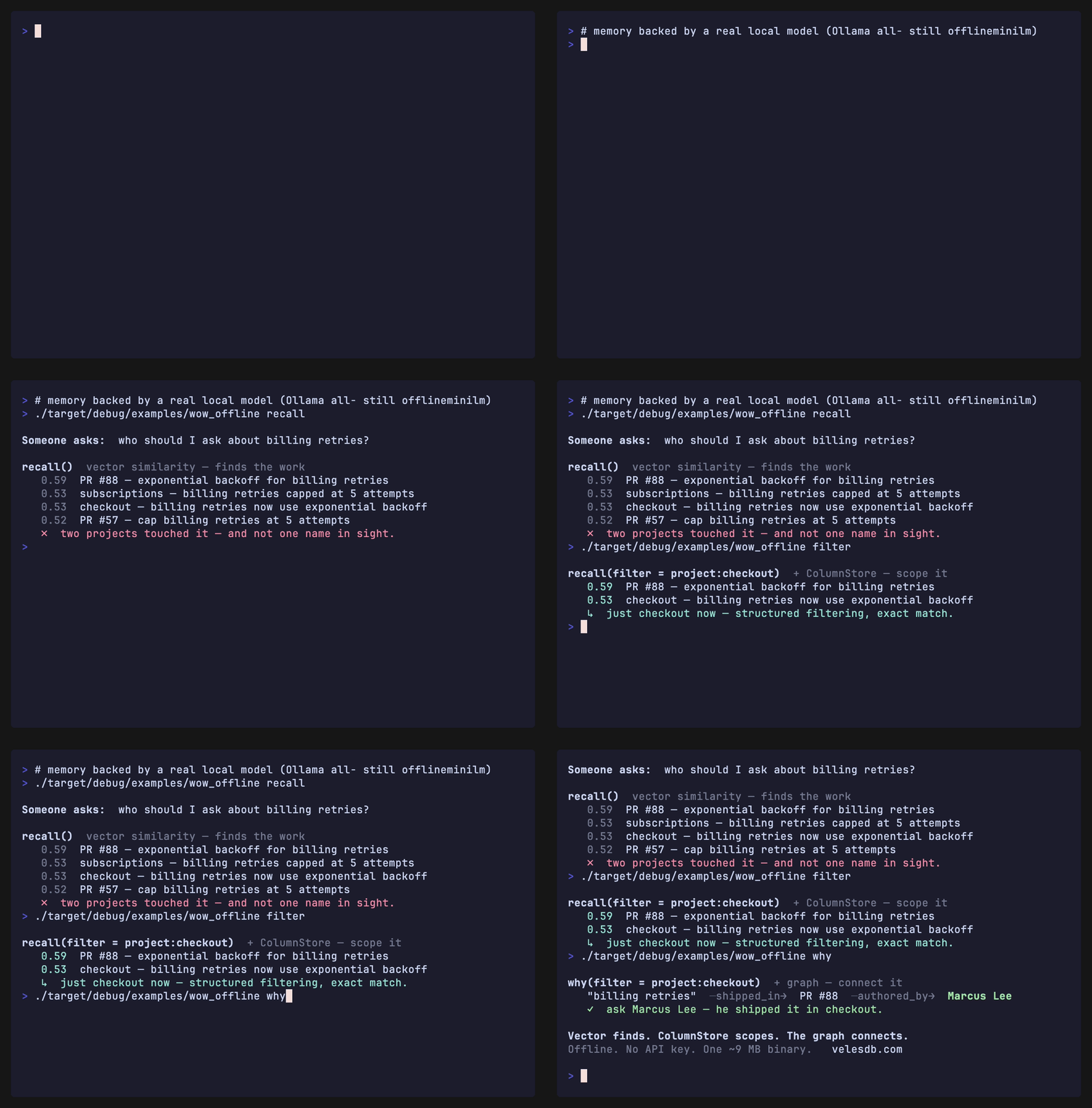
recall("why we chose parking_lot")   [vector similarity only]
   0.47  we chose parking_lot to avoid lock poisoning after a panic
   0.18  PR #42 swaps the std Mutex for parking_lot
   └─ EPIC-317 is nowhere here — it shares no words with the question.

why("why we chose parking_lot")      [vector seed + graph traversal]
   hop 0  we chose parking_lot ...
   hop 1  PR #42 ...
   hop 2  EPIC-317: intermittent CI hang under load
   └─ the graph reached the very ticket the decision fixed.
A vector search ranks by resemblance; the ticket shares no words with the
question, so a pure similarity search is blind to it. why() follows the typed
links and reaches it. That gap is the product.
Four runnable demos of the wedge
Each is a real run that shows what plain recall misses and why() recovers:
| Demo | What it shows |
|---|---|
why_across_sessions.py |
the reason survives a process restart — recall of the top 5 of 16 memories stays blind, why() reaches it |
why_magic_constant.py |
why a magic constant has its value — a business reason that shares no words with the code |
memory_builds_its_own_graph.py |
paste raw prose → a local model auto-wires the graph (no relate()), why() walks it to the root cause |
why_magic_constant.mjs (Node) |
the same engine and wedge in the @wiscale/velesdb-memory-node binding |
Not a weak-embedder trick. In each retrieval demo, recall stays blind to the reason even under a real semantic embedder (
ollama/all-minilm), not just the offlinehashdefault — the reason is connected by a decision, not by surface similarity, which is exactly what a vector store cannot follow.
How it compares — and who it's for
velesdb-memory is embedded memory, not a cloud memory service. The
difference isn't a benchmark bar chart — it's three things no competitor
counters: an evidence trail you can audit (why() shows which facts an
answer came from), zero AI calls to store a memory (the incumbents run 2–3
AI-model calls per save — by default, paid cloud calls), and published
retrieval numbers — we measure, with no AI grader in the loop, how often the
memory finds the right information; to our knowledge, nobody else in this
market publishes that at all:
| velesdb-memory | Mem0 | Zep / Graphiti | |
|---|---|---|---|
| What it is | one embedded binary (vector + graph + column engines) | coordinator over separate services (Qdrant + Postgres) | coordinator, graph-centric (needs Neo4j/FalkorDB) |
| AI calls to store a memory | zero required (optional extraction runs on your local model) | AI-model calls on every write (cloud by default) | AI-model calls on every write (cloud by default) |
| Runs | 100% local / offline | self-host still needs an AI service in the write path | Zep's self-hosted edition was discontinued; Graphiti needs a graph database + an AI service |
| Explains its answers | yes — why() returns the evidence trail |
no — returns an answer only | no — returns an answer only |
| Publishes retrieval accuracy | yes — +7.2pts multi-hop, +9.7pts time-scoped, no AI grader | no | no |
| Time-related questions on LoCoMo | 55–61% on a fully local model — floor = without the optional scaffold (method + stats) | 55.5% base / 58.1% graph-enhanced "Mem0g" (its own best score), both on cloud AI (own paper) | 49.3% on cloud AI — as measured in Mem0's evaluation, which Zep disputes |
Why no single "overall score" comparison row? Because overall scores from
different labs can't be fairly compared: the same product's score can swing
~21 points between two test setups, and vendor headlines often diverge widely
from what other labs measure. Our fully-local 56% aggregate comes with the
full method and statistics disclosed, and instead of a bar chart we publish
the complete sourced landscape — who measured what, with which AI models, and
which figures are disputed: BENCHMARK.md.
Choose velesdb-memory when local-first is a requirement, not a preference:
- Regulated / sovereign data (health, legal, finance, defense) — context can't transit a third-party LLM API;
why()gives both data residency and an auditable recall trail. - Air-gapped / on-prem / edge — a self-contained binary against a local model is the only shape that deploys with no outbound internet.
- Cost-sensitive, high-volume agents — running extraction + recall on a local stack removes the per-token cloud bill.
If you're cloud-native and want the largest community, Mem0 is the default reach. If your
data can't leave the box — or you need to audit why it recalled something — this is the
one that fits. (Deeper positioning: POSITIONING.md.)
Benchmark
cargo run --release -p velesdb-memory --example bench_multihop isolates the
graph's contribution — 24 decision → PR → problem chains, the same embedder
throughout, only the graph toggled. Each question ("why did we adopt <tech>")
has a 1-hop answer (the decision, shares words) and a 2-hop answer (the original
problem, shares none):
| embedder | direct recall | multi-hop, vector-only | multi-hop, vector + graph |
|---|---|---|---|
hash (deterministic) |
100% | 0% | 100% |
real model (Ollama all-minilm) |
100% | 33% | 100% |
Read it this way: the direct control confirms the vector engine is healthy (100% — it aces look-alike retrieval). On multi-hop, a real semantic embedder still recovers only a third of the answers (the problem shares no words with the question); the graph recovers all of them — +67 pp with a real model (structurally +100 pp with the deterministic one). Run the real one yourself:
&&
VELESDB_MEMORY_EMBEDDER=ollama \
Engine isolation, and extraction.
bench_multihopmeasures the engine's contribution on controlled data with the graph pre-wired, so the numbers reflect retrieval, not an LLM. For end-to-end extraction (turning raw text into the graph automatically), the server ships an opt-in layer — theremember_extractedtool /MemoryService::remember_extracted, backed by the dependency-freeExtractortrait (bring your own LLM) or the built-inOllamaExtractorbehind--features extract. The apples-to-apples comparison on the real LoCoMo dataset lives inexamples/locomo/: it builds a fact↔entity graph from the conversations and scores the graph's QA contribution with a hybrid LLM-judge + deterministic metric. The core stays bring-your-own-links; extraction is a commodity on top.
On public benchmarks — each engine, measured
The controlled demo above proves the idea; these run the same engines on
public, third-party datasets with generation-free metrics (pure retrieval
recall — no LLM in the scoring loop, so the number is the memory, not a model).
Each engine is isolated against a pure-vector baseline. Full method, tables and
honest limits in BENCHMARK.md and POSITIONING.md;
every figure reproduces from the bundled examples.
| Engine | Public benchmark | What it measures | Vector → fused |
|---|---|---|---|
Graph (why() BFS) |
HotpotQA (3 000 dev, distractor) | retrieving both bridge facts of a multi-hop question | +7.2pp both-facts on bridge questions (+5.6pp all types) |
| Graph — replicated | 2WikiMultiHopQA (1 000 dev) | supporting-fact recall, second independently built dataset | +2.6 to +3.1pp on its three bridged types (+2.1pp overall) |
ColumnStore (recall_where) |
TimeQA (real Wikipedia bios) | time-scoped recall a year-range filter can do and cosine can't | +9.7pp gold-sentence recall |
| Tri-engine (compound) | synthetic, multi-hop and time-scoped | do the engines stack? | +29pp together — more than the sum of each alone |
Read it straight: the graph helps exactly where a second hop is required — and the lift survives moving to a different multi-hop dataset (more modest there, +2.1pp overall, stated as measured — not a one-dataset fluke). The ColumnStore wins where the answer hinges on a number cosine cannot rank. And on a task that needs both, they compound rather than merely coexist. A pure vector store / RAG orchestrator has none of these — it ranks by similarity and stops.
Install
One command (recommended, with a Rust toolchain present):
# → installs the `velesdb-memory` MCP server binary onto your PATH
The binary is tiny, zero-dependency, and fully offline. It speaks MCP over stdio, so client and server run on the same machine and the memory never leaves it.
From the workspace (for hacking on the server itself):
In an MCP client (no Rust toolchain needed): velesdb-memory is listed on the official MCP registry as
io.github.cyberlife-coder/velesdb-memory. Registry-aware clients can install it straight from the per-platform.mcpbbundles attached to each GitHub release. Acurl | sh/ Homebrew installer is a tracked follow-up; with a Rust toolchain,cargo install velesdb-memoryis the supported one-liner.
Configure your client
All clients use the same stdio shape — point command at the built binary.
cargo install velesdb-memory puts it at ~/.cargo/bin/velesdb-memory
(or the path of your local build, target/release/velesdb-memory).
JSON/TOML configs spawn the binary without a shell, so ~ is not
expanded there — use an absolute path (shown below as
/home/you/.cargo/bin/velesdb-memory; adjust to your home directory).
Claude Code — the one command most people need:
That's it — jump straight to teach your agent the flow below. Using a different client instead? Expand for its config:
Want several clients sharing one memory? Skip everything below and run
./scripts/install-memory-daemon.sh(macOS — full daemon automation; on Linux it still builds and wires clients but skips daemon setup, see the script's own non-macOS notice) orpwsh -File scripts/install-memory-daemon.ps1(Windows 10/11 — full daemon automation via a Scheduled Task) instead — it builds, runs, and wires Claude Code / Claude Desktop / Windsurf / Devin CLI to a single shared daemon in one command (see "HTTP transport" further down).
Cursor — ~/.cursor/mcp.json (global) or .cursor/mcp.json (per project)
Cline — cline_mcp_settings.json — same mcpServers block as Cursor.
Zed — settings.json
Codex CLI — codex mcp add, or a [mcp_servers.*] table in ~/.codex/config.toml
# equivalent ~/.codex/config.toml entry
[]
= "/home/you/.cargo/bin/velesdb-memory"
= []
= { = "/home/you/.velesdb-memory" }
opencode — opencode.json (per project) or ~/.config/opencode/opencode.json (global)
Claude Desktop — claude_desktop_config.json (macOS:
~/Library/Application Support/Claude/claude_desktop_config.json)
Windsurf — ~/.codeium/windsurf/mcp_config.json
Devin CLI — ~/.config/devin/config.json (its mcpServers block sits
inside a top-level {"version": 1, ...} envelope, unlike the clients above)
Teach your agent the flow (skill)
Wiring the MCP server gives your agent the tools; it doesn't tell it when to
use them — and the differentiator (why) only pays off if the agent builds the
graph as it works. Ship it the flow with the bundled agent skill:
# Claude Code / opencode: copy the skill into your skills directory
skill/velesdb-memory/SKILL.md teaches the agent
the loop — recall before acting → remember decisions with metadata and links →
relate facts as relationships appear → why to explain → feedback to reinforce —
with concrete scenarios (incident→decision→"why?", onboarding, cross-session
continuity). Without it, an agent will call recall at best and never build the
graph that makes why shine.
A second bundled skill, velesdb-context-optimizer, teaches the compiler
workflow below (when/what to compress, how to read risk). Install it the
same way:
skills/velesdb-context-optimizer/SKILL.md
— see The context compiler tools below.
No repo clone needed: every GitHub Release
attaches velesdb-skills.tar.gz — both skills, one folder per skill at the
archive root — so a one-liner installs them straight from the release:
|
Keep skills fresh: the cp/curl above is a snapshot, not a live link — a
skill installed once does not update itself when a new release changes it.
Re-run the same command after every upgrade (safe to repeat: it just
overwrites the local copy).
Skills teach an agent what to do; they don't make it remember to do it.
integrations/agent-hooks/
closes that gap for Claude Code with real SessionStart/Stop/PreCompact
hooks that nudge load_working_context/save_working_context automatically
— install once globally (~/.claude/hooks/) to get continuous memory
across every project, or per-project if you'd rather vendor the scripts into
one repo. Codex CLI has no hook mechanism yet; the same directory documents
an AGENTS.md-based convention for it.
HTTP transport (multi-client)
You don't need this to get started — it's for later, once you're already using velesdb-memory and want more than one client (say, Claude Code and Claude Desktop) sharing the same memory at the same time instead of one at a time.
Every config above spawns its own velesdb-memory process over stdio — and
the store's single-writer flock means only ONE of those processes can hold
it open at a time, so only one client can actually use memory at once.
Switching a client mid-session, or running two clients side by side, fails
with an opaque Storage(DatabaseLocked).
The fix: build with --features http and run ONE velesdb-memory --http
daemon that every client connects to instead of spawning its own process.
The hash/ollama embedder choice stays a pure runtime switch either way — only
the transport changes.
The daemon serves HTTPS by default, terminated with a CA + leaf
certificate it generates itself — no mkcert/openssl/reverse proxy to
install. Some MCP clients (e.g. Claude Desktop's "Add custom connector" UI)
refuse any URL that isn't https://, even for 127.0.0.1, so plain HTTP is
no longer viable as the default.
# → still opt into `ollama` at BUILD time only if you want that embedder available;
# VELESDB_MEMORY_EMBEDDER stays a runtime choice regardless (see "Embedding backend" below)
# [velesdb-memory] HTTPS server listening on https://127.0.0.1:18090/mcp
# [velesdb-memory] Local CA: /home/you/.velesdb-memory-tls/ca-cert.pem — a client only needs to
# trust this once (see ./scripts/install-memory-daemon.sh — install-memory-daemon.ps1 on
# Windows — which does this automatically); every future leaf certificate this daemon issues
# is signed by the same CA and is trusted automatically after that.
--http/VELESDB_MEMORY_HTTP=1— serve over streamable-HTTP instead of stdio.--http-port <PORT>/VELESDB_MEMORY_HTTP_BIND=<host:port>— override the bind address (default127.0.0.1:18090;--http-portoverrides just the port on top ofVELESDB_MEMORY_HTTP_BIND).--http-insecure/VELESDB_MEMORY_HTTP_INSECURE=1— opt OUT of HTTPS and serve plain HTTP instead, printing a loud warning at startup. For local debugging, or when a trusted TLS-terminating proxy already sits in front — not for normal use.- The transport has no authentication — anyone who can reach the socket
gets full
remember/recall/relateaccess to the store. HTTPS-by-default protects the bytes on the wire from anyone else on the same machine reading them, but it is not access control: that's still the default loopback-only bind (only processes on the same machine can reach it at all), so a non-loopbackVELESDB_MEMORY_HTTP_BINDhost is refused at startup unless you also setVELESDB_MEMORY_HTTP_ALLOW_REMOTE=1. Only set that if you're putting an authenticating reverse proxy in front — never point the bare daemon at a network-reachable address.
The local CA
On first start, the daemon generates a self-signed root CA and caches it at
$VELESDB_MEMORY_TLS_DIR (default ~/.velesdb-memory-tls, a sibling of the
default store — deliberately not nested inside it, since wiping the store to
reset your memory shouldn't also invalidate a CA your OS has been told to
trust). The CA is never regenerated once it exists — that's the entire
point of caching it: trust it once, and every leaf certificate it signs
afterwards (including ones re-issued across restarts) is automatically
trusted with no further action. The leaf certificate itself (for
localhost/127.0.0.1/::1) is short-lived (30 days) and silently re-issued
— re-signed by the same CA, no new trust required — on every daemon start.
The CA's private key is written with 0600 permissions (owner-read/write
only) and its directory with 0700; only the certificate itself
(ca-cert.pem) is meant to be handed to a trust store or another machine.
scripts/install-memory-daemon.sh adds the CA to your macOS login
keychain (not the system one — no sudo needed) as a trusted root for SSL,
so a strict HTTPS client (a browser, plain curl) connects with no warning.
macOS may show a system prompt (Touch ID / password) to confirm this — the
installer waits up to 60s for it; if it times out or you'd rather do it by
hand, it prints the exact command:
On Windows, scripts/install-memory-daemon.ps1 does the equivalent into the
CurrentUser\Root certificate store (no admin rights needed), checking the
CA's thumbprint first so a re-run never re-imports it. If it times out or you'd
rather do it by hand:
certutil -addstore -user Root "$env:USERPROFILE\.velesdb-memory-tls\ca-cert.pem"
Node-based tools (Claude Code's CLI, Electron apps like Claude Desktop) don't
always consult the OS keychain for TLS trust the way curl/Safari do. If one
of them still reports a certificate error after the keychain step above,
point it at the CA directly:
GET /health— plain 200 OK liveness probe (no MCP handshake needed) — what the installer script and CI use to confirm the daemon is up (over HTTPS too, once TLS is the transport).VELESDB_MEMORY_HTTP_MAX_BODY_BYTES— max size of a single/mcprequest body, in bytes (default 16 MiB). A misbehaving or hostile client sending an oversized request is rejected instead of having its body buffered into memory unbounded.VELESDB_MEMORY_HTTP_MAX_SESSIONS— max number of concurrent MCP sessions (default 64). Each session holds a worker task and a couple of small bounded channels — cheap individually, but with no ceiling on the count a client that opens sessions without closing them (malicious, or just buggy) could otherwise grow that without bound. 64 is generous headroom for this daemon's actual shape: a handful of local, cooperating clients, not a public service.- The store's
flockis unchanged: a secondvelesdb-memory --http(or a stray stdio process) against the same store still fails fast with the same actionable lock message — the daemon is the ONE process that opens the store; every client just connects to it over the network.
Point each client's config at the daemon instead of a local binary:
Claude Code
Cursor / Cline — same mcpServers files as above, type: "http" instead of command:
Claude Desktop (macOS / Windows)
Claude Desktop is a different mechanism than every other client above, twice over:
- its local config file (
claude_desktop_config.json) only recognizes stdio (command) entries — aurl/type: "http"block there is silently ignored (confirmed: it does not even try to connect); - its Settings → Connectors → Add custom connector UI accepts an
https://URL, but verifies TLS through its own Chromium/Node stack, which does not reliably consult the OS keychain/certificate store — so even after the CA-trust step above, the UI path can still refuse the daemon's certificate.
The installers therefore wire Desktop through a stdio→HTTPS bridge:
mcp-remote (needs Node.js),
spawned by Desktop over stdio, connecting to the daemon over HTTPS with
NODE_EXTRA_CA_CERTS pointed at the daemon's CA so TLS is verified
strictly (never NODE_TLS_REJECT_UNAUTHORIZED=0, which disables
verification entirely). The bridge is a plain HTTPS client of the daemon —
it never opens the store itself, so there is no flock conflict.
Happy path — run the installer, restart Desktop, done:
# macOS
# Windows
pwsh -File scripts/install-memory-daemon.ps1
then quit Claude Desktop fully (macOS: menu bar → Quit; Windows: system
tray → Quit — closing the window is not enough) and relaunch it:
velesdb-memory appears under Settings → Developer as "running". The
installer verifies the whole TLS path before writing the entry (a Node probe
against /health with NODE_EXTRA_CA_CERTS — exactly what the bridge will
do) and merges into the existing config non-destructively, with a
timestamped backup. Re-running is idempotent; to re-wire without rebuilding
anything (e.g. after installing Node later), pass --wire-only / -WireOnly.
The generated entry looks like this (macOS shown; Windows is the same shape
with mcp-remote.cmd/npx.cmd and %USERPROFILE% paths — the installer
resolves absolute paths because Desktop spawns the command without a
shell and, on macOS, with launchd's minimal PATH that contains neither
Homebrew nor nvm):
(without a global mcp-remote, the installer writes
npx -y mcp-remote <url> instead — same result, fetched on first launch.)
Troubleshooting
- Certificate refused / bridge disconnected: check the daemon answers —
curl --cacert ~/.velesdb-memory-tls/ca-cert.pem https://127.0.0.1:18090/health(Windows:curl.exe --cacert "$env:USERPROFILE\.velesdb-memory-tls\ca-cert.pem" https://127.0.0.1:18090/health) — then confirm the config entry'sNODE_EXTRA_CA_CERTSpath exists. Re-run the installer with--wire-only/-WireOnlyto re-verify and re-write the entry. Never "fix" a certificate error withNODE_TLS_REJECT_UNAUTHORIZED=0— that turns TLS verification off. - Port already in use: the installer refuses to grab a port another process
holds — re-run everything with
--port=<other>/-Port <other>(the Desktop entry is rewritten to match). - No Node.js on the machine: the bridge can't run — install Node (macOS:
brew install node; Windows: https://nodejs.org) and re-run with--wire-only/-WireOnly. Until then the installer prints the UI alternative: Settings → Connectors → Add custom connector, pastehttps://127.0.0.1:18090/mcp(no API key — loopback only; requires the CA-trust step to have succeeded, and Desktop's own TLS stack may still refuse a local CA — which is why the bridge is the default). Storage(DatabaseLocked): something is opening the store directly alongside the daemon — the bridge never does this; look for a leftover stdio entry pointingVELESDB_MEMORY_PATHat the daemon's store.
Removing the CA trust (the uninstallers never touch it — "never delete local state"):
# macOS — remove the trust-settings record, then the certificate itself
# Windows — user store only, mirroring how it was added
certutil -delstore -user Root "VelesDB Memory Local CA"
If you'd rather not share memory with the daemon at all, the plain stdio
config still works — same block as every other client above, but point
VELESDB_MEMORY_PATH at a different directory than the daemon's store:
pointed at the same one, the stdio process and the daemon would fight over
the same flock, reproducing the exact DatabaseLocked problem this
section exists to avoid. This gives Desktop its own separate memory.
Windsurf — ~/.codeium/windsurf/mcp_config.json
Devin CLI — ~/.config/devin/config.json
scripts/install-memory-daemon.sh automates all of this end to end on
macOS: building with the right features, running the daemon (as a launchd
agent), trusting the local CA in your login keychain, and wiring Claude Code /
Claude Desktop / Windsurf / Devin CLI — see --help for flags (--embedder,
--port, --store, --tls-dir, --ttl, --skip-client, --skip-ca-trust,
--wire-only,
--from-release, --uninstall, …).
Windows
scripts/install-memory-daemon.ps1 (pwsh -File scripts/install-memory-daemon.ps1,
PowerShell 7+ on Windows 10/11) is the same automation with the same flags
(PowerShell-cased: -Embedder, -Port, -Store, -TlsDir, -Ttl,
-SkipClient, -SkipCaTrust, -WireOnly, -FromRelease, -Uninstall, …), adapted to
Windows in three places:
- Daemon: a per-user Scheduled Task (
\VelesDB\MemoryDaemon, triggered at logon) instead of alaunchdagent — a Windows service needs admin rights, which this installer never asks for. Since a Scheduled Task action carries no environment block, the daemon's env vars are baked into a small generated wrapper (%LOCALAPPDATA%\velesdb-memory\run-daemon.cmd) that the task launches; daemon logs land in%LOCALAPPDATA%\velesdb-memory\logs\. - CA trust: the
Cert:\CurrentUser\Rootcertificate store instead of the login keychain — also no admin rights needed (see "The local CA" above for the exact command). - Client config paths: Claude Desktop
%APPDATA%\Claude\claude_desktop_config.json(wired with the samemcp-remotestdio→HTTPS bridge as macOS — see "Claude Desktop (macOS / Windows)" above;.cmdshims resolved explicitly because Desktop spawns the command without a shell), Windsurf%USERPROFILE%\.codeium\windsurf\mcp_config.json, Devin CLI%APPDATA%\devin\config.json.
Installing the daemon without a Rust toolchain
Both installers default to cargo install --features ollama,http, which
needs a Rust toolchain on the machine. Pass --from-release[=TAG] (.sh) or
-FromRelease / -FromReleaseTag <TAG> (.ps1, which has no PowerShell
equivalent of the shell flag's optional inline value) to instead download a
prebuilt velesdb-memory-daemon-<target>.{tar.gz,zip} archive from a
velesdb-memory-vX.Y.Z GitHub Release, verify its checksum, and install the
binary straight to the expected path — no cargo, no local build. Defaults to
the latest published velesdb-memory-vX.Y.Z release when no tag is given.
Checksum verification is blocking by default: if the release's .sha256
sidecar can't be fetched, or the downloaded archive doesn't match it, the
install aborts rather than silently installing an unverified binary. Pass
--skip-checksum (.sh) / -SkipChecksum (.ps1) to opt out. Be clear
about what this checksum actually proves: it's a plain SHA-256 published
alongside the archive on the same GitHub Release, so it verifies transfer
integrity (the bytes weren't corrupted or truncated in flight) — it is
not a cryptographic signature and does not by itself prove the archive's
authenticity (anyone who could tamper with the archive could regenerate a
matching checksum next to it).
This path only becomes active from the first release published after this
change — release-memory.yml's build-daemon-archive job produces these
archives, but the velesdb-memory-v0.11.0 release (and everything before it)
predates it and carries no such asset, so --from-release against v0.11.0
fails with a clear 404-explaining message rather than a bare curl/Invoke-WebRequest
error. This is a different artifact than the .mcpb bundles on the same
release: those are built with default features (stdio only) for MCP-registry
clients and cannot run as this daemon.
Teach your agent the flow (skill)
Wiring the MCP server gives your agent the tools; it doesn't tell it when to
use them — and the differentiator (why) only pays off if the agent builds the
graph as it works. Ship it the flow with the bundled agent skill:
# Claude Code / opencode: copy the skill into your skills directory
skill/velesdb-memory/SKILL.md teaches the agent
the loop — recall before acting → remember decisions with metadata and links →
relate facts as relationships appear → why to explain → feedback to reinforce —
with concrete scenarios (incident→decision→"why?", onboarding, cross-session
continuity). Without it, an agent will call recall at best and never build the
graph that makes why shine.
A second bundled skill, velesdb-context-optimizer, teaches the compiler
workflow below (when/what to compress, how to read risk). Install it the
same way:
skills/velesdb-context-optimizer/SKILL.md
— see The context compiler tools below.
No repo clone needed: every GitHub Release
attaches velesdb-skills.tar.gz — both skills, one folder per skill at the
archive root — so a one-liner installs them straight from the release:
|
Keep skills fresh: the cp/curl above is a snapshot, not a live link — a
skill installed once does not update itself when a new release changes it.
Re-run the same command after every upgrade (safe to repeat: it just
overwrites the local copy).
Skills teach an agent what to do; they don't make it remember to do it.
integrations/agent-hooks/
closes that gap for Claude Code with real SessionStart/Stop/PreCompact
hooks that nudge load_working_context/save_working_context automatically
— install once globally (~/.claude/hooks/) to get continuous memory
across every project, or per-project if you'd rather vendor the scripts into
one repo. Codex CLI has no hook mechanism yet; the same directory documents
an AGENTS.md-based convention for it.
Using the tools
Once configured, your agent discovers the tools automatically (via MCP
tools/list). Each takes JSON and returns JSON:
// remember — store a fact; returns a stable, content-derived id
//            (re-remembering identical text is idempotent — same id, updated in place)
remember { "fact": "we chose parking_lot to avoid lock poisoning",
           "metadata": { "project": "checkout" },                  // optional → enables filtering
           "links":   [ { "target": 1234, "relation": "decided_in" } ],  // optional typed edges
           "ttl_seconds": 604800 }                                 // optional → expires in 7 days
→ { "id": 9876543210 }

// relate — add a typed edge between two existing memories
relate { "from": 9876543210, "to": 1234, "relation": "depends_on" }
→ { "edge_id": 42 }

// recall — semantic search; optional exact-match metadata filter (ColumnStore)
recall { "query": "billing retries", "limit": 5, "filter": { "project": "checkout" } }
→ { "memories": [ { "id": 9876543210, "score": 0.59, "content": "…" }, … ] }

// why — the differentiator: best match + its connected subgraph (multi-hop)
why { "decision": "why did we choose parking_lot", "max_hops": 2,
      "filter": { "project": "checkout" } }
→ { "nodes": [ { "id": …, "content": "…", "hop": 0 }, … ],
    "edges": [ { "from": …, "to": …, "relation": "decided_in" }, … ] }

// forget — delete a memory by id
forget { "id": 9876543210 } → { "id": 9876543210, "found": true }

// remember_extracted — extract facts from raw text and auto-wire the graph
//   (opt-in: needs a server built with --features extract + VELESDB_MEMORY_EXTRACTOR)
remember_extracted { "text": "Met Dana at the Rust meetup; she now leads the parser rewrite." }
→ { "ids": [ 11122233, 44455566 ] }   // stored facts; topics become shared graph hubs
limit defaults to 10 (capped at 1000); max_hops defaults to 2 (capped at 10);
links, metadata, and filter are optional.
The context compiler tools
Compiler surfaces today: MCP server and Rust ship the full tool set
(compile_context, retrieve_context_source, context_savings,
save_working_context, load_working_context, explain_compilation;
compile_context_reranked is Rust-only). Node
(@wiscale/velesdb-memory-node) has compileContext, retrieveContextSource,
save/loadWorkingContext, and feedback, but not yet context_savings or
explain_compilation. Python (from velesdb import MemoryService) has
compile_context, retrieve_context_source, context_savings,
save/load_working_context, and feedback merged on develop (no
explain_compilation yet) — but the published PyPI wheel predates all of
it; until the next PyPI release, Python agents reach the compiler through
the MCP server. Any MCP-speaking client gets the full surface regardless of
language. compile_transcript is MCP-only for now — Rust callers get the
same building blocks directly (context::segment_transcript +
ContextCompiler/MemoryService::compile_context), but neither the Node nor
the Python binding exposes a one-call convenience method yet (tracked as a
follow-up, see CHANGELOG.md).
Why: agents spend most of their tokens re-reading redundant context.
compile_context compresses it deterministically — no LLM, no cloud, no
API key: same request, byte-identical output. What must survive verbatim
does (code fences, URLs, numbers/dates/ids, negative constraints, anything
marked {"verbatim": true}); duplicates drop; repeated log lines collapse
with counts (ERROR timeout (x50)); over-budget content becomes a
recoverable ctx://source/ handle instead of a silent loss; and every
fragment gets one auditable decision (stable rule id, reason, relevance,
risk). Guarantees, per compilation:
- Budget: the assembled content never exceeds
token_budget. - Provenance:
sources+ per-decisioncontent_hashidentify the exact bytes;retrieval_handleslist what was externalized. - Nothing critical silently lost: losing preserve-classified content
raises the compilation's
riskto"high"— check it before use.
How it works

Not a transparent proxy. compile_context only touches what your agent
explicitly hands it as fragments — logs, retrieved docs, conversation
history you choose to route through the call. It never sees or compresses
the harness's system prompt or tool-call schemas; those stay outside the
compiler entirely. Knowing when and what to route through it is the
velesdb-context-optimizer
skill's job, not the compiler's — the compiler just compresses what it's
given, deterministically.
No automatic repo indexing. Nothing enters recallable memory — what
recall / why / memory_scope can surface — unless you call remember /
relate / remember_extracted explicitly. Compilation does write two things
to the local store under VELESDB_MEMORY_PATH (default ~/.velesdb-memory):
all fragment sources are cached locally (content-addressed — not just the
over-budget ones) so every ctx://source/ handle stays recoverable via
retrieve_context_source, and context_savings records aggregate stats
(tokens in/out/saved) per project. Both stay on disk — local-first, nothing
is ever sent off the machine.

// compile_context — minimal call: query + token_budget + fragments
compile_context { "query": "state of the canary deploy",
                  "token_budget": 500,
                  "fragments": [
                    { "content": "The canary is green: 2% traffic, zero errors in the last 10 minutes." },
                    { "content": "Rollback runbook: kubectl rollout undo deployment/canary." } ] }
→ { "content": "…both fragments packed…", "decisions": […2 entries, "action": "preserve"…],
    "insights": { "tokens_in": 44, "tokens_out": 45, "tokens_saved": 0 }, "risk": "low" }
Add memory_scope, project, and metadata: {"cache": true} once you need
stored-memory recall or provider prompt-cache alignment — the full request:
// compile_context — deterministic compression under a token budget
compile_context { "query": "state of the canary deploy",
                  "token_budget": 4000,
                  "project": "veles",
                  "memory_scope": { "k": 5 },                 // optional: pull relevant memories in
                  "fragments": [
                    { "content": "You are the deploy assistant.", "metadata": { "cache": true } },
                    { "content": "<600 lines of CI logs>", "kind": "log" },
                    { "content": "Never restart the primary during a rebalance." } ] }
→ { "content": "…", "sections": […], "decisions": […], "sources": […],
    "retrieval_handles": […], "insights": { "tokens_in": 2244, "tokens_out": 545,
    "tokens_saved": 1699, … }, "risk": "low" }

// retrieve_context_source — what was externalized is recoverable, byte for byte
retrieve_context_source { "handle": "ctx://source/1234567890" }
→ { "handle": "ctx://source/1234567890", "content": "…original bytes…" }

// explain_compilation — "why was this fragment dropped/shortened?" (stateless:
//   compilation is deterministic, so the request is re-compiled)
explain_compilation { "request": { …same request… }, "fragment_id": 1234567890 }
→ { "action": "drop", "rule_id": "drop.duplicate", "reason": "…", "risk": "low", … }

// explain_compilation — byte-identical fragments share a content-addressed
//   fragment_id, so a plain fragment_id lookup always resolves to the
//   deduplication survivor. Pass fragment_index (0-based position in
//   request.fragments) to target one specific fragment instead:
explain_compilation { "request": { …fragments: [a, a]… }, "fragment_id": 1234567890,
                       "fragment_index": 1 }
→ { "action": "drop", "rule_id": "drop.duplicate", … }   // the SECOND "a", not the survivor

// context_savings — aggregate recorded savings, optionally per project
context_savings { "project": "veles" }
→ { "events": 12, "tokens_in": …, "tokens_saved": …, "truncated": false }
JS clients talking raw MCP (no Node binding): watch
fragment_id/content_hash/memory_idprecision. Every id in acompile_contextorexplain_compilationresponse is au64. The@wiscale/velesdb-memory-nodebinding always crosses ids as decimal strings, so it is unaffected — but a plain MCP client speaking JSON straight over stdio/SSE (no binding in between) gets a JSON number, andJSON.parsein JS represents that as an IEEE-754 double: ids above2^53 − 1(9007199254740991) silently lose precision. Set"policy": { "ids_as_strings": true }on the request to opt every id field of that response into decimal-string form instead (same rewrite the Node binding applies internally, reused — not reimplemented). Defaultfalse: existing clients keep today's numeric response unless they opt in.fragments[].idon the way IN already accepts either a JSON number or a decimal string, so a caller can resubmit an id it received stringified without converting it back.
Preservation rules (stable ids, first match wins): preserve.marked_verbatim,
cache.stable_prefix (cache-marked fragments form a stable prefix for
provider prompt caching), preserve.code_fence,
preserve.negative_constraint, abstract.log_dedup,
preserve.exact_values, preserve.url, preserve.default; the budget layer
adds budget.externalize and dedup adds drop.duplicate /
drop.near_duplicate. First-match-wins also means media.atomic is checked
before cache.stable_prefix: a media fragment marked metadata: {"cache": true} still classifies media.atomic and packs in the Body section, never
the Cache prefix — the cache flag is ignored on media fragments.
insights.tokens_saved is a local estimate, calibrated against a real
BPE (cl100k) to deliberately over-count every measured content class
(+9.6 %…+63.8 %, per-class figures in the table below) — not the provider's
count, not billed tokens, not cache reads.
The reproducible benchmark (examples/context_savings)
measures 82.5 % real (cl100k) token savings on a committed 12-turn agent-session benchmark (sub-ms stateless compiles), 75–82 % estimated savings on its static corpus in ~2 ms compile, and — with memory_scope's fused HNSW + graph-walk recall over relate-linked fact chains — 9/9 answer facts surfaced vs 3/9 for vector-only recall on the committed tri-engine benchmark
latency. The committed
cache_prefix
harness measures the cache: true prefix's byte stability directly: across
10 consecutive compiles with changing volatile content, the cache section is
a byte-identical 100 % stable prefix on all 9 consecutive turn pairs
(reproducible: two full 10-turn runs, byte-identical). That measurement
holds the query fixed across turns; the guarantee also holds when the query
changes (issue #1455,
fixed): a cache: true fragment's rank never consults relevance, so when a
budget is too tight for every cache-marked fragment, which ones survive is
decided by priority then input order alone — never by lexical relevance to
the query — so the Cache prefix stays byte-identical across a query change
at a fixed fragment set and budget. The accepted trade-off: a same-tier
non-cache fragment that is more relevant to the query can still lose that
tight-budget race to a cache-marked fragment (stability wins over relevance,
but only for cache-marked fragments). That tri-engine path — the one memory_scope drives inside compile_context — looks like this:

The velesdb-context-optimizer
skill teaches an agent the full workflow — including when not to compress.
Measured on a real coding session
Your AI coding assistant re-sends everything it has seen on every single message — old screenshots, logs it already read, files it re-opened. VelesDB compiles that context first: same information, fewer tokens (what LLM providers bill you for), so each message costs less and your session lasts longer before hitting the context limit.
To measure that, a committed benchmark replays a realistic multi-turn coding
session — screenshots, CI logs, documents the assistant reads again, code
files re-opened after edits — two ways: once sending everything raw, once
compiled through compile_context. Everything is counted with cl100k (a
real tokenizer — the same counting the API does) and the API's own
image-pricing formula. Every run is deterministic and was reproduced twice,
byte-identical:

| Scenario | Without VelesDB | With VelesDB | Saved |
|---|---|---|---|
| A balanced bug-fix session (14 turns) | 84,334 tokens | 69,843 tokens | 17.2 % — duplicates and outdated screenshots only; nothing unique removed |
| The same session with a hard 8,000-token window | 84,334 tokens | 67,194 tokens | 20.3 % — the extra points come from content set aside (retrievable on demand — never deleted), not from more duplicates |
| A long session where you keep iterating (36 turns) | 449,836 tokens | 310,850 tokens | 30.9 % — savings compound as the session grows |
| With the memory features turned on (14 turns) | 84,334 tokens | 68,839 tokens | 18.4 % — reference docs stored once, recalled per turn, out-of-the-box settings |

The long session also answers the endurance question: over the full measured session (feature-building included) the raw context grows ~555 tokens per message versus ~333 compiled — 1.7× more headroom (how many more turns fit in one session before the context limit forces a summarize-and-restart), and up to 6.6× in the verification/wrap-up phase, where most turns are re-reads. Projections always use the full-session rate:

Reproduce any of these in one command, no key and no network needed
(node examples/real-session-benchmark/offline.mjs, long-session.mjs,
memory-enabled.mjs). An opt-in billed mode measures the same session
against real provider usage — through your own Claude Code CLI account with
zero configuration, or an API key — and additionally grades real generated
answers in both arms against a committed fact checklist, so a token saving
that costs answer quality is reported, never hidden. Full protocol,
attribution details, and caveats →
examples/real-session-benchmark/
(repo root — commands above run from a repo checkout).
Exact token estimators
The default HeuristicEstimator
is a deterministic, dependency-free char-class approximation, calibrated to
always over-count a real BPE (never under, so packing never silently
overflows a provider's window) — measured margins from +9.6 % (CJK) to
+63.8 % (English prose) on the committed
exact_estimator
harness (numbers below are from its own runs, reproducible: two runs, byte-
and figure-identical). For an id-dense corpus against a tight budget, or
whenever you need the provider's real count instead of a safe
over-approximation, inject a model-exact
TokenEstimator
via ContextCompiler::with_estimator — the trait is two methods, one of
them defaulted:
use TokenEstimator;
/// OpenAI cl100k, via any tiktoken-style encoder you already depend on
/// (not a VelesDB dependency — bring your own, e.g. `tiktoken-rs`).
;
// with_estimator takes a boxed trait object (DynTokenEstimator):
let compiler = new
.with_estimator;
Anthropic does not publish a tokenizer, so there is no exact-count
equivalent to plug in the same way; the closest honest option is to price
and pack against a cl100k estimator (Claude's real count runs close to it
for prose/code) or to keep the default heuristic's safe over-count, which
never claims to be exact. Injecting a custom estimator only changes
estimate()'s output — the pipeline (chunk → classify → dedup → score → pack → assemble) and its determinism guarantee are unaffected either way.
Measured on the harness's per-category corpus (two runs, identical):
| Category | Default estimate | Real (cl100k) | Error | Direction |
|---|---|---|---|---|
| English prose | 77 | 47 | +63.8 % | over (safe) |
| French prose | 90 | 59 | +52.5 % | over (safe) |
| Repetitive logs | 730 | 479 | +52.4 % | over (safe) |
| Rust code | 64 | 49 | +30.6 % | over (safe) |
| Digit-dense ids/dates | 89 | 68 | +30.9 % | over (safe) |
| Markdown | 78 | 69 | +13.0 % | over (safe) |
| JSON | 50 | 44 | +13.6 % | over (safe) |
| URLs | 57 | 51 | +11.8 % | over (safe) |
| CJK | 80 | 73 | +9.6 % | over (safe) |
Audit mode: a dry-run importance report
compile_context has no separate "audit" flag — pass a budget large enough
that nothing gets dropped, abstracted, or externalized (the request's own
hard ceiling, MAX_TOKEN_BUDGET = 10,000,000 tokens, always qualifies), and
the response is the audit: every fragment gets a full
ContextDecision
(rule id, relevance in [0, 1], reason, content hash) with risk: "low"
(nothing critical was lost — a dry run should never itself lose anything).
Sort decisions by relevance descending client-side for an at-a-glance
importance report of what the compiler would prioritize under a tighter
budget, without actually dropping anything:
compile_context { "query": "state of the canary deploy",
                   "token_budget": 10000000,               // MAX_TOKEN_BUDGET: dry-run, nothing lost
                   "fragments": [ /* … */ ] }
→ { "risk": "low", "decisions": [ /* one per fragment, every action + relevance + reason */ ], … }
Normalizing timestamped logs
By default, abstract.log_dedup collapses only byte-identical repeated
lines — real logs are usually timestamped, so a burst of otherwise-identical
lines survives as distinct entries and the fragment falls through to
whichever rule matches its literal bytes instead (see the skill's
"Timestamped logs" note). Set policy.normalize_log_timestamps: true to
opt in to a deterministic, fixed-pattern mask applied before grouping,
for kind: "log" fragments only:
- a leading timestamp — ISO-8601 (
2026-07-18T10:23:45.123Z,2026-07-18T10:23:45+02:00) or the space/comma log4j variant (2026-07-18 10:23:45,123), or syslog (Jul 18 10:23:45); - one or more immediately-following bracketed hex/decimal counters
(
[a1b2c3],[1234]) — a bracket whose content is not purely hex/decimal ([ERROR],[shard-3]) is left alone, so level tags and named ids never match.
Only the grouping key changes — the emitted line is still the first
occurrence's exact bytes, so nothing is rewritten into the output. The
patterns are fixed in the compiler (never a caller-supplied regex), so the
same request keeps producing the same collapse. When normalization actually
merged lines that would otherwise have stayed distinct, the fragment's
decision.reason says so ("… — timestamps normalized before collapsing"),
so an audit trail always shows why a log collapsed the way it did. Off by
default: it changes what "duplicate" means for logs, so existing callers
keep byte-exact grouping unless they opt in.
Media fragments
A fragment may carry an inline image alongside its text: set
media: {"mime": "image/png", "bytes_b64": "<base64>"} on a
ContextFragment; content stays the caption (often empty for a bare
screenshot).
- Atomic packing: a media fragment is never chunked — it packs whole under the budget or not at all, so an image can never be cut mid-stream.
- Token cost from the image itself, not its base64 text: PNG/JPEG
dimensions are sniffed from the header (
ceil(width * height / 750), a published Claude image-token constant); an unsupported mime or an unreadable header falls back to a safe over-count of the base64 text. - Dedup on raw bytes: two fragments with byte-identical decoded media are deduplicated regardless of their caption text (screenshots are often captionless, so caption-text dedup would false-positive on "" == ""). Media is never near-duplicated.
- Capped at 4 MiB of base64 (
limits::MAX_MEDIA_BYTES, ≈3 MiB decoded), independent of the text-content cap; malformed base64 is rejected at validation. - Real retrieval, through the memory bridge. A media fragment that does
not fit the budget externalizes exactly like text:
decision.action == "retrieve",rule_id == "budget.externalize", and actx://source/handle. A media handle is content-addressed on the raw decoded bytes (the same identity dedup uses), never the caption — two different images always get two distinct, independently resolving handles even when both captions are blank (the common case), and byte-identical images share one handle.MemoryService::compile_context(withpolicy.store_sources, the default) persists the fragment's base64 payload alongside its caption —MemoryService::retrieve_context_source(handle)returns{content, media?},mediapresent whenever the original fragment carried one. Media is embedded with a deterministic placeholder vector derived from its raw bytes' hash, never through the text embedder: resolution is by content-addressed hash only, never by vector search. The bareContextCompiler(no memory) still just mints the handle, exactly as it does for text — it never knows or cares whether a resolver is attached. - Screenshot supersession. Fragments that share
media,kind: "screenshot", and the samemetadata.targetvalue form a succession series: only the LAST one in the request (input order — never a clock) stays inline; every earlier one is reclassifiedretrieve.screenshot_supersededand externalized behind a resolvable handle, regardless of budget — a stale screenshot never competes with the current one for space.metadata.targetshould identify the subject being screenshotted (a URL, a test name, a UI element id — the caller's choice); a screenshot with nometadata.targetis never superseded, since there is no evidence it succeeds anything. Opt out per request withpolicy.disabled_rules: ["retrieve.screenshot_superseded"]. - Every surface carries media: the MCP tools (
compile_context/retrieve_context_source, schemas included —fragments[].mediaand the optionalmediaon the retrieve result are both advertised, not just accepted), the Python binding, the Node binding (compileContext/retrieveContextSource, same{handle, content, media?}shape as the MCP tool — see the Node README), and WASM'scompileContext(media fragments compile, dedup, and cost correctly on the in-memoryWasmStore;retrieveContextSourceis not yet exposed on the WASM binding, so resolving a media handle back to bytes within a wasm session is Node/Python/MCP-only for now).
Minimal end-to-end example, over the MCP tools (the exact calls
examples/context_savings/real_measures/mcp_e2e.py makes against a real
velesdb-memory server over stdio):
=
=
= # too big for budget=1, externalized
=
assert == # byte-identical round trip
Ingesting files by reference (path)
A compile_context (or explain_compilation) fragment may set path
instead of inline content, to ingest a file straight off disk:
compile_context { "query": "review the failing test",
                   "token_budget": 4000,
                   "fragments": [ { "path": "/home/you/project/tests/failing_test.rs" } ] }
Opt-in and allowlisted — off by default. Nothing is readable until the
server is started with VELESDB_MEMORY_INGEST_ROOTS set to a PATH-list of
directories (:-separated on Unix, ;-separated on Windows, parsed with
std::env::split_paths):
VELESDB_MEMORY_INGEST_ROOTS="/home/you/project:/home/you/notes" \
Each root is canonicalized once, at startup — an entry that does not
exist or is not a directory is a fail-fast configuration error (the server
refuses to start), never something discovered later on a caller's first
path fragment. An unset or empty variable leaves the allowlist empty, which
disables the field entirely — every path fragment then fails with
IngestDisabled, not silently ignored.
Every path fragment runs the same ordered, short-circuiting pipeline:
- A fragment may set exactly one of
path, non-emptycontent, ormedia— checked first, independent of whether ingestion is enabled. - The path must be absolute (an MCP server's working directory is not something a caller can rely on) — a relative path is rejected outright.
std::fs::canonicalizeresolves every symlink in one call.- The canonical path is checked against the canonical roots
component-wise (
Path::starts_with, never a string prefix — a sibling directory like/root-evilnext to a root of/rootis correctly rejected). On failure the error cites the path the caller asked for, never the resolved target, so a rejection never leaks where a symlink actually points. - The target must be a plain file (directories are rejected), no larger
than 1 MiB (
MAX_INGEST_FILE_BYTES) — checked from metadata before any read. - The file is read, its length re-checked against the running total for
the whole request — capped at 64 MiB (
MAX_TOTAL_INGEST_BYTES) — and decoded as UTF-8; non-UTF-8 content is rejected, never lossily decoded (a short hint is added when the leading bytes look like a PNG or JPEG, pointing toward amediafragment instead).
A request may reference at most 64 files (MAX_INGEST_FILES) via
path. Symlinks are allowed as long as their canonical target lands under a
root — no special-casing needed, step 3 already resolves them.
Typed errors (INVALID_PARAMS on the wire): IngestDisabled (no root
configured), IngestOutsideRoots (the path escapes every root — carries the
requested path, never the resolved one), IngestPath (a relative path, an
unreadable/nonexistent/non-file path, a path combined with content or
media, or non-UTF-8 content), and ContextOverLimit for the file-count and
byte caps.
WASM builds never ingest. The context::ingest module is compiled only
under #[cfg(not(target_arch = "wasm32"))] — a path fragment reaching the
WASM binding's in-memory compiler is rejected with IngestDisabled, the same
error a native build reports with no roots configured; there is no adapter
in a wasm session to resolve a filesystem path against.
Determinism caveat. A file that changes between two calls compiles
whatever content was actually read at call time — the deterministic
contract is on the bytes read, not on the file as it exists at any other
instant (a documented, accepted TOCTOU non-goal: this is a local,
single-user server). explain_compilation re-reads the path when it
re-compiles, so its decision reflects the file's current content, not
necessarily what the original compile_context call saw.
compile_transcript: one-call transcript ingestion
compile_transcript is a shortcut over compile_context for a raw
agent-session transcript: it deterministically segments the transcript into
turns and sub-turns, then compiles the result exactly like compile_context
— an agent no longer has to hand-split a transcript into fragments first.
compile_transcript { "query": "what did we decide about the canary rollback",
                      "token_budget": 4000,
                      "transcript": "System: You are the deploy assistant.\nUser: …\nAssistant: …" }
→ { "context": { /* byte-compatible with compile_context's output */ },
    "segmentation": { "format_detected": "plain",
                       "segments": [ { "index": 0, "turn": 0, "role": "System", "kind": "body",
                                        "byte_start": 0, "byte_end": 34, "fragment_id": … }, … ],
                       "merged_segments": 2 } }
Exactly one of transcript (inline text) or path (an absolute filesystem
path) must be set. path goes through the same
VELESDB_MEMORY_INGEST_ROOTS allowlist and security pipeline as a
compile_context fragment's path (above), except capped at 8 MiB
(MAX_TRANSCRIPT_BYTES) instead of the ordinary 1 MiB fragment ceiling — a
transcript is the one caller-facing shape allowed to read past that limit,
because it is immediately segmented into sub-1-MiB pieces before compilation
ever sees it as one oversized fragment.
Format detection (segmentation.format, default auto):
jsonl— one line, one turn; each line must parse as a{"role": …, "content": …}JSON object. A blank line never opens a turn of its own (its bytes fold into the surrounding turn), so a JSONL transcript that merely uses blank lines as separators still parses.plain— turns are opened by the first match of a CLOSED table of markers at the start of a line, checked in order:System:,User:,Human:,Assistant:,AI:,Tool:,### User,### Assistant. A transcript with no marker at all is one turn withrole: null. The table is fixed in the compiler, never a caller-supplied pattern — a"User:"cited in prose (a false positive) is a known, accepted trade-off: predictable, deterministic segmentation beats configurable-but-fragile marker matching. Forceplainwhen a transcript's content would otherwise trip a false positive, or fall back to plaincompile_contextwith hand-built fragments for full control.auto(default) — triesjsonlfirst, falls back toplainwhen the transcript does not parse as JSONL. A caller-forced format that fails to parse is a hard error, never a silent fallback to the other format.
Within each plain turn, content is further cut into sub-segments: a
fenced code block becomes an atomic code segment (never split, exactly
like compile_context's own fence handling); a run of at least 8
consecutive log-like lines (a volatile timestamp/pid prefix, or a raw-text
repeat) becomes a log segment (so abstract.log_dedup can collapse it
exactly like a caller-declared kind: "log" fragment); everything else is
body, left for the ordinary classification rules to judge. Segments under
segmentation.min_segment_bytes (default 256) merge into an adjacent
segment of the same turn and kind — but merging never crosses
MAX_FRAGMENT_BYTES (1 MiB), the one invariant every normalization step
upholds. When segmentation.cache_system_turn is true (the default) and
the first turn's role is "system" (case-insensitive), every segment of
that turn is marked metadata.cache = true — the same signal
cache.stable_prefix reads — so a system-prompt turn becomes the compiled
output's stable, cache-friendly prefix without hand-annotating it.
The response's segmentation.segments field is the full audit trail (see
SegmentInfo in the crate docs): index, turn, role, kind, byte range, and
the fragment_id the segment carries into context.decisions. Two
documented edge cases:
- Segmentation failures reuse
compile_context's error taxonomy. An unsplittable fence over 1 MiB, a forcedjsonlformat that fails to parse, or too many fragments after merging all surface asContextOverLimitwith a segmentation-specific message — deliberately no new error variant for this PR; revisit if that makes a segmentation failure hard to tell apart from an ordinary budget error. - A single JSONL line whose decoded content alone exceeds 1 MiB is
re-split into several sub-1-MiB segments, but every child segment reports
the same
byte_start/byte_end(the original line's span) — a JSONL line's decoded text has no byte-aligned mapping back into the raw (JSON-escaped) source bytes. An extreme edge case; every other segment kind keeps a unique, non-overlapping range.
Source TTL & disk growth
policy.source_ttl_seconds (None by default) controls how long a
compiled fragment's cached original — the bytes behind its
ctx://source/<hash> handle — stays retrievable. Default is permanent:
every distinct fragment compiled through the memory bridge is kept until
explicitly forgotten, on purpose — a compiler that silently expired sources
would make retrieve_context_source unreliable exactly when an audit needs
it most (auditability over disk thrift). Set a TTL (seconds) when you
compile high-volume, low-value volatile content (e.g. per-turn logs in a
long-running agent) and do not need those sources recoverable past a
bounded window; policy.event_ttl_seconds applies the same trade-off to
context_savings' aggregated compilation events.
Disk growth: with the default permanent TTL, every distinct fragment's
source accumulates under VELESDB_MEMORY_PATH (default
~/.velesdb-memory) for as long as the process compiles new content — by
design, since sources are what makes retrieval and audit trustworthy. To
reclaim space:
- set
source_ttl_seconds/event_ttl_secondsgoing forward so new compilations self-expire; - or purge the whole store manually: stop every process using it, then
delete the store directory at
VELESDB_MEMORY_PATH(the same manual purge documented above forremember-stored facts) — there is no selective "purge sources older than N days" command today, only whole- store deletion or per-factforget.
Usage-driven importance: RL confidence + recency in the same ranking
memory_scope selection composes one more engine pair: the learned RL
confidence that feedback trains, and a batch-relative recency term.
policy.importance drives the blend; per pulled memory the ranking key is
score = fused_norm + confidence·(rl_confidence − 0.5)·2 + recency·recency_norm
"policy": { "importance": {
  "confidence": 0.2,          // default; 0.0 switches the term off
  "recency": 0.1,             // default; inert without recency_field
  "recency_field": "day"      // optional caller metadata key; no default
} }
- Selection is untouched. The blend re-ranks only the pool the fused vector+graph similarity already selected — confidence is not relevance, so an over-reinforced but off-topic fact can never buy its way in (pinned by an adversarial test).
- Recency contract (strict).
recency_field: nulldisables the term — no implicit default key exists. When set, it must name a numeric caller metadata field on one monotone scale per batch (e.g. the automatic_veles_dateYYYYMMDDfield everyremember-d fact already carries, per Automatic dating, anotherYYYYMMDDfield, or an epoch); the scale is documented, not verified. Values are min-max normalised within the pulled batch: the newest reads1.0, the oldest0.0, a memory without the key contributes0(never penalised), and a degenerate batch (max == min) contributes0for all. The compile pipeline never reads a clock — recency is relative to the batch, so compilation stays byte-deterministic. - Compat. Both weights at
0.0reproduce the 0.8.0 output byte for byte (golden-pinned); requests withoutimportanceparse unchanged. Behavioral change on upgrade: the defaults are active, so with an untouched policy RL-reinforced memories rank higher out of the box — zero the weights to restore the exact 0.8.0 ordering. - Weight range. Recommended
[0, 1]for both weights. Out-of-range values are accepted verbatim, never clamped: a negative weight inverts its term (e.g. demote reinforced facts), a weight above1lets the term dominate similarity; only the recorded decisionrelevanceis clamped into[0, 1]. - Explainable. Every pulled memory's decision
reasonventilates all four signals, e.g. (from the committed tri-engine benchmark):pulled from memory 1444253315203703248 (vector 0.00, graph 1.00, confidence 1.00, recency 0.00)— a fact invisible to vector search, rescued by the graph walk, promoted by learned confidence. - Reranker seam. The blend also composes with
compile_context_reranked(Rust-only seam for a semantic cross-encoder or LLM judge): the reranker picks and orders the pool, then the same importance blend re-ranks inside it — one coherent, auditable ranking across HNSW seed, graph reach, fusion, reranker, confidence, and recency.
The committed tri_engine_rescue
harness measures the synergy end-to-end: with zero weights the wordy
similar-only fact precedes the real fix (0.8.0 behaviour); with
confidence: 0.8, the fact the team reinforced via feedback and that
only the typed-edge walk reaches leads the compiled context — identical
across two runs.
IDs & linking. remember returns a stable id derived from the fact's
content. Pass it to relate / forget, or as a links[].target on a later
remember — that is how the graph gets built, and what why traverses.
A natural agent pattern. At the end of a task, remember the decision with
metadata (project, author, status) and a link to the PR or ticket. Days
later, why("…") recovers not just the decision but the PR, ticket, and
benchmark linked to it — where recall alone returns only look-alike text.
Forgetting & expiry. Facts are permanent by default. Delete one explicitly
with forget { "id": … }. To make a fact self-expire, pass ttl_seconds to
remember (a durable TTL persisted with the fact, so it survives a restart;
expired facts stop being recalled). Set VELESDB_MEMORY_DEFAULT_TTL (seconds) to
apply a default expiry to every fact that doesn't set its own. To wipe everything,
delete the store directory at VELESDB_MEMORY_PATH.
Embedding the library directly? The same wedge is available without the MCP server: as a Rust API (
MemoryService::remember/recall/relate/forget/why, see the rustdoc on docs.rs), in Python (from velesdb import MemoryService), and in Node.js (npm install @wiscale/velesdb-memory-node).
Embedding backend
remember / relate / why / forget behave the same regardless of the
embedder — the graph is what makes why shine. Only recall's semantic
quality (and why's seed match) depend on it.
VELESDB_MEMORY_EMBEDDER |
Recall quality | Footprint | Needs |
|---|---|---|---|
hash (default) |
keyword-ish, deterministic | tiny, fully offline, zero-dep | nothing |
ollama |
real semantic | tiny binary + your local model | a running Ollama; build --features ollama |
The default keeps the single tiny offline binary promise intact. For real
semantic recall, build with the ollama feature and point it at a local model
— the model runs in your own Ollama, so memory still never leaves the machine:
VELESDB_MEMORY_EMBEDDER=ollama \
VELESDB_MEMORY_OLLAMA_MODEL=all-minilm \
Env vars: VELESDB_MEMORY_OLLAMA_URL (default http://localhost:11434),
VELESDB_MEMORY_OLLAMA_MODEL (default all-minilm). The embedding dimension is
probed from the model, so a store is fixed to one embedder — don't switch
embedders on an existing store.
Auto-extraction backend (opt-in)
By default the graph is bring-your-own-links: you wire edges with relate
or links. The remember_extracted tool turns that into a commodity — a local
LLM reads raw text and the server stores its facts + auto-builds the fact↔topic
graph. It is off by default (it pulls an HTTP dependency), so the standard
binary stays tiny and offline:
VELESDB_MEMORY_EXTRACTOR=ollama \
VELESDB_MEMORY_EXTRACTOR_MODEL=qwen3.6:35b-mlx \
Env vars: VELESDB_MEMORY_EXTRACTOR (ollama to enable), VELESDB_MEMORY_EXTRACTOR_URL
(default http://localhost:11434), VELESDB_MEMORY_EXTRACTOR_MODEL (required, a
generative model). Without a backend the tool returns a clear "not configured"
error. To plug a different model, implement the dependency-free Extractor
trait and pass it to MemoryService::remember_extracted from Rust.
License
The distributed binary embeds velesdb-core and is therefore governed by the
VelesDB Core License 1.0 (source-available): redistribution must keep the
license and notices, with velesdb.com attribution for
public apps. The wrapper source in this crate is intentionally readable and
forkable.
By design, this server exposes memory semantics only —
remember/recall/relate/forget/why, which return results. It never exposes
raw database capabilities (query, create_collection, upsert, traverse).
Run locally over stdio, you operate the software for yourself: this is the
license's expressly-permitted embedded, local-first use — not a hosted
service to third parties.
License FAQ
Is this open source? It is source-available: the full source is readable, modifiable, and redistributable under the VelesDB Core License 1.0 (a derivative of the Elastic License 2.0). It is not an OSI-approved license.
Can I use it at work / in a commercial product? Yes. Running the server
locally, or embedding the library inside your own application where your users
only ever receive results (a memory, a why() subgraph), is expressly permitted
— the license's embedded, local-first use clause.
What's actually forbidden? Re-hosting VelesDB as a multi-tenant service
where third parties drive the database (run arbitrary queries, manage
collections/indexes/graph nodes). This server makes that impossible by design:
it exposes memory semantics only (remember/recall/relate/forget/why),
never raw query / create_collection / upsert / traverse.
Why this license? So that you can embed agent memory locally and freely, while a third party cannot turn our engine into a memory-as-a-service and resell it. The moat protects the project, not your usage.
What do I owe when I redistribute? Keep the LICENSE file and copyright notices, and add a velesdb.com attribution in any public app that ships the binary. Internal, dev, and test use need no attribution.
Full terms and the canonical FAQ: LICENSE. Questions: contact@wiscale.fr.