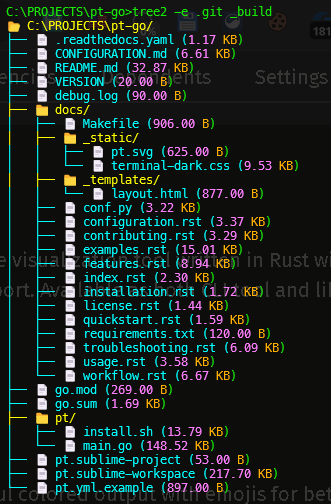
# Tree2 Quick Start Guide
## Installation
### Option 1: Using Cargo
```bash
cargo install tree2
```
### Option 2: From Source
```bash
git clone https://github.com/cumulus13/tree2
cd tree2
cargo build --release
# Binary will be in target/release/tree2
```
### Option 3: Download Binary
Download the latest release from [GitHub Releases](https://github.com/cumulus13/tree2/releases)
---
## Quick Start (5 Minutes)
### 1. Basic Usage
```bash
# Show current directory
tree2
# Show specific directory
tree2 /path/to/project
# Note: .git, .svn, and other system folders are hidden by default
# Use -a flag to show them if needed
tree2 -a
```
**Output:**
```
📂 /path/to/project/
├── 📁 src/
│ ├── 📄 main.rs (5.23 KB)
│ └── 📄 lib.rs (2.10 KB)
├── 📄 Cargo.toml (0.85 KB)
└── 📄 README.md (3.45 KB)
# .git folder is hidden by default ✓
```
### 2. Using .pt File (Recommended)
Create a `.pt` file in your project root:
```bash
cat > .pt << EOF
target
*.tmp
.cache
EOF
```
Then run:
```bash
tree2 # Automatically uses .pt + all other ignore files
```
### 3. Keep Specific Files
Want to see `.log` files even though they're ignored?
```bash
tree2 -e "*.log"
```
### 4. Use Specific Ignore File
Only want to use `.gitignore`?
```bash
tree2 -i .gitignore
```
---
## Common Use Cases
### Use Case 1: Code Review
**Goal:** Show only source code files
```bash
tree2 -e "*.rs" "*.toml" "Cargo.lock"
```
### Use Case 2: Documentation
**Goal:** Copy tree structure for documentation
```bash
tree2 -c # Copies to clipboard
```
Then paste into your README or documentation.
### Use Case 3: Docker Build Verification
**Goal:** See what files would be included in Docker image
```bash
tree2 -i .dockerignore
```
### Use Case 4: Debugging
**Goal:** Keep all debug and log files
```bash
tree2 -e "debug_*" "*.log"
```
---
## Pattern Syntax
### Wildcards
- `*` = Match any characters
- `?` = Match single character
**Examples:**
```bash
tree2 -e "*.log" # All .log files
tree2 -e "test_*" # Files starting with test_
tree2 -e "?.txt" # Single char + .txt
tree2 -e "*_backup.*" # Files with _backup in name
```
### Exact Match
No special characters = exact match
**Examples:**
```bash
tree2 -e "node_modules" # Exact folder name
tree2 -e ".env" # Exact file name
tree2 -e "Cargo.lock" # Exact file name
```
### Regex (Advanced)
Use `regex:` prefix for complex patterns
**Examples:**
```bash
tree2 -e "regex:.*\d+$" # Files ending with numbers
tree2 -e "regex:^test.*\.rs$" # Rust test files
---
## Tips & Tricks
### Tip 1: Create Project-Specific .pt
```bash
# In your project root
echo "target/" >> .pt
echo "*.tmp" >> .pt
echo ".cache/" >> .pt
```
### Tip 2: Combine Multiple Exceptions
```bash
tree2 -e "*.log" "*.md" "config*"
```
### Tip 3: Save Output to File
```bash
tree2 > project_structure.txt
```
### Tip 4: Search in Output
```bash
tree2 | grep "📁" # Only folders
```
### Tip 5: Count Files
```bash
---
## Troubleshooting
### Problem: Too many files shown
**Solution:** Add them to `.pt` or use manual exclude
```bash
# Option 1: Add to .pt
echo "unwanted_folder/" >> .pt
# Option 2: Manual exclude
tree2 --exclude unwanted_folder
```
### Problem: Need to see ignored file
**Solution:** Use exception pattern
```bash
tree2 -e "filename"
tree2 -e "*.extension"
```
### Problem: Permission denied errors
**Solution:** This is normal for restricted folders. Tree2 will show what it can access and mark denied areas with 🔒
### Problem: Colors not showing
**Solution:** Colors are disabled when using `-c` (clipboard). Remove `-c` flag to see colors.
---
## Next Steps
1. ✅ Create a `.pt` file in your project
2. ✅ Try exception patterns with `-e`
3. ✅ Explore different ignore file combinations with `-i`
4. 📖 Read full [README.md](README.md) for advanced features
5. 📖 Check [EXAMPLES.md](EXAMPLES.md) for more use cases
---
## Getting Help
```bash
# Show help
tree2 --help
# Show version
tree2 --version
```
**Need more help?**
- 📖 [Full Documentation](README.md)
- 💡 [Examples](EXAMPLES.md)
- 🐛 [Report Issues](https://github.com/cumulus13/tree2/issues)
- 💬 [Discussions](https://github.com/cumulus13/tree2/discussions)
---
## Cheat Sheet
```bash
# Basic
tree2 # Current directory
tree2 /path # Specific directory
tree2 -c # Copy to clipboard
tree2 -a # Show system folders (.git, etc.)
# Ignore Files
tree2 -i .gitignore # Use only .gitignore
tree2 -i .gitignore .dockerignore # Multiple ignore files
tree2 # Use all (default)
# Exceptions
tree2 -e "*.log" # Keep .log files
tree2 -e "test_*" "debug_*" # Multiple patterns
tree2 -e "regex:.*\.rs$" # Regex pattern
# Combined
tree2 -i .gitignore -e "*.log" # Ignore file + exception
tree2 -c -e "*.md" # Clipboard + exception
tree2 -a -e "*.log" # Show all + keep logs
tree2 --exclude build -e "build/important" # Manual + exception
# Manual Exclusion
tree2 --exclude folder1 folder2 # Exclude specific items
tree2 -x node_modules target # Short form
```
---
**Happy tree viewing! 🌲**