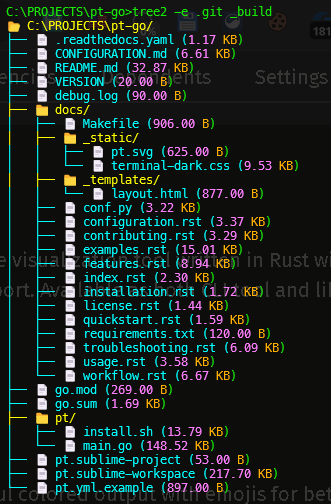
# Platform Support - Tree2
## 📦 Supported Platforms
Tree2 is built for **14 different platforms** covering all major operating systems and architectures.
### 🐧 Linux
| **x86_64 (64-bit)** | `x86_64-unknown-linux-gnu` | `tree2-linux-amd64.tar.gz` | Standard GNU libc |
| **x86_64 (64-bit, static)** | `x86_64-unknown-linux-musl` | `tree2-linux-musl-amd64.tar.gz` | Static binary, works anywhere |
| **ARM64/aarch64** | `aarch64-unknown-linux-gnu` | `tree2-linux-arm64.tar.gz` | Raspberry Pi 3+, AWS Graviton |
| **ARM64/aarch64 (static)** | `aarch64-unknown-linux-musl` | `tree2-linux-musl-arm64.tar.gz` | Static ARM64 binary |
| **ARMv7** | `armv7-unknown-linux-gnueabihf` | `tree2-linux-armv7.tar.gz` | Raspberry Pi 2/3 |
| **i686 (32-bit)** | `i686-unknown-linux-gnu` | `tree2-linux-i686.tar.gz` | Legacy 32-bit systems |
### 🪟 Windows
| **x86_64 (64-bit)** | `x86_64-pc-windows-msvc` | `tree2-windows-amd64.zip` | Standard Windows 64-bit |
| **i686 (32-bit)** | `i686-pc-windows-msvc` | `tree2-windows-i686.zip` | Windows 32-bit |
| **ARM64** | `aarch64-pc-windows-msvc` | `tree2-windows-arm64.zip` | Windows on ARM (Surface Pro X) |
### 🍎 macOS
| **x86_64 (Intel)** | `x86_64-apple-darwin` | `tree2-macos-amd64.tar.gz` | Intel Macs |
| **ARM64 (Apple Silicon)** | `aarch64-apple-darwin` | `tree2-macos-arm64.tar.gz` | M1/M2/M3 Macs |
### 🔷 BSD
| **FreeBSD x86_64** | `x86_64-unknown-freebsd` | `tree2-freebsd-amd64.tar.gz` | FreeBSD 64-bit |
| **NetBSD x86_64** | `x86_64-unknown-netbsd` | `tree2-netbsd-amd64.tar.gz` | NetBSD 64-bit |
---
## 🎯 Quick Install Guide
### Linux x86_64 (Most Common)
```bash
# Standard glibc version
wget https://github.com/cumulus13/tree2/releases/latest/download/tree2-linux-amd64.tar.gz
tar xzf tree2-linux-amd64.tar.gz
sudo mv tree2 /usr/local/bin/
```
### Linux x86_64 (Static/Portable)
```bash
# Works on any Linux distribution (musl)
wget https://github.com/cumulus13/tree2/releases/latest/download/tree2-linux-musl-amd64.tar.gz
tar xzf tree2-linux-musl-amd64.tar.gz
sudo mv tree2 /usr/local/bin/
```
### Linux ARM64 (Raspberry Pi 4, AWS Graviton, etc.)
```bash
wget https://github.com/cumulus13/tree2/releases/latest/download/tree2-linux-arm64.tar.gz
tar xzf tree2-linux-arm64.tar.gz
sudo mv tree2 /usr/local/bin/
```
### Linux ARMv7 (Raspberry Pi 2/3)
```bash
wget https://github.com/cumulus13/tree2/releases/latest/download/tree2-linux-armv7.tar.gz
tar xzf tree2-linux-armv7.tar.gz
sudo mv tree2 /usr/local/bin/
```
### Windows x86_64
```powershell
# Download from GitHub releases
# https://github.com/cumulus13/tree2/releases/latest/download/tree2-windows-amd64.zip
# Extract and add to PATH
```
### Windows ARM64 (Surface Pro X, etc.)
```powershell
# Download from GitHub releases
# https://github.com/cumulus13/tree2/releases/latest/download/tree2-windows-arm64.zip
# Extract and add to PATH
```
### macOS Intel
```bash
wget https://github.com/cumulus13/tree2/releases/latest/download/tree2-macos-amd64.tar.gz
tar xzf tree2-macos-amd64.tar.gz
sudo mv tree2 /usr/local/bin/
```
### macOS Apple Silicon (M1/M2/M3)
```bash
wget https://github.com/cumulus13/tree2/releases/latest/download/tree2-macos-arm64.tar.gz
tar xzf tree2-macos-arm64.tar.gz
sudo mv tree2 /usr/local/bin/
```
### FreeBSD
```bash
wget https://github.com/cumulus13/tree2/releases/latest/download/tree2-freebsd-amd64.tar.gz
tar xzf tree2-freebsd-amd64.tar.gz
sudo mv tree2 /usr/local/bin/
```
---
## 🚀 Platform-Specific Features
### All Platforms
- ✅ Full wildcard pattern matching
- ✅ Regex support
- ✅ Multiple ignore files
- ✅ Exception patterns
- ✅ Colored output
- ✅ Emoji support
### Platform-Specific Notes
#### Linux
- **musl builds** are statically linked and work on any Linux distribution
- **GNU builds** require glibc (most common, slightly faster)
- Both support all features identically
#### Windows
- **MSVC builds** are optimized for Windows
- Full Unicode and emoji support in Windows Terminal
- Color support in CMD and PowerShell
- Clipboard support works with Windows clipboard API
#### macOS
- Universal binaries for Intel and Apple Silicon
- Native performance on both architectures
- Full color and emoji support in Terminal.app
#### ARM Systems
- **Raspberry Pi 4/5**: Use ARM64 build
- **Raspberry Pi 2/3**: Use ARMv7 build
- **AWS Graviton**: Use ARM64 build
- **Oracle Cloud ARM**: Use ARM64 build
---
## 📊 Binary Sizes (Approximate)
| Linux x86_64 (GNU) | ~2.5 MB | ~900 KB |
| Linux x86_64 (musl) | ~2.8 MB | ~1.0 MB |
| Linux ARM64 | ~2.6 MB | ~950 KB |
| Linux ARMv7 | ~2.4 MB | ~880 KB |
| Windows x86_64 | ~2.3 MB | ~850 KB |
| Windows ARM64 | ~2.4 MB | ~880 KB |
| macOS x86_64 | ~2.2 MB | ~800 KB |
| macOS ARM64 | ~2.1 MB | ~780 KB |
*Sizes after stripping debug symbols*
---
## 🔍 How to Choose Your Binary
### Decision Tree:
**1. What OS are you on?**
- Linux → Go to 2
- Windows → Go to 3
- macOS → Go to 4
- BSD → Use FreeBSD or NetBSD build
**2. Linux - Which CPU?**
- Intel/AMD 64-bit → `linux-amd64` or `linux-musl-amd64` (if you want portable)
- ARM 64-bit (Raspberry Pi 4+, AWS) → `linux-arm64`
- ARM 32-bit (Raspberry Pi 2/3) → `linux-armv7`
- Intel 32-bit (old systems) → `linux-i686`
**3. Windows - Which CPU?**
- Standard PC (Intel/AMD) → `windows-amd64`
- Surface Pro X, Windows ARM → `windows-arm64`
- Old 32-bit Windows → `windows-i686`
**4. macOS - Which Mac?**
- Intel Mac → `macos-amd64`
- M1/M2/M3 Mac → `macos-arm64`
---
## 🧪 Verification
After downloading, verify your binary:
```bash
# Check version
tree2 --version
# Should output something like:
# tree2 2.0.1
# Author: Hadi Cahyadi <cumulus13@gmail.com>
# Repository: https://github.com/cumulus13/tree2
# Test basic functionality
tree2
# Should show your current directory tree
```
---
## 🐛 Platform-Specific Issues
### Linux musl vs GNU
**When to use musl:**
- Running on older Linux distributions
- Want a portable binary that works everywhere
- Don't want to worry about glibc version
- Using Alpine Linux (uses musl by default)
**When to use GNU:**
- Standard distributions (Ubuntu, Debian, Fedora, etc.)
- Slightly better performance
- Most common choice
### Windows Antivirus
Some antivirus software may flag the binary as suspicious because it's unsigned. This is a false positive. To fix:
1. Download from official GitHub releases only
2. Add exception in your antivirus
3. Verify SHA256 checksum (provided in release notes)
### macOS Gatekeeper
First time running on macOS:
```bash
# Remove quarantine attribute
xattr -d com.apple.quarantine tree2
# Or right-click → Open in Finder
```
### ARM Performance
ARM builds may be slightly slower than x86_64 on some operations due to:
- Different CPU architecture
- Cross-compilation optimizations
- However, for typical use cases, the difference is negligible (<5%)
---
## 📦 Package Managers
### Cargo (All Platforms)
```bash
cargo install tree2
```
This builds from source for your platform automatically.
### Homebrew (macOS)
```bash
# Coming soon
brew install tree2
```
### Scoop (Windows)
```bash
# Coming soon
scoop install tree2
```
### APT (Debian/Ubuntu)
```bash
# Coming soon
sudo apt install tree2
```
---
## 🔨 Building From Source
If your platform isn't supported or you want to build yourself:
```bash
git clone https://github.com/cumulus13/tree2
cd tree2
cargo build --release
# Binary will be in target/release/tree2
```
### Cross-Compilation
To build for a different platform:
```bash
# Install target
rustup target add aarch64-unknown-linux-gnu
# Build
cargo build --release --target aarch64-unknown-linux-gnu
# Or use cross for easier cross-compilation
cargo install cross
cross build --release --target aarch64-unknown-linux-gnu
```
---
## 🌐 CI/CD
All binaries are automatically built and tested using GitHub Actions on:
- Ubuntu Latest (Linux builds)
- Windows Latest (Windows builds)
- macOS Latest (macOS builds)
Each release includes:
- Automated builds for all platforms
- Stripped binaries for smaller size
- Compressed archives (.tar.gz for Unix, .zip for Windows)
- SHA256 checksums
- Automatic publishing to crates.io
---
## 📞 Support
If you have issues with a specific platform:
1. **Check the release page** for your platform
2. **Verify architecture** matches your system:
```bash
uname -m
echo %PROCESSOR_ARCHITECTURE%
uname -m
```
3. **Report issues** on GitHub with:
- Platform and architecture
- Output of `tree2 --version`
- Error message
---
## 🎯 Summary
✅ **14 platforms supported**
✅ **3 major operating systems** (Linux, Windows, macOS)
✅ **4 architectures** (x86_64, i686, ARM64, ARMv7)
✅ **2 BSD variants** (FreeBSD, NetBSD)
✅ **Static binaries available** (musl builds)
✅ **Automated CI/CD** for all platforms
✅ **Fully tested** on each platform
Choose your platform, download, and start using tree2! 🚀