# Todo Tree
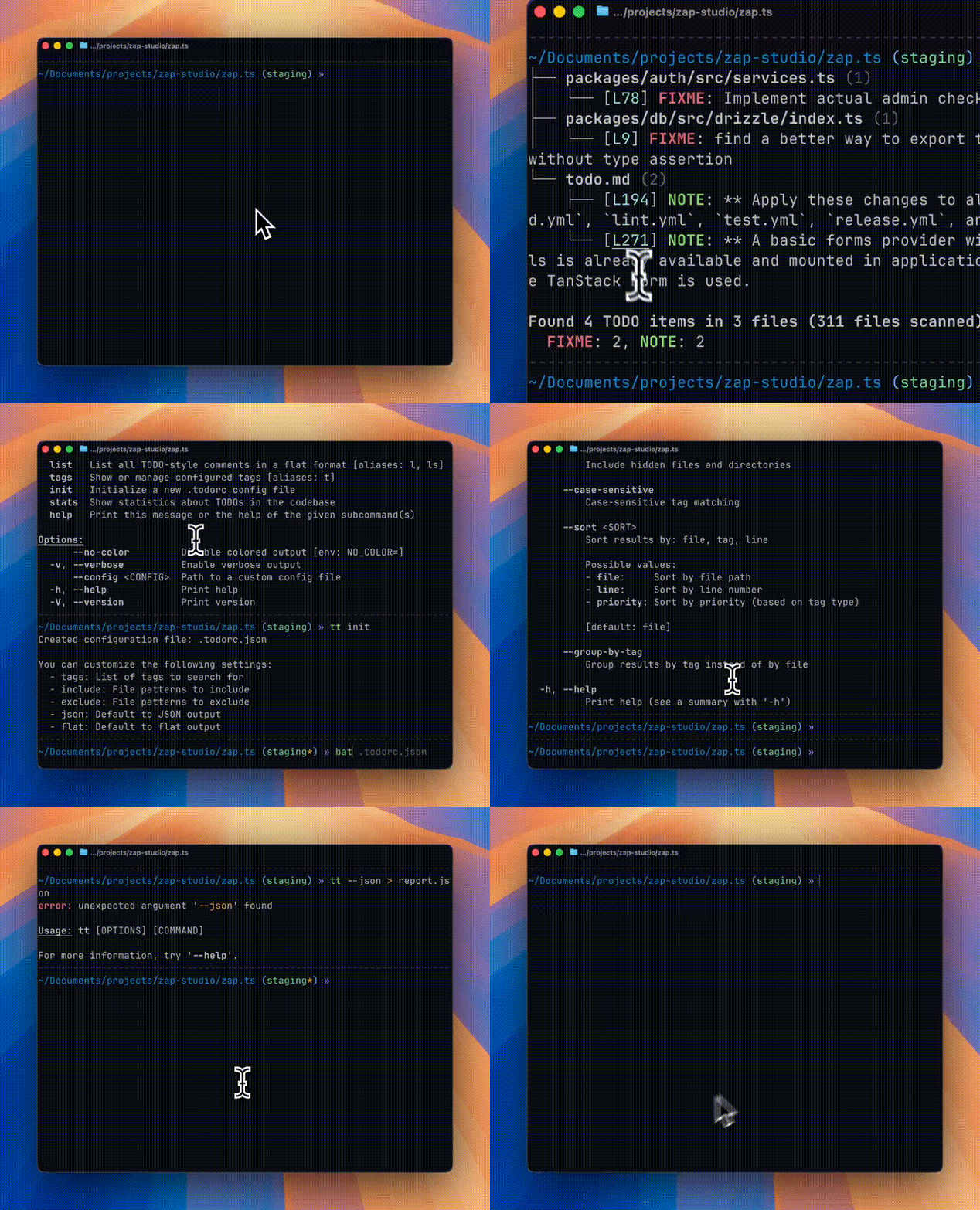
A command-line tool to find and display TODO-style comments in your codebase, similar to the VS Code "Todo Tree" extension.
## Features
- 🔍 **Recursive directory scanning** - Respects `.gitignore` rules automatically, walked in parallel across CPU cores
- 👀 **Watch mode** - `tt watch` re-scans automatically as files change
- 🏷️ **Configurable tags** - TODO, FIXME, BUG, NOTE, HACK, WARN, PERF, and more (and custom tags)
- 🌳 **Tree view output** - Beautiful hierarchical display grouped by file
- 📋 **Multiple output formats** - Tree, flat list, and JSON
- ⚙️ **Configuration file support** - `.todorc` in JSON or TOML format
- 🎨 **Colored output** - Priority-based coloring for different tag types
- 🔗 **Clickable links** - Terminal hyperlinks to file locations (where supported)
- 🤖 **GitHub Action** - Automatically scan PRs and post TODO summaries as comments
## Installation
### Using Cargo (Recommended)
```bash
cargo install todo-tree
```
### From Source
```bash
# Clone the repository
git clone https://github.com/alexandretrotel/todo-tree.git
cd todo-tree
# Build and install
cargo install --path .
```
### Using Homebrew (macOS/Linux)
```bash
brew tap alexandretrotel/todo-tree
brew install todo-tree
```
### NixOS (Flakes)
#### Try before you install
```bash
# runs the default todo-tree command
nix run github:alexandretrotel/todo-tree
# create a shell with the command available (with nix-output-monitor)
nom shell github:alexandretrotel/todo-tree
tt tags
# or, just normal nix
nix shell github:alexandretrotel/todo-tree
tt scan ~/projects/todo-tree --tags FIXME
```
**Note:** If you haven't enabled the experimental Nix command and flakes features, you need to pass `--extra-experimental-features "nix-command flakes"` to the command. See the [Nix command wiki](https://nixos.wiki/wiki/Nix_command) for more details.
#### Install for your system
```nix
# flake.nix
{
inputs = {
nixpkgs.url = "github:nixos/nixpkgs/nixos-unstable";
todo-tree.url = "github:alexandretrotel/todo-tree";
};
outputs = { self, nixpkgs, todo-tree, ... }: {
nixosConfigurations.my-host = nixpkgs.lib.nixosSystem {
system = "x86_64-linux";
modules = [ ./configuration.nix ];
specialArgs = { inherit todo-tree; };
};
};
}
# configuration.nix
{ pkgs, todo-tree, ... }:
{
environment.systemPackages = [
todo-tree.packages.${pkgs.stdenv.hostPlatform.system}.todo-tree
];
}
```
## Usage
The tool provides two binary names: `todo-tree` and `tt` (alias for quick access).
### Basic Commands
```bash
# Scan current directory (default command)
tt
# Scan a specific directory
tt scan ./src
# Scan with specific tags
tt scan --tags TODO,FIXME,BUG
# Watch for file changes and re-scan automatically
tt watch ./src
# Tune the debounce window (default 250ms) for bursty saves
tt watch --debounce-ms 500
# List all TODOs in flat format
tt list
# Show configured tags
tt tags
# Show statistics
tt stats
# Generate a shell completion script
tt completions zsh > /usr/local/share/zsh/site-functions/_tt
# Generate a man page
tt man > /usr/local/share/man/man1/tt.1
```
### Watch Mode
`tt watch` (alias `tt w`) accepts the same filter and output flags as `tt scan` (`--tags`, `--include`, `--exclude`, `--json`, `--flat`, `--hidden`, etc.), re-scanning and reprinting on every relevant file change:
```bash
tt watch --tags TODO,FIXME --exclude "*.log"
```
File-system events are filtered through the same `.gitignore` and `--include`/`--exclude` rules as a normal scan before a re-scan is triggered, so noise from ignored directories (`target/`, `node_modules/`, ...) doesn't cause unnecessary re-scans.
### Output Formats
`tt scan`/`tt` (default), `tt list`, `tt watch`, and `tt stats` render human-oriented output locally: a colored tree (or flat list for `tt list`), plus a summary block. Pass `--json` to switch any of them to machine-readable JSON, `--flat` (`tt scan`/`tt watch` only) for a flat, ungrouped list, or `--plain` for uncolored, unlinked, script-friendly text (implies `--flat` unless `--json` is also set).
Scans that take over a second print a "Scanning..." indicator to stderr (only when stderr is a terminal and outside CI), so a large tree doesn't look hung.
### Exit Codes
`todo-tree`/`tt` return `0` on success and a specific non-zero code otherwise, so scripts can branch on failure mode without parsing stderr: `1` for an unclassified error, `2` for a command-line usage error (from argument parsing itself), `3` for a config file that exists but couldn't be parsed, and `4` for a filesystem error (bad path, permissions, ...).
**CI auto-detection:** when a `CI` environment variable is set — as GitHub Actions, GitLab CI, CircleCI, Travis CI, and most other providers do by default — these commands default to JSON output instead of the local tree/flat/text output, so CI logs and downstream tooling get structured data without needing `--json` on every invocation. An explicit `--json` or `--flat` flag always overrides this auto-detection.
## Configuration
Create a `.todorc.json` or `.todorc.toml` file in your project root, either by hand or with `tt init` (`--format toml` for TOML). If the file already exists, `tt init` asks before overwriting it when running interactively; pass `--force` to overwrite unconditionally, or `--no-input` (global flag) to fail instead of prompting, e.g. in CI:
### JSON Format (`.todorc.json`)
```json
{
"tags": ["TODO", "FIXME", "BUG", "NOTE", "HACK", "XXX", "WARN", "PERF"],
"include": ["*.rs", "*.py", "*.js", "*.ts"],
"exclude": ["target/**", "node_modules/**", "dist/**"],
"json": false,
"flat": false,
"no_color": false,
"ignore_case": false,
"require_colon": true
}
```
### TOML Format (`.todorc.toml`)
```toml
tags = ["TODO", "FIXME", "BUG", "NOTE", "HACK"]
include = ["*.rs", "*.py"]
exclude = ["target/**", "node_modules/**"]
json = false
flat = false
no_color = false
```
### Configuration Search Order
1. `.todorc` in the current directory
2. `.todorc.json` in the current directory
3. `.todorc.toml` in the current directory
4. Parent directories (recursive)
5. `$XDG_CONFIG_HOME/todo-tree/config.json` or `config.toml` (global config); falls back to the platform config directory (e.g. `~/.config` on Linux, `~/Library/Application Support` on macOS) if `XDG_CONFIG_HOME` isn't set
### Environment Variables
`TODO_TREE_TAGS`, `TODO_TREE_INCLUDE`, and `TODO_TREE_EXCLUDE` (comma-separated) and `TODO_TREE_JSON`/`TODO_TREE_FLAT`/`TODO_TREE_NO_COLOR`/`TODO_TREE_IGNORE_CASE`/`TODO_TREE_REQUIRE_COLON` (booleans) override the loaded config file. Full precedence, highest first: **CLI flags > environment variables > project/user `.todorc` file > built-in defaults**.
```bash
TODO_TREE_TAGS=TODO,FIXME TODO_TREE_NO_COLOR=1 tt
```
## Tag Matching Rules
By default, todo-tree requires tags to be **UPPERCASE** and followed by a **colon**:
```rust
// TODO: This will be found ✓
// FIXME: This will be found ✓
// BUG: This will be found ✓
// todo: This will NOT be found (lowercase) ✗
// TODO This will NOT be found (no colon) ✗
// Todo: This will NOT be found (mixed case) ✗
```
**Optional author/assignee syntax** (still works with colon):
```rust
// TODO(john): Assigned to john ✓
// FIXME(team): Needs team review ✓
```
### Flexible Matching Options
You can customize the matching behavior with CLI flags:
```bash
# Ignore case when matching (matches TODO, todo, Todo, etc.)
tt scan --ignore-case
# Allow tags without colon (matches "TODO something")
tt scan --no-require-colon
# Use both options together (most flexible)
tt scan --ignore-case --no-require-colon
```
Or set these options in your `.todorc.json`:
```json
{
"ignore_case": true,
"require_colon": false
}
```
### Why These Defaults?
The strict defaults (uppercase + colon required) significantly reduce false positives.
These defaults align with most coding conventions and help you find **intentional TODO comments**, not accidental matches.
## Terminal Support
### Clickable Links
The tool generates clickable hyperlinks (OSC 8) in supported terminals:
- [iTerm2](https://iterm2.com/)
- [WezTerm](https://wezfurlong.org/wezterm/)
- [Hyper](https://hyper.is/)
- [VS Code Terminal](https://code.visualstudio.com/docs/terminal/basics)
- [GNOME Terminal](https://help.gnome.org/users/gnome-terminal/stable/) (VTE 0.50+)
- [Konsole](https://konsole.kde.org/)
- [Alacritty](https://alacritty.org/)
- [Ghostty](https://ghostty.org/)
### Color Support
Colors are automatically enabled when outputting to a terminal. Use `--no-color` or set the [`NO_COLOR`](https://no-color.org/) environment variable to disable.
## GitHub Actions
[todo-tree-action](https://github.com/alexandretrotel/todo-tree-action) is a GitHub Action that automatically scans your pull requests for TODO comments and posts a summary as a PR comment. Features include:
- Scan only changed files in PRs
- Filter to show only NEW TODOs (not in base branch)
- Automatic PR comment with formatted results
- Full configuration support
## Contributing
Contributions are welcome! Please feel free to submit a Pull Request.
## Acknowledgments
Inspired by the [Todo Tree](https://marketplace.visualstudio.com/items?itemName=Gruntfuggly.todo-tree) VS Code extension
## License
GPL-3.0-or-later