# sparcli
[](https://crates.io/crates/sparcli)
[](https://docs.rs/sparcli)
[](LICENSE)
[](https://www.rust-lang.org)
A lightweight, cross-platform toolkit for **styled CLI output** and
**interactive input widgets** in Rust. It renders directly to the terminal via
[`crossterm`](https://crates.io/crates/crossterm) (no `ratatui` dependency) but
mirrors ratatui's familiar vocabulary (`Style`, `Color`, `Span`, `Line`,
`Text`), so the API feels at home if you already use ratatui.
sparcli is meant for small, lightweight CLI tools: a single accent color, muted
defaults, rounded borders, graceful `NO_COLOR` and non-terminal behavior. Heavy,
full-screen/retained TUIs are out of scope (that is what ratatui is for).
## Highlights
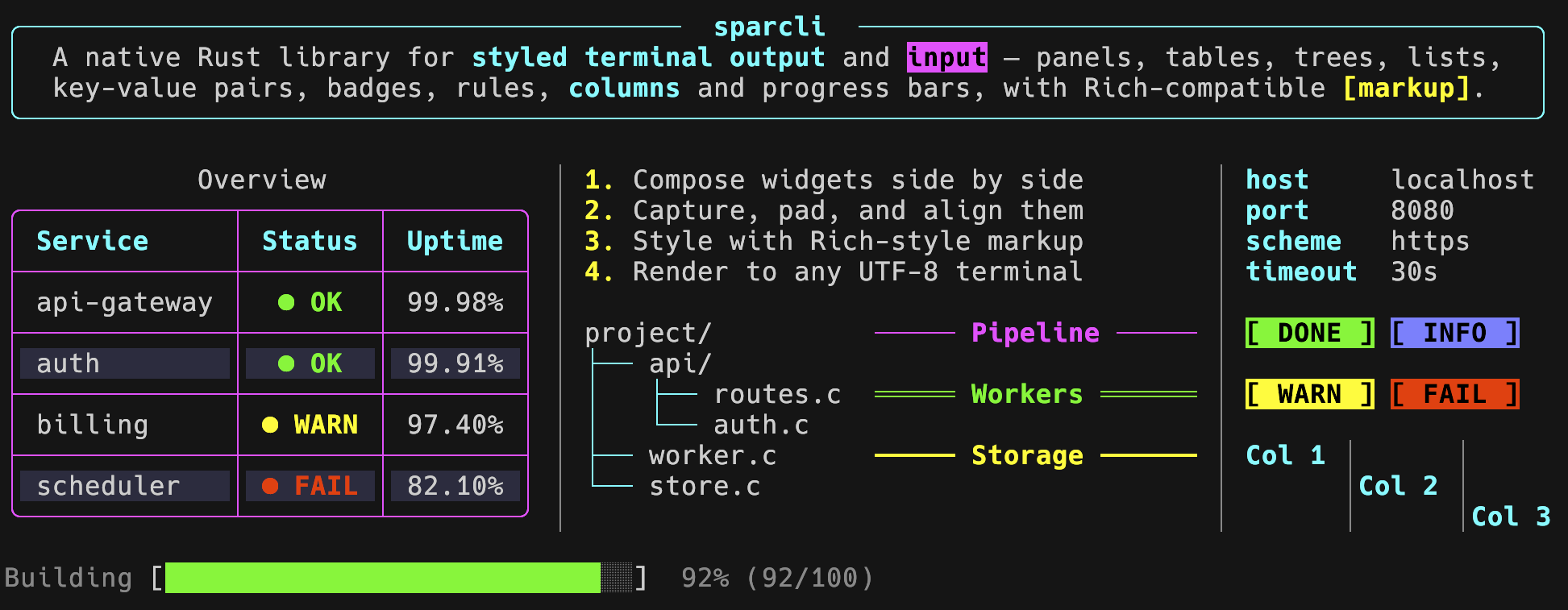
- **Output**: styled text, markup, tables (colspan, striping, wrap, titles),
panels, alerts, rules, lists, trees, key-value lists, badges, progress bars,
spinners, multi-progress, diffs, columns, live display, pager, and
composition helpers (`align`, `pad`, `vstack`).
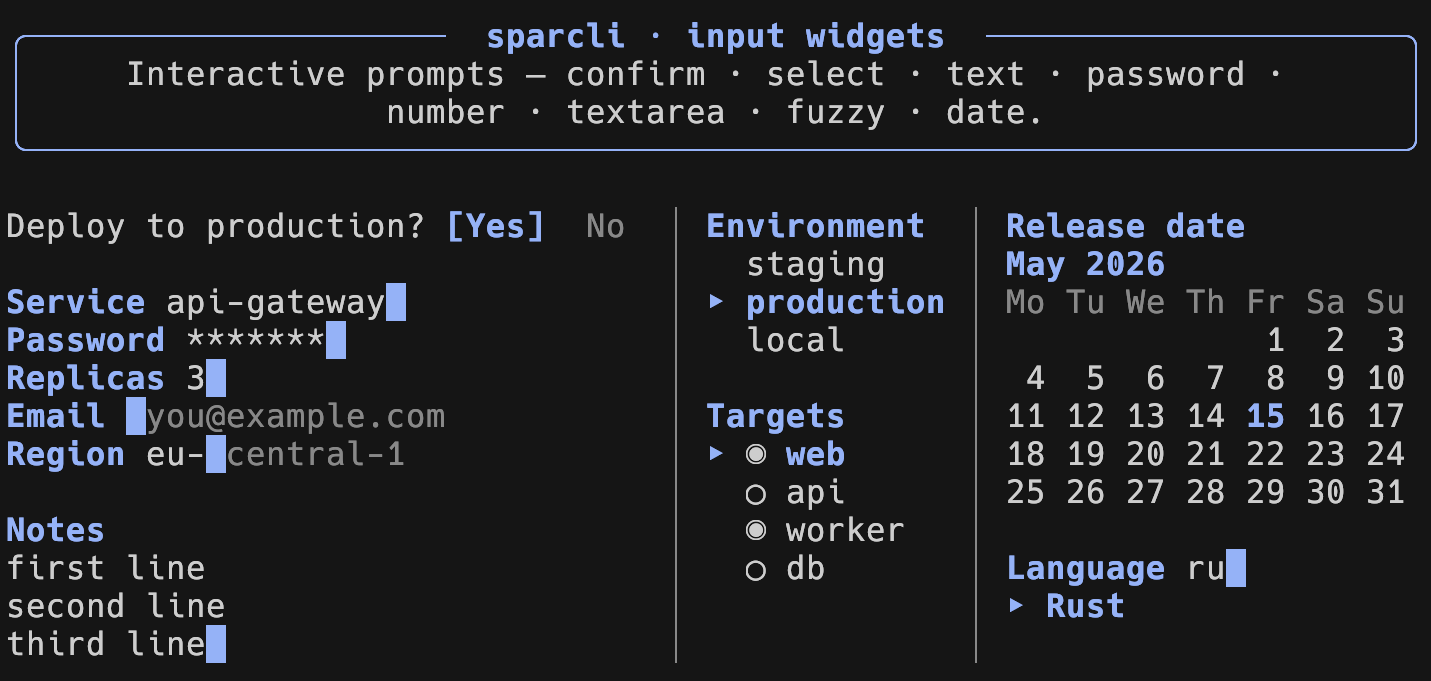
- **Input**: confirm, text (validation, char filters, history, ghost
autocomplete), password, number (with a calculator), textarea, single/multi
select, an inline fuzzy select, and a calendar date picker.
- **Unified theme** for input *and* output, set once and overridable per call.
- **Robust**: no panics on input, RAII terminal restore, `Result`-based errors.
## Install
```toml
[dependencies]
sparcli = "0.2"
# Opt-in features (the base stays small):
# sparcli = { version = "0.2", features = ["markup", "fuzzy", "pager"] }
```
MSRV: Rust 1.88 (edition 2024).
| `markup` | `[bold red]…[/]` inline markup parsing |
| `fuzzy` | inline fuzzy-select (pulls in `nucleo-matcher`) |
| `pager` | paging via `$PAGER` / `less` / `more` |
| `full` | enables `markup`, `fuzzy` and `pager` |
### From a local checkout or Git
To use an unpublished or local copy instead of the crates.io release, point
Cargo at the source directory or repository:
```toml
[dependencies]
# Local path (absolute or relative to your Cargo.toml):
sparcli = { path = "../sparcli" }
# Straight from Git:
# sparcli = { git = "https://github.com/cgroening/rs-sparcli", branch = "main" }
```
## Output example
```rust
use sparcli::prelude::*;
use sparcli::{Alert, Table};
fn main() -> sparcli::Result<()> {
Alert::success("Build finished.").print()?;
Table::new()
.columns(["Name", "Status"])
.row(["web-1", "online"])
.row(["db-1", "online"])
.striped(true)
.print()?;
Ok(())
}
```
Every output widget implements `Renderable`: call `.print()` to write to stdout,
or `.print_to(&mut writer)` to capture output. When stdout is not a terminal (a
pipe, a file, or with `NO_COLOR`), no escape codes are emitted.
## Input example
```rust
use sparcli::validate::non_empty;
use sparcli::{Confirm, Outcome, TextInput};
fn main() -> sparcli::Result<()> {
if let Outcome::Submitted(name) =
TextInput::new("Your name?").validate(non_empty()).run()?
{
if let Outcome::Submitted(true) = Confirm::new("Continue?").run()? {
println!("Hello, {name}!");
}
}
Ok(())
}
```
Prompts return `Outcome<T>` (`Submitted(value)`, `Cancelled`, or a fired
`Shortcut(id)`) and never panic. They require an interactive terminal; without
one they return `SparcliError::NoTerminal`.
## Theming
```rust
use sparcli::{Color, Theme, set_theme};
let theme = Theme {
accent: Color::Rgb(180, 142, 173),
unicode: true, // set false for ASCII-only glyphs
..Theme::default()
};
set_theme(theme);
```
The same theme drives both output widgets and input prompts.
## Examples
```sh
cargo run --example output_gallery --features markup,fuzzy,pager
cargo run --example output_dynamic --features pager # spinner/progress/live
cargo run --example prompts --features fuzzy # interactive; needs a TTY
cargo run --example output-readme --features markup # screenshot collage
cargo run --example prompt-readme # non-interactive prompts
```
## Documentation
- [docs.rs/sparcli](https://docs.rs/sparcli) – the complete API reference (rustdoc, built with all features).
- [`DEVELOPMENT.md`](https://github.com/cgroening/rs-sparcli/blob/main/docs/DEVELOPMENT.md) – building, testing and contributing.
- [`CHANGELOG.md`](https://github.com/cgroening/rs-sparcli/blob/main/CHANGELOG.md) – release notes.
- `cargo doc --all-features --open` – build the same reference locally.
## License
MIT – see [`LICENSE`](LICENSE).