
ryl
ryl - the Rust Yaml Linter is intended to ultimately be a drop in replacement for yamllint. It is usable today, but parity and edge-case behavior are still maturing.
Compatibility note:
rylaims to matchyamllintbehavior and includes many parity tests.ryluses thesaphyrparser stack, whileyamllintuses thePyYAMLparser stack.saphyrandPyYAMLdo not always agree on which files are valid YAML.
Quick Start
For prek / pre-commit integration, see
ryl-pre-commit.
Installation
uv
pip
Cargo
Usage
ryl accepts one or more paths: files and/or directories.
Basic:
ryl <PATH_OR_FILE> [PATH_OR_FILE...]
Behavior:
- Files: parsed as YAML even if the extension is not
.yml/.yaml. - Directories: recursively lints
.ymland.yamlfiles.- Respects
.gitignore, global git ignores, and git excludes. - Does not follow symlinks.
- Respects
Exit codes:
0when all parsed files are valid (or no files found).1when any invalid YAML is found.2for CLI usage errors (for example, no paths provided).
Examples:
# Single file
ryl myfile.yml

# Multiple inputs (mix files and directories)
ryl config/ another.yml

# Multiple directories
ryl dir1 dir2

# Explicit non-YAML extension (parsed as YAML)
ryl notes.txt
Help and version:
Fast YAML linter written in Rust

Usage: ryl [OPTIONS] [PATH_OR_FILE]...

Arguments:
  [PATH_OR_FILE]...  One or more paths: files and/or directories

Options:
  -c, --config-file <FILE>           Path to configuration file (YAML or TOML)
  -d, --config-data <YAML>           Inline configuration data (yaml)
  -f, --format <FORMAT>              Output format (auto, standard, colored, github,
                                     parsable) [default: auto]
                                     [possible values: auto, standard, colored,
                                     github, parsable]
      --migrate-configs              Convert discovered legacy YAML config files
                                     into .ryl.toml files
      --list-files                   List files that would be linted (reserved)
  -s, --strict                       Strict mode (reserved)
      --no-warnings                  Suppress warnings (reserved)
      --migrate-root <DIR>           Root path to search for legacy YAML config
                                     files (default: .)
      --migrate-write                Write migrated .ryl.toml files (otherwise
                                     preview only)
      --migrate-stdout               Print generated TOML to stdout during migration
      --migrate-rename-old <SUFFIX>  Rename source YAML configs by appending
                                     this suffix after migration
      --migrate-delete-old           Delete source YAML configs after migration
  -h, --help                         Print help
  -V, --version                      Print version
Performance benchmarking
This repo includes a standalone benchmark script that compares PyPI ryl and
yamllint using synthetic YAML corpora and hyperfine.
Prerequisites:
uvhyperfine
Run a quick sample:
uv run scripts/benchmark_perf_vs_yamllint.py --file-counts 25,100 --file-sizes-kib 1,8 --runs 5 --warmup 1
Run a fuller matrix (explicit lists):
uv run scripts/benchmark_perf_vs_yamllint.py --file-counts 25,100,400,1000 --file-sizes-kib 1,8,32,128 --runs 10 --warmup 2
Run a fuller matrix (ranges with increments):
uv run scripts/benchmark_perf_vs_yamllint.py --file-count-start 100 --file-count-end 1000 --file-count-step 100 --file-size-start-kib 4 --file-size-end-kib 64 --file-size-step-kib 4 --runs 10 --warmup 2
The script uses Typer; use --help for all options.
Artifacts are written under manual_outputs/benchmarks/<UTC_TIMESTAMP>/:
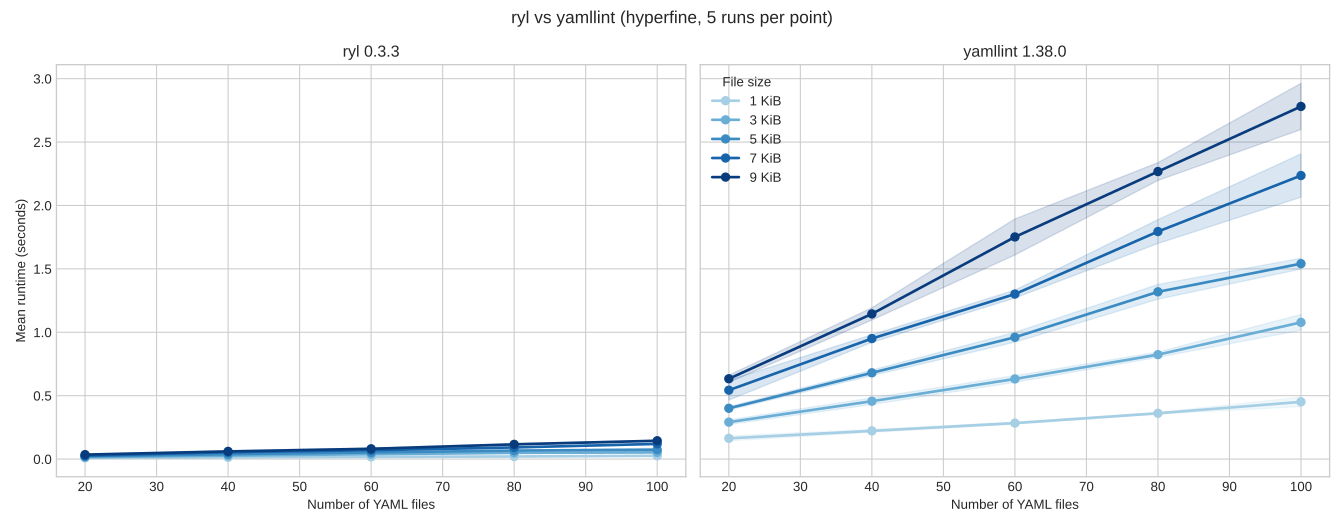
benchmark.pngandbenchmark.svg: side-by-side facet plot with shared Y axis.summary.csv: aggregated timing table.meta.json: tool versions and run parameters.hyperfine-json/: raw results fromhyperfine.
Example benchmark figure (5x5 matrix, 5 runs per point):
Configuration
- Flags:
-c, --config-file <FILE>: path to a YAML or TOML config file.-d, --config-data <YAML>: inline YAML config (highest precedence).--list-files: print files that would be linted after applying ignores and exit.--migrate-configs: discover legacy YAML configs and plan TOML migration.--migrate-root <DIR>: root to search for legacy YAML configs (default.).--migrate-write: write migrated.ryl.tomlfiles (without this it is preview-only).--migrate-stdout: print generated TOML in migration mode.--migrate-rename-old <SUFFIX>: rename discovered legacy YAML config files after writing.--migrate-delete-old: delete discovered legacy YAML config files after writing.-f, --format,-s, --strict,--no-warnings: reserved for compatibility.
- Discovery precedence:
inline
--config-data>--config-file> envYAMLLINT_CONFIG_FILE(global) > nearest project config up the tree: TOML (.ryl.toml,ryl.toml,pyproject.tomlwith[tool.ryl]) then YAML fallback (.yamllint,.yamllint.yml,.yamllint.yaml)user-global (
$XDG_CONFIG_HOME/yamllint/configor~/.config/yamllint/config) > built-in defaults. - TOML and YAML are not merged during discovery. If a TOML project config is
found, YAML project config discovery is skipped (and
rylprints a warning). - Per-file behavior: unless a global config is set via
--config-data,--config-file, orYAMLLINT_CONFIG_FILE, each file discovers its nearest project config. Ignores apply to directory scans and explicit files (parity). - Presets and extends: supports yamllint’s built-in
default,relaxed, andemptyviaextends. Rule maps are deep-merged; scalars/sequences overwrite. - TOML preset examples: see
docs/config-presets.md
for
default/relaxedequivalents.
Example TOML config (.ryl.toml):
= ["*.yaml", "*.yml"]
= ["vendor/**", "generated/**"]
= "en_US.UTF-8"
[]
= "disable"
[]
= 120
[]
= ["true", "false"]
Migration example:
# Preview migration actions
ryl --migrate-configs --migrate-root .

# Write .ryl.toml files and keep old files with a suffix
ryl --migrate-configs --migrate-root . --migrate-write --migrate-rename-old .bak
Acknowledgements
This project exists thanks to the tooling and ecosystems around YAML linting and developer automation, especially:
- yamllint - for giving me the shoulders to stand on and the source of many of the automated tests that ryl uses now to check for behaviour parity. Copying the behaviour of an existing tool is infinitely easier than building one from scratch - there'd be no ryl without yamllint.
- ruff - for showing the power of Rust tooling for Python development and inspiring the config and API for ryl.
- rumdl - for giving me another template to follow for Rust tooling and showing me almost the only dev tool I was still using after this that wasn't written in Rust was yamllint (which inspired me to tackle this project)
- saphyr - ryl is built on saphyr and saphyr's developers were very patient in showing some of the nuance and complexity of parsing YAML which I was embarrassingly ignorant of when start ryl.