
ryl
ryl - the Rust Yaml Linter is intended to ultimately be a drop in replacement for yamllint. It is usable today, but parity and edge-case behavior are still maturing.
Compatibility note:
rylaims to matchyamllintbehavior and includes many parity tests.ryluses thesaphyrparser stack, whileyamllintuses thePyYAMLparser stack.saphyrandPyYAMLdo not always agree on which files are valid YAML.
Usage
ryl accepts one or more paths: files and/or directories.
Basic:
ryl <PATH_OR_FILE> [PATH_OR_FILE...]
Behavior:
- Files: parsed as YAML even if the extension is not
.yml/.yaml. - Directories: recursively lints
.ymland.yamlfiles.- Respects
.gitignore, global git ignores, and git excludes. - Does not follow symlinks.
- Respects
Exit codes:
0when all parsed files are valid (or no files found).1when any invalid YAML is found.2for CLI usage errors (for example, no paths provided).
Examples:
# Single file
ryl myfile.yml

# Multiple inputs (mix files and directories)
ryl config/ another.yml

# Multiple directories
ryl dir1 dir2

# Explicit non-YAML extension (parsed as YAML)
ryl notes.txt
Help and version:
ryl -horryl --helpshows auto-generated help.ryl -Vorryl --versionprints the version.
The CLI is built with clap, which auto-generates --help and --version.
Performance benchmarking
This repo includes a standalone benchmark script that compares PyPI ryl and
yamllint using synthetic YAML corpora and hyperfine.
Prerequisites:
uvhyperfine
Run a quick sample:
uv run scripts/benchmark_perf_vs_yamllint.py --file-counts 25,100 --file-sizes-kib 1,8 --runs 5 --warmup 1
Run a fuller matrix (explicit lists):
uv run scripts/benchmark_perf_vs_yamllint.py --file-counts 25,100,400,1000 --file-sizes-kib 1,8,32,128 --runs 10 --warmup 2
Run a fuller matrix (ranges with increments):
uv run scripts/benchmark_perf_vs_yamllint.py --file-count-start 100 --file-count-end 1000 --file-count-step 100 --file-size-start-kib 4 --file-size-end-kib 64 --file-size-step-kib 4 --runs 10 --warmup 2
The script uses Typer; use --help for all options.
Artifacts are written under manual_outputs/benchmarks/<UTC_TIMESTAMP>/:
benchmark.pngandbenchmark.svg: side-by-side facet plot with shared Y axis.summary.csv: aggregated timing table.meta.json: tool versions and run parameters.hyperfine-json/: raw results fromhyperfine.
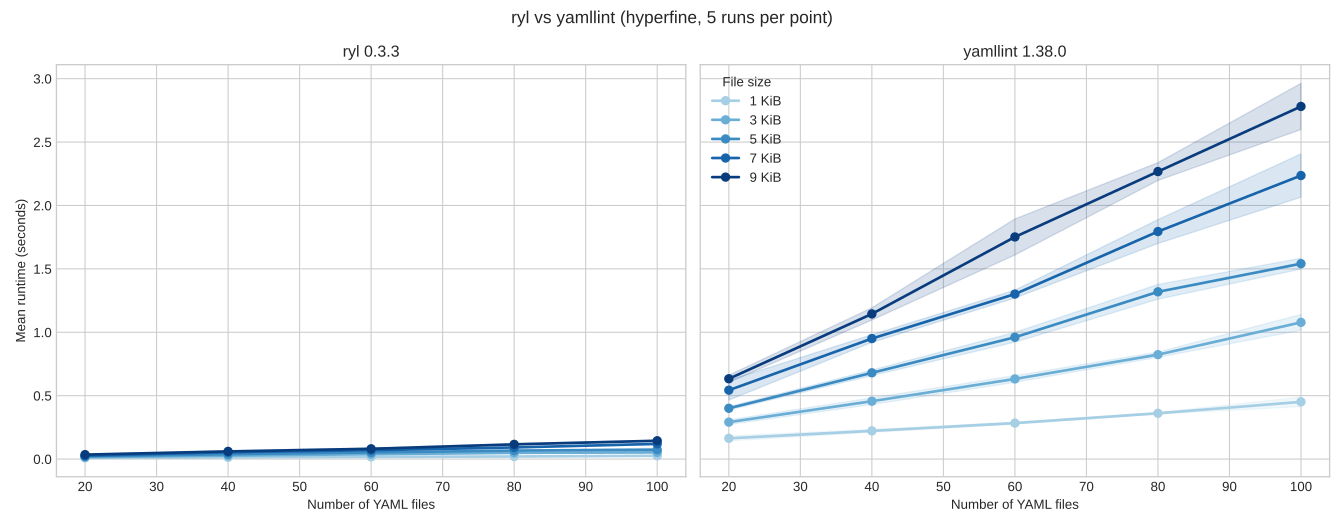
Example benchmark figure (5x5 matrix, 5 runs per point):
Configuration
- Flags:
-c, --config-file <FILE>: path to a YAML config file.-d, --config-data <YAML>: inline YAML config (highest precedence).--list-files: print files that would be linted after applying ignores and exit.-f, --format,-s, --strict,--no-warnings: reserved for compatibility.
- Discovery precedence:
inline
--config-data>--config-file> envYAMLLINT_CONFIG_FILE(global) > nearest project config up the tree (.yamllint,.yamllint.yml,.yamllint.yaml) > user-global ($XDG_CONFIG_HOME/yamllint/configor~/.config/yamllint/config) > built-in defaults. - Per-file behavior: unless a global config is set via
--config-data,--config-file, orYAMLLINT_CONFIG_FILE, each file discovers its nearest project config. Ignores apply to directory scans and explicit files (parity). - Presets and extends: supports yamllint’s built-in
default,relaxed, andemptyviaextends. Rule maps are deep-merged; scalars/sequences overwrite.