Rust plotting library using Python (Matplotlib)




Contents
Introduction
This crate implements functions for generating plots and drawings in Rust. It uses Python/Matplotlib but is designed specifically for Rust developers, combining the convenience of a Rust-native API with the exceptional quality of Matplotlib 😀.
Plotpy is more verbose than native Matplotlib because the aim here is to take advantage of the intelligence of the IDE (e.g., VS Code) to auto-complete the code while developing in Rust.
Plotpy generates Python code in a temporary directory (e.g., /tmp/plotpy). It then runs the code via Python 3 using Rust's std::process::Command. The result is an image file such as SVG.
For more information (and examples), check out the plotpy documentation on docs.rs.
See also the examples directory with the output of the integration tests.
Installation
This code is mainly tested on Arch Linux and Debian/Ubuntu Linux.
This crate needs Python3 and Matplotlib.
Arch Linux
Install the dependencies:
pacman -Syu --noconfirm python-matplotlib
Debian/Ubuntu Linux
Install the dependencies:
sudo apt install python3-matplotlib
Other systems
It is possible to run plotpy in other systems where Python and Matplotlib are already installed. The Rust code calls python3 via std::process::Command. However, there is an option to call a different python executable; for instance (the code below is untested):
let mut plot = Plot::new();
plot.set_python_exe("C:\Windows11\WhereIs\python.exe")
    .add(...)
    .save(...)?;
Setting Cargo.toml

👆 Check the crate version and update your Cargo.toml accordingly:
[dependencies]
plotpy = "*"
Use of Jupyter via evcxr
Plotpy can be used with Jupyter via evcxr. Thus, it can interactively display the plots in a Jupyter Notebook. This feature requires the installation of evcxr. See the Jupyter/evcxr article.
The following code shows a minimal example (the code below is untested)
// set the python path
let python = "where-is-my/python";

// set the figure path and name to be saved
let path = "my-figure.svg";

// plot and show in a Jupyter notebook
let mut plot = Plot::new();
plot.set_python_exe(python)
    .set_label_x("x")
    .set_label_y("y")
    .show_in_jupyter(path)?;
Examples
Note, below StrError is defined as pub type StrError = &'static str; — a type alias for a static string slice. It's used throughout the library as the error type returned from functions. It's essentially a lightweight, allocation-free error type that avoids pulling in a full error-handling crate.
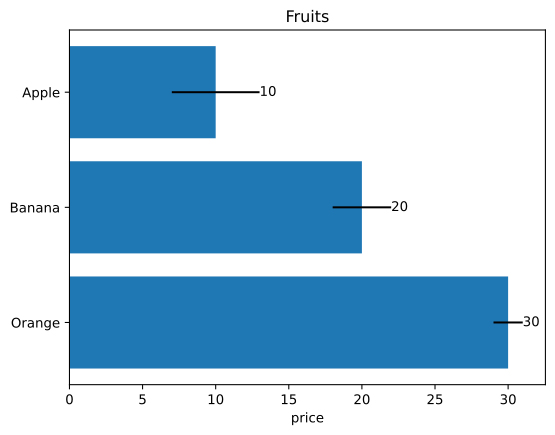
Barplot
See the documentation
use plotpy::{Barplot, Plot, StrError};
fn main() -> Result<(), StrError> {
let fruits = ["Apple", "Banana", "Orange"];
let prices = [10.0, 20.0, 30.0];
let errors = [3.0, 2.0, 1.0];
let mut bar = Barplot::new();
bar.set_errors(&errors)
.set_horizontal(true)
.set_with_text("edge")
.draw_with_str(&fruits, &prices);
let mut plot = Plot::new();
plot.set_inv_y()
.add(&bar)
.set_title("Fruits")
.set_label_x("price");
Ok(())
}
Boxplot
See the documentation
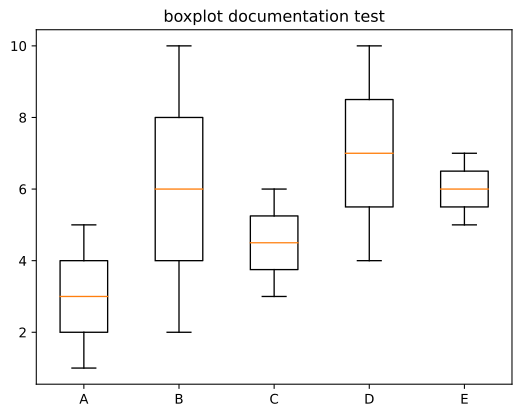
use plotpy::{Boxplot, Plot, StrError};
fn main() -> Result<(), StrError> {
let data = vec![
vec![1, 2, 3, 4, 5], vec![2, 3, 4, 5, 6, 7, 8, 9, 10], vec![3, 4, 5, 6], vec![4, 5, 6, 7, 8, 9, 10], vec![5, 6, 7], ];
let n = data.len();
let ticks: Vec<_> = (1..(n + 1)).into_iter().collect();
let labels = ["A", "B", "C", "D", "E"];
let mut boxes = Boxplot::new();
boxes.draw(&data);
let mut plot = Plot::new();
plot.add(&boxes)
.set_title("boxplot documentation test")
.set_ticks_x_labels(&ticks, &labels);
Ok(())
}
Canvas
See the documentation
use plotpy::{Canvas, Plot, PolyCode, StrError};
fn main() -> Result<(), StrError> {
let data = [
(3.0, 0.0, PolyCode::MoveTo),
(1.0, 1.5, PolyCode::Curve4),
(0.0, 4.0, PolyCode::Curve4),
(2.5, 3.9, PolyCode::Curve4),
(3.0, 3.8, PolyCode::LineTo),
(3.5, 3.9, PolyCode::LineTo),
(6.0, 4.0, PolyCode::Curve4),
(5.0, 1.5, PolyCode::Curve4),
(3.0, 0.0, PolyCode::Curve4),
];
let mut canvas = Canvas::new();
canvas.set_face_color("#f88989").set_edge_color("red");
canvas.polycurve_begin();
for (x, y, code) in data {
canvas.polycurve_add(x, y, code);
}
canvas.polycurve_end(true);
let mut plot = Plot::new();
plot.add(&canvas);
plot.set_range(1.0, 5.0, 0.0, 4.0)
.set_frame_borders(false)
.set_hide_axes(true)
.set_equal_axes(true)
.set_show_errors(true);
Ok(())
}

Contour
See the documentation
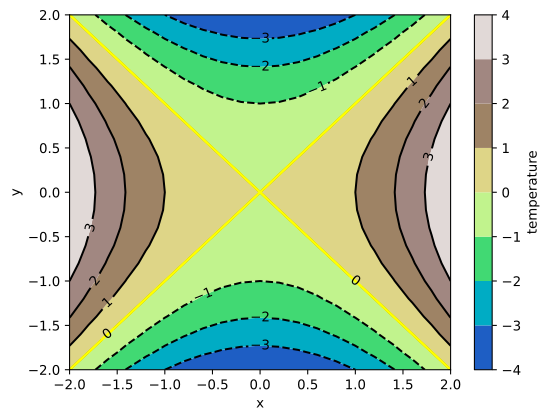
use plotpy::{generate3d, Contour, Plot, StrError};
fn main() -> Result<(), StrError> {
let n = 21;
let (x, y, z) = generate3d(-2.0, 2.0, -2.0, 2.0, n, n, |x, y| x * x - y * y);
let mut contour = Contour::new();
contour
.set_colorbar_label("temperature")
.set_colormap_name("terrain")
.set_selected_level(0.0, true);
contour.draw(&x, &y, &z);
let mut plot = Plot::new();
plot.add(&contour)
.set_labels("x", "y");
Ok(())
}
Curve
See the documentation
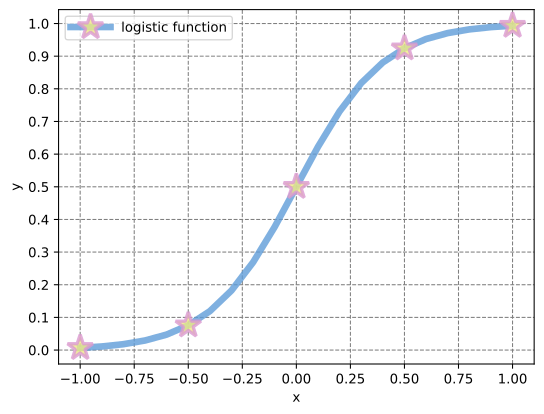
use plotpy::{linspace, Curve, Plot, StrError};
fn main() -> Result<(), StrError> {
let x = linspace(-1.0, 1.0, 21);
let y: Vec<_> = x.iter().map(|v| 1.0 / (1.0 + f64::exp(-5.0 * *v))).collect();
let mut curve = Curve::new();
curve
.set_label("logistic function")
.set_line_alpha(0.8)
.set_line_color("#5f9cd8")
.set_line_style("-")
.set_line_width(5.0)
.set_marker_color("#eeea83")
.set_marker_every(5)
.set_marker_line_color("#da98d1")
.set_marker_line_width(2.5)
.set_marker_size(20.0)
.set_marker_style("*");
curve.draw(&x, &y);
let mut plot = Plot::new();
plot.add(&curve)
.set_num_ticks_y(11)
.grid_labels_legend("x", "y");
Ok(())
}
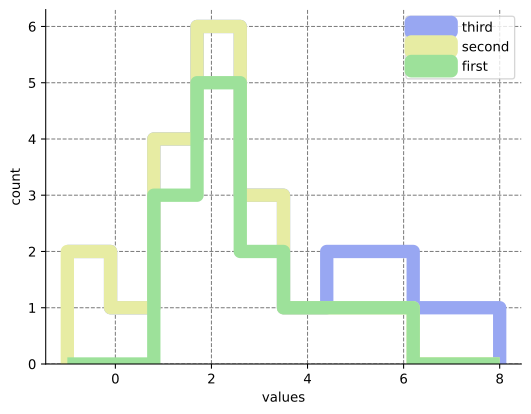
Histogram
See the documentation
use plotpy::{Histogram, Plot, StrError};
fn main() -> Result<(), StrError> {
let values = vec![
vec![1, 1, 1, 2, 2, 2, 2, 2, 3, 3, 4, 5, 6], vec![-1, -1, 0, 1, 2, 3], vec![5, 6, 7, 8], ];
let labels = ["first", "second", "third"];
let mut histogram = Histogram::new();
histogram.set_colors(&["#9de19a", "#e7eca3", "#98a7f2"])
.set_line_width(10.0)
.set_stacked(true)
.set_style("step");
histogram.draw(&values, &labels);
let mut plot = Plot::new();
plot.add(&histogram)
.set_frame_border(true, false, true, false)
.grid_labels_legend("values", "count");
Ok(())
}
Image
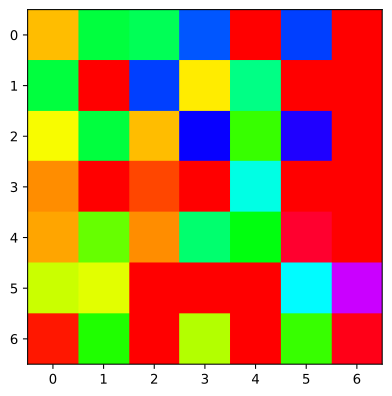
use plotpy::{Image, Plot, StrError};
fn main() -> Result<(), StrError> {
let data = [
[0.8, 2.4, 2.5, 3.9, 0.0, 4.0, 0.0],
[2.4, 0.0, 4.0, 1.0, 2.7, 0.0, 0.0],
[1.1, 2.4, 0.8, 4.3, 1.9, 4.4, 0.0],
[0.6, 0.0, 0.3, 0.0, 3.1, 0.0, 0.0],
[0.7, 1.7, 0.6, 2.6, 2.2, 6.2, 0.0],
[1.3, 1.2, 0.0, 0.0, 0.0, 3.2, 5.1],
[0.1, 2.0, 0.0, 1.4, 0.0, 1.9, 6.3],
];
let mut img = Image::new();
img.set_colormap_name("hsv").draw(&data);
let mut plot = Plot::new();
plot.add(&img);
Ok(())
}
InsetAxes
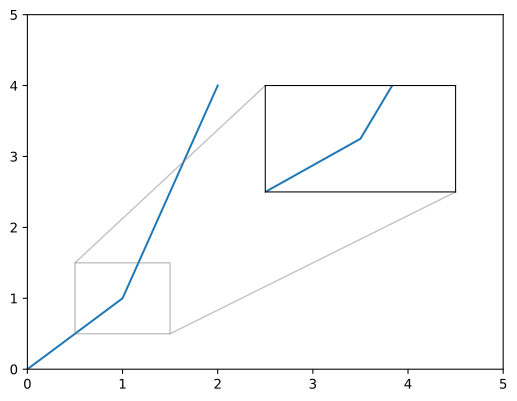
use plotpy::{Curve, InsetAxes, Plot, StrError};
fn main() -> Result<(), StrError> {
let mut curve = Curve::new();
curve.draw(&[0.0, 1.0, 2.0], &[0.0, 1.0, 4.0]);
let mut inset = InsetAxes::new();
inset
.add(&curve) .set_range(0.5, 1.5, 0.5, 1.5) .draw(0.5, 0.5, 0.4, 0.3);
let mut plot = Plot::new();
plot.add(&curve)
.set_range(0.0, 5.0, 0.0, 5.0)
.add(&inset);
Ok(())
}
Surface
See the documentation
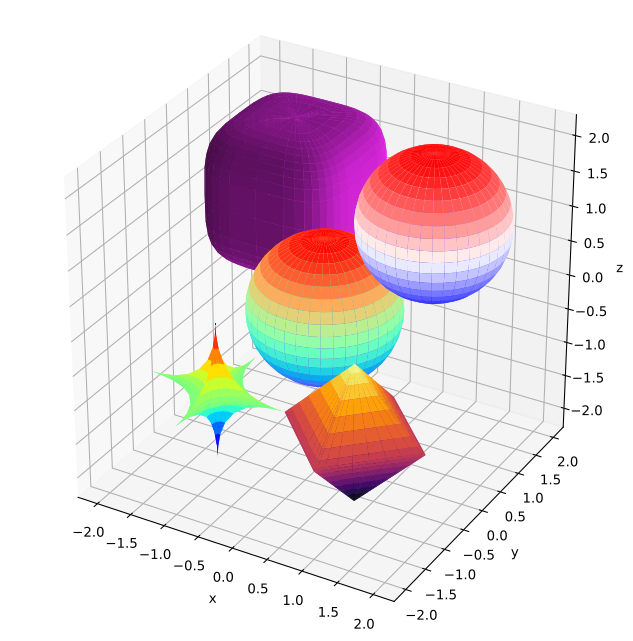
use plotpy::{Plot, StrError, Surface};
fn main() -> Result<(), StrError> {
let r = &[1.0, 1.0, 1.0];
let c = &[-1.0, -1.0, -1.0];
let k = &[0.5, 0.5, 0.5];
let mut star = Surface::new();
star.set_colormap_name("jet")
.draw_superquadric(c, r, k, -180.0, 180.0, -90.0, 90.0, 40, 20)?;
let c = &[1.0, -1.0, -1.0];
let k = &[1.0, 1.0, 1.0];
let mut pyramids = Surface::new();
pyramids
.set_colormap_name("inferno")
.draw_superquadric(c, r, k, -180.0, 180.0, -90.0, 90.0, 40, 20)?;
let c = &[-1.0, 1.0, 1.0];
let k = &[4.0, 4.0, 4.0];
let mut cube = Surface::new();
cube.set_surf_color("#ee29f2")
.draw_superquadric(c, r, k, -180.0, 180.0, -90.0, 90.0, 40, 20)?;
let c = &[0.0, 0.0, 0.0];
let k = &[2.0, 2.0, 2.0];
let mut sphere = Surface::new();
sphere
.set_colormap_name("rainbow")
.draw_superquadric(c, r, k, -180.0, 180.0, -90.0, 90.0, 40, 20)?;
let mut sphere_direct = Surface::new();
sphere_direct.draw_sphere(&[1.0, 1.0, 1.0], 1.0, 40, 20)?;
let mut plot = Plot::new();
plot.add(&star)
.add(&pyramids)
.add(&cube)
.add(&sphere)
.add(&sphere_direct);
plot.set_equal_axes(true)
.set_figure_size_points(600.0, 600.0);
Ok(())
}
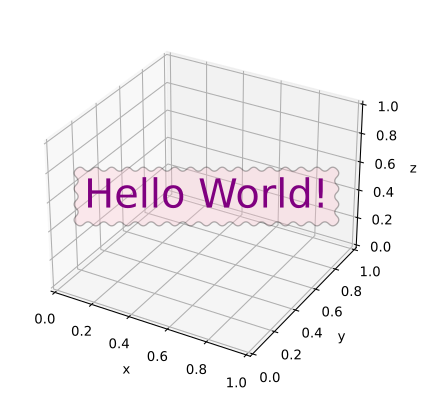
Text
use plotpy::{Plot, Text, StrError};
use std::path::Path;
fn main() -> Result<(), StrError> {
let mut text = Text::new();
text.set_color("purple")
.set_align_horizontal("center")
.set_align_vertical("center")
.set_fontsize(30.0)
.set_bbox(true)
.set_bbox_facecolor("pink")
.set_bbox_edgecolor("black")
.set_bbox_alpha(0.3)
.set_bbox_style("roundtooth,pad=0.3,tooth_size=0.2");
text.draw_3d(0.5, 0.5, 0.5, "Hello World!");
let mut plot = Plot::new();
plot.add(&text);
Ok(())
}
Architecture
(Generated by DeepSeek)
Core idea: Generates Python 3 scripts as strings from Rust, then executes them via python3. Not a direct API wrapper — it's a code generator.
- 25 source files in
src/, each a standalone module
- Each "graph entity" struct (
Curve, Barplot, Boxplot, Contour, Surface, Canvas, Histogram, Text, etc.) implements GraphMaker trait (get_buffer() + clear_buffer())
Plot is the central coordinator — collects buffers via add(&entity), prepends a Python header, appends plt.savefig(), writes .py file, executes it- Only one dependency:
num-traits = "0.2" (for generic Num bound)
- Two data abstraction traits:
AsVector (for 1D data) and AsMatrix (for 2D data)
Chaining pattern (builder style)
The entire library follows something.method1().method2().method3() pervasively.
Graph entities — setters return &mut Self:
curve.set_label("logistic")
     .set_line_color("#5f9cd8")
     .set_line_style("-")
     .set_line_width(5.0);
curve.draw(&x, &y);
Note: draw() methods don't return &mut Self (they finalize by writing Python code). But points_begin()/points_add()/points_end() do chain.
Plot — everything returns &mut Self:
plot.set_subplot(2, 2, 1)
    .set_title("first")
    .add(&curve1)
    .grid_labels_legend("x", "y")
    .set_equal_axes(true);
Consistent conventions across all files
new() → defaults (empty strings, 0.0 sentinels)set_*() → returns &mut Selfoptions() → private method builds CSV-style parameter stringdraw() → writes Python to buffer using write! macro (all .unwrap() since String writes are infallible)GraphMaker impl → exposes the buffer- Inline
#[cfg(test)] mod tests in every file + integration tests under tests/
max_width = 120 in rustfmt.toml- Error type:
pub type StrError = &'static str;
