
Analyzes runtime traces (SQL queries, HTTP calls) to detect N+1 queries, redundant calls and scores I/O intensity per endpoint (GreenOps).
Why perf-sentinel?
Performance anti-patterns like N+1 queries exist in any application that does I/O: monoliths and microservices alike. In distributed architectures, a single user request cascades across multiple services, each with its own I/O and nobody has visibility on the full path. Existing tools each solve part of the problem: Hypersistence Utils covers JPA only, Datadog and New Relic are heavy proprietary agents you may not want in every pipeline, Sentry's detectors are solid but tied to its SDK and backend. None of them give you a protocol-level CI gate you can self-host.
perf-sentinel takes a different approach: protocol-level analysis. It observes the traces your application produces (SQL queries, HTTP calls) regardless of language or ORM. It doesn't need to understand JPA, EF Core or SeaORM, it sees the queries they generate.
Quick look

GreenOps: built-in carbon-aware scoring
Every finding includes an I/O Intensity Score (IIS): the number of I/O operations generated per user request for a given endpoint. Reducing unnecessary I/O (N+1 queries, redundant calls) improves response times and reduces energy consumption, these are not competing goals.
- I/O Intensity Score = total I/O ops for an endpoint / number of invocations
- I/O Waste Ratio = avoidable I/O ops (from findings) / total I/O ops
Aligned with the Software Carbon Intensity model (SCI v1.0 / ISO/IEC 21031:2024) from the Green Software Foundation. The co2.total field holds the SCI numerator (E × I) + M summed over analyzed traces, not the per-request intensity score. Multi-region scoring is automatic when OTel spans carry the cloud.region attribute. 30+ cloud regions have embedded hourly carbon intensity profiles, with monthly x hourly seasonal variation for FR, DE, GB and US-East. In daemon mode, energy estimation can be refined via Scaphandre RAPL (bare metal) or cloud-native CPU% + SPECpower (AWS/GCP/Azure) and grid intensity can be pulled live from the Electricity Maps API, with automatic fallback to the I/O proxy model. Users can supply their own hourly profiles via [green] hourly_profiles_file or tune the proxy coefficients from on-site measurements via perf-sentinel calibrate.
Note: CO₂ estimates are directional, not regulatory-grade. Every estimate carries a
~2×multiplicative uncertainty bracket (low = mid/2,high = mid×2) because the I/O proxy model is rough. perf-sentinel is a waste counter, not a carbon-accounting tool. Do not use it for CSRD or GHG Protocol Scope 3 reporting. See docs/LIMITATIONS.md for the full methodology.
How does it compare?
Trace-based performance anti-pattern detection exists in mature APMs and in several open-source tools. perf-sentinel's niche is being lightweight, protocol-agnostic, CI/CD-native and carbon-aware, not replacing a full observability suite.
| Capability | Hypersistence Optimizer | Datadog APM + DBM | New Relic APM | Sentry | Digma | perf-sentinel |
|---|---|---|---|---|---|---|
| N+1 SQL detection | JPA only, test-time | Yes, automatic (DBM) | Yes, automatic | Yes, automatic OOTB | Yes, IDE-centric (JVM/.NET) | Yes, protocol-level, any OTel runtime |
| N+1 HTTP detection | No | Yes, service maps | Yes, trace correlation | Yes, N+1 API Call detector | Partial | Yes |
| Polyglot support | Java only | Per-language agents | Per-language agents | Per-SDK, most languages | JVM + .NET (Rider beta) | Any OTel-instrumented runtime |
| Cross-service correlation | No | Yes | Yes | Yes | Limited (local IDE) | Via trace ID |
| GreenOps / SCI v1.0 scoring | No | No | No | No | No | Built-in (directional) |
| Runtime footprint | Library (no overhead) | Agent (~100-150 MB RSS) | Agent (~100-150 MB RSS) | SDK + backend | Local backend (Docker) | Standalone binary (<10 MB RSS) |
| Native CI/CD quality gate | Manual test assertions | Alerts, no build gate | Alerts, no build gate | Alerts, no build gate | No | Yes (exit 1 on threshold breach) |
| License | Commercial (Optimizer) | Proprietary SaaS | Proprietary SaaS | FSL (converts to Apache-2 after 2y) | Freemium, proprietary | AGPL-3.0 |
Agent footprint figures for commercial APMs are order-of-magnitude estimates from public deployment reports; actual overhead depends on instrumentation scope.
What perf-sentinel is not
A fair comparison requires naming what perf-sentinel does not do:
- Not a full APM replacement. No dashboards, no alerting UI, no RUM, no log aggregation, no distributed profiling. If you need those, Datadog, New Relic and Sentry remain the right tools.
- Not a real-time monitoring solution. Daemon mode streams findings but the project's center of gravity is CI/CD quality gates and post-hoc trace analysis, not live prod observability.
- Not a regulatory carbon accounting tool. Use it to spot waste, not to file CSRD or GHG Protocol Scope 3 reports. See the GreenOps note above for methodology bounds.
- Not a replacement for measured energy. The I/O-to-energy model is an approximation. For accurate per-process power, use Scaphandre (supported as an input) or cloud provider energy APIs.
- Not zero-config. Protocol-level detection requires OTel instrumentation in your apps. If your stack does not emit traces, perf-sentinel has nothing to analyze.
- Not an IDE plugin. For in-IDE feedback on JVM/.NET code as you type, Digma offers a well-integrated JetBrains experience.
perf-sentinel is a complementary tool focused on one specific problem: detecting I/O anti-patterns in traces, scoring their impact (including carbon) and enforcing thresholds in CI. Use it alongside your existing observability stack, not in place of it.
What does it report?
For each detected anti-pattern, perf-sentinel reports:
- Type: N+1 SQL, N+1 HTTP, redundant query, slow SQL, slow HTTP, excessive fanout, chatty service, pool saturation or serialized calls. Cross-trace correlations are also surfaced in daemon mode
- Normalized template: the query or URL with parameters replaced by placeholders (
?,{id}) - Occurrences: how many times the pattern fired within the detection window
- Source endpoint: which application endpoint triggered it (e.g.
GET /api/orders) - Suggestion: e.g. "batch this query", "use a batch endpoint", "consider adding an index"
- Source location: when OTel spans carry
code.function,code.filepath,code.linenoattributes, findings display the originating source file and line. SARIF reports includephysicalLocationsfor inline GitHub/GitLab annotations - GreenOps impact: estimated avoidable I/O ops, I/O Intensity Score, structured
co2object (low/mid/high, SCI v1.0 operational + embodied terms), per-region breakdown when multi-region scoring is active
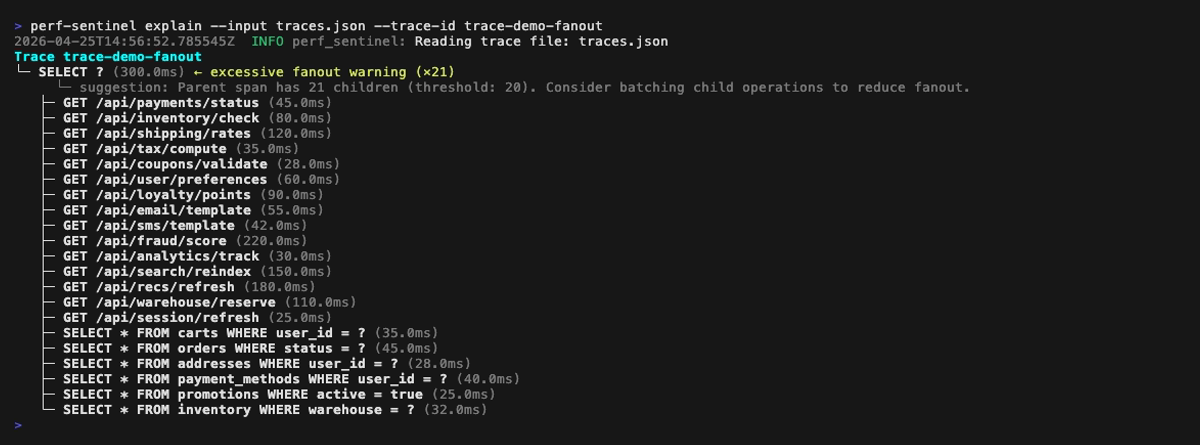
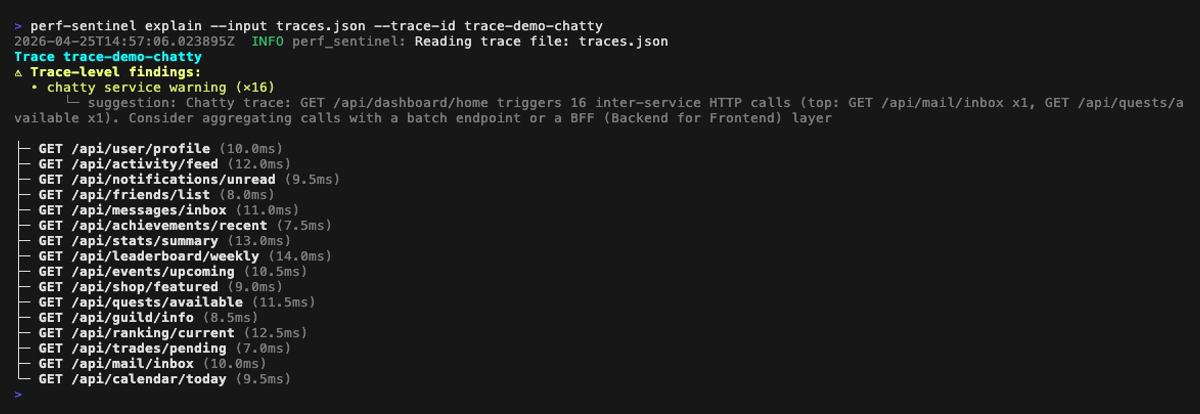
You can also drill into a single trace with the explain tree view, which annotates findings inline next to the offending spans:

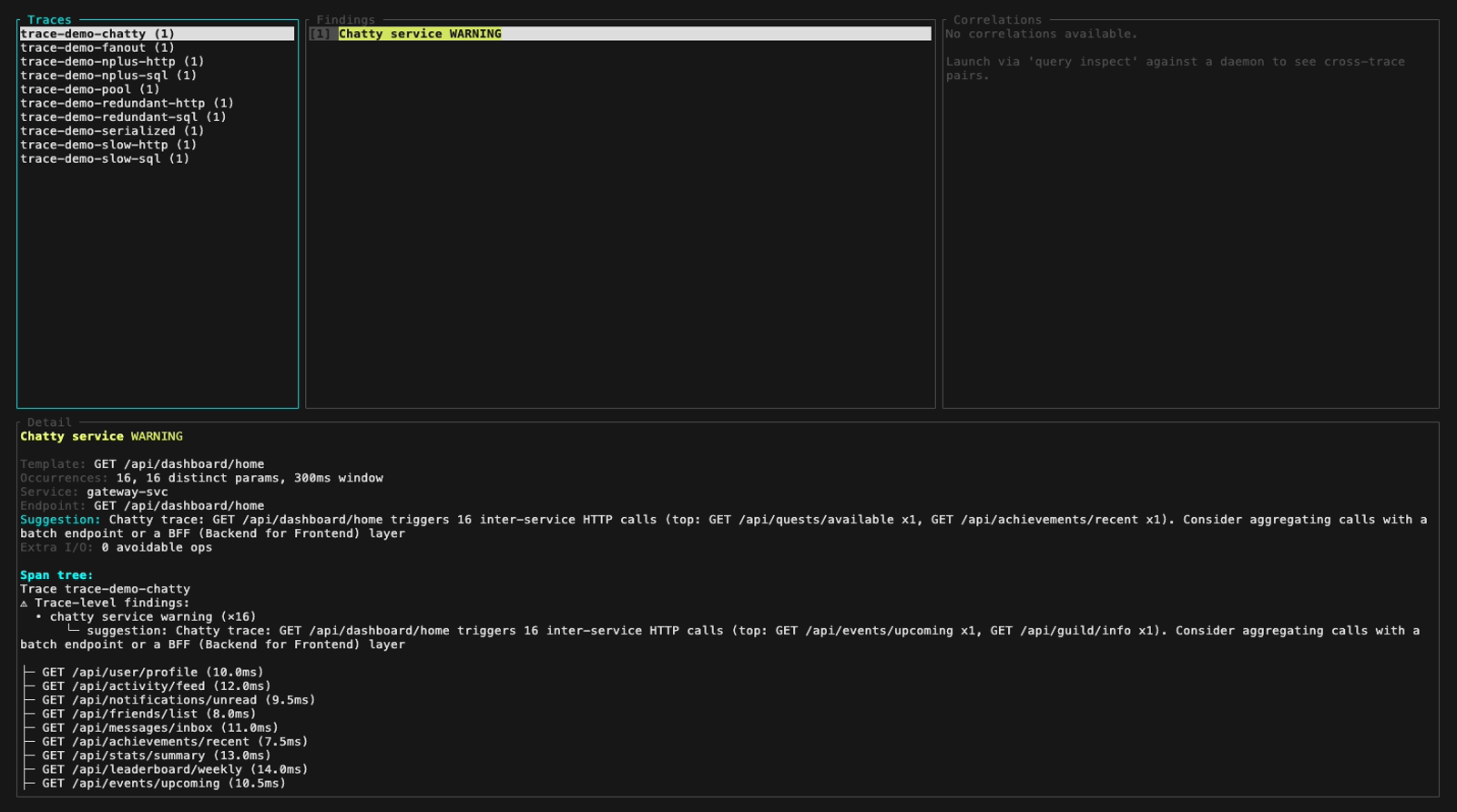
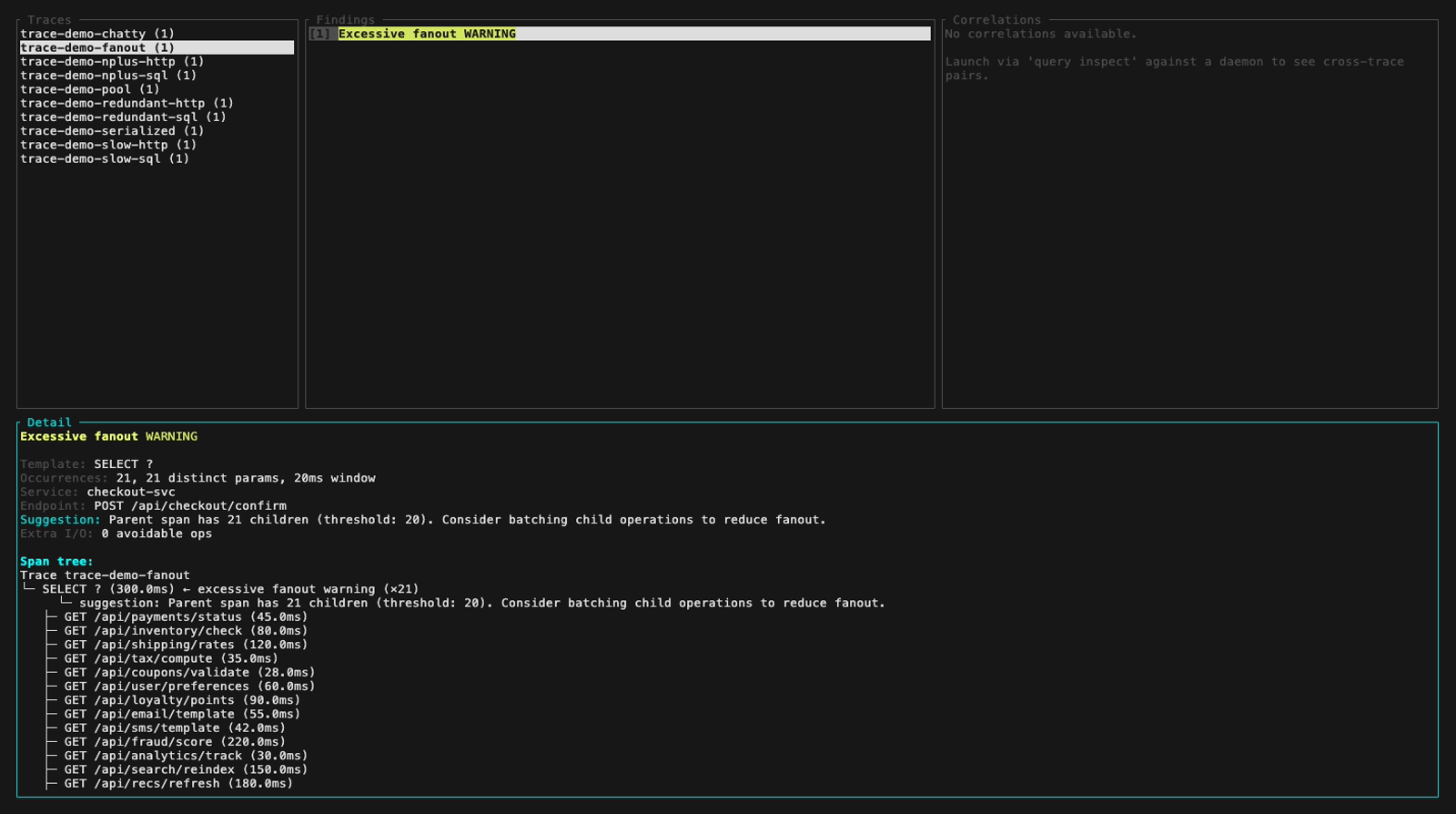
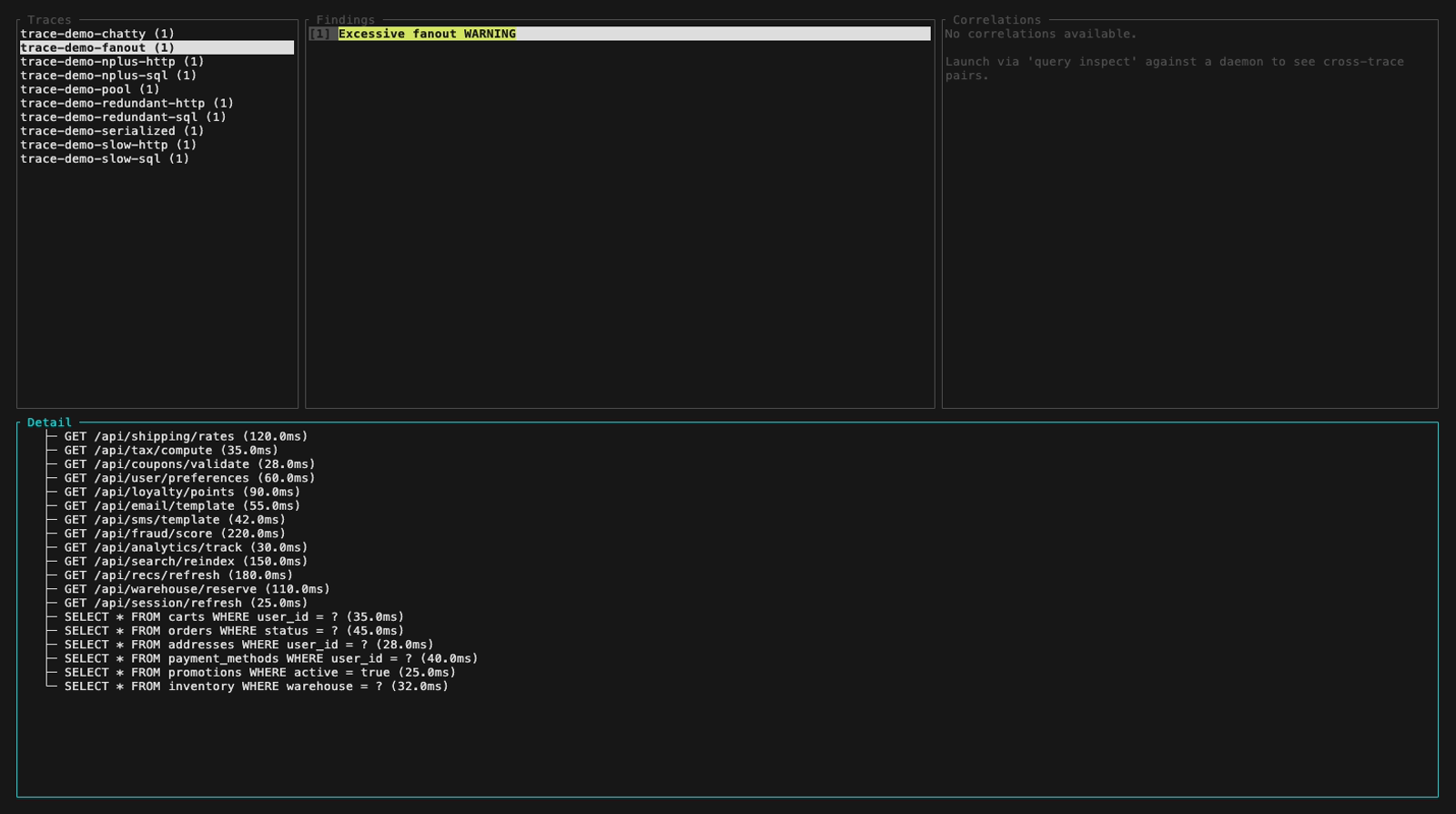
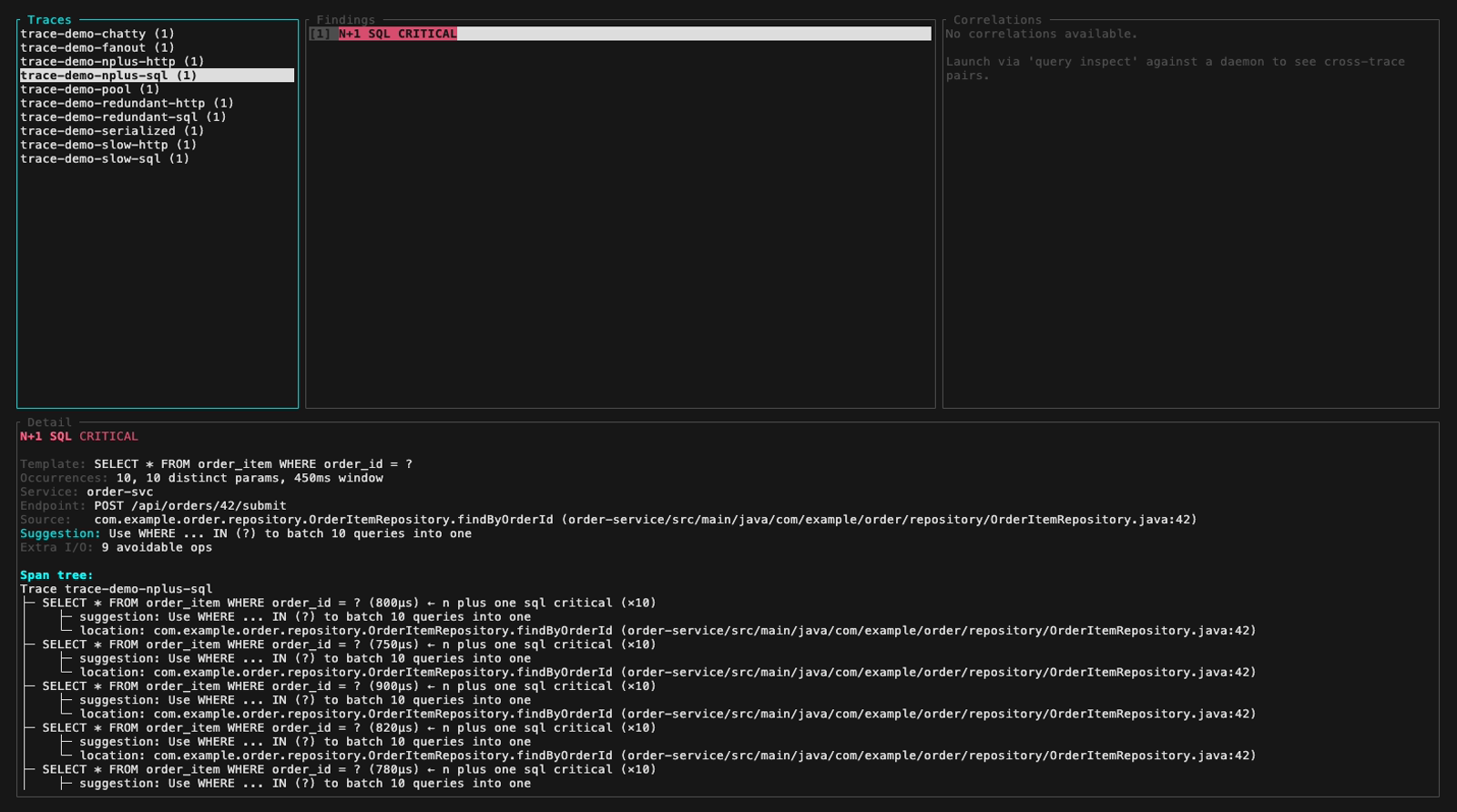
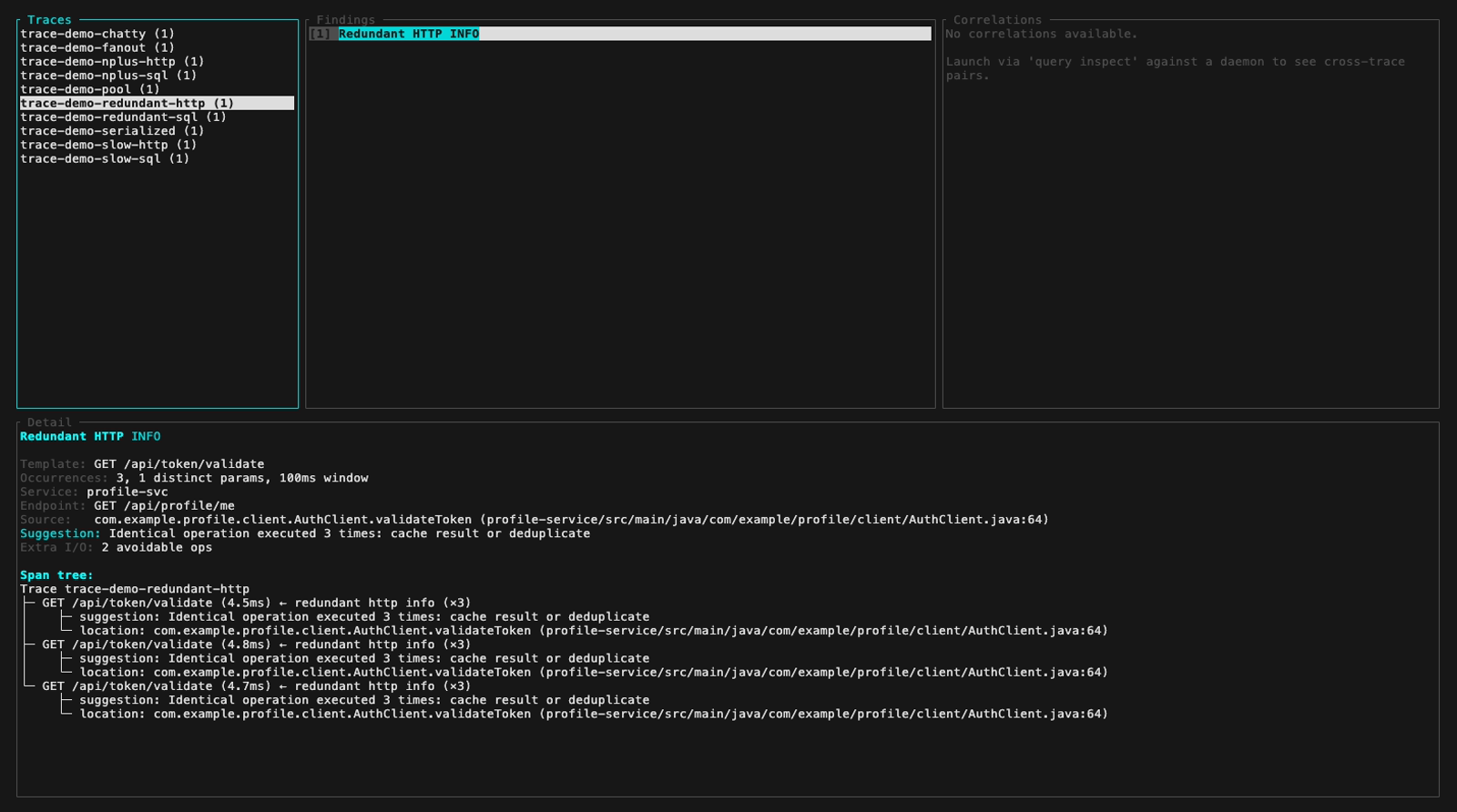
Or browse traces, findings and span trees interactively with the inspect TUI (3-panel layout, keyboard navigation):

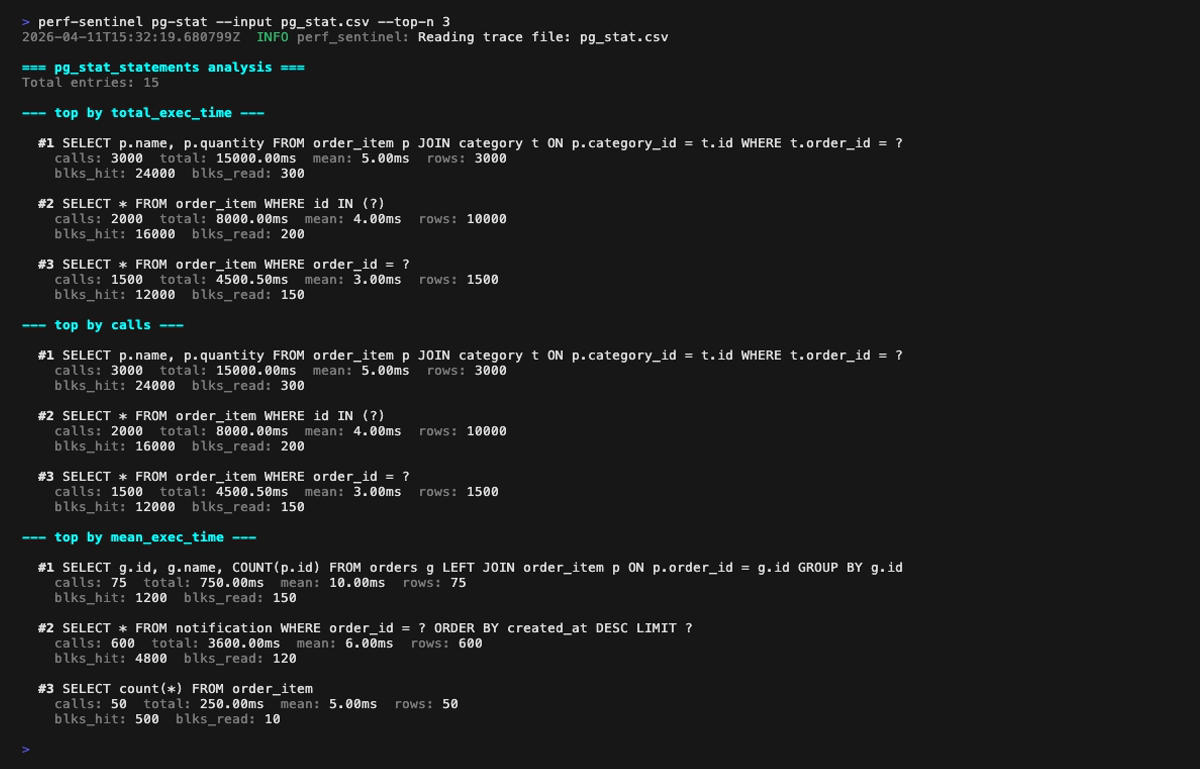
Or rank SQL hotspots from a PostgreSQL pg_stat_statements export with pg-stat. Three rankings (by total time, by call count, by mean latency) help you spot queries that dominate the DB without being visible in your traces, a sign of instrumentation gaps:

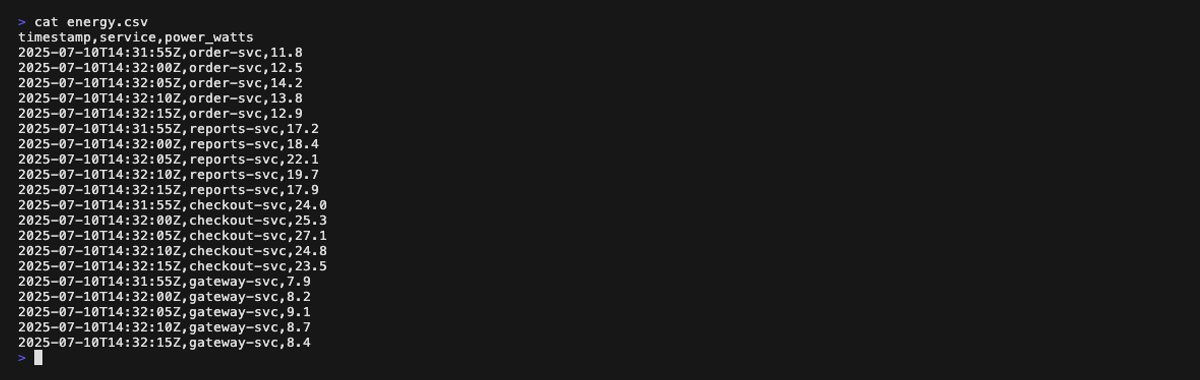
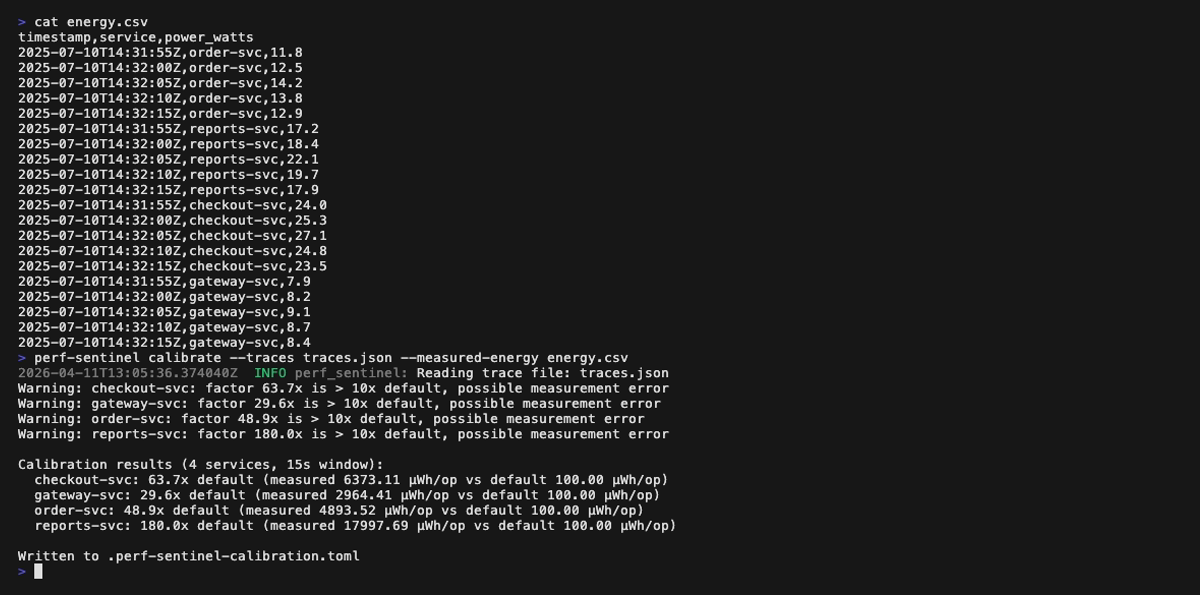
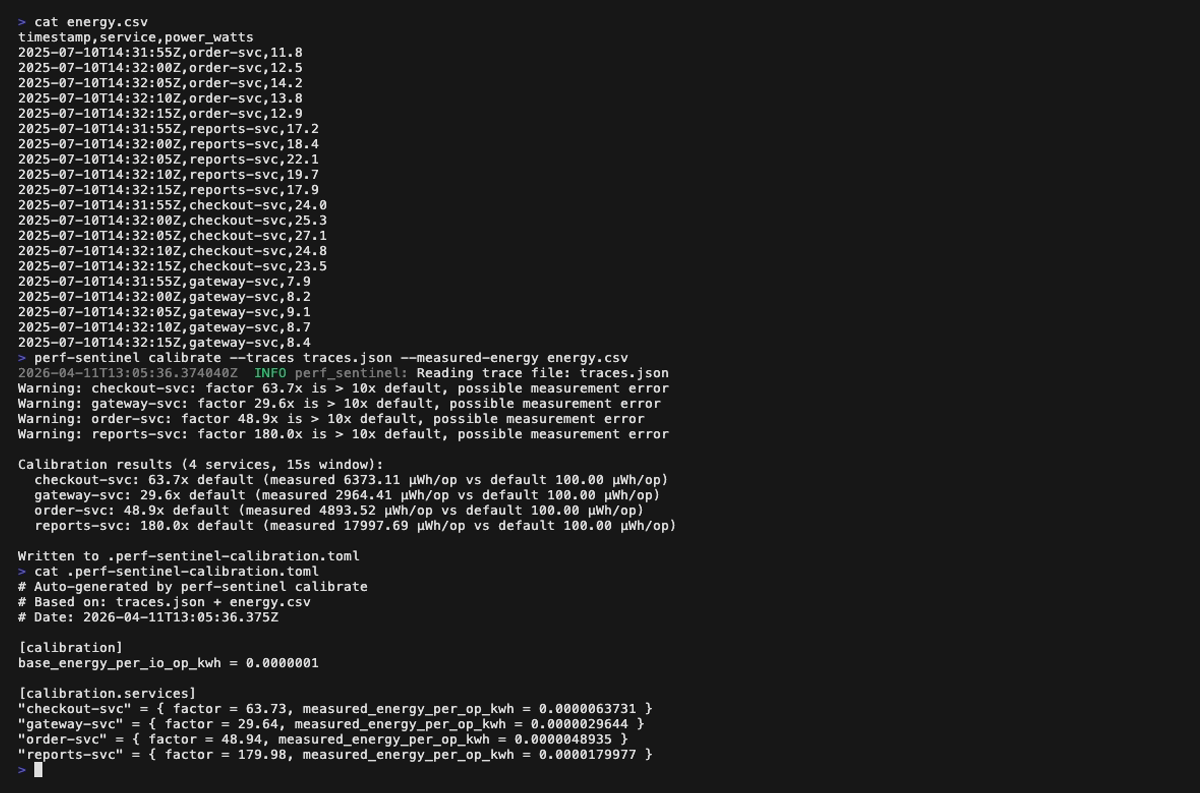
Finally, tune the I/O-to-energy coefficients to your real infrastructure with calibrate, which correlates a trace file with measured energy readings (Scaphandre, cloud monitoring, etc.) and emits a TOML file loaded via [green] calibration_file:

Configuration (.perf-sentinel.toml):

Analysis report (the first GIF above scrolls through the full report; the four still frames below cover it page by page, with a small overlap so every finding appears fully on at least one page):
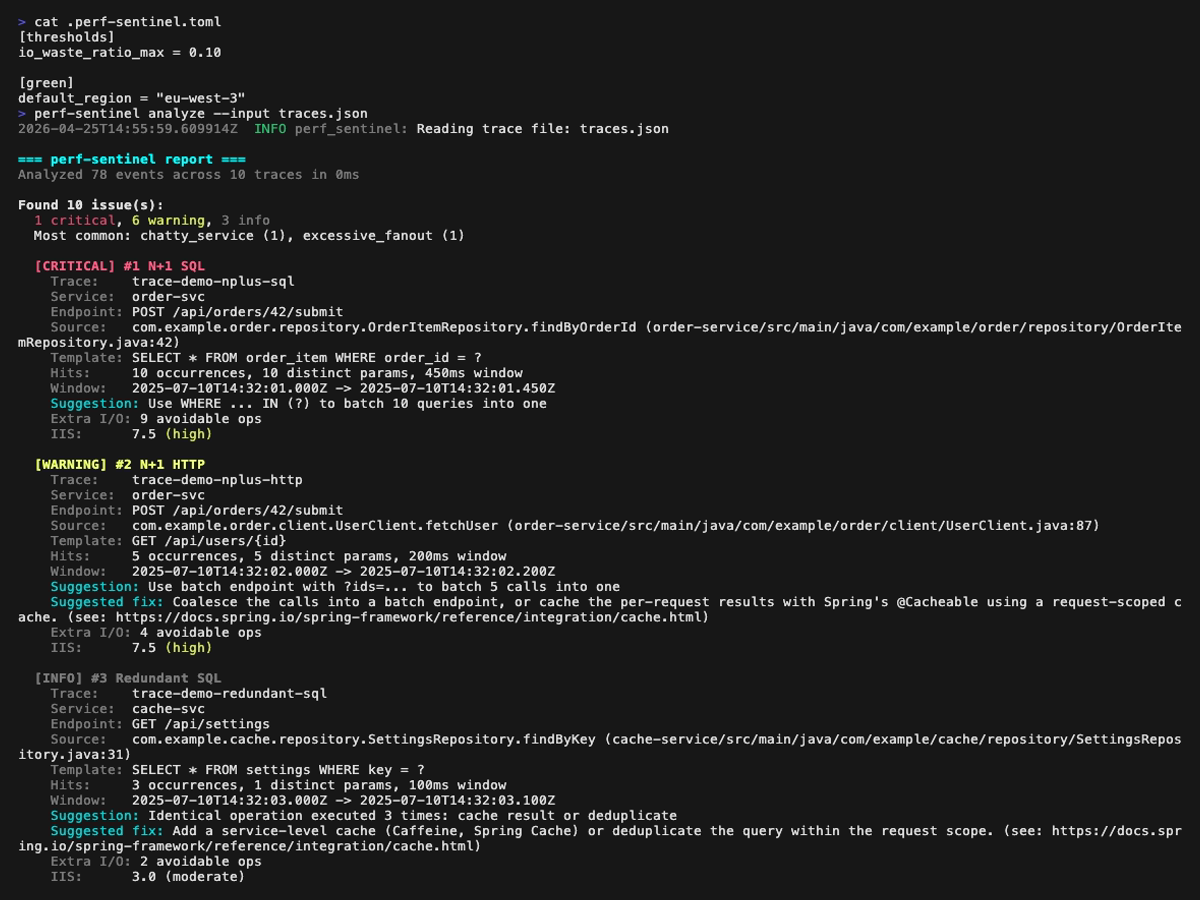
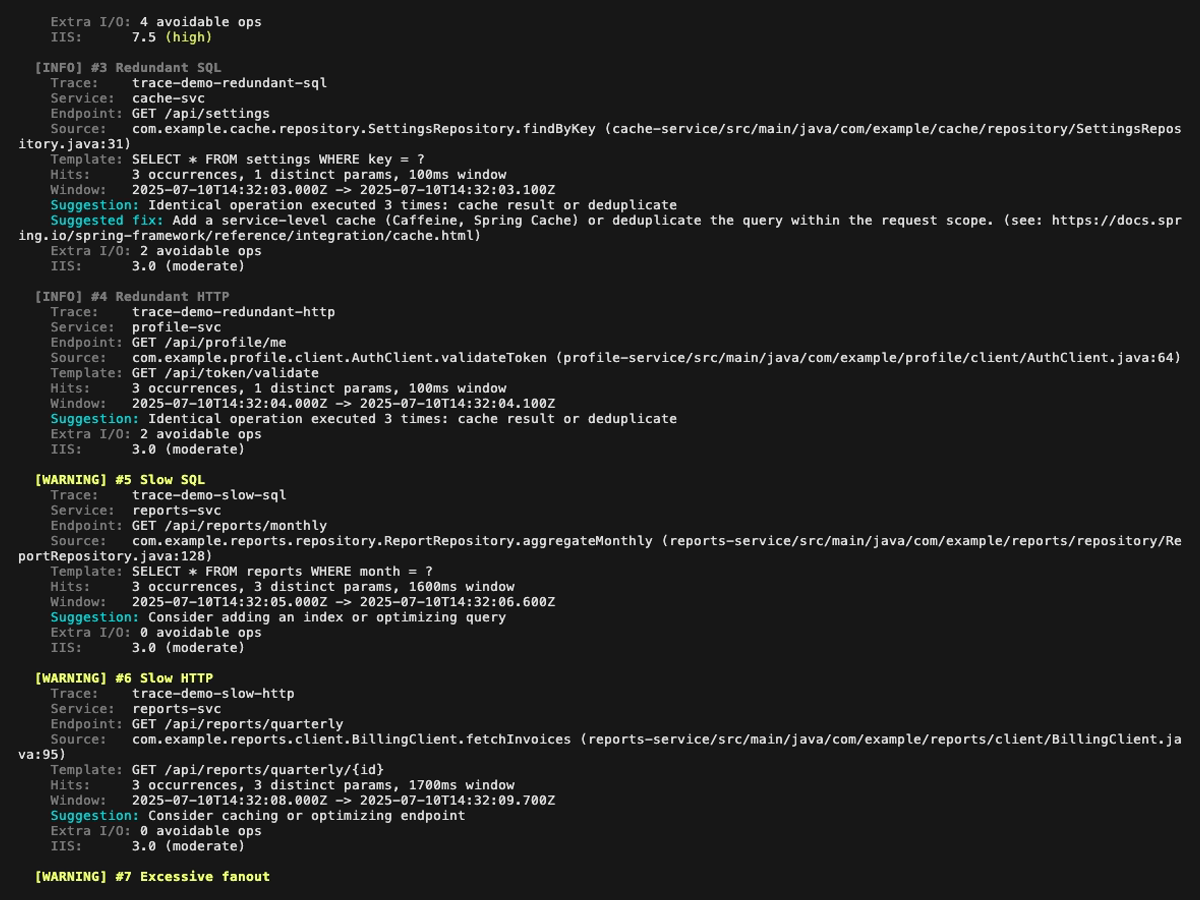
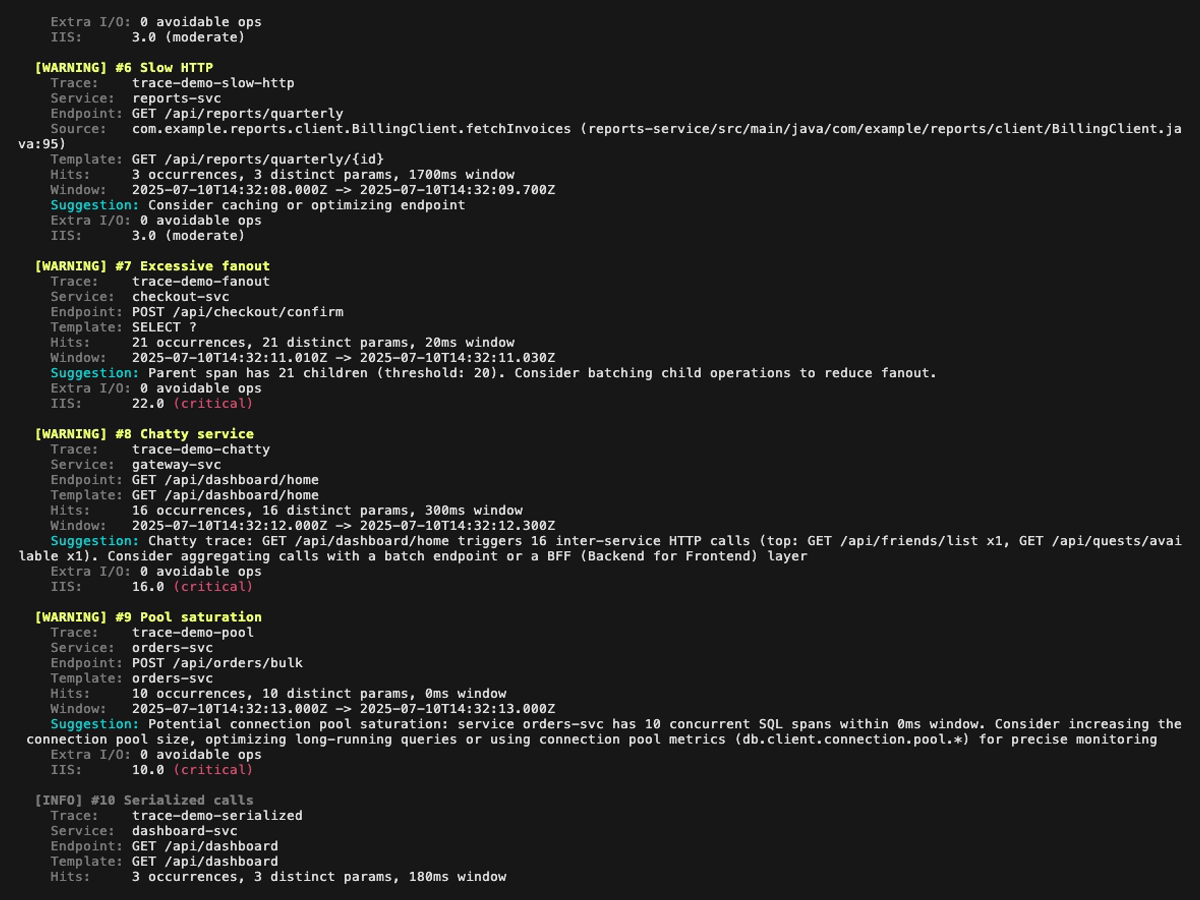
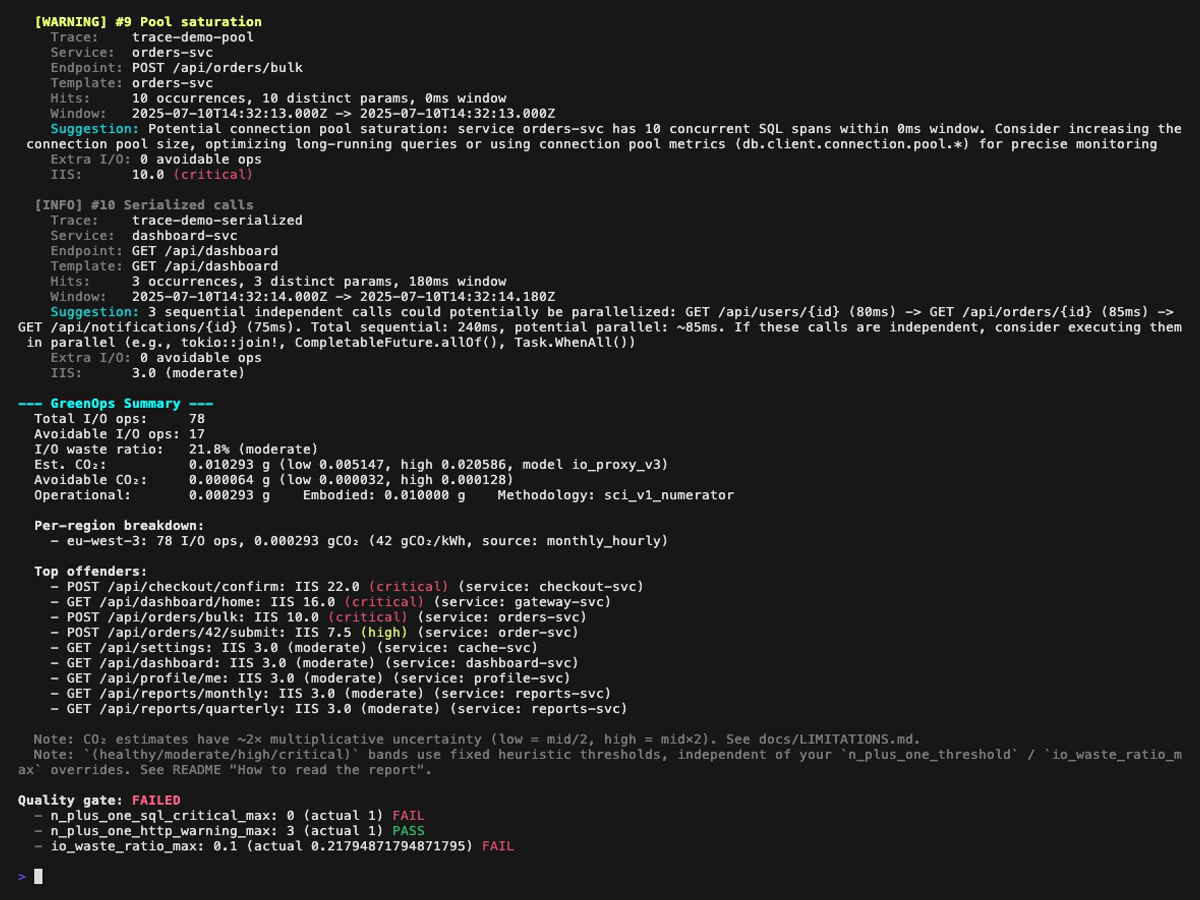
Explain mode (tree view of a single trace, perf-sentinel explain --trace-id <id>). Span-anchored findings (N+1, redundant, slow, fanout) are rendered inline next to the offending spans; trace-level findings (chatty service, pool saturation, serialized calls) are surfaced in a dedicated header above the tree:
Inspect mode (interactive TUI, perf-sentinel inspect). The findings panel header colors findings by severity; below are five still frames walking the demo fixture across the three severity levels plus a detail-panel view with its scroll feature:
pg-stat mode (perf-sentinel pg-stat --input <pg_stat_statements.csv>): ranks SQL queries three ways (by total execution time, by call count, by mean latency). Cross-reference with your traces via --traces to spot queries that dominate the DB without showing up in instrumentation:
Calibrate mode (perf-sentinel calibrate --traces <traces.json> --measured-energy <energy.csv>):
In CI mode (perf-sentinel analyze --ci), the output is a structured JSON report:
How to read the report
The CLI renders a (healthy / moderate / high / critical) qualifier next to I/O Intensity Score and I/O waste ratio. The same classification ships as sibling fields in the JSON report (io_intensity_band, io_waste_ratio_band), so downstream tools like SARIF converters, Grafana panels or IDE plugins can consume our heuristics or apply their own on the raw numbers.
| IIS | Band | Anchor |
|---|---|---|
| < 2.0 | healthy |
simple CRUD baseline (≤ 2 I/O per request) |
| 2.0 - 4.9 | moderate |
above baseline, worth watching (heuristic) |
| 5.0 - 9.9 | high |
N+1 detector's flag threshold (5 occurrences) |
| ≥ 10.0 | critical |
N+1 detector's CRITICAL severity escalation |
| I/O waste ratio | Band | Anchor |
|---|---|---|
| < 10% | healthy |
|
| 10 - 29% | moderate |
|
| 30 - 49% | high |
default [thresholds] io_waste_ratio_max |
| ≥ 50% | critical |
majority of analyzed I/O is waste |
JSON stability contract: the enum values above (healthy / moderate / high / critical) are stable across versions. The numeric thresholds behind them are versioned with the binary and may evolve. Consumers who want a version-independent classification should read the raw io_intensity_score and io_waste_ratio fields and apply their own bands.
For per-finding severity (Critical / Warning / Info on each detector type), see docs/design/04-DETECTION.md. For the full rationale behind the interpretation bands, see docs/LIMITATIONS.md.
Getting Started
Install from crates.io
Download a prebuilt binary
Binaries for Linux (amd64, arm64), macOS (arm64) and Windows (amd64) are available on the GitHub Releases page. Linux binaries target musl and are fully statically linked, so they run on any distribution (Debian, Ubuntu, Alpine, RHEL, etc.) regardless of glibc version, and inside FROM scratch images. macOS Intel users can run the arm64 binary via Rosetta 2.
# Example: Linux amd64
Run with Docker
The daemon binds to 127.0.0.1 by default for security. Inside a container that is unreachable from the host, so the quickstart above overrides the bind address with --listen-address 0.0.0.0. The daemon will log a non-loopback warning on startup, which is expected. For real deployments, put a reverse proxy (or a NetworkPolicy on Kubernetes) in front, or mount examples/perf-sentinel-docker.toml for the full compose topology.
Quick demo
Batch analysis (CI)
Explain a trace
SARIF export (GitHub/GitLab code scanning)
Import from Jaeger or Zipkin
# Jaeger JSON export (auto-detected)
# Zipkin JSON v2 (auto-detected)
pg_stat_statements analysis
# Analyze PostgreSQL pg_stat_statements export for SQL hotspots
# Cross-reference with trace findings
# Scrape pg_stat_statements metrics from a postgres_exporter Prometheus endpoint
Interactive inspection (TUI)
Tempo trace ingestion
# Fetch and analyze a single trace from Grafana Tempo
# Search and analyze recent traces by service name
Calibrate energy coefficients
# Tune I/O-to-energy coefficients from real measurements
Query a running daemon
All query sub-actions default to colored terminal output. Use --format json for scripting.
# List recent findings (colored text by default)
# Explain a trace tree with inline findings
# Interactive TUI with live daemon data
# View cross-trace correlations
# Check daemon health
# JSON output for scripting
Streaming mode (daemon)
Architecture
Deployment topologies
perf-sentinel supports three deployment models. Pick the one that fits your environment.
1. CI batch analysis (recommended starting point)
Analyze pre-collected trace files in your CI/CD pipeline. The process exits with code 1 if the quality gate fails.
# In your CI job:
Create a .perf-sentinel.toml at your project root:
[]
= 0 # zero tolerance for N+1 SQL
= 0.30 # max 30% avoidable I/O
[]
= 5
= 500
[]
= true
= "eu-west-3" # optional: enables gCO2eq conversion
= 0.001 # SCI v1.0 M term, default 0.001 g/req
# Optional per-service overrides for multi-region deployments
# (used when OTel cloud.region is absent from spans):
# [green.service_regions]
# "order-svc" = "us-east-1"
# "chat-svc" = "ap-southeast-1"
Output formats: --format text (colored, default), --format json (structured), --format sarif (GitHub/GitLab code scanning).
2. Central collector (recommended for production)
An OpenTelemetry Collector receives traces from all services and forwards them to perf-sentinel. Zero code changes in your services.
app-1 --\
app-2 ---+--> OTel Collector --> perf-sentinel (watch)
app-3 --/
Ready-to-use files are provided in examples/:
# Start the collector + perf-sentinel
# Point your apps at the collector:
# OTEL_EXPORTER_OTLP_ENDPOINT=http://otel-collector:4317
perf-sentinel streams findings as NDJSON to stdout and exposes Prometheus metrics with Grafana Exemplars at /metrics (port 4318). A GET /health liveness endpoint is also exposed on the same port for Kubernetes or load-balancer probes.
See examples/otel-collector-config.yaml for the full collector config with sampling and filtering options.
3. Sidecar (per-service diagnostics)
perf-sentinel runs alongside a single service, sharing its network namespace. Useful for isolated debugging.
The app sends traces to localhost:4317 (no network hop). See examples/docker-compose-sidecar.yml.
For language-specific OTLP instrumentation (Java, .NET, Rust), see docs/INTEGRATION.md. For the full configuration reference, see docs/CONFIGURATION.md. For the daemon HTTP query API (findings, explain, correlations, status), see docs/QUERY-API.md. For the post-mortem workflow when a trace is older than the daemon's live window, see docs/RUNBOOK.md. For in-depth design documentation, see docs/design/.
Standards and data sources
perf-sentinel's carbon estimates rest on an auditable chain of public standards, reference datasets and peer-reviewed methodology. The authoritative per-reference citation list lives in crates/sentinel-core/src/score/carbon.rs (module docstring) and in crates/sentinel-core/src/score/carbon_profiles.rs (per-region source comments on every profile entry). This section is the narrative companion.
Standard / specification
- Software Carbon Intensity v1.0 (ISO/IEC 21031:2024), Green Software Foundation.
co2.totalis the SCI v1.0 numerator(E × I) + M + T, not the per-R intensity. Full discussion in docs/design/05-GREENOPS-AND-CARBON.md.
Reference datasets
- Cloud Carbon Footprint (CCF): annual grid intensity per cloud region, per-provider PUE values (AWS 1.135, GCP 1.10, Azure 1.185, generic 1.2) and the SPECpower coefficient tables (~180 instance types) that feed the
cloud_specpowerenergy backend. - Electricity Maps: annual average intensities for 30+ regions (2023-2024) used as the
io_proxy_v1baseline, plus the real-time API (electricity_maps_apibackend, opt-in via[green.electricity_maps]). - ENTSO-E Transparency Platform: hourly generation and load data used to derive the monthly x hourly profiles for European bidding zones (FR, DE, GB, IE, NL, SE, BE, FI, IT, ES, PL, NO).
- National TSOs and grid operators: RTE eCO2mix (France), Fraunhofer ISE energy-charts.info (Germany), National Grid ESO Carbon Intensity API (UK), EIA Open Data API for US balancing authorities (PJM, CAISO, BPA), Hydro-Quebec annual reports (Canada), AEMO NEM / OpenNEM (Australia).
- Scaphandre: per-process Intel / AMD RAPL power measurement, scraped via its Prometheus endpoint when the
[green.scaphandre]section is configured.
Academic methodology
- Xu et al., Energy-Efficient Query Processing, VLDB 2010. Foundational DBMS per-operation energy benchmark that motivated the
SELECT 0.5x/INSERT 1.5x/UPDATE 1.5x/DELETE 1.2xmultipliers on the proxy model. - Tsirogiannis et al., Analyzing the Energy Efficiency of a Database Server, SIGMOD 2010. Companion benchmark establishing verb-level coefficients.
- Siddik et al., DBJoules: Towards Understanding the Energy Consumption of Database Management Systems, 2023. Confirms 7-38% inter-operation variance across verbs, cross-validation for the
per_operation_coefficientsfeature. - Guo et al., Energy-efficient Database Systems: A Systematic Survey, ACM Computing Surveys 2022. Overview of the field.
- IDEAS 2025 framework: real-time energy estimation model for SQL queries, referenced as the direction of travel for future
calibrateimprovements. - Mytton, Lunden & Malmodin, Estimating electricity usage of data transmission networks, Journal of Industrial Ecology 2024. Source for the 0.04 kWh/GB default on the optional
include_network_transportterm; the paper's 0.03-0.06 kWh/GB range is the origin of the configurablenetwork_energy_per_byte_kwhfield. - Boavizta API / HotCarbon 2024: bottom-up server lifecycle embodied carbon model, referenced for the
embodied_per_request_gco2default calibration.
License
This project is licensed under the GNU Affero General Public License v3.0.