
peekme
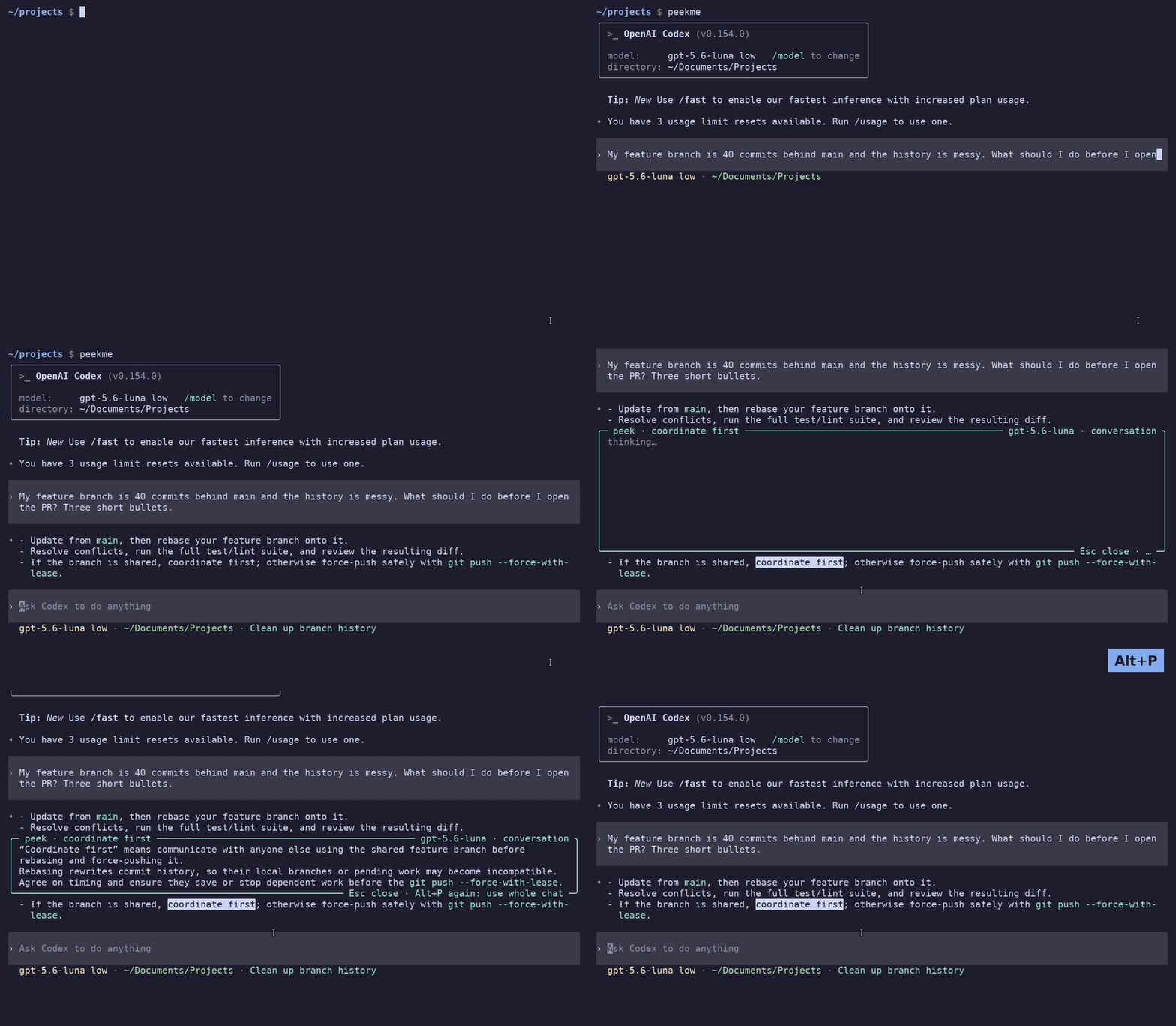
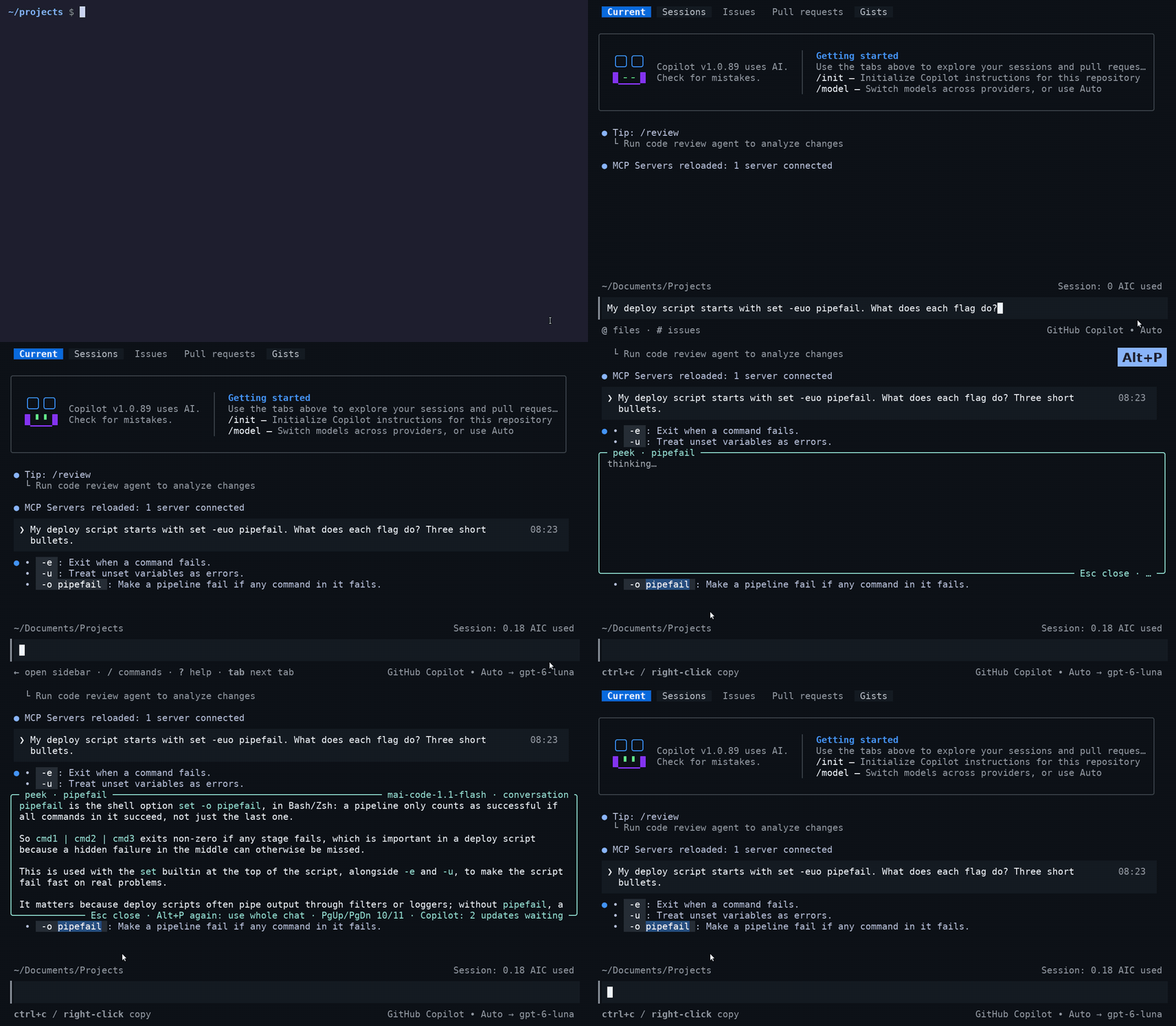
Pick me. Select text in Claude Code, Codex CLI or GitHub Copilot CLI output, press Alt+P (Option+P on a Mac), and a short explanation opens right next to that text, inside the terminal. The other lines move to make room, like Peek in VS Code. Esc closes it and the screen is exactly as before.
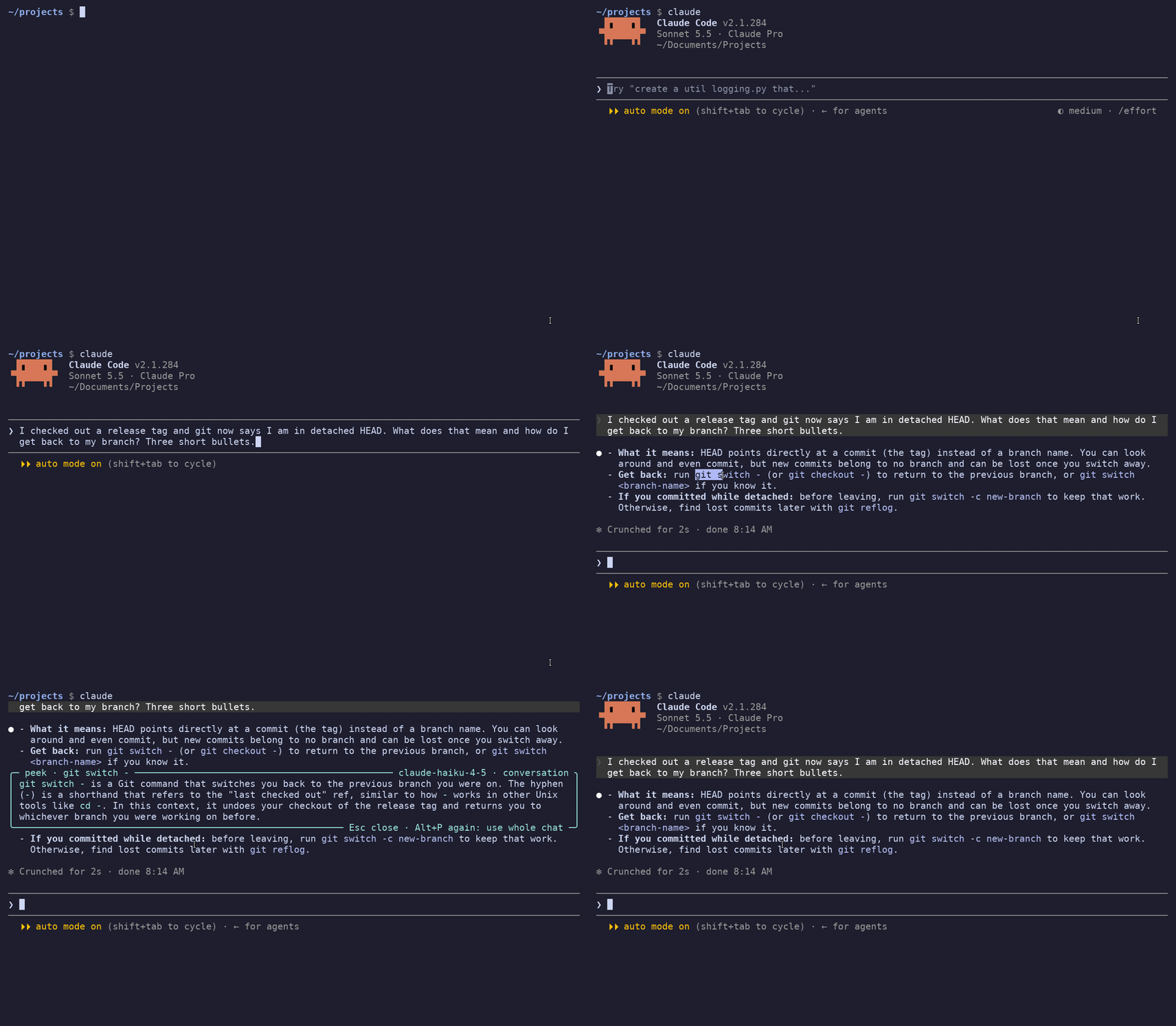
The explanation comes from a small, fast model and it knows the conversation. If you select "its split panes" in an answer that recommends Kitty, it tells you it is about Kitty.
Status: 0.3.4. Tested with Claude Code 2.1.285, Codex 0.159 and Copilot CLI 1.0.89 on Linux, also inside tmux and over SSH. On macOS it is tested in Terminal and iTerm2 with a stand-in agent, and in Terminal with the real Codex, also inside tmux and over SSH.
One peekme for all your agents
Many developers have more than one agent CLI and switch between them during the day. peekme works the same way in each of them. You install it once, and the key and the box are the same everywhere. Claude Code, Codex CLI and GitHub Copilot CLI work today, and more agents are planned. If one agent gets its own way to explain a selection some day, it will work in that agent only. peekme keeps working in all of them.
Codex CLI:
GitHub Copilot CLI:
Install
npm i -g peekme
peekme install
Open a new terminal. Now claude, codex and copilot open with peekme, and you type them as
always. That's all.
peekme has no account of its own. The explanation uses the login of the agent you are in.
Don't have npm? Use one of these instead of the first line:
- Homebrew:
brew install gregorybolshakov/tap/peekme - Rust:
cargo install peekme - Neither:
curl -LsSf https://github.com/GregoryBolshakov/peekme/releases/latest/download/peekme-installer.sh | sh
Use
Start Claude Code, Codex or Copilot CLI as always. Select text with the mouse as you normally
do, then press Alt+P. When the agent draws full screen (Claude Code with "tui": "fullscreen",
Codex since 0.157, Copilot CLI), it makes the selection itself, and peekme uses that selection.
| Key | When | What it does |
|---|---|---|
| Alt+P (Mac: Option+P) | any time | explain the selected text |
| Alt+P again | box is open, same selection | explain again using the whole conversation |
| PgUp / PgDn, mouse wheel | box is open | scroll a long explanation |
| Esc | box is open | close the box |
| typing | box is open | goes to the agent's input line, the box stays open |
| Enter | box is open | sends your message and closes the box |
On a Mac
Option+P works as it is, with no terminal setting, also over SSH and inside tmux. A Mac
terminal sends Option+P as the character π. When something is selected, peekme takes π as
the shortcut. When nothing is selected, π is typed as usual, so you never lose the letter. If
you type Greek, π stays a letter. If your terminal sends Option as Meta, Option+P works too.
When the agent draws full screen, peekme gets the selection from the agent. Otherwise (Claude
Code's classic screen) it reads the clipboard: iTerm2 copies a selection there by itself, in
Terminal press Cmd+C after you select. Over SSH only the agent's own selection can be read, so
use the full screen mode there (Claude Code with "tui": "fullscreen", Codex and Copilot CLI
by default).
Inside tmux, Codex leaves the mouse to the terminal when tmux has the mouse off, which is tmux's
default. A selection is then your terminal's own, and over SSH peekme cannot read it. Add
set -g mouse on to ~/.tmux.conf and restart Codex. peekme tells you this the first time you
press Option+P there.
In Claude Code, Alt+P opens the model picker. With peekme it explains the selection instead.
/model still opens the model picker.
No API key is needed. peekme asks the agent's own CLI, with your existing login:
- Claude Code:
claude -pon Haiku, without tools and without saving the session, so nothing appears in/resume. After the first explanation oneclaude -pwaits in the background for the next one, so it starts in about half a second. It takes about 210 MB. - Codex: its
app-server, on a temporary thread that is not saved. Since Codex 0.157 a shared Codex server runs in the background, and peekme uses it, so it adds only a few MB of memory. Without that server it starts its owncodex app-server, which takes about 250 MB. - Copilot CLI: its headless server (
copilot --headless, the one the Copilot SDK uses), started on the first explanation. Each explanation is a short session without tools, and peekme deletes it afterwards, so nothing appears in your session list. The model is Copilot's Auto unless you set one. It uses a little of your AI credits for each explanation.
It does use your plan, a little for each explanation. Nothing starts before the first Alt+P.
Only the interactive screen gets peekme: claude, claude "prompt", claude --resume,
claude -c, codex, codex "prompt", codex resume, codex fork, and copilot,
copilot -i "prompt", copilot --resume. Commands like claude -p, codex exec, copilot -p
or copilot login, and anything with output going to a pipe or a file, run the agent directly.
How it works
The agent runs in a pseudo-terminal. Its output goes to your terminal unchanged, and the same
bytes also go to a terminal emulator in memory (alacritty_terminal). So peekme always knows
what is on your screen.
On Alt+P it takes the selection and finds it on the screen:
- Claude Code full screen: Claude copies the selection with an OSC 52 escape sequence when you release the mouse. peekme reads the text from that sequence as it passes through, and knows where the drag ended. This also works over SSH.
- Codex full screen: the text Codex highlighted.
- Copilot CLI: the same OSC 52 sequence as Claude Code.
- Otherwise: your terminal's mouse selection (the X11 PRIMARY selection).
Then it redraws only the rows next to the selection, with the box between them. Nothing is cleared and there is no switch to another screen, so there is no flicker. The agent's input line and status line under the box keep updating, so you can type while you read. Other output that arrives while the box is open is kept aside.
On Esc it draws those rows again from a copy taken when the box opened. After that it sends the kept output, so the terminal ends in the same state as if the box never existed. Tests check this cell by cell on real Claude Code, Codex and Copilot CLI output.
What the model gets
A few words alone are not enough ("Desktop app", which one?). The whole chat is too much and too slow. So the model gets small parts, each with a size limit:
- One line saying which agent this is and in which directory. This is enough for text from the agent itself, like the startup tips.
- The text around the selection, with the selection marked in place like
⟦this⟧. peekme finds it in the conversation by searching for the selection together with the words next to it on screen. This way it finds the right place when the same words appear many times. If the text is not in the conversation, it uses the screen. - Your request that this text answers, and one line for each of your earlier requests.
- The first places in the conversation where the same words were used before.
The conversation comes from Claude Code's session transcript in ~/.claude/projects, from
Codex's app-server, or from Copilot CLI's session log in ~/.copilot/session-state. peekme
knows which session, because the agent registers its process id there.
Usually this is 1 to 7 KB of text. When it is not enough, press Alt+P again and the model gets the whole conversation. A long chat can be 5 to 30 times bigger than a normal explanation, so above about 40k tokens peekme shows the size first and sends it only when you press Alt+P once more.
Settings
| Variable | Meaning |
|---|---|
PEEKME_CLAUDE_MODEL |
model for Claude Code explanations. Default is haiku |
PEEKME_CLAUDE_BIN |
claude binary to use for explanations. Default is claude |
PEEKME_MODEL |
model for Codex explanations. Default is the model your account lists as fast |
PEEKME_CODEX_BIN |
codex binary to use for explanations. Default is codex |
PEEKME_OWN_SERVER |
set to 1 to start peekme's own codex app-server instead of using the shared one |
PEEKME_COPILOT_MODEL |
model for Copilot CLI explanations. Default is Copilot's Auto |
PEEKME_COPILOT_BIN |
copilot binary to use for explanations. Default is copilot |
PEEKME_SELECTION |
use this text instead of the mouse selection, for testing |
How claude, codex and copilot get peekme
peekme doctor      # check the setup, and see what is in the way if something is
peekme uninstall   # remove it, your files are as before
command claude     # run plain Claude Code once (same for codex, copilot)
peekme install does two things:
- It defines shell functions
claude,codexandcopilotin your shell setup. A function wins over anything on PATH, so it keeps working when nvm, mise, Homebrew or an agent's installer change PATH later. Aliases that call them go through it too. - It puts
claude,codexandcopilotlinks to peekme in~/.local/share/peekme/binat the front of PATH, so scripts that run them also get peekme. If some tool puts its own directory in front of it later, only scripts lose peekme, andpeekme doctortells you which directory it is.
Both find the real agent on PATH themselves, so updating the agent changes nothing. If you remove peekme, the functions fall back to the plain agents.
The block in ~/.bashrc or ~/.zshrc (for fish, a file in ~/.config/fish/conf.d) is short
and marked. It covers all three agents, so an agent you install later gets peekme too. When a new
peekme version knows more agents, it adds them to your setup the next time it starts and says
so once.
npm 12 may say that it skipped an install script of peekme. That is fine: peekme then downloads its binary the first time it runs. Ready binaries for Linux and macOS (x86_64 and ARM) are on the latest release page.
To use peekme with another program, run peekme -- COMMAND.
Limits
- Only text that is on screen now. Text that scrolled up into the terminal history can't be selected yet.
- In full screen mode selection works anywhere, also over SSH, because peekme reads the selection from the agent. Otherwise peekme needs the terminal's selection, which it reads on Linux with X11 only. On Wayland it works through XWayland, and on macOS it reads the clipboard (see On a Mac).
- Claude Code full screen: if
copyOnSelectis off, Claude does not report the selection. Then only a Shift+drag selection works (read from X11 PRIMARY). - An explanation takes about 1 to 2 seconds to start arriving.
peekme installis tested with bash. zsh uses the same block and should work the same way, but it is not tested yet. The fish setup is not tested either.
Development
cargo test
cargo clippy --all-targets
cargo run --example vtdump -- capture.bin 120 40 [offset]
cargo run --example peek_text -- "<screen text>" "<selection>" [--deep] [--claude|--copilot] [--pid PID]
python3 spikes/capture.py out.bin 120 40 "<script>" -- peekme claude
python3 spikes/flicker_test.py
python3 spikes/explain_probe.py
python3 spikes/copilot_probe.py info
vtdump replays a captured byte stream and prints the screen. peek_text runs one explanation
without a terminal and prints the exact prompt. capture.py runs a command in a pseudo-terminal,
sends keys and mouse events from a script and saves everything it prints. flicker_test.py
shows if your terminal flickers when a program switches screens. explain_probe.py makes one
explanation request to codex app-server and prints timings. copilot_probe.py does the same
with Copilot CLI's headless server.
Each agent has its own folder in src/ (claude/, codex/, copilot/): how its selection is read, where
its conversation comes from, and which model explains. The rest is shared.
License
MIT or Apache-2.0, at your choice.