# par-term
[](https://github.com/paulrobello/par-term/actions/workflows/ci.yml)
[](https://crates.io/crates/par-term)




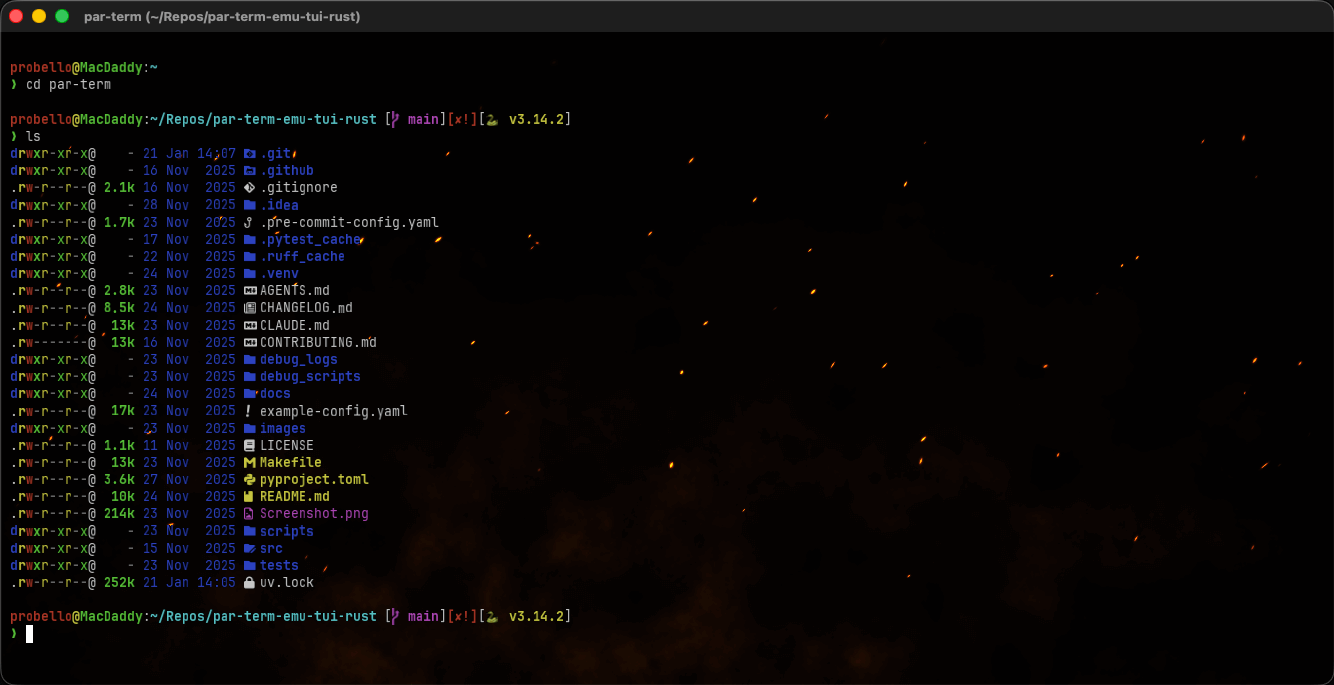
A cross-platform, GPU-accelerated terminal emulator frontend built with Rust, powered by [par-term-emu-core-rust](https://github.com/paulrobello/par-term-emu-core-rust). Designed for high performance, modern typography, and rich graphics support.
[](https://buymeacoffee.com/probello3)
## Table of Contents
- [Getting Started](#getting-started)
- [What's New](#whats-new-in-03012)
- [Features](#features)
- [Documentation](#documentation)
- [Installation](#installation)
- [Homebrew (macOS)](#homebrew-macos)
- [Cargo Install](#cargo-install)
- [From Source](#from-source)
- [macOS Bundle](#macos-bundle)
- [Linux Dependencies](#linux-dependencies)
- [Installing Shaders](#installing-shaders)
- [Keyboard Shortcuts](#keyboard-shortcuts)
- [Configuration](#configuration)
- [Technology](#technology)
- [Contributing](#contributing)
- [License](#license)
## Getting Started
New to par-term? The [Getting Started Guide](docs/guides/GETTING_STARTED.md) walks you through installation, essential keyboard shortcuts, fonts, and split panes — everything you need to be productive in under 10 minutes.
- **[Getting Started Guide](docs/guides/GETTING_STARTED.md)** — Install, launch, and configure par-term
- **[Installation](#installation)** — Platform-specific install instructions below
- **[Configuration Reference](docs/CONFIG_REFERENCE.md)** — All 200+ configuration options
- **[Keyboard Shortcuts](docs/guides/KEYBOARD_SHORTCUTS.md)** — Complete keyboard shortcut reference
## What's New in 0.32.1
- **Scrollback Fix for Partial Scroll Regions** -- top-anchored scroll regions (e.g. Codex CLI's `CSI 1;{rows-1}r`) now correctly preserve evicted rows in scrollback instead of discarding them, matching iTerm2 behavior.
For the full history of changes across all versions, see [CHANGELOG.md](CHANGELOG.md).
## What's New in 0.32.0
- **Promote Pane to Tab / Demote Tab to Pane** -- new actions to move panes between tabs while preserving all running processes. Promote instantly extracts a focused pane into its own tab; demote provides a multi-step pick mode to merge a tab's pane tree into another tab.
- **Kitty Terminal Graphics Protocol — Full Support** -- par-term now parses, stores, renders, and responds to Kitty TGP (Phases 1–3). Virtual-placement images display correctly and autodetect probes succeed.
- **Platform-Native Modifier for Hardcoded Shortcuts** -- font size, clear scrollback, and clipboard history shortcuts now use Cmd on macOS instead of bare Ctrl.
- **Ctrl+Punctuation Control Codes** -- Ctrl with ASCII punctuation (@ [ \ ] ^ _) now correctly maps to control equivalents (e.g. Ctrl+_ sends 0x1F for joe editor undo).
For the full history of changes across all versions, see [CHANGELOG.md](CHANGELOG.md).
## Features
### Core Terminal Frontend
- **Cross-platform Support**: Native performance on macOS (Metal), Linux (Vulkan/X11/Wayland), and Windows (DirectX 12).
- **Multi-Window & Multi-Tab**: Multiple windows with independent tab sessions per window.
- **GPU-Accelerated Rendering**: Powered by `wgpu` with custom glyph atlas for blazing-fast text rasterization.
- **Inline Graphics**: Full support for Sixel, iTerm2, and Kitty graphics protocols.
- **Real PTY Integration**: Full pseudo-terminal support for interactive shell sessions.
- **Advanced Sequence Support**: VT100/VT220/VT320/VT420/VT520 compatibility via `par-term-emu-core-rust`.
- **Intelligent Reflow**: Full content reflow on window resize, preserving scrollback and visible state.
### Modern UI & Visuals
- **Custom GLSL Shaders**: 73 included shaders with hot reload, per-shader config, terminal-aware uniforms, and cubemap support.
- **Background Images**: Support for PNG/JPEG backgrounds with configurable opacity and scaling modes.
- **Window Transparency**: True per-pixel alpha with macOS blur support and text clarity options.
- **Visual Bell**: Flash-based alerts for terminal bell events.
- **Dynamic Themes**: Support for iTerm2-style color schemes (Dracula, Monokai, Solarized, etc.).
- **Standalone Settings**: Dedicated settings window (F12) for live configuration editing.
### Typography & Fonts
- **Styled Font Variants**: Explicit support for separate Bold, Italic, and Bold-Italic font families.
- **Unicode Range Mapping**: Assign specific fonts to Unicode ranges (perfect for CJK, Emoji, or Symbols).
- **Text Shaping**: HarfBuzz-powered shaping for ligatures, complex scripts, and emoji sequences.
- **Grapheme Clusters**: Proper rendering of flag emoji, ZWJ sequences, skin tone modifiers.
- **Box Drawing**: Geometric rendering for pixel-perfect TUI borders and block characters.
- **Smart Fallback**: Automatic system font discovery and fallback chain.
### Selection & Clipboard
- **Advanced Selection**: Block/Rectangular, Line-based, and Word-based selection modes.
- **Multi-platform Clipboard**: Seamless integration with system clipboards via `arboard`.
- **Middle-click Paste**: Standard Unix-style middle-click paste support.
- **Automatic Copy**: Optional "copy on select" behavior.
### Hyperlinks & URL Detection
- **OSC 8 Support**: Native support for application-provided hyperlinks.
- **Regex Detection**: Automatic detection of URLs in terminal output.
- **Interactive Links**: Ctrl+Click to open links in your default browser, with hover highlighting and tooltips.
### Assistant Panel & ACP Agents
- **Assistant Panel**: DevTools-style side panel for terminal state inspection and ACP agent chat.
- **Bundled + Custom ACP Agents**: Built-in agent definitions plus custom agents via `config.yaml` or `~/.config/par-term/agents/*.toml`.
- **Per-Agent Environment Variables**: Configure local/provider-specific env vars (for example Ollama/OpenRouter endpoints) for each agent.
- **Local Claude via Ollama**: Supports `claude-agent-acp` with Ollama Claude-compatible launch mode (see `docs/ASSISTANT_PANEL.md`).
## Documentation
### Getting Started
- **[Getting Started Guide](docs/guides/GETTING_STARTED.md)** - Install, launch, and configure par-term in under 10 minutes.
- **[Quick Start Fonts Guide](docs/guides/QUICK_START_FONTS.md)** - Get up and running with custom fonts.
- **[Configuration Examples](examples/README.md)** - Annotated YAML configuration examples.
- **[Environment Variables](docs/guides/ENVIRONMENT_VARIABLES.md)** - All recognized environment variables.
### Features
- **[Keyboard Shortcuts](docs/guides/KEYBOARD_SHORTCUTS.md)** - Complete keyboard shortcut reference.
- **[Mouse Features](docs/features/MOUSE_FEATURES.md)** - Text selection, URL handling, and pane interaction.
- **[Semantic History](docs/features/SEMANTIC_HISTORY.md)** - Click file paths to open in your editor.
- **[Automation](docs/features/AUTOMATION.md)** - Regex triggers, actions, and coprocesses.
- **[Profiles](docs/features/PROFILES.md)** - Profile system for saving terminal configurations.
- **[Session Logging](docs/features/SESSION_LOGGING.md)** - Recording sessions in Plain/HTML/Asciicast formats.
- **[Search](docs/features/SEARCH.md)** - Terminal search with regex, case-sensitive, and whole-word modes.
- **[Paste Special](docs/features/PASTE_SPECIAL.md)** - 28 clipboard transformations for pasting.
- **[Copy Mode](docs/features/COPY_MODE.md)** - Vi-style keyboard-driven text selection and navigation.
- **[Snippets & Actions](docs/features/SNIPPETS.md)** - Text snippets with variables, custom actions, and keybinding management.
- **[Progress Bars](docs/features/PROGRESS_BARS.md)** - OSC 9;4 and OSC 934 progress bar rendering and shader integration.
- **[Accessibility](docs/features/ACCESSIBILITY.md)** - Minimum contrast enforcement and display options.
- **[Integrations](docs/features/INTEGRATIONS.md)** - Shell integration and shader installation system.
- **[Window Management](docs/features/WINDOW_MANAGEMENT.md)** - Window types, multi-monitor, and transparency.
- **[Window Arrangements](docs/features/ARRANGEMENTS.md)** - Save and restore window layouts with auto-restore.
- **[Command Separators](docs/features/COMMAND_SEPARATORS.md)** - Horizontal lines between shell commands with exit-code coloring.
- **[SSH Host Management](docs/features/SSH.md)** - SSH quick connect, host discovery, and SSH profiles.
- **[Status Bar](docs/features/STATUS_BAR.md)** - Configurable status bar with widgets and system monitoring.
- **[Tabs](docs/features/TABS.md)** - Tab management, duplicate tab, and tab behavior.
- **[Assistant Panel](docs/ASSISTANT_PANEL.md)** - ACP agent chat, custom agents (UI/TOML/YAML), shader assistant, and Claude+Ollama setup/troubleshooting.
- **[File Transfers](docs/features/FILE_TRANSFERS.md)** - OSC 1337 file transfers with shell utilities.
- **[Self-Update](docs/features/SELF_UPDATE.md)** - In-place update capability via CLI and Settings UI.
- **[Debug Logging](docs/LOGGING.md)** - Configurable log levels and troubleshooting.
### Shaders
- **[Shader Gallery](https://paulrobello.github.io/par-term/)** - Visual gallery of 73 included shaders with screenshots.
- **[Shader Reference](docs/features/SHADERS.md)** - Complete list of bundled shaders.
- **[Custom Shaders Guide](docs/features/CUSTOM_SHADERS.md)** - Create custom GLSL shaders with hot reload and per-shader config.
- **[Compositor Details](docs/architecture/COMPOSITOR.md)** - Deep dive into the rendering architecture.
### Technical
- **[Architecture Overview](docs/architecture/ARCHITECTURE.md)** - High-level system architecture and components.
- **[API Documentation Index](docs/API.md)** - Public types across all workspace crates.
- **[Environment Variables](docs/guides/ENVIRONMENT_VARIABLES.md)** - Runtime environment variable reference.
- **[Core Library](https://github.com/paulrobello/par-term-emu-core-rust)** - Documentation for the underlying terminal engine.
## Installation
### Homebrew (macOS)
```bash
brew install --cask paulrobello/tap/par-term
```
### Cargo Install
If you have a Rust toolchain installed, install directly from crates.io:
```bash
cargo install par-term
```
This builds and installs the binary to `~/.cargo/bin/par-term`.
### From Source
Requires Rust 1.94+ (stable, 2024 edition) and modern graphics drivers:
```bash
# Clone the repository
git clone https://github.com/paulrobello/par-term
cd par-term
# Build with the optimized dev-release profile (~1m20s clean, ~1-2s incremental, ~90-95% of full release performance)
make build
# Run
make run
# Or build the full release binary (~3 min, for distribution)
make build-full
# Install Claude ACP bridge for Assistant Panel (Claude connector)
make install-acp
```
> **Note:** The legacy package `@zed-industries/claude-code-acp` was renamed/deprecated upstream. Use `@zed-industries/claude-agent-acp` (`claude-agent-acp` binary).
### macOS Bundle
To create a native macOS `.app` bundle with a dock icon:
```bash
make bundle
make run-bundle
```
To build and install the app bundle plus the CLI binary and Claude ACP bridge in one step:
```bash
make bundle-install
```
### Linux Dependencies
On Linux, you need GTK3 and X11/Wayland libraries. Install the appropriate packages for your distribution:
**Ubuntu/Debian**:
```bash
sudo apt install libgtk-3-dev libxkbcommon-dev libwayland-dev libxcb-render0-dev libxcb-shape0-dev libxcb-xfixes0-dev libasound2-dev
```
**Fedora/RHEL**:
```bash
sudo dnf install gtk3-devel libxkbcommon-devel wayland-devel libxcb-devel alsa-lib-devel
```
**Arch Linux**:
```bash
sudo pacman -S gtk3 libxkbcommon wayland libxcb alsa-lib
```
### macOS Gatekeeper Notice
If macOS reports that par-term "is damaged and can't be opened", this is caused by the Gatekeeper quarantine attribute applied to unsigned binaries. Remove it with:
```bash
# For the release binary
xattr -cr target/release/par-term
# For the .app bundle
xattr -cr /Applications/par-term.app
```
> **Note:** The Homebrew cask install (`brew install --cask paulrobello/tap/par-term`) handles this automatically.
## Installing Shaders
par-term includes 73 custom GLSL shaders for background effects and cursor animations. These need to be installed to your config directory.
### Built-in Installer (Recommended)
Use the built-in CLI command to download and install all shaders from the latest release:
```bash
# Install shaders (with confirmation prompt)
par-term install-shaders
# Install without prompts
par-term install-shaders -y
# Force overwrite existing shaders
par-term install-shaders --force
```
### Shell Script
Alternatively, use the shell script installer. The recommended approach is to
download the script first, inspect it, and then run it:
```bash
# Recommended: download, inspect, then run
curl -O https://raw.githubusercontent.com/paulrobello/par-term/main/install_shaders.sh
# Review the script before executing:
less install_shaders.sh
chmod +x install_shaders.sh
./install_shaders.sh
```
> **Note**: The one-liner pipe-to-shell pattern executes remote code without
> review. Use the download-then-inspect workflow above when security matters.
```bash
# Convenience only — inspect the script first when possible
curl -sL https://raw.githubusercontent.com/paulrobello/par-term/main/install_shaders.sh | sh
```
### Manual Install
1. Download `shaders.zip` from the [latest release](https://github.com/paulrobello/par-term/releases/latest)
2. Extract to your config directory:
- **macOS/Linux**: `~/.config/par-term/shaders/`
- **Windows**: `%APPDATA%\par-term\shaders\`
### From Source
If building from source, copy the shaders folder manually:
```bash
# macOS/Linux
cp -r shaders ~/.config/par-term/
# Windows (PowerShell)
Copy-Item -Recurse shaders $env:APPDATA\par-term\
```
### Using Shaders
Once installed, enable shaders in your `config.yaml`:
```yaml
# Background shader
custom_shader: "starfield.glsl"
custom_shader_enabled: true
# Cursor shader
cursor_shader: "cursor_glow.glsl"
cursor_shader_enabled: true
```
See the [Shader Gallery](docs/features/SHADERS.md) for previews of all included shaders.
### Linting Shaders
Validate shader metadata, channel references, and control comments from Settings > Effects > Custom Shaders with **Run Lint** (and clear the current output with **Clear Lint**), or from the CLI with:
```bash
par-term shader-lint ~/.config/par-term/shaders/my-shader.glsl
```
Add `--readability` to print a readability score plus suggested `custom_shader_brightness` and `custom_shader_text_opacity` defaults. By default, readability mode prompts before writing those suggestions into shader metadata:
```bash
par-term shader-lint my-shader.glsl --readability
par-term shader-lint my-shader.glsl --apply # apply suggestions without prompting
par-term shader-lint my-shader.glsl --readability --no-prompt
```
## Keyboard Shortcuts
Essential shortcuts to get started. On macOS, keybindings use `Cmd`; on Linux/Windows, they use `Ctrl+Shift` to avoid conflicts with terminal control codes.
| `Cmd/Ctrl + T` | New tab |
| `Cmd/Ctrl + W` | Close tab (or window if single tab) |
| `Cmd/Ctrl + N` | New window |
| `Cmd/Ctrl + C` | Copy selection |
| `Cmd/Ctrl + V` | Paste from clipboard |
| `Cmd/Ctrl + F` | Open search |
| `Cmd/Ctrl + D` | Split pane horizontally |
| `F5` | Reload configuration |
| `F11` | Toggle fullscreen |
| `F12` / `Cmd + ,` | Open Settings |
See the [full keyboard shortcuts reference](docs/guides/KEYBOARD_SHORTCUTS.md) for the complete list, including copy mode, pane management, shader toggles, SSH quick connect, and all customizable keybindings.
## Configuration
Configuration is stored in YAML format:
- **Unix**: `~/.config/par-term/config.yaml`
- **Windows**: `%APPDATA%\par-term\config.yaml`
```yaml
cols: 80
rows: 24
font_size: 13.0
font_family: "JetBrains Mono"
theme: "dark-background"
window_opacity: 0.95
scrollbar_position: "right"
# Tab bar settings
tab_bar_mode: "always" # always (default), when_multiple, never
tab_bar_height: 28.0
tab_show_close_button: true
tab_inherit_cwd: true
dim_inactive_tabs: true
inactive_tab_opacity: 0.6
# Transparency settings
keep_text_opaque: true
transparency_affects_only_default_background: true
blur_radius: 8 # macOS only
# Power saving
pause_shaders_on_blur: true
unfocused_fps: 30
# Cursor lock options (prevent apps from overriding)
lock_cursor_visibility: false
lock_cursor_style: false
lock_cursor_blink: false
# Custom shader settings
custom_shader: "starfield.glsl"
custom_shader_enabled: true
shader_hot_reload: true # Auto-reload on file changes
# Per-shader overrides (optional)
shader_configs:
starfield.glsl:
animation_speed: 0.8
brightness: 0.3
```
See `examples/config-complete.yaml` for a full list of options.
## Technology
- **Terminal Engine**: [par-term-emu-core-rust](https://github.com/paulrobello/par-term-emu-core-rust)
- **Graphics**: `wgpu` (WebGPU for Rust)
- **Text**: `swash` + `rustybuzz` (custom glyph atlas)
- **UI**: `egui` for settings and overlays
- **Windowing**: `winit`
- **Async**: `tokio`
## Contributing
Contributions are welcome! See [CONTRIBUTING.md](CONTRIBUTING.md) for the full development setup, build commands, testing workflow, commit message format, and PR process.
Before submitting a pull request:
```bash
make fmt # Format code
make lint # Run clippy
make test # Run test suite
make checkall # Run all of the above
```
For documentation contributions, follow the conventions in [docs/DOCUMENTATION_STYLE_GUIDE.md](docs/DOCUMENTATION_STYLE_GUIDE.md).
## License
This project is licensed under the MIT License - see the [LICENSE](LICENSE) file for details.
## Author
Paul Robello - probello@gmail.com
## Links
- **GitHub**: [https://github.com/paulrobello/par-term](https://github.com/paulrobello/par-term)
- **Core Library**: [https://github.com/paulrobello/par-term-emu-core-rust](https://github.com/paulrobello/par-term-emu-core-rust)
