# opi
**Operations Interface** — a project control center for your terminal.
Go into any repository, type `opi`, and get a usable interface for that
project — without configuring anything first.
> **Status: `0.11.0`.** Scripts are the main thing; health, security, updates,
> clean and the commit/push/release workflows are built on top of them. npm, pnpm,
> bun and Cargo projects are covered; yarn's scripts, health and security
> audit are too — its update listing is not read yet.
## What it does
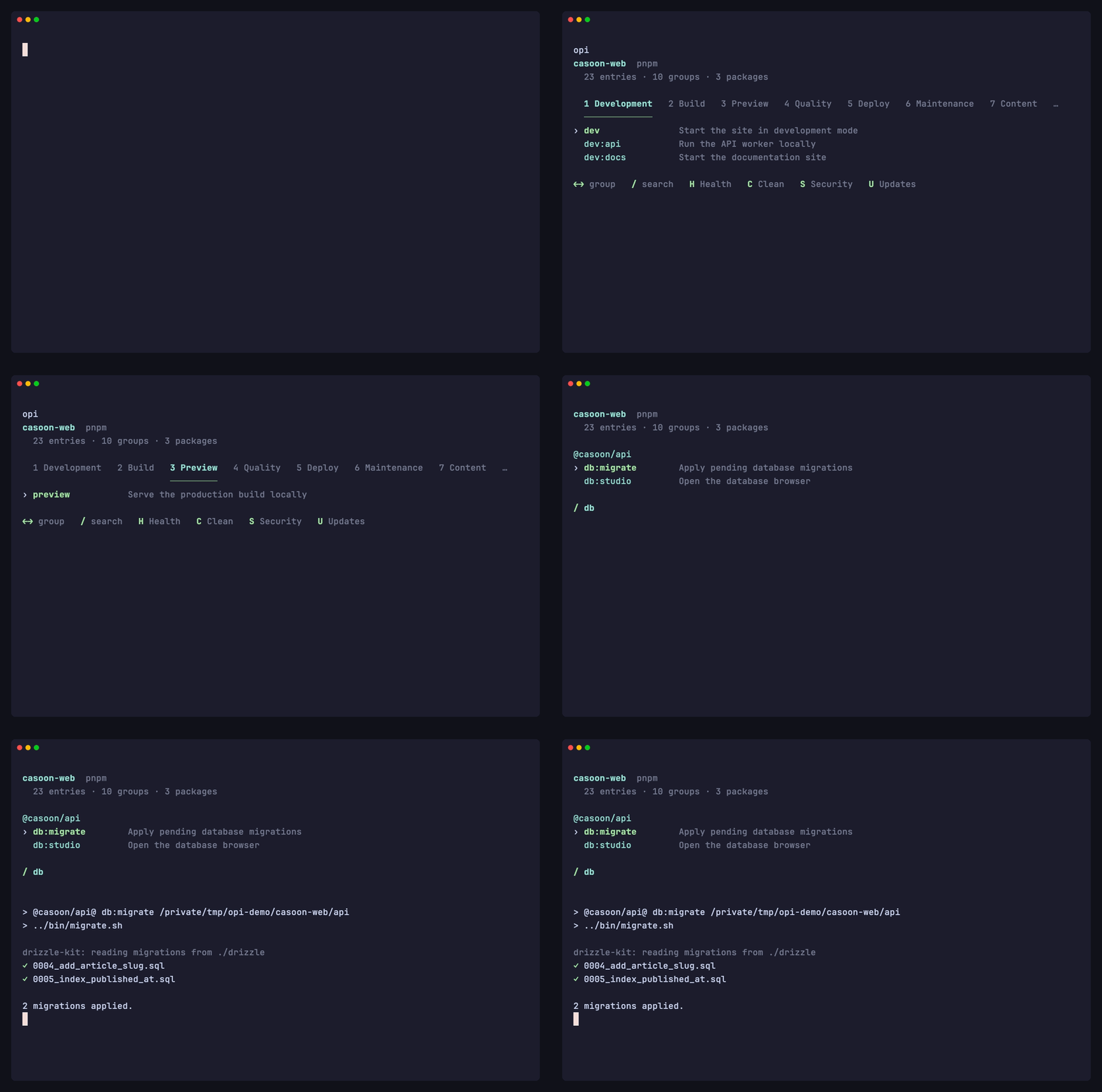
Its primary job is to be a better `npm run`. The start screen shows the
project's scripts — grouped by prefix, labelled from `scripts-info`, with the
package manager detected rather than typed:
```
astro-v7-workspace pnpm
12 entries · 4 groups
Development
› dev Startet die Starter-App im Dev-Modus
dev:blog Startet die Blog-App im Dev-Modus
Build
build Baut Starter- und Blog-App
build:blog Baut die Blog-App
Preview
preview Vorschau des Starter-Builds
Quality
check Prüft das Repo mit Biome
check:fix Behebt Lint- und Formatfehler
```
`Enter` runs the highlighted script. That is the shortest path, and nothing is
placed in front of it. A list taller than the terminal scrolls, and `/` filters
it as you type — in a monorepo that is the difference between scrolling past
thirty entries and typing three letters.
Past **15 entries or 5 groups** the groups move into a row of tabs and only the
active one's entries are listed, because a heading per group over thirty-odd
scripts is taller than the terminal:
```
casoon-web pnpm
43 entries · 10 groups · 3 packages
1 Development 2 Build 3 Preview 4 Quality … │ 8 Packages
─────────────
› dev Startet die Homepage
dev:homepage Startet die Homepage
dev:insights Startet Insights
dev:webcheck Startet Webcheck
←→ group / search H Health C Clean S Security U Updates
```
A workspace's packages share the last tab rather than taking one each — 52 of
them against 6 action groups is a tab row nobody can use — and a divider marks
it, because the other tabs name what you are doing and that one names where.
The first group is preselected and the cursor is on its first entry, so `opi ↵`
still starts `dev` — the tabs hide what is not needed rather than asking for a
choice first. `←` `→`, `Tab` and the digits switch groups; `/` searches **all**
of them, which is the case the tabs are worst at. `opi | cat` lists every group
as before: nothing on the other end of a pipe can press a key.
Three speeds, all backed by the same task model:
```bash
opi # navigate: ↓ ↓ Enter
opi # filter: /dep ↵
opi dev # direct, no interface
```
Arguments after the name go to the script: `opi build --verbose`.
In a monorepo each workspace member's scripts appear under the member's name —
only those the root does not already define, since the root's script usually
wraps them and wins the name anyway. Where both exist, a bare name runs the
root's and `blog/dev` runs the member's:
```bash
opi dev # the root's dev
opi blog/dev # the blog package's dev
```
`opi` also works from anywhere inside a project, not only from the directory
holding `package.json`.
The script replaces the `opi` process, so `Ctrl-C` reaches your dev server
rather than killing a wrapper, and the script's exit code is what your shell
sees — `opi build && …` works.
## More than one kind of project
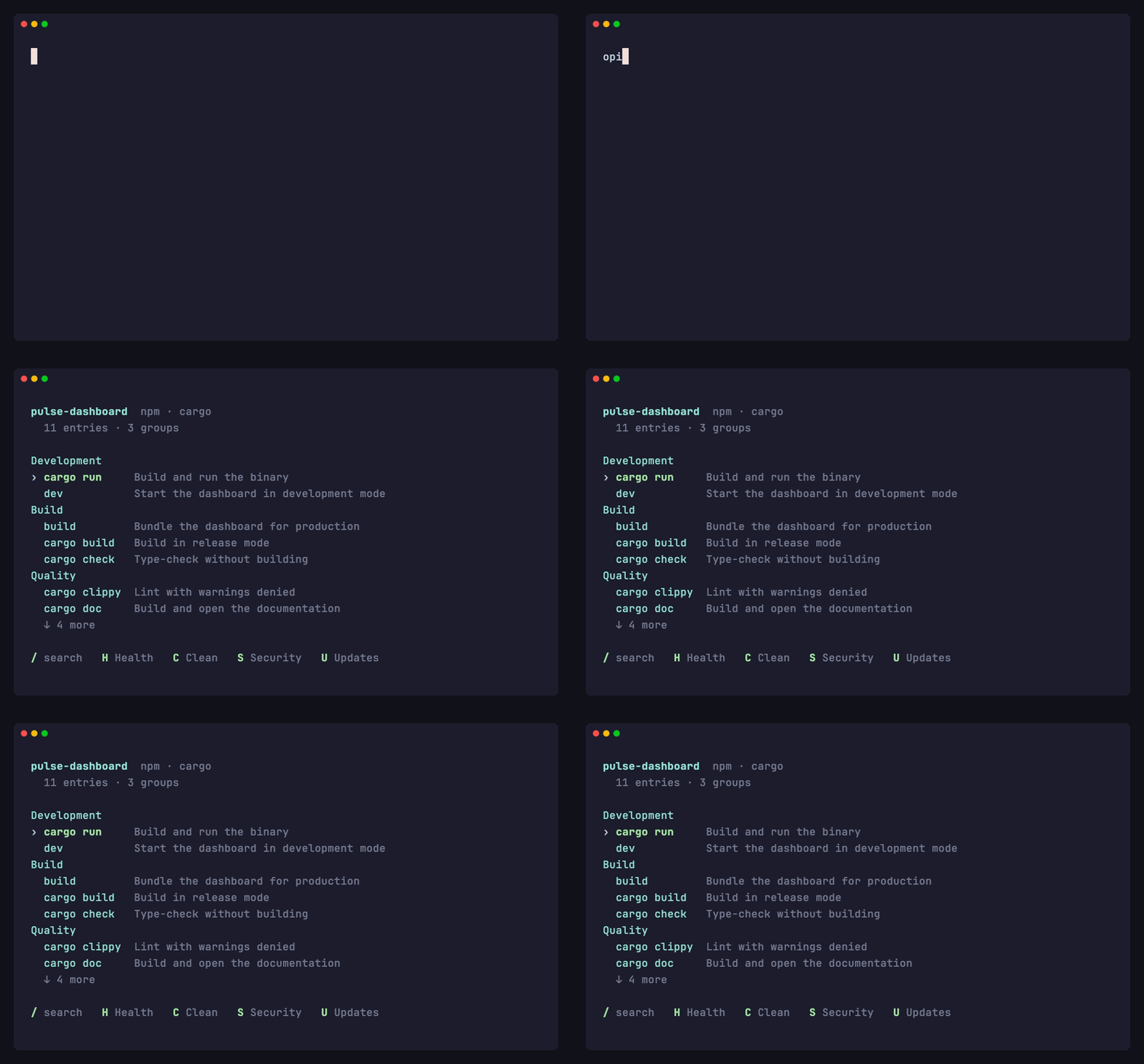
A repository can be several things at once, and `opi` does not make it choose.
`package.json` and `Cargo.toml` are both read, and their commands share one
list:
```
llmux-dashboard npm · cargo
Development
cargo run Build and run the binary
dev
Build
build
cargo build Build in release mode
cargo check Type-check without building
```
Every area follows: `cargo fmt --check`, `cargo clippy`, `cargo rustdoc` and
`cargo test` run alongside the npm checks, `cargo audit` and `cargo outdated`
answer for the crates where they are installed, and `target/` is listed with
the build artefacts. A repository carrying both manifests gets a section each
rather than one merged list — `Dependencies` and `Dependencies (rust)` —
because "safe to take" orders within an ecosystem and not across two.
Both are external cargo subcommands rather than part of the toolchain, so
where one is missing `opi` says so along with the `cargo install` that adds
it, instead of leaving a section that reads like "nothing found".
In a Cargo workspace `opi` works on the workspace even when started inside one
of its crates — that is where `target/` lives and where the checks reach every
member. `cargo run` still follows you: it is offered in a binary crate, because
that is where cargo would start it.
## Saying more about a script
Optional, and only ever refinement — a project with neither `opi` nor
`scripts-info` still gets a usable list, which is the whole point.
```json
{
"scripts": { "dev": "astro dev", "deploy": "wrangler deploy" },
"scripts-info": { "dev": "Start development server" },
"opi": {
"scripts": {
"dev": { "favorite": true },
"deploy": { "group": "Deployment", "confirm": true }
}
}
}
```
| `description` | Wins over `scripts-info`, which stays valid for `nr` |
| `group` | Replaces the group the script's name implies |
| `favorite` | Lifts it out of its group, to the top |
| `confirm` | Asks before running it; `opi --yes <script>` answers in advance |
A `confirm` script refuses to run without a terminal rather than assuming yes —
otherwise the protection would vanish in exactly the case it exists for.
## The other areas
Each is a hotkey in the list and a flag on the command line. Never a bare word:
`health`, `clean` and `release` are script names in real projects, and the bare
word stays theirs.
| `H` | `opi --health` | Runs every check the project's tools can answer, concurrently |
| `S` | `opi --security` | Secret scan, a parsed dependency audit per ecosystem, signatures, release age and licenses |
| `U` | `opi --updates` | What is outdated, split into safe and major — and the offer to take it |
| `C` | `opi --clean` | Removable artefacts, with what each one costs |
| | `opi --check commit` | The fast checks, before you commit |
| | `opi --check push` | Everything plus the build, on a clean tree that is not behind upstream |
| | `opi --check release` | Everything plus the build, a clean tree and an untagged version |
| | `opi --hooks` | Installs `opi --check push` as the pre-push hook |
```
astro-v7-workspace health
✓ Lint & format 0.2s biome
✗ Secrets 1.0s nosecrets
✓ TypeScript (@astro-v7/starter) 5.2s astro
✓ TypeScript (@astro-v7/blog) 5.4s astro
```
`opi` reimplements none of this. It detects which tool a project depends on —
Biome, ESLint, Prettier, `tsc`, `astro check`, Vitest, Jest, fallow, Knip, a
secret scanner, `cargo` — runs it, and relays what came back. In a workspace the
checks run per member, in the member, because that is where the tools and their
config live.
Output is parsed only where the format is documented (`audit --json`,
`outdated --json`, `audit signatures --json`, `licenses list --json`). Everything else is relayed whole and capped at twenty lines,
with the command to see the rest: a parser that guesses at a tool's output
breaks on that tool's next release.
There is no health score. A composite number stops meaning anything within
weeks; what a failing tool actually said does not.
### Taking the updates
`--updates` can apply what it found, and then runs the commit checks on what
comes back — update, install, check, what is red now. That chain is the reason
the action exists; saving you from typing `pnpm update` would not have been.
The choice offered is **not** safe against major. That is how the list is
ordered, and it is the wrong question for an action: in a project whose ranges
are exact or `~`, `pnpm update` moves none of what the list calls safe. The
real choice is staying inside the declared ranges against raising them, and
each line carries its own count and disappears when that count is zero.
`opi` writes nothing itself. It calls the package manager with a list of names
— no `package.json`, no lockfile, no `pnpm-workspace.yaml`. Majors are never in
that list. Raising ranges is offered for pnpm only, because npm has no command
that keeps the operator: `npm install x@1.1.1` turns an exact `2.1.2` into
`^2.1.3`, and an exact pin is a statement. Where two lockfiles disagree and no
`packageManager` field settles it, the offer is withheld and the finding named
instead.
## Design rules
- **Zero configuration.** `opi` must be useful in an unmodified repository. A
tool you have to configure first never gets started in someone else's project.
- **The project's own files are the only interface.** `package.json` and
`Cargo.toml` — no `opi.toml`, no second source of truth of `opi`'s own
making. `scripts`, optionally `scripts-info`, optionally an `opi` key for
refinement.
- **No task system of its own.** `opi` does not define tasks with their own
commands — that would put it in competition with npm scripts, `just`, `make`
and Taskfile for no gain.
- **Orchestration, not reimplementation.** `opi` is a UX layer over proven
tooling.
- **`opi` writes nothing.** Clean removes what you pick, updates are applied
by the package manager, and `opi --hooks` adds one line to the pre-push hook
without touching the rest. No manifest or lockfile is ever rewritten by
`opi` itself, and where a tool cannot do something cleanly it is not offered rather than
offered badly.
## Install
```bash
That downloads the release binary for your platform, checks it against the
published SHA-256 and puts it in `~/.local/bin` — `OPI_INSTALL_DIR` picks
another directory, `OPI_VERSION` another version. Binaries exist for macOS on
Apple silicon and Intel, and for Linux on x86-64 and arm64; the Linux ones are
static musl builds, so the distribution does not matter.
From the registry instead, which builds it here:
```bash
cargo install opi
```
**Unix only.** `opi` runs a script by replacing its own process with `exec`, so
`Ctrl-C` reaches the dev server rather than killing a wrapper, and its
interactive list drives termios directly. Windows offers neither, and a second
execution model that nothing exercises would be worse than an honest boundary.
Building on Windows fails with that message rather than producing a degraded
binary.
## Documentation
**[casoon.github.io/opi](https://casoon.github.io/opi/)** — installation, a
guide per area, the command line reference and the changelog, with the terminal
output captured from the binary.
The files below are the same documentation as it sits in the repository:
- [docs/project-state.md](docs/project-state.md) — what this is and where it stands
- [docs/architecture.md](docs/architecture.md) — the modules and how they fit
- [docs/constraints.md](docs/constraints.md) — the boundaries the implementation respects
- [docs/conventions.md](docs/conventions.md) — the rules future changes follow
- [docs/decisions.md](docs/decisions.md) — the decisions in force, and why
[demo/](demo/) holds the fixtures and the scripted scenes the recordings above
are made from, and says what has to be true for a recording to show `opi` rather
than the repository it was recorded in.
Terminal presentation comes from [runemark](https://github.com/casoon/runemark),
the shared presentation layer for these CLI tools.
## Name
`opi` is unrelated to [OdradekAI/opi](https://github.com/OdradekAI/opi), which
owns the `opi-*` crate namespace on crates.io. Installing both puts two `opi`
binaries in `~/.cargo/bin`.
## License
MIT ([LICENSE](LICENSE)).