
oly — Open Relay


Run any CLI like a managed service.
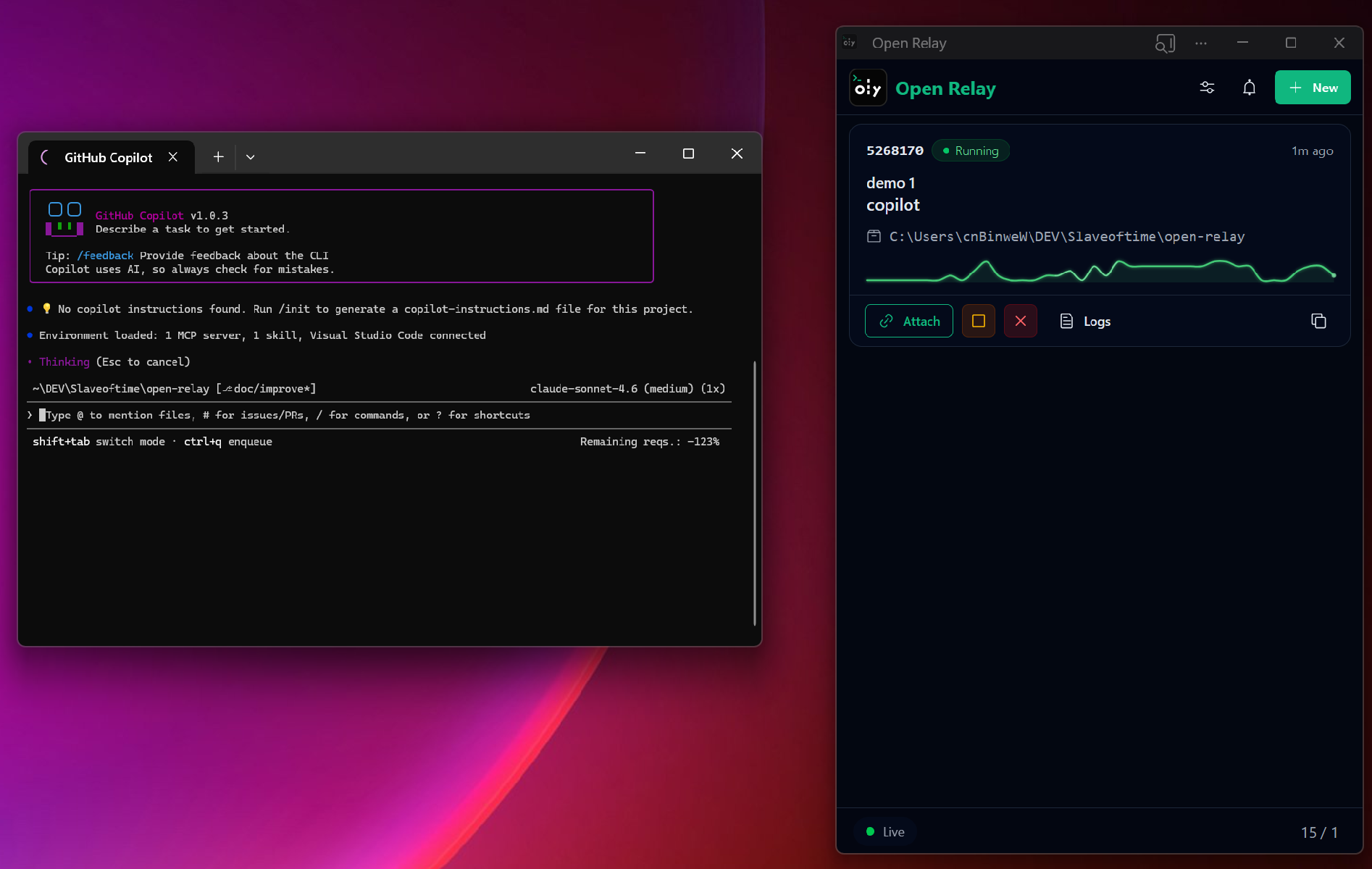
oly turns long-running and interactive CLI workflows into persistent, supervised sessions for humans and AI agents. Close the terminal, keep the process alive, get notified when input is needed, and jump back in from anywhere.
If this solves a real problem for you, give the repo a star so more people can find it.
For a full repository architecture map, see ARCHITECTURE.md. For the PTY/session internals specifically, see ARCHITECTURE_PTY.md. For edge cases, limitations, and operational notes, see ARCHITECTURE_NOTES.md.
The problem 😤
You start an agent or interactive CLI task. It runs for 20 minutes. Halfway through it hits a y/n prompt and just... sits there. You had to keep a terminal open, stay at your desk, babysit it.
That's over.
What oly does ⚡
- Turns interactive CLIs into managed, auditable sessions
- Owns agent sessions in a background daemon — closing your terminal changes nothing
- Replays buffered output when you reattach (no lost context)
- Detects when input is likely needed and notifies you
- Lets you inject input without attaching (
oly send <id> key:enter) - Keeps auditable logs of everything
Who it's for
- People running AI coding agents that stall on prompts, permissions, or long-running work
- Anyone using interactive CLIs that should survive terminal closes, disconnects, or context switches
- Teams that want auditable logs and remote intervention instead of fragile ad-hoc shell sessions
Agent-supervises-agent 🤖 👀 🤖
You can run one agent to supervise another. When the supervisor hits something it's unsure about — or something that needs elevated permission — it escalates to you. You decide whether to approve, modify, or abort. You're still in the loop, just not watching.
Install 📦
Supported platform
- macOS: Apple Silicon (
arm64)- Linux: x86_64 / AMD64
- Windows: x86_64 / AMD64
Pre-built binaries
Download the latest release for your platform from the Releases page.
- macOS: Download
oly-macos-arm64.zip, unzip,chmod +x oly, and move to/usr/local/bin. - Linux: Download
oly-linux-amd64.zip, unzip,chmod +x oly, and move to/usr/local/bin. - Windows: Download
oly-windows-amd64.zip, unzip, and add to your PATH.
Quick start 🚀
The CLI is for both humans and AI agents.
If you only try one workflow, make it this one: start the daemon, launch a session detached, inspect logs, then send input only when needed.
# Start the daemon (once per boot, or add to your init)
# Launch an agent session and detach immediately
# Check what's running
# Peek at output without attaching
# Something needs your input — send it without a terminal
# Actually attach and drive it yourself
# Ctrl+D to detach anytime
# Stop it when done
Remote supervision 🌐
Access and manage sessions from a browser, with push notification support. Intervene from anywhere.
oly has no built-in network listener — deliberately. Expose it the way you control:
[anywhere] → [your auth gateway] → [tunnel] → [oly daemon, local IPC]
Put Cloudflare Access, Tailscale, or any auth proxy in front. Every action logged. Your rules. 🔒
Notification hooks 🔔
If the built-in OS notification is not enough, oly can also launch your own hook command on every delivered notification. This is useful for piping alerts into Slack wrappers, custom desktop automation, pagers, or supervisor scripts.
Set notification_hook in your config.json under the OLY_STATE_DIR state folder:
The hook is spawned fire-and-forget after local notification delivery. Arguments support placeholder substitution from the event payload:
{kind}{title}and{summary}(same title value){description}{body}{navigation_url}{node}{session_ids}{trigger_rule}{trigger_detail}
The same data is also exported as environment variables:
OLY_EVENT_KINDOLY_EVENT_TITLEOLY_EVENT_SUMMARY(same value asOLY_EVENT_TITLE)OLY_EVENT_DESCRIPTIONOLY_EVENT_BODYOLY_EVENT_NAVIGATION_URLOLY_EVENT_NODEOLY_EVENT_SESSION_IDSOLY_EVENT_TRIGGER_RULEOLY_EVENT_TRIGGER_DETAIL
Example:
Use quoted arguments if values may contain spaces. Hooks are best-effort: failures are logged, but they do not block session execution or notification delivery.
You can use this hook together with oly send for bidirectional communication.
Commands 📋
| Command | What it does |
|---|---|
oly daemon start |
Start background daemon |
oly start [--detach] [--disable-notifications] [--cwd DIR] <cmd> |
Launch session in PTY |
oly notify <enable|disable|suppress> <id> |
Toggle notifications for a running session |
oly ls |
Show sessions (supports search/status/time filters) |
oly attach <id> |
Reattach (replays buffer first) |
oly logs <id> [--tail N] [--wait-for-prompt] [--timeout DURATION] |
Read logs without attaching |
oly send <id> [CHUNK]... |
Send input without attaching |
oly stop <id> |
Graceful stop |
Federation commands
| Command | What it does |
|---|---|
oly api-key add <name> |
Create API key on primary (printed once) |
oly api-key ls |
List API key labels on primary |
oly api-key remove <name> |
Revoke API key on primary |
oly join start --name <name> --key <key> <url> |
Connect this daemon as a secondary |
oly join ls |
List saved join configs on this daemon |
oly join stop --name <name> |
Disconnect and remove a saved join config |
oly node ls |
List currently connected secondary nodes on primary |
All session commands support --node <name> to target a connected secondary.
Detach from an attached session: Ctrl-] then d.
When using oly logs --wait-for-prompt, --timeout accepts plain milliseconds for compatibility or basic units like 250ms, 10s, 5m, and 1h. The default is 30s, and 0 waits forever.