
ndl - needle



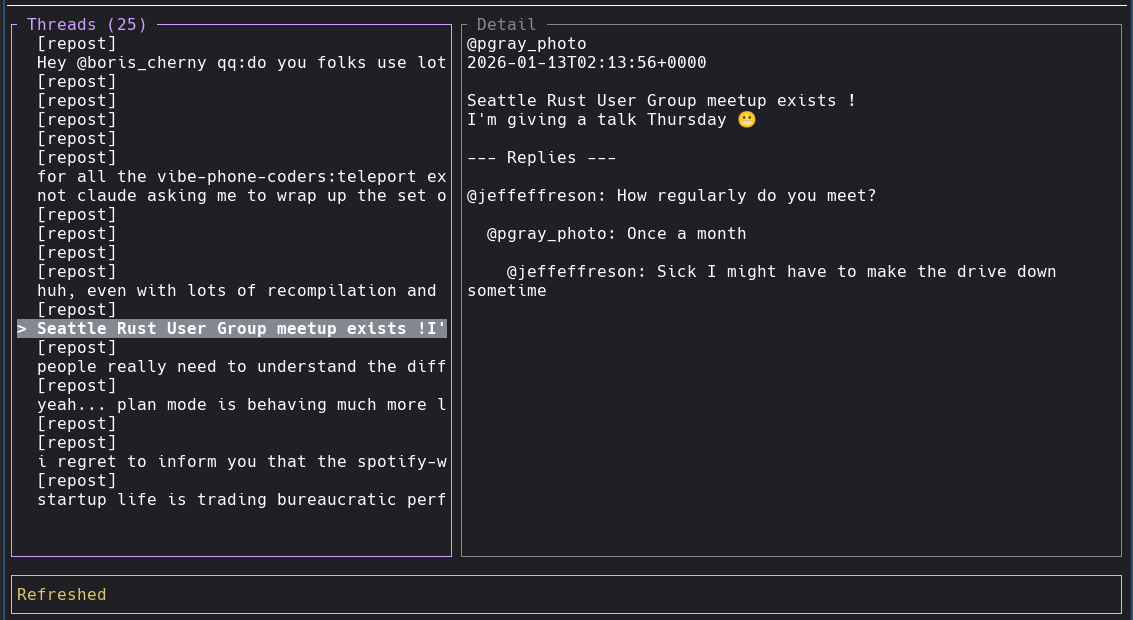
A minimal multi-platform TUI client for Threads and Bluesky - stay aware of notifications without the distractions of a full social media interface.
Why needle?
Social media notifications can pull you out of flow state. needle lets you:
- Monitor your feed in a lightweight terminal interface
- Quickly check and respond without opening a browser
- Keep your focus while staying connected
Features
- Multi-platform support - Use both Threads and Bluesky simultaneously
- Platform switching - Toggle between platforms with
Tabkey - Cross-posting - Post to all platforms at once with
Shift+P - Vim-style navigation -
h,j,k,lfor intuitive movement - Two-panel layout - Threads list on left, detail view on right (swappable)
- Thread feed - View your threads with auto-refresh every 15 seconds
- Nested replies - See replies to threads, including replies-to-replies (2 levels deep)
- Quick replies - Respond to threads without leaving the terminal
- Post new threads - Create new posts directly from the terminal
- Media type indicators - Reposts, images, videos, and carousels clearly labeled
- Minimal footprint - Runs in a terminal, no Electron bloat
Project Structure
This is a Cargo workspace with two binaries and a shared library:
- ndl - The TUI client
- ndld - OAuth server for hosted authentication (keeps client_secret secure on server)
- ndl-core - Shared library for OAuth types and token exchange
Installation
From source
On Linux, the build uses wild linker for faster builds.
Install with cargo install wild-linker and ensure clang is available.
Configuration
needle supports both Threads and Bluesky. You can configure one or both platforms.
Threads Authentication
See OAUTH.md for detailed Threads API setup instructions.
Default: Hosted Auth
By default, ndl uses the hosted auth server at ndl.pgray.dev - no setup required:
# or
Bluesky Authentication
Bluesky uses username/password authentication:
You'll be prompted for:
- Identifier: Your handle (e.g.,
user.bsky.social) or email - Password: Your password or an app-specific password (recommended)
Credentials are saved to ~/.config/ndl/config.json:
Custom Auth Server
To use a different auth server:
# Via environment variable
# Or add to ~/.config/ndl/config.json:
# "auth_server": "https://your-ndld-server.com"
Local OAuth
If you have your own Threads API credentials and want to run OAuth locally:
# Set empty endpoint to disable hosted auth
Logout
Version
Config is stored at ~/.config/ndl/config.json.
Running the Auth Server (ndld)
If you want to host your own OAuth server:
# Must match Threads app redirect URI
# Optional, defaults to 8080
With Let's Encrypt (ACME)
Automatic TLS certificates via Let's Encrypt:
# Optional, for cert persistence
Set NDLD_ACME_STAGING=1 to use Let's Encrypt staging environment for testing.
With Manual TLS
Docker Compose (Recommended)
# Edit .env with your credentials
# Create data directory with correct ownership (ndld runs as UID 10001)
Docker
For Let's Encrypt in Docker:
# Create data directory with correct ownership (ndld runs as UID 10001)
For manual TLS in Docker:
The server exposes:
GET /- Landing page with project infoGET /privacy-policy- Privacy policyGET /tos- Terms of servicePOST /auth/start- Start OAuth sessionGET /auth/callback- OAuth callback (configure in Threads app)GET /auth/poll/{session_id}- Poll for auth completionGET /health- Health check
Usage
When you have multiple platforms configured, ndl automatically enters multi-platform mode. You'll see platform indicators in the status bar (e.g., [Threads] Bluesky) showing which platform is currently active (in brackets).
Multi-Platform Mode
- Switch platforms: Press
Tabto toggle between configured platforms - Cross-post: Press
Shift+Pto post to all platforms simultaneously - Per-platform timelines: Each platform maintains its own timeline and state
- Selective login: You can use just Threads, just Bluesky, or both
Keybindings
| Key | Action |
|---|---|
j/Down |
Move down |
k/Up |
Move up |
h/Left |
Focus threads panel |
l/Right |
Focus detail panel |
t |
Swap panel positions |
p |
Post new thread |
P |
Cross-post to all platforms |
r |
Reply to selected thread |
R |
Refresh feed |
Tab/] |
Switch platform (multi-platform) |
Enter |
Select / focus detail |
Esc |
Back / cancel |
? |
Toggle help |
q |
Quit |
Roadmap
Core Features
- OAuth login with auto-generated localhost certs
- Hosted OAuth server (ndld) for secure credential management
- View threads feed
- View thread details with nested replies
- Reply to threads
- Post new threads
- Auto-refresh (15s)
Multi-Platform Support
- Platform abstraction layer
- Bluesky integration (AT Protocol)
- Platform switching UI
- Cross-posting to multiple platforms
- Per-platform state management
- Session persistence for Bluesky
- Full post text extraction for Bluesky
- Bluesky reply support with proper threading
Future Enhancements
- Like/repost actions
- Media preview (images)
- More platforms (Mastodon, etc.)
Privacy
ndl and ndld do not track, collect, or store any personal information. See PRIVACY.md for details.
License
MIT
References
APIs & Protocols
- Threads API docs
- AT Protocol - Bluesky's underlying protocol
- Bluesky API docs
- ATrium - Rust AT Protocol SDK