
ndl - needle
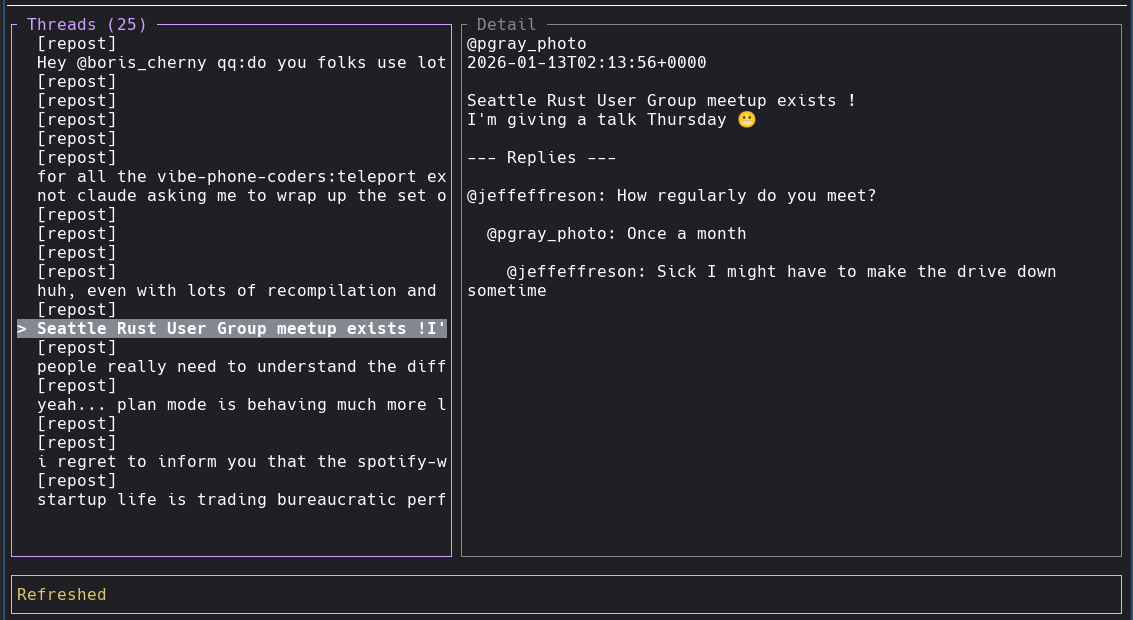
A minimal TUI client for Threads - stay aware of notifications without the distractions of a full social media interface.
Why needle?
Social media notifications can pull you out of flow state. needle lets you:
- Monitor your feed in a lightweight terminal interface
- Quickly check and respond without opening a browser
- Keep your focus while staying connected
Features
- Vim-style navigation -
h,j,k,lfor intuitive movement - Two-panel layout - Threads list on left, detail view on right (swappable)
- Thread feed - View your threads with auto-refresh every 15 seconds
- Nested replies - See replies to threads, including replies-to-replies (2 levels deep)
- Quick replies - Respond to threads without leaving the terminal
- Post new threads - Create new posts directly from the terminal
- Media type indicators - Reposts, images, videos, and carousels clearly labeled
- Minimal footprint - Runs in a terminal, no Electron bloat
Project Structure
This is a Cargo workspace with two binaries and a shared library:
- ndl - The TUI client
- ndld - OAuth server for hosted authentication (keeps client_secret secure on server)
- ndl-core - Shared library for OAuth types and token exchange
Installation
From source
On Linux, the build uses wild linker for faster builds. Install with cargo install wild-linker and ensure clang is available.
Configuration
needle requires a Threads API access token. See OAUTH.md for detailed setup instructions.
Default: Hosted Auth
By default, ndl uses the hosted auth server at ndl.pgray.dev - no setup required:
Custom Auth Server
To use a different auth server:
# Via environment variable
# Or add to ~/.config/ndl/config.toml:
# auth_server = "https://your-ndld-server.com"
Local OAuth
If you have your own Threads API credentials and want to run OAuth locally:
# Set empty endpoint to disable hosted auth
Logout
Version
Config is stored at ~/.config/ndl/config.toml.
Running the Auth Server (ndld)
If you want to host your own OAuth server:
# Must match Threads app redirect URI
# Optional, defaults to 8080
With Let's Encrypt (ACME)
Automatic TLS certificates via Let's Encrypt:
# Optional, for cert persistence
Set NDLD_ACME_STAGING=1 to use Let's Encrypt staging environment for testing.
With Manual TLS
Docker Compose (Recommended)
# Edit .env with your credentials
# Create data directory with correct ownership (ndld runs as UID 10001)
Docker
For Let's Encrypt in Docker:
# Create data directory with correct ownership (ndld runs as UID 10001)
For manual TLS in Docker:
The server exposes:
GET /- Landing page with project infoGET /privacy-policy- Privacy policyGET /tos- Terms of servicePOST /auth/start- Start OAuth sessionGET /auth/callback- OAuth callback (configure in Threads app)GET /auth/poll/{session_id}- Poll for auth completionGET /health- Health check
Usage
Keybindings
| Key | Action |
|---|---|
j/Down |
Move down |
k/Up |
Move up |
h/Left |
Focus threads panel |
l/Right |
Focus detail panel |
t |
Swap panel positions |
p |
Post new thread |
r |
Reply to selected thread |
R |
Refresh feed |
Enter |
Select / focus detail |
Esc |
Back / cancel |
? |
Toggle help |
q |
Quit |
Roadmap
- OAuth login with auto-generated localhost certs
- Hosted OAuth server (ndld) for secure credential management
- View threads feed
- View thread details with nested replies
- Reply to threads
- Post new threads
- Auto-refresh (15s)
- Like/repost actions
- Media preview (images)
Privacy
ndl and ndld do not track, collect, or store any personal information. See PRIVACY.md for details.
License
MIT
References
- Threads API docs
- ratatui - TUI framework
- initial human written readme