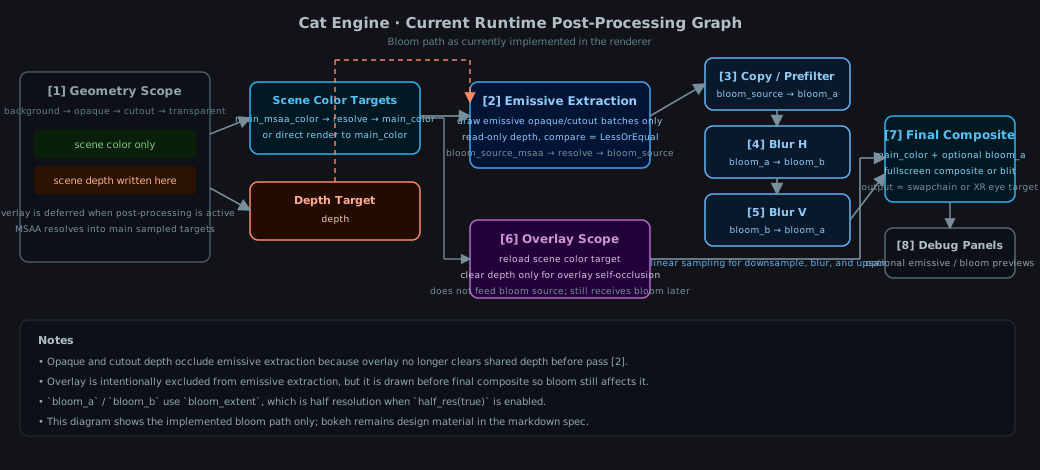
# Render phases (render graph)
Cat Engine records rendering in a single dynamic-rendering scope, but it’s structured as an
explicit sequence of phases.
Think of this as a small “render graph”: `VisualWorld` builds per-phase draw orders/batches, and
`VulkanoRenderer` records those phases into a command buffer.
This document describes what the phases are and where they live in the code.
## Where this is implemented
- Phase preparation (CPU-side):
- `VisualWorld::prepare_draw_cache()` partitions instances and builds draw batches.
- `VisualWorld::prepare_transparent_multi_draw_cache_for_eye(...)` sorts multi-layer
transparency per camera/eye.
- Command buffer recording (GPU-side):
- `VulkanoRenderer` builds a command buffer via `build_draw_batches_command_buffer(...)`.
- The actual per-phase drawing helpers are on `VulkanoState` (see `record_*_draws(...)`).
## Phase list (current)
The phases are ordered to balance correctness and performance:
1. **Background** (instanced)
- Uses the transparent pipeline variant (no depth write).
- Intended for skyboxes / distant backgrounds that should never occlude foreground.
2. **Background occluded+lit** (instanced)
- Uses the opaque pipeline variant (depth write ON) so the background can self-occlude.
After both background phases, the renderer clears depth so the background can’t occlude the
foreground.
3. **Opaque** (instanced)
- The main fast path: depth test ON, depth write ON.
- `VisualWorld` groups instances into `DrawBatch` ranges so each batch can be drawn with a
single instanced draw.
4. **Cutout** (instanced, alpha-tested)
- For “binary transparency” materials (foliage, sprites with hard alpha edges).
- Uses a cutout pipeline variant.
5. **Transparent single-layer** (instanced)
- For transparency that doesn’t need correct stacking with other transparent surfaces.
- Depth write is OFF so later transparent draws can still blend.
- Still batched/instanced for speed.
6. **Transparent multi-layer** (sorted back-to-front)
- For stacked transparency that must blend correctly.
- `VisualWorld` sorts instances back-to-front *per eye* (ordering depends on camera).
- The renderer still groups by pipeline/material/mesh/texture for binding efficiency, but
draws each instance one-by-one in sorted order for correct alpha blending.
7. **Overlay** (instanced)
- A separate pass drawn *after* all other phases.
- **Scope: gizmos and debug overlays only.** Transform gizmos, selection outlines, raycasting
debug helpers — things that must always appear on top of the scene by design.
- UI layout panels, inspector panels, text, buttons, and other application UI are **not**
overlay. They belong in the opaque or transparent phases so that 3D scene geometry can
occlude them naturally.
- The renderer clears the depth attachment right before the overlay phase so overlay
instances draw on top of the scene.
- Overlay is **not** combined with background/opaque/cutout/transparent; it has its own
draw lists and batches.
- Stencil clipping (overflow: hidden) does **not** apply to the overlay phase. Gizmos
are not clipped by UI scroll regions. Stencil clip applies to opaque and transparent.
Post-processing note:
- In the current non-post-process path, this means overlay is always-on-top and self-occludes
against other overlay geometry only.
- In the current post-process path, opaque and cutout scene depth occlude the emissive
extraction pass, while overlay remains visible in the main color path so it can be affected
by bloom.
- In that post-process behavior, overlay is not part of the emissive-source extraction even if
its final color later receives bloom during composite.
## How instances get classified
At draw-cache build time, `VisualWorld` partitions instances using instance flags (e.g.
`background`, `background_occluded_lit`, `transparent_cutout`, and transparency derived from
opacity/color).
At a high level:
- Background instances go into background draw lists (excluded from foreground lists).
- Overlay instances go into the overlay draw list (excluded from all other lists).
**Only attach `OverlayComponent` to gizmos and debug visuals.**
- Cutout instances go into the cutout list.
- Foreground opaque instances go into the opaque list. **UI panels and layout elements belong here.**
- Foreground transparent instances are split into:
- single-layer (instanced), or
- multi-layer (sorted per eye). **Transparent UI (glass panels, fades) belongs here.**
## `OverlayComponent` — correct and incorrect uses
| Transform gizmo rings/axes | Overlay ✓ | Must stay on top of scene |
| Selection outline | Overlay ✓ | Debug/editor helper |
| Inspector panel | Opaque ✗→✓ | Should be occluded by 3D geometry |
| World panel | Opaque ✗→✓ | Should be occluded by 3D geometry |
| Layout quads / text / buttons | Opaque or transparent ✗→✓ | Same |
| GLTF visualization node | Opaque ✗→✓ | Debug mesh, not always-on-top |
## Notes
- These are *not* Vulkan “render passes” in the classic sense; the engine uses dynamic rendering and
records all phases inside one rendering scope.
- The exact pipeline state (depth write, blending, alpha test) is encoded in the per-phase pipelines
used by the `record_*_draws` helpers.