
mirador





An opinionated personal dashboard for your terminal: world clocks, a calendar, weather, a real task list, notes, a market watchlist, and live CPU and network charts, laid out how you want them.
It is built for one job — to sit in a terminal tab you leave open all day and glance at. That single constraint drives every decision below: nothing blinks, nothing shimmers, and nothing is designed to pull you back to it.
A mirador is a lookout — the tower you climb to see everything at once.
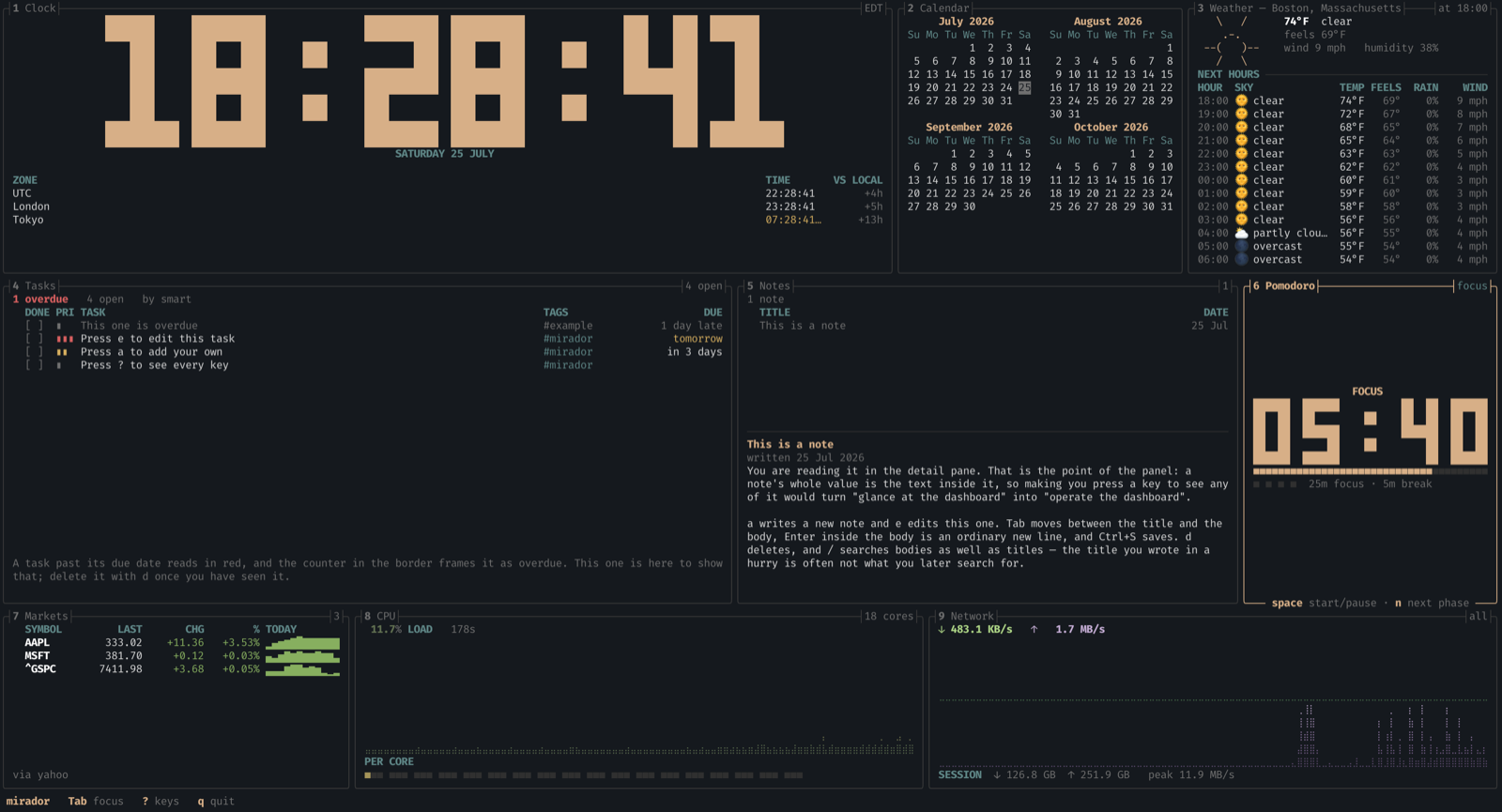
All nine panels on a wide terminal, on a first run — the tasks and the note are the examples mirador seeds for you. The pomodoro panel has focus, which is why its frame is lit and its key hints are in its bottom border; every other panel is dimmed. Every screen in this README is a real capture, not a mock-up.
Why
There are good terminal dashboards already, but the task panels in them tend to be flat checklists. mirador treats the to-do list as a first-class feature: due dates, priorities, notes, tags, and full editing without leaving the dashboard. Everything is stored in a plain TOML file you can hand-edit or keep in git.
No accounts. No API keys. No telemetry. Weather comes from Open-Meteo, which is free and key-less.
Install
From crates.io, if you have Rust:
Without Rust, on macOS or Linux:
|
and on Windows:
irm https://github.com/jchultarsky/mirador/releases/latest/download/mirador-installer.ps1 | iex
Both fetch the right archive for your platform, check it against its published checksum, and unpack the binary. If you would rather read the script before running it, it is an ordinary file at that URL, and the manual route is below.
They also install mirador-update beside it, so a later upgrade is:
It asks GitHub what the newest release is and installs it if that is newer than
what you have. It runs only when you run it — mirador itself never checks
for updates, never phones home, and does not know this program exists. If you
installed with cargo install or from source, upgrade the same way you
installed; the updater is only for the two installers above.
From source:
Or download a pre-built binary from the
latest release.
Every archive carries a .sha256 beside it, so verify it before running. On
macOS:
|
and on Linux:
|
Either prints … OK and exits 0, or prints FAILED and exits 1. The grep .
drops a trailing blank line that the checksum files are written with; without
it the command still verifies correctly but adds WARNING: 1 line is improperly formatted, and a warning printed next to a checksum is exactly the
wrong thing to make someone squint at.
On Windows, print the hash and compare it with the .sha256 file beside the
archive:
Get-FileHash .\mirador-x86_64-pc-windows-msvc.zip
Get-Content .\mirador-x86_64-pc-windows-msvc.zip.sha256
| Platform | Archive |
|---|---|
| macOS, Apple silicon | mirador-aarch64-apple-darwin.tar.gz |
| macOS, Intel | mirador-x86_64-apple-darwin.tar.gz |
| Linux x86-64 | mirador-x86_64-unknown-linux-gnu.tar.gz |
| Windows x86-64 | mirador-x86_64-pc-windows-msvc.zip |
Requires Rust 1.95 or newer to build from source.
Windows has been run and works — installed with the PowerShell one-liner
above, in the default Windows terminal. It is still the least-travelled of the
three: macOS and Linux are used daily and Windows has been checked rather than
lived in, so a report of something off there is genuinely useful. Windows on
ARM is deliberately absent: ring, reached through ureq's TLS, does not
build for it.
Quick start
On first run it writes a commented config file, lays out every panel, and seeds
the task list and notes with a few examples so nothing starts blank. The
examples are ordinary entries — they explain the keys and then you delete them
with d. They are seeded only when there is no file yet, so once you clear
them they stay cleared.
To find the config:
Edit [weather].location to your own city and you are done. Nothing else is
required: no account, no API key, no environment variables.
Remembered settings
Some settings you change with a keystroke are remembered across restarts:
| Setting | Key | Panel |
|---|---|---|
| Weather units | u |
Weather |
| Task sort order | s |
Tasks |
| Whether completed tasks show | c |
Tasks |
| Seconds on the clock | s |
Clock |
| Pomodoro durations | + / - |
Pomodoro |
| Watchlist symbols | a / d |
Markets |
| Which panels are shown | w |
— |
| Panel sizes | Ctrl+arrow |
— |
They go to two different places, and the split is deliberate.
Anything to do with [layout] is written back into your config — which
panels exist, and how wide they are. That is the part of the file you actually
read and curate, so a change you make with w has to show up there or your
config would end up describing a dashboard nobody is looking at.
The edit is surgical, never a reserialise: mirador rewrites the one line it has
to and leaves your comments, spacing and ordering exactly as they were. Adding
a panel is a one-line diff. If your [layout] is formatted in a way it cannot
edit confidently, it says so in the picker and changes nothing rather than
guessing — the failure mode is "that did not stick", not a mangled config.
Everything else goes to a small state file beside your tasks, and only what
you actually changed is written. Pressing u records the units and nothing
else, so editing any other value in your config still takes effect. Delete that
file and every remembered setting falls back to what the config says; it says
so at the top of itself, because a preference you cannot remember setting needs
an obvious way back.
Upgrading
A new widget will not appear in a config you already have. A config written by an earlier version lays out exactly the panels that existed when it was written, and nothing since. Leaving a panel out is a legitimate choice, so this cannot be an error and cannot be decided for you.
You get a notice on the right of the status bar naming what your layout does not place, and telling you which key fixes it:
mirador Tab focus ? keys q quit w panels 1 unused: pomodoro press w
It retires on your first keypress, because a dashboard you leave open all day
must not nag; ? keeps it in the help overlay. Press w and you get the
picker:
╭PANELS────────────────────────────────╮
│    ■ clocks                          │
│    ■ weather                         │
│    ■ todo                            │
│    ■ notes                           │
│    ■ stocks                          │
│    ■ calendar                        │
│  ▸ □ pomodoro                        │
│    ■ cpu                             │
│    ■ network                         │
│                                      │
│   written to your config on close    │
│   space toggle   esc close           │
╰──────────────────────────────────────╯
space toggles, ↑/↓ or j/k move, esc closes. A panel appears or
disappears the moment you toggle it, and the change is written to your config
when you close the dialog — as a one-line edit, with your comments untouched.
A new panel joins the row carrying the fewest panels; Ctrl+arrow moves the
space around afterwards, and that is written too.
The last panel cannot be switched off, because a layout with nothing in it is rejected at startup and would leave you with a config that will not open.
mirador --migrate-config is still there for keys renamed between versions,
and leaves a backup beside the original.
The panels
Eight widgets, each answering one question. Put the ones you want in the layout and drop the rest — an unused widget costs nothing but is also not built.
Tasks
The reason this project exists. Other terminal dashboards tend to render a to-do list as a flat checklist; this one has due dates, priorities, tags, notes, filtering and full editing without leaving the dashboard.
╭┤3 Tasks├───────────────────────────────────────────────────────────┤3 open├╮
│ 1 overdue   1 due today   3 open   by smart                                │
│   DONE PRI TASK                              TAGS                      DUE │
│   [ ]  ▮▮▮ Renew the domain                  #admin            2 days late │
│   [ ]  ▮▮  Reply to the design review        #work                   today │
│   [ ]  ▮   Read the ratatui layout docs      #rust              Fri 07 Aug │
│                                                                            │
│ Card on file expired; the registrar will not auto-renew.                   │
╰────────────────────────────────────────────────────────────────────────────╯
The selected task's note sits at the foot of the panel, so a one-line summary in the list does not mean losing the detail behind it. Priority reads as bars rather than colour alone, and an overdue task is red and counted in the header — the same fact twice, because colour is the first thing a terminal theme can take away from you.
smart sort is the default and means: unfinished first, then overdue, then by
priority, then by due date. s cycles to plain due, priority, created
or title when you want something simpler.
Notes
Free-form notes in a master-detail layout, the shape a mail client uses.
╭┤2 Notes├───────────────────────────────┤1├╮
│ 1 note                                    │
│   TITLE                              DATE │
│   Release checklist                ·25 J… │
│ ───────────────────────────────────────── │
│ Release checklist                         │
│ written 22 Jul 2026   edited 25 Jul 2026  │
│ Bump the version, run the four gates, tag │
│ v-something, and let CI build the three   │
╰───────────────────────────────────────────╯
The body is visible without pressing anything, which is the whole point: a
note's value is the text inside it, and making you press a key to see any of
it turns "glance at the dashboard" into "operate the dashboard". / searches
bodies as well as titles, because the title you wrote in a hurry is often not
what you later search for.
Clock and calendar
The first configured zone renders large; the rest become a table showing their
offset relative to that zone, which is the number you actually want when
scheduling across one. The calendar prints month grids in the shape cal
does, with today marked.
╭┤1 Calendar├───────────────────╮
│      July 2026                │
│ Su Mo Tu We Th Fr Sa          │
│           1  2  3  4          │
│  5  6  7  8  9 10 11          │
│ 12 13 14 15 16 17 18          │
│ 19 20 21 22 23 24 25          │
│ 26 27 28 29 30 31             │
╰───── n/p month · t today ─────╯
The calendar is deliberately offline — it reads no mail server and no account.
months sets how many sit across; a taller panel stacks more rather than
leaving a void, up to a year in view.
Weather
Current conditions and an hourly forecast from Open-Meteo,
which needs no key and no account. u switches between imperial and metric at
runtime, converting what is already on screen rather than re-fetching.
A failed refresh keeps the last reading and shows its age in amber rather than blanking the panel — weather two hours old is still useful, and an empty panel is not. Columns drop as the panel narrows, in the order that costs you least.
Markets
A watchlist with the last price, the day's change, and an intraday sparkline.
╭┤1 Markets├──────────────────────────────────────────────────────────────┤3├╮
│   SYMBOL         LAST       CHG        % TODAY                             │
│ ▸ AAPL         333.02    +11.36   +3.53% ▂▄▅▆▇█▇▇▇▇▇▇                      │
│   MSFT         381.70     +0.12   +0.03% ▄▃▅▇▆▇▆▆▇▆▆▃                      │
│   ^GSPC       7411.98     +3.68   +0.05% ▃▃▃▆▇▇▅▆▅▂▁▂                      │
│ via yahoo                                                                  │
╰─────────────────────── a add · d remove · r refresh ───────────────────────╯
a adds a symbol and d removes one, and those edits stick — the watchlist
is a data file rather than config, which is what lets the panel own it. See
Market data before filing a bug about HTTP 429.
Pomodoro
A focus timer, in the same block numerals the clock uses.
| Key | Action |
|---|---|
space |
Start or pause |
n |
Skip to the next phase |
r |
Put the current phase back to full |
+ / - |
Lengthen or shorten the phase you are in, by a minute |
Focus intervals are brass and breaks are moss, and the phase is spelled out above the numerals as well — colour alone is a bad way to tell someone whether they are meant to be working. A paused timer goes grey rather than blinking: this is a dashboard you leave open, and a flashing clock is the opposite of that. Pips along the bottom count the set, and the long break falls when they fill.
+ and - move the phase length and what is left of it together, so adding
a minute eighteen minutes into a focus interval does not rewind you to the
start. Changes last for the session; [pomodoro] decides where the timer
starts.
A chime is available and off by default, because a dashboard you leave open
all day has no business making noise you did not ask for. Set
[pomodoro].chime = true and each phase ends with the terminal bell — which
your terminal is free to render as a sound, a flash, or nothing, according to
settings you have already chosen.
mirador ships no audio library on purpose. Playing a sound file means linking your platform's audio stack, which on Linux means a C library and its dev headers on every machine that builds this. If you want a particular sound, name a player instead and it is run directly, with no shell in the way:
[]
= true
= ["afplay", "/System/Library/Sounds/Glass.aiff"]
If that program cannot be started, the panel says so where the durations usually sit. A notification you believe is working but is not is worse than none at all.
CPU and network
CPU shows average load, a moving history graph and a per-core meter row. Network shows receive and transmit rates as two graphs, plus a session total and the peak rate seen.
Both draw their history in braille, which packs two samples into every character cell and four levels into every row — twice the horizontal resolution of a block-element sparkline in the same space. The colour gradient runs vertically by magnitude, one colour per row, so the profile stays put as data scrolls: a graph left on screen all day changes colour when the load changes, not merely because time passed.
These two panels are the one thing this README will not show you in a code block. Braille is missing from several of the fonts GitHub falls back to, so the glyphs render at a width the surrounding box characters do not share and the panel tears itself apart. The screenshot at the top of this file shows them as they actually look. It is a real terminal, which is the only place the alignment is guaranteed.
Both buffers grow to fill the panel, so history is a floor on what is kept
rather than a cap on what a wider panel can draw.
Keys
| Key | Action |
|---|---|
Tab / Shift+Tab |
Move focus between panels |
1 – 9 |
Jump straight to a panel |
? |
Show all key bindings |
q / Ctrl+C |
Quit |
In the task panel:
| Key | Action |
|---|---|
j / k, ↑ / ↓ |
Move the selection |
g / G |
Jump to first / last |
Space |
Toggle done |
a |
Add a task |
e |
Edit the selected task |
d |
Delete (asks first) |
p / P |
Cycle priority forward / back |
s |
Cycle sort mode |
c |
Show or hide completed tasks |
/ |
Filter by title, tag or notes |
o |
Show the task file path |
In the add/edit form, Tab and Shift+Tab move between fields, Enter saves
and Esc cancels. While a form is open, global keys are suppressed, so typing
a q into a task title does not quit the dashboard.
Due dates
The due field accepts more than ISO dates:
| Input | Meaning |
|---|---|
2026-07-28 |
That date |
today, tomorrow, yesterday |
Relative to now |
mon, friday, sat |
The next such weekday, never today |
+3d, 3d, 2w, 1m, 1y |
An offset from today |
| (empty) | No due date |
Anything else is rejected with an explanation rather than silently guessed.
Configuration
One TOML file. Run mirador --print-config to see the fully commented default.
The layout is a grid of rows, where height and width are relative weights
rather than cell counts, so proportions hold at any terminal size:
[]
= [
{ = 30, = [
{ = "clocks", = 26 },
{ = "calendar", = 34 },
{ = "weather", = 40 },
] },
{ = 45, = [
{ = "todo", = 44 },
{ = "notes", = 30 },
{ = "pomodoro", = 26 },
] },
{ = 25, = [
{ = "stocks", = 40 },
{ = "cpu", = 30 },
{ = "network", = 30 },
] },
]
Widgets
| Widget | What it shows |
|---|---|
clocks |
Any number of world clocks, by IANA timezone |
weather |
Current conditions plus a 1–7 day forecast |
todo |
The task list, with full editing |
notes |
Free-form notes: a list of titles and dates above the note you are reading |
stocks |
A watchlist: last price, the day's change, and an intraday sparkline |
calendar |
Month grids in the shape cal prints, with today marked |
pomodoro |
A focus timer: phase, time left, progress, and the set so far |
cpu |
Average utilisation, a moving chart, and per-core meters |
network |
Receive and transmit rates as moving charts |
Market data
The watchlist reads a free, keyless endpoint. Two things follow from that, and they are worth knowing before you file a bug:
- Access is gated on your IP address, not on a key. Datacenter and VPN ranges are blocked wholesale, so the same build can work on your laptop and fail on a VPS. Persistent HTTP 429 is that, not a rate you can tune down. The data source is a swappable trait for exactly this reason.
- Polling is deliberately unhurried — no faster than once a minute, one symbol at a time. These services are free and unauthenticated, and a burst of parallel requests is what gets an address blocked for everyone behind it.
mirador ships no API key and never will: a key baked into a public binary is a shared secret, and its rate limit would be shared too. Prices are never written to disk, only the list of symbols.
Mouse
Click a panel to focus it, and scroll the wheel over a list or a calendar to move through it. Scrolling deliberately does not move focus, so running the wheel across the screen cannot take the keyboard away from what you were doing.
While mirador holds the mouse your terminal's own click-to-select-text stops
working; copying a value off the dashboard needs the terminal's override
modifier, which is Shift in most terminals and Option in macOS Terminal and
iTerm2. Set [general].mouse = false to keep ordinary selection instead.
Colours accept a name (red, light-blue), a hex string (#ff8800), or a
256-colour index (12). reset uses your terminal's own default.
An unknown widget name or a malformed colour is reported at startup with a message that says how to fix it, rather than being ignored.
Task file format
Tasks live in one TOML file — by default under your platform's data directory,
or wherever [todo].file points. Press o in the task panel to see the path.
[[]]
= 1
= "Publish 0.0.0 placeholder"
= "Reserve the crates.io name"
= "2026-07-28"
= "high" # high | medium | low | none
= ["mirador", "rust"]
= false
= "2026-07-25"
Writes are atomic — mirador writes a temporary file and renames it — so an interrupted save can never truncate your tasks.
Contributing
Bug reports, feature requests and pull requests are welcome. See CONTRIBUTING.md for the development workflow, and CODE_OF_CONDUCT.md for the ground rules.
Adding a widget means implementing the Panel trait, registering the name in
src/widgets/mod.rs, and documenting it here. Nothing else in the codebase
needs to know it exists.
Acknowledgements
mirador is a thin layer over other people's hard work. Ten direct dependencies, every one of them maintained by someone who did not have to.
ratatui deserves top billing. Every frame here is
ratatui: the layout solver, the buffer diffing that makes a redraw cheap
enough to leave running all day, the widget model that made Panel a
twenty-line trait instead of a framework. The border-embedded titles and hints
this project leans on are ratatui's block API being more flexible than it had
any obligation to be. It is the successor to
tui-rs by Florian Dehau, carried forward
by a community that kept it alive rather than letting it archive — and it
brings crossterm with it, which
is what makes the same binary work on macOS, Linux and Windows terminals.
| Crate | What it does here |
|---|---|
| ratatui | Every widget, layout and redraw |
| crossterm | Terminal control, key and mouse events |
| jiff | Dates, IANA timezones, the "2 days late" arithmetic |
| sysinfo | CPU and network counters, per platform |
| ureq | Blocking HTTP for weather and quotes |
| serde + toml + serde_json | Config, tasks and notes as hand-editable TOML; JSON from the APIs |
| anyhow | Error context that survives to the message a user reads |
| dirs | Finding the right config and data directory per platform |
| unicode-width | Measuring text in display cells, without which every table misaligns |
unicode-width is worth singling out: measuring chars() instead of display
cells is a bug this project shipped once, and one emoji is enough to slide
every column after it under the wrong header.
Services
Open-Meteo provides the weather, free and without an API key or an account, which is the only reason the weather panel can exist in a tool that refuses to bundle credentials. Their terms are generous to open source and they deserve the traffic; if you build on them at scale, pay them.
Market data comes from Yahoo Finance's public chart endpoint. It is not a
documented API and mirador treats it accordingly — one request per symbol, no
faster than once a minute, never persisted to disk. QuoteSource is a trait
so it can be replaced when it inevitably changes.
Prior art
Techniques were taken deliberately from projects that solved these problems
first, and are described in CLAUDE.md where they are implemented:
- btop and its ancestor bpytop — the braille level table, and the insight that a gradient should run vertically by magnitude so a graph does not shimmer as data scrolls. The CPU and network panels are wearing their ideas.
- clock-tui — run-length row encoding for block numerals, which turns thirteen glyphs and free integer scaling into about twenty lines.
- gitui, lazygit and ratatui's own tutorial — focus by dimming the unfocused rather than brightening the focused, hints in the bottom border, the jump key in the title.
License
MIT. See LICENSE.