
Minion Engine
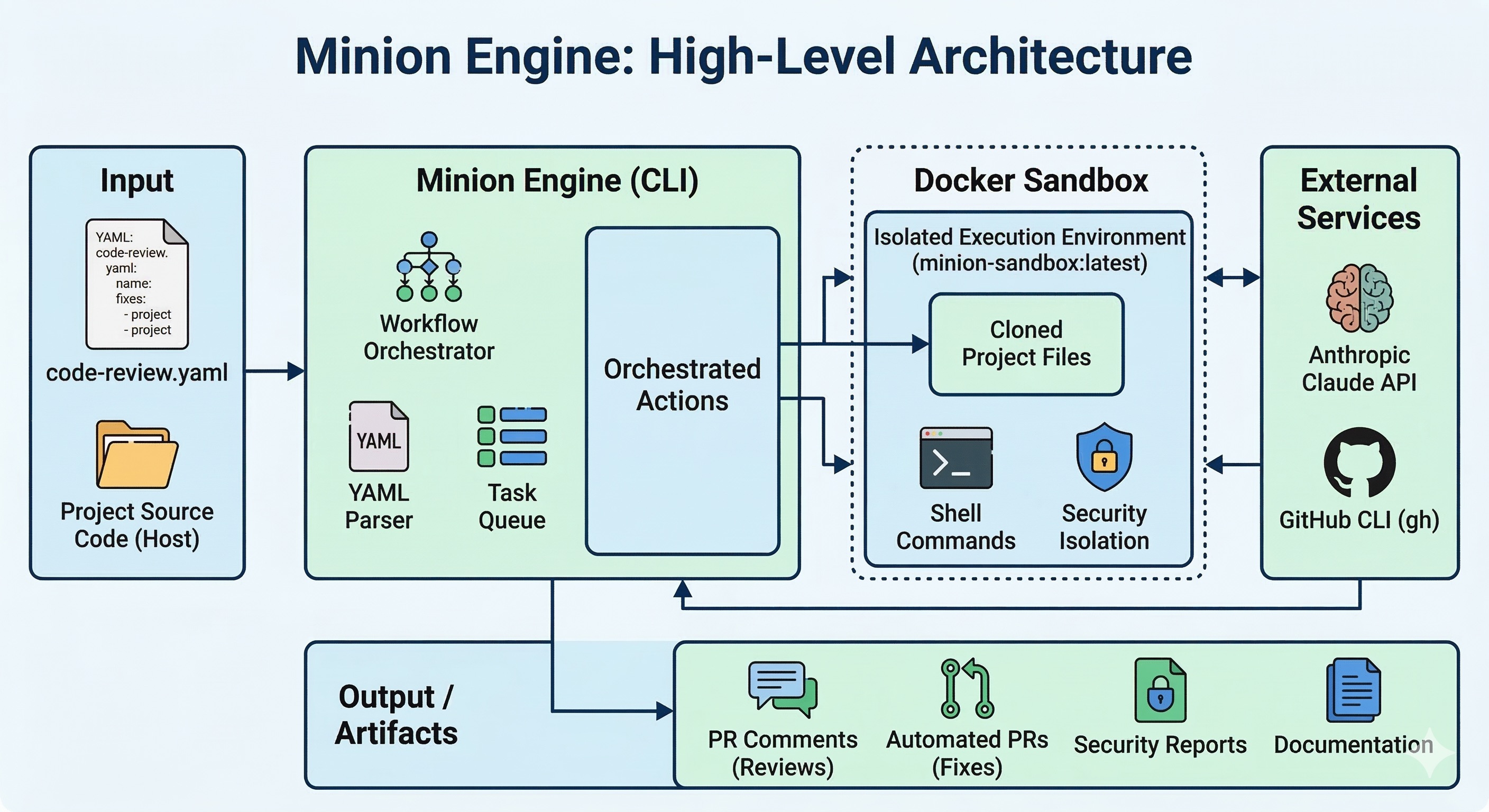
Run AI workflows in Docker. Define steps in YAML. No surprises.
Reviews every changed file in PR #42, detects each file's language, applies language-specific rules, and posts a structured report as a PR comment — in 2–5 min.
Why?
Every AI coding tool eventually surprises you. It refactors the wrong file, invents a dependency, or drifts mid-task. The root cause is always the same: the agent decides what to do next.
Minion Engine inverts that. You define the steps. The agent executes them.
Workflows are YAML files. Each step is explicit: run a command, call the AI, check a condition, retry until tests pass. The agent never improvises — it follows the script.
Without Minion Engine, reviewing a PR means:
- Open the PR, read each file manually
- Switch context between Python, TypeScript, Rust conventions
- Remember to check for security issues, type safety, error handling
- Write your findings as a comment
With Minion Engine, one command does it all:
Every changed file is reviewed with language-specific criteria (Python gets Python rules, TypeScript gets TypeScript rules), the project architecture is considered, and a structured report is posted as a PR comment.
Typical execution times:
| Workflow | Time |
|---|---|
code-review |
2–5 min |
fix-issue |
8–15 min |
security-audit |
3–6 min |
generate-docs |
4–8 min |
First run: Docker image builds automatically (~2 min, cached after that). Large projects take longer to copy into the sandbox. See Troubleshooting for common issues.
Prerequisites
| Requirement | How to get it | Notes |
|---|---|---|
| Rust toolchain | rustup.rs | For cargo install |
| ANTHROPIC_API_KEY | console.anthropic.com | export ANTHROPIC_API_KEY="sk-ant-..." |
| Docker Desktop | docker.com | Sandbox runs workflows in isolation |
| gh CLI | cli.github.com | gh auth login — GH_TOKEN is auto-detected |
Quick Start
# 1. Install (Rust toolchain required)
# 2. Interactive setup — checks requirements and configures API keys
# 3. Go to your project and run a workflow
That's it. Docker image is built automatically on first run. No manual setup needed.
Install with Slack Bot
# Install with Slack integration
# Run interactive setup (includes Slack configuration)
# Start the bot
What Can It Do?
| Workflow | What it does |
|---|---|
| code-review | Review a PR — detects language per file, loads language-specific prompts, posts findings as PR comment |
| fix-issue | Fetch a GitHub issue → plan → implement → lint → test → create PR |
| fix-test | Detect failing tests → analyze → fix → verify — repeat until green |
| security-audit | Scan codebase for OWASP vulnerabilities with AI analysis |
| generate-docs | Generate documentation from source code |
All workflows are YAML files you can customize or create from scratch.
Features
🐳 Docker Sandbox (default)
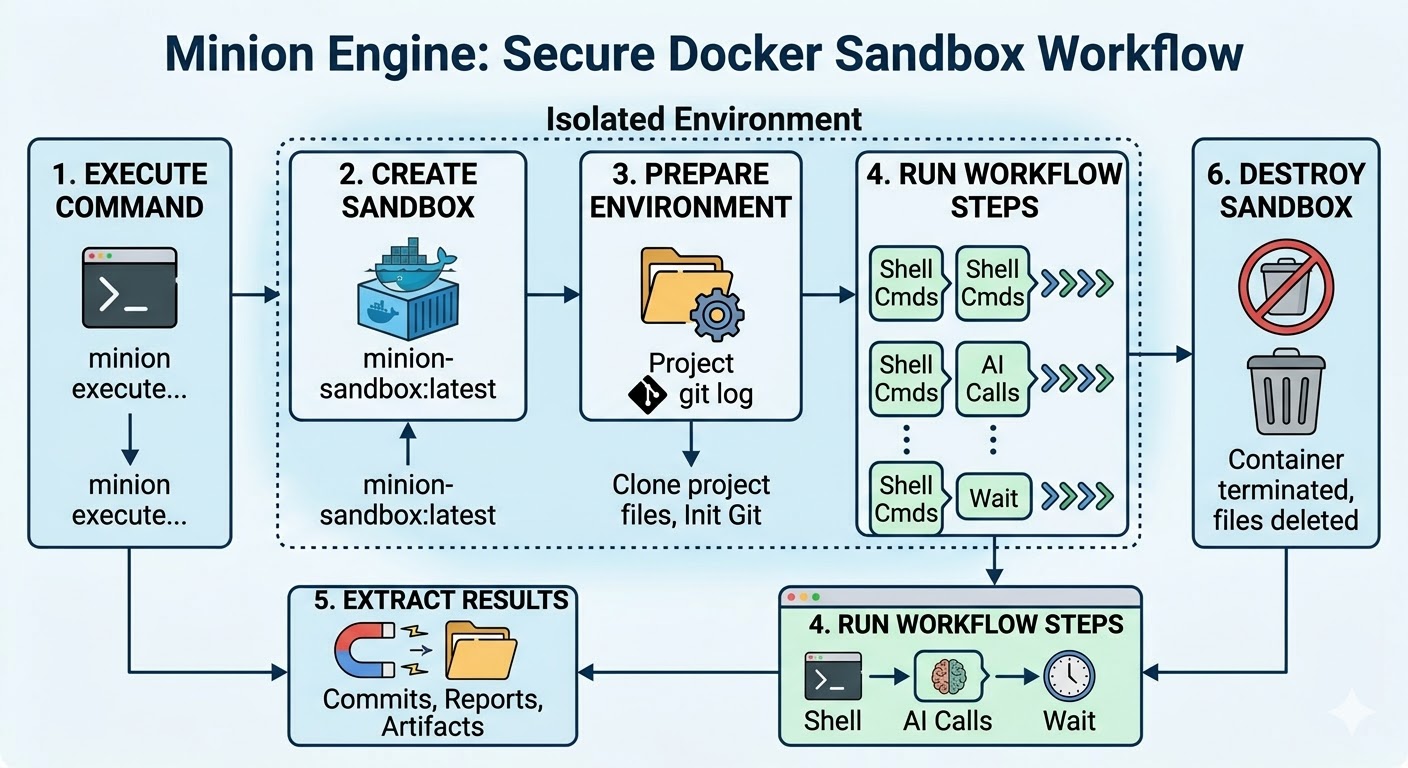
Every workflow runs inside an isolated Docker container. Your project is copied in, the AI works in isolation, and only the results come back. If anything goes wrong, the container is destroyed — zero impact on your project.
🔐 Secure API Proxy
API keys never enter the container. Minion runs a host-side reverse proxy that intercepts API calls from inside the sandbox and injects authentication headers on-the-fly:
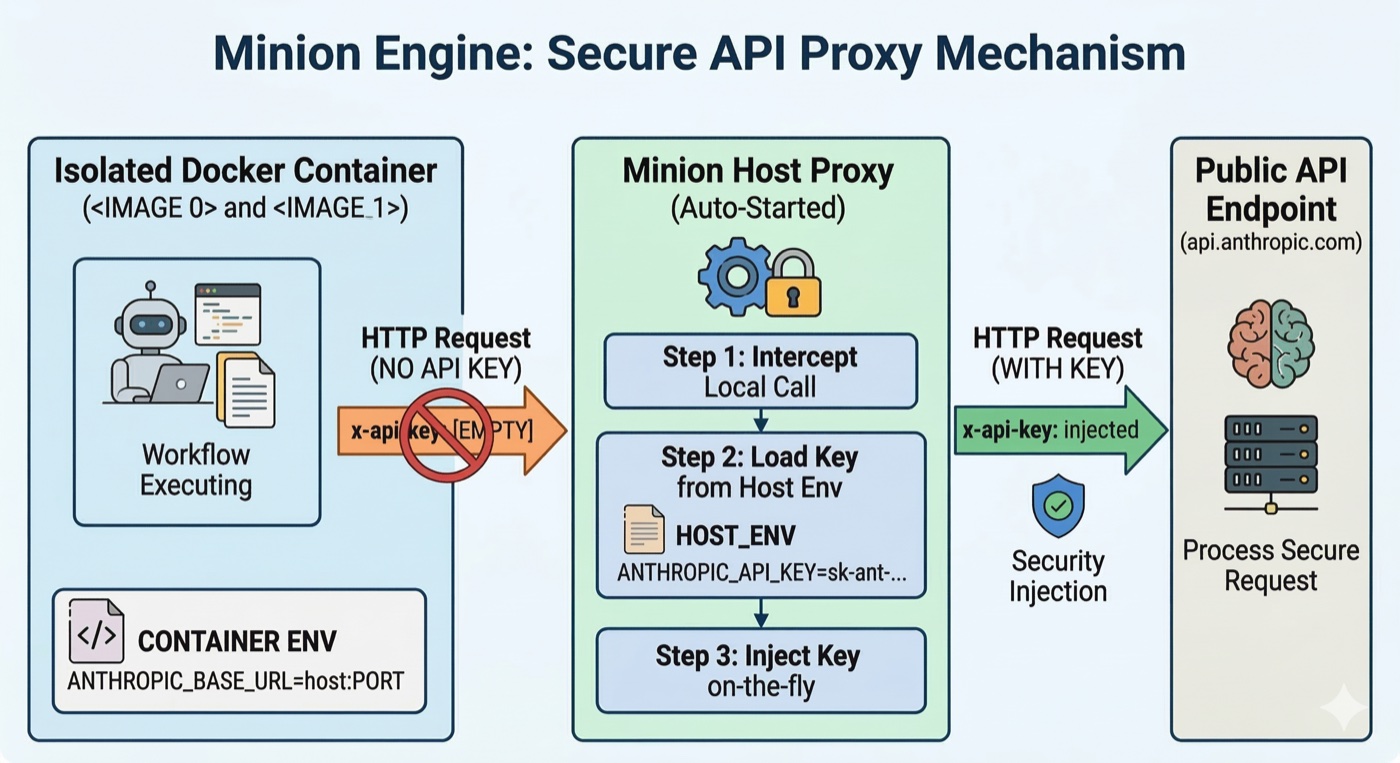
- The container only sees
ANTHROPIC_BASE_URL=http://host.docker.internal:<port> ANTHROPIC_API_KEYstays on the host machine — never exposed as a container env var- Proxy starts automatically with the workflow and stops when it completes
- Zero configuration required — works out of the box with
cargo install
Security Model
| What | Where it lives |
|---|---|
ANTHROPIC_API_KEY |
Host machine only — never passed to the container |
| API requests from inside sandbox | Intercepted by host proxy, auth header injected on-the-fly |
| Project files | Copied into the container, isolated from your working directory |
| Container lifecycle | Fresh container per run — destroyed on completion |
If anything goes wrong inside the sandbox, the container is destroyed with zero impact on your project. The proxy process starts with the workflow and stops when it completes.
🔍 Language-Aware Code Review
The code review workflow detects the language of each changed file and applies language-specific review criteria:
- Python → checks for bare
except:, missing type annotations, mutable default arguments - TypeScript → checks for
anytypes, missingawait, unhandled promise rejections - Rust → checks for
unwrap()in production, unnecessary clones, unsafe blocks - Java → checks for resource leaks, null safety, checked exceptions
- Falls back to generic review for other languages
📐 Architecture Context
If your project has a CLAUDE.md, ARCHITECTURE.md, or README.md, the code review workflow reads it automatically and uses it to evaluate whether changes align with your project's design.
🎯 Stack Detection & Prompt Registry
Minion detects your project's tech stack (Rust, Python, TypeScript, React, Java, etc.) from file markers (Cargo.toml, package.json, requirements.txt) and uses it to select the right prompts and tools.
CLI Reference
minion execute
| Flag | Description |
|---|---|
--no-sandbox |
Disable Docker sandbox (sandbox is ON by default) |
--verbose |
Show all step outputs |
--quiet |
Only show errors |
--json |
Output result as JSON |
--dry-run |
Show what steps would run without executing |
--var KEY=VALUE |
Set a workflow variable (repeatable) |
--timeout SECONDS |
Override global timeout |
--resume STEP |
Resume from a specific step |
# Examples
minion init
Creates a new workflow from a built-in template.
Templates: blank, fix-issue, code-review, security-audit
minion validate
Parses and validates a workflow without executing it.
minion list
Lists workflows found in the current directory, ./workflows/, and ~/.minion/workflows/.
minion inspect
Shows config layers, scopes, step dependency graph, and dry-run summary.
minion config
Manage default configuration (model, provider, timeouts).
# Examples
Config priority (lowest → highest):
- Embedded defaults — compiled into the binary, always available
- User-level —
~/.minion/defaults.yaml(created withminion config init) - Project-level —
.minion/config.yamlin your project root - Workflow YAML —
config:section in each workflow file - Step inline —
config:on individual steps
New users get sensible defaults automatically via cargo install — no config files needed.
minion setup
Interactive setup wizard — checks requirements, configures API keys, and optionally sets up Slack bot credentials. Saves config to ~/.minion/config.toml.
minion slack start (requires --features slack)
Starts the Slack bot server. Reads config from ~/.minion/config.toml or environment variables.
Workflow YAML Format
name: my-workflow
version: 1
description: "What this workflow does"

# Config is optional — sensible defaults are embedded in the binary.
# Only specify overrides for what's different from defaults.
config:
  global:
    timeout: 600s           # Override default 300s
  chat:
    temperature: 0.1        # Override default 0.2

steps:
  - name: get_info
    type: cmd
    run: "gh issue view {{ target }} --json title,body"

  - name: analyze
    type: chat
    prompt: |
      Analyze this issue and suggest a fix:
      {{ steps.get_info.stdout }}

  - name: report
    type: cmd
    run: "echo 'Analysis complete'"
Step Types
| Type | Description |
|---|---|
cmd |
Execute a shell command |
agent |
Invoke Claude Code CLI |
chat |
Direct Anthropic API call |
gate |
Evaluate a condition, control flow |
repeat |
Run a scope repeatedly (retry loop) |
map |
Run a scope once per item in a list |
parallel |
Run nested steps concurrently |
call |
Invoke a scope once |
Template Variables
| Variable | Description |
|---|---|
{{ target }} |
Target argument passed after -- |
{{ steps.<name>.stdout }} |
stdout of a cmd step |
{{ steps.<name>.stderr }} |
stderr of a cmd step |
{{ steps.<name>.exit_code }} |
Exit code of a cmd step |
{{ steps.<name>.response }} |
Response from a chat/agent step |
{{ scope.value }} |
Current item in a map/repeat scope |
{{ scope.index }} |
Current iteration index (0-based) |
{{ args.<key> }} |
Variable set via --var KEY=VALUE |
{{ prompts.<name> }} |
Load a prompt from the prompt registry |
Example Output
▶ code-review
  🔒 Sandbox mode: FullWorkflow
  🐳 Creating Docker sandbox container…
  🔒 Sandbox ready — container 1.3s, copy 12.4s, git 98.7s (total 112.4s)
  ✓ get_diff (3.2s)
  ✓ changed_files (1.8s)
  ✓ check_files (0.0s)
  ✓ file_reviews (45.3s)    ← map scope: reviews each file with language-specific criteria
  ✓ summary (28.1s)          ← chat step: synthesizes all reviews into a report
  ✓ post_comment (2.1s)
  ✓ report (0.3s)
  📦 Copying results from sandbox…
  🗑️  Sandbox destroyed

✓ Done — 7 steps in 193.2s
Slack Bot Integration
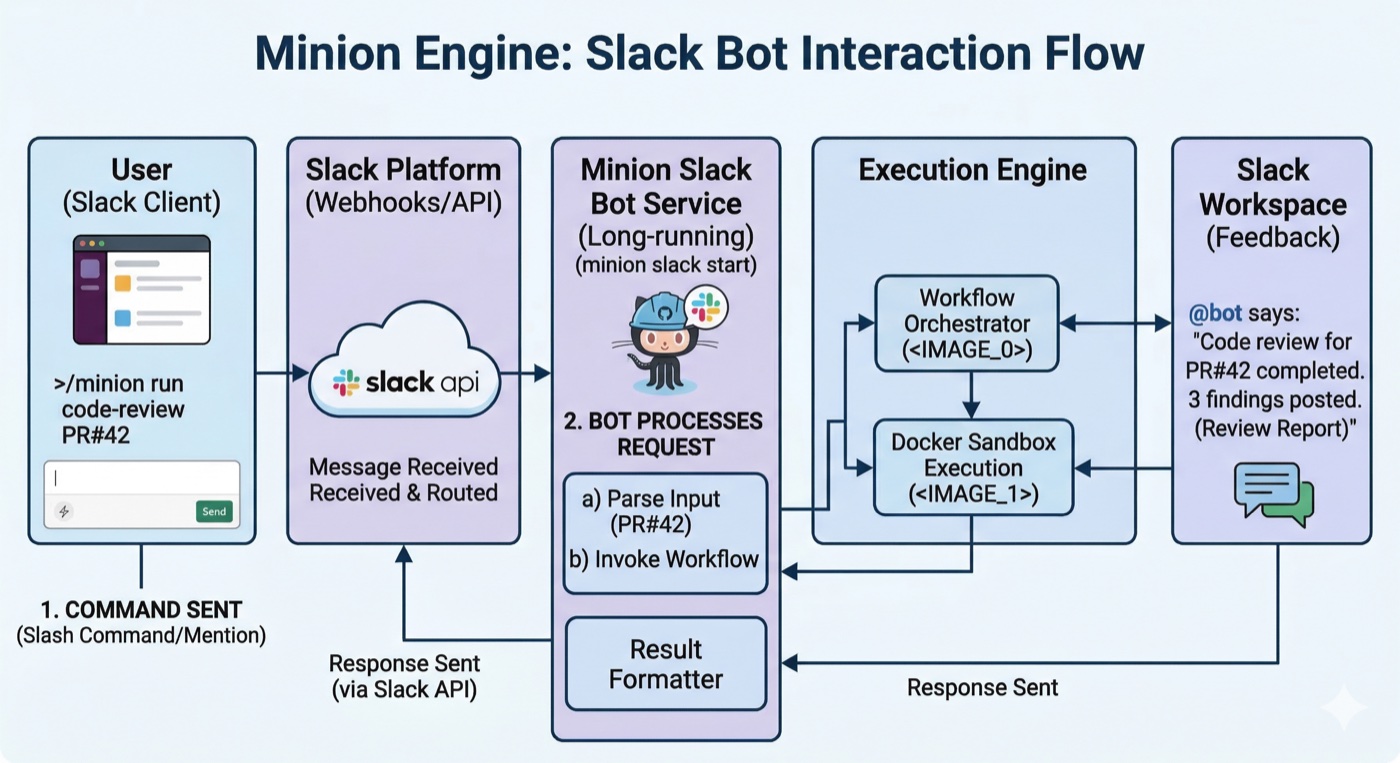
Trigger Minion workflows from Slack by mentioning the bot:
@YourBot review pr #42
@YourBot fix issue https://github.com/org/repo/issues/10
@YourBot security audit myproject
@YourBot generate docs myproject
Step-by-step Setup
1. Create a Slack App
- Go to https://api.slack.com/apps → Create New App → From Scratch
- Name it (e.g., "Minion Engine") and select your workspace
2. Configure Permissions
Go to OAuth & Permissions → Bot Token Scopes and add:
| Scope | Purpose |
|---|---|
app_mentions:read |
Detect @YourBot mentions |
chat:write |
Post replies in channels |
channels:history |
Read channel messages |
channels:read |
List channels |
Click Install to Workspace and copy the Bot User OAuth Token (xoxb-...).
3. Configure Event Subscriptions
Go to Event Subscriptions → toggle ON.
Under Subscribe to bot events, add:
app_mention
For the Request URL, you need a public endpoint. Use ngrok for development:
# Install ngrok (https://ngrok.com)
# or download from https://ngrok.com/download
# Start a tunnel to port 9000
Copy the ngrok URL (e.g., https://abc123.ngrok-free.app) and set the Request URL to:
https://abc123.ngrok-free.app/slack/events
Wait for the "Verified" checkmark, then click Save Changes.
Tip: Use
ngrok http 9000 --domain your-name.ngrok-free.appfor a stable domain (free ngrok accounts get one static domain).
4. Get the Signing Secret
Go to Basic Information → App Credentials → copy the Signing Secret.
5. Install and Configure Minion
# Install with Slack support
# Run setup wizard — it will ask for your Slack tokens
The setup wizard saves your config to ~/.minion/config.toml:
[]
= "sk-ant-..."
= "./workflows"
[]
= "xoxb-..."
= "2d91c..."
= 9000
Or set environment variables directly:
6. Start the Bot
# Make sure ngrok is running: ngrok http 9000
7. Invite the Bot
In your Slack channel:
/invite @YourBot
Then mention it:
@YourBot review pr #42
Supported Commands
| Slack Message | Workflow |
|---|---|
@bot fix issue #10 or @bot fix issue <url> |
fix-issue.yaml |
@bot review pr #42 or @bot review pr <url> |
code-review.yaml |
@bot security audit <target> |
security-audit.yaml |
@bot generate docs <target> |
generate-docs.yaml |
@bot fix ci <pr-url> |
fix-ci.yaml |
Troubleshooting
First run is slow — Docker image builds once (~2 min) and is cached after that. Larger projects take longer to copy into the container.
429 Too Many Requests — reduce parallelism in map steps. The default parallel: 5 can hit API rate limits; try parallel: 2.
Sandbox setup takes 90+ seconds — this is proportional to project size. A known limitation; smaller repos are noticeably faster.
gh not found inside sandbox — run gh auth login on the host before executing workflows that interact with GitHub.
minion-sandbox:latest not found — run minion setup once to trigger the image build, or let any minion execute call build it automatically.
Contributing
Issues and PRs are welcome. To run the project locally:
Workflow YAML files live in workflows/ — the fastest way to contribute is adding or improving a workflow template. Language-specific prompt templates are in prompts/.
Project Structure
src/
  cli/          # CLI commands (execute, validate, list, init, inspect, setup)
  engine/       # Core engine — step execution, context, templates
  workflow/     # YAML parsing, validation
  steps/        # Step executors (cmd, agent, chat, gate, repeat, map, parallel)
  sandbox/      # Docker sandbox management
  prompts/      # Stack detection and prompt registry
  config/       # 5-layer config resolution (embedded → user → project → workflow → step)
  slack/        # Slack bot integration (optional, --features slack)
  plugins/      # Dynamic plugin system
workflows/      # Example workflow YAML files
prompts/        # Language-specific prompt templates
License
MIT — see LICENSE for details.