

meteostat 0.4.2

Get historic weather data from thousands of weather stations around the world.
Documentation

Meteostat for Rust

Crates.io Docs.rs License Repository Build Status

The Weather's Record Keeper - In Rust!
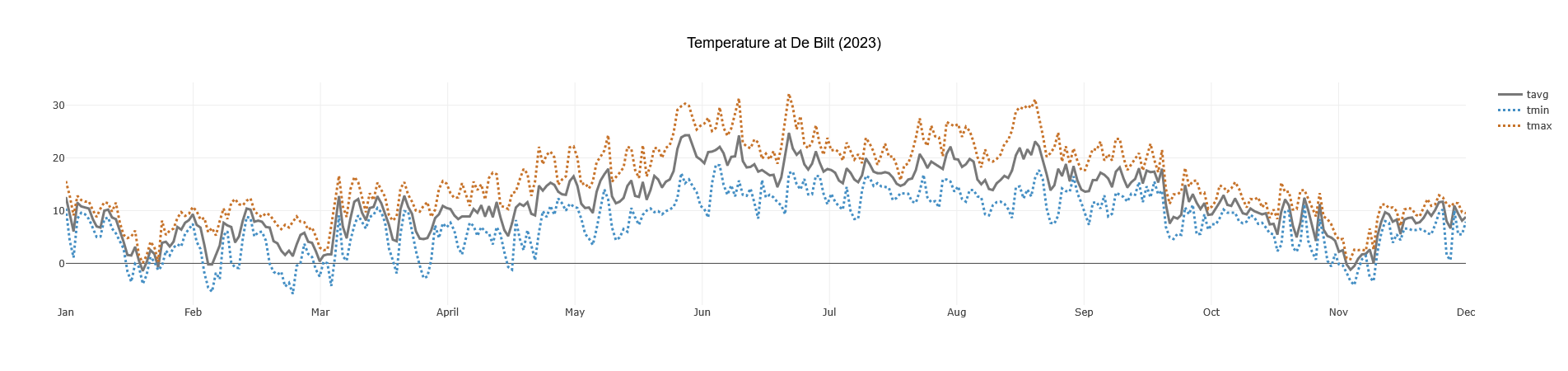
Example Plot showing Daily Temperature Averages, Min, and Max for De Bilt (2023).

This crate provides a convenient asynchronous Rust interface for accessing historical weather and climate data from Meteostat, leveraging their publicly available bulk data interface. It allows fetching data for thousands of weather stations worldwide.

Meteostat is a free and open provider of weather & climate data. They do the hard work of collecting, processing, and providing the data. This crate is simply a Rust client for their bulk API. Please consider supporting Meteostat if you find their data useful: Donate to Meteostat.

Take a look at yesterday's temperatures or discover the weather hundreds of years ago, right from your Rust application.

Features

  • Fetch by Station ID or Location: Initiate requests via frequency-specific clients (client.hourly(), client.daily(), etc.) and then specify either .station("ID") or .location(LatLon).
  • Find Nearby Stations: Search for stations near coordinates using client.find_stations(), optionally filtering by distance and required data availability (inventory).
  • Multiple Frequencies: Supports Hourly, **Daily **, Monthly, and * Climate Normals* data.
  • Efficient Data Handling: Returns data as wrappers around Polars LazyFrames (e.g., HourlyLazyFrame), allowing for powerful, memory-efficient filtering and manipulation before collecting results.
  • Convenient Filtering: Frame wrappers provide methods for easy filtering by date, year, month, or datetime ranges ( e.g., daily_lazy.get_for_period(Year(2023))).
  • Collect to Structs: Frame wrappers also offer direct collection methods (e.g., hourly_lazy.collect_hourly(), daily_lazy.collect_single_daily()) to get results as Vec<Struct> or a single Struct (like Hourly, Daily), handling the conversion from Polars types.
  • Automatic Caching: Downloads and caches station metadata and weather data files locally to speed up subsequent requests and reduce load on Meteostat's servers.
  • Asynchronous: Built with tokio for non-blocking I/O.

Installation

Add meteostat to your Cargo.toml dependencies:

cargo add meteostat

Basic Usage

Here's a quick example demonstrating fetching data by location and station ID:

use meteostat::{Meteostat, LatLon, MeteostatError, Year};
use polars::prelude::*;
use chrono::{NaiveDate};

#[tokio::main]
async fn main() -> Result<(), MeteostatError> {
    let client = Meteostat::new().await?;
    // Period for which we want hourly data:
    let period = NaiveDate::from_ymd_opt(2023, 9, 1).unwrap();
    // --- Example 1: Collect 24 hourly data points into `Vec<Hourly>` ---
    let hourly_vec = client
        .hourly()
        .location(LatLon(52.0836403, 5.1257283))
        .call()
        .await? // `HourlyLazyFrame`
        .get_for_period(period)? // `HourlyLazyFrame` with filter plan
        .collect_hourly()?; // `Vec<Hourly>`
    // Do something with the hourly data...
    
    // --- Example 2: Collect daily data from 2023 into a `DataFrame` ---
    // Explicit call to find stations just for the example, the params here can also be set on client.hourly().location(...
    let stations = client.find_stations()
        .location(LatLon(52.520008, 13.404954))
        .max_distance_km(50.0) // Station must be within 50 km of the location
        .inventory_request(InventoryRequest::new(Frequency::Daily, RequiredData::FullYear(2023))) // Station must have daily data from 2023
        .call()
        .await?; // `Vec<Station>` sorted by distance to the location, closest first.
    
    let daily_df = client
        .daily()
        .station(&stations.first().unwrap().id)
        .call()
        .await? // `DailyLazyFrame`
        .get_for_period(Year(2023))? // `DailyLazyFrame`
        .frame // `LazyFrame`
        .collect()?; // `DataFrame` with 365 rows
    // Do something with the daily data...
    Ok(())
}

(See more examples in the examples directory)

Finding Stations

You can search for stations near a specific location using client.find_stations():

use meteostat::{Meteostat, MeteostatError, LatLon, InventoryRequest, Frequency, RequiredData};

#[tokio::main]
async fn main() -> Result<(), MeteostatError> {
    let client = Meteostat::new().await?;
    let nyc = LatLon(40.7128, -74.0060);

    // Find the 3 closest stations within 100km of NYC
    // that have reported *any* Daily data.
    let inventory_req = InventoryRequest::new(Frequency::Daily, RequiredData::Any);

    let stations = client.find_stations()
        .location(nyc)
        .max_distance_km(100.0)
        .station_limit(3)
        .inventory_request(inventory_req)
        .call()
        .await?;

    println!("Found {} stations near NYC matching criteria:", stations.len());
    for station in stations {
        println!("  - ID: {}, Name: {:?}", station.id, station.name.get("en"));
    }
    Ok(())
}

Data Handling

Polars LazyFrame Wrappers

All weather data fetching methods return a specific wrapper struct (e.g., HourlyLazyFrame, DailyLazyFrame) which contains a Polars LazyFrame. This allows you to:

  1. Use convenience filters: Apply common filters directly using methods on the wrapper (e.g., daily_lazy.get_for_period(Year(2023))).
  2. Access the underlying frame: Get the LazyFrame via the .frame field for advanced Polars operations (joins, aggregations, complex selections, etc.).
  3. Optimize queries: Polars optimizes the execution plan built from chained operations.
  4. Collect to DataFrame: Use .frame.collect()? on the wrapper to execute the plan and get a DataFrame in memory for use with Polars or other tools.
  5. Collect to Rust Structs: Alternatively, use methods like .collect_hourly(), .collect_daily(), .collect_single_daily(), etc., directly on the wrapper struct to get the results conveniently mapped into a Vec<Struct> or a single Struct (e.g., Vec<Hourly>, Daily). This avoids needing to manually handle the DataFrame conversion if you just need the data in native Rust types.

This lazy approach is particularly beneficial when dealing with potentially large historical datasets.

Caching

The crate automatically caches downloaded data to avoid redundant downloads and respect Meteostat's resources:

  • Station Metadata: The list of all stations (stations/lite.json.gz) is downloaded once and cached.
  • Weather Data: Individual station data files (e.g., hourly/10637.csv.gz) are downloaded and cached per station and frequency.

By default, cache files are stored in your system's standard cache directory (e.g., ~/.cache/meteostat-rs on Linux, %LOCALAPPDATA%/meteostat_rs_cache on Windows). You can specify a custom cache location using Meteostat::with_cache_folder(path).

Filtering Data Frames and Collecting Results

Each data frequency (Hourly, Daily, Monthly, Climate) has its own LazyFrame wrapper struct (HourlyLazyFrame, DailyLazyFrame, etc.) that provides convenient methods for common filtering tasks. After filtering, you can collect the results either as a Polars DataFrame or directly into Rust structs.

Access these wrappers by first selecting the frequency client and then fetching the data:

use meteostat::{Meteostat, MeteostatError, Year, Month, Daily};
use polars::prelude::*;
use chrono::{NaiveDate, Utc, TimeZone};

#[tokio::main]
async fn main() -> Result<(), MeteostatError> {
    let client = Meteostat::new().await?;
    let station_id = "10637"; // Schiphol

    // --- Filter Daily Data by Year and collect to DataFrame ---
    let daily_lazy = client.daily().station(station_id).await?;
    let daily_2022_lazy = daily_lazy.get_for_period(Year(2022))?;
    let daily_2022_df = daily_2022_lazy.frame.collect()?;
    println!("Daily data for 2022 (DataFrame):\n{}", daily_2022_df.head(Some(3)));

    // --- Filter Hourly Data by Datetime Range and collect to Vec<Hourly> ---
    let hourly_lazy = client.hourly().station(station_id).await?;
    let start_dt = Utc.with_ymd_and_hms(2023, 5, 1, 6, 0, 0).unwrap(); // May 1st 2023, 06:00 UTC
    let end_dt = Utc.with_ymd_and_hms(2023, 5, 1, 8, 0, 0).unwrap(); // May 1st 2023, 08:00 UTC
    let hourly_morning_lazy = hourly_lazy.get_range(start_dt, end_dt)?;
    // Collect directly into Vec<Hourly>
    let hourly_morning_vec = hourly_morning_lazy.collect_hourly()?;
    println!("\nHourly data for morning of 2023-05-01 (Vec<Hourly>):");
    for record in hourly_morning_vec.iter().take(3) {
        println!("  {:?}", record);
    }

    // --- Get a Single Daily Row and collect to Daily struct ---
    let daily_lazy_again = client.daily().station(station_id).await?;
    let specific_date = NaiveDate::from_ymd_opt(2023, 10, 26).unwrap();
    let single_day_lazy = daily_lazy_again.get_at(specific_date)?;
    // Collect directly into Option<Daily> (or Result<Daily, MeteostatError>)
    match single_day_lazy.collect_single_daily() {
        Ok(daily_record) => {
            println!("\nDaily data for {} (Daily struct):\n  {:?}", specific_date, daily_record);
        }
        Err(MeteostatError::ExpectedSingleRow { actual: 0 }) => {
            println!("\nNo daily data found for {}", specific_date);
        }
        Err(e) => return Err(e), // Other errors
    }


    // --- Get a Single Monthly Row (using .frame.collect()) ---
    let monthly_lazy = client.monthly().station(station_id).await?;
    let specific_month = Month::new(7, 2023); // July 2023
    let single_month_lazy = monthly_lazy.get_at(specific_month)?;
    let single_month_df = single_month_lazy.frame.collect()?; // Collect to DF example
    println!("\nMonthly data for {:?} (DataFrame):\n{}", specific_month, single_month_df);

    Ok(())
}

See the documentation for the specific frame wrappers for all available filtering and collection methods:

For more complex filtering or analysis before collection, access the underlying Polars LazyFrame via the .frame field on the wrapper structs.

Data Source and Attribution

  • All weather data is sourced from Meteostat.
  • This crate uses Meteostat's free bulk data interface. No API key is required.

API Documentation

Full API documentation is available on docs.rs.

Example: Plotting Data

You can easily use the DataFrame output with plotting libraries like plotlars.

// Requires the 'examples' feature: cargo run --example graph_data --features examples
use std::error::Error;

use meteostat::{Frequency, LatLon, Meteostat, MeteostatError, Year};
use plotlars::{Line, Plot, Rgb, TimeSeriesPlot};
use polars::prelude::*;

#[tokio::main]
async fn main() -> Result<(), Box<dyn Error>> {
    let meteostat = Meteostat::new().await?;
    let location = LatLon(52.118641, 5.185589); // De Bilt, Netherlands

    // Fetch and collect data into a DataFrame for plotting
    let weather_data: DataFrame = meteostat
        .daily() // Select daily client
        .location(location) // Specify location
        .call() // Execute request
        .await? // -> Result<DailyLazyFrame, MeteostatError>
        .get_for_period(Year(2023))? // Filter the DailyLazyFrame
        .frame // Access the inner LazyFrame
        .collect()?; // Collect into DataFrame

    println!(
        "Daily Data for De Bilt (2023):\n{}",
        weather_data.head(Some(5))
    );

    plot_temperature(&weather_data);

    Ok(())
}

fn plot_temperature(dataset: &DataFrame) {
    TimeSeriesPlot::builder()
        .data(dataset)
        .x("date")
        .y("tavg")
        .additional_series(vec!["tmin", "tmax"])
        .colors(vec![
            Rgb(120, 120, 120), // tavg
            Rgb(69, 143, 196),  // tmin
            Rgb(199, 115, 42),  // tmax
        ])
        .lines(vec![
            Line::Solid,
            Line::Dot,
            Line::Dot,
        ])
        .plot_title("Temperature at De Bilt (2023)")
        .build()
        .plot();
}

To run this specific example, enable the examples feature: cargo run --example graph_data --features examples

(This will generate a plot similar to the one shown at the top of this README)

Contributing

Contributions, bug reports, and feature requests are welcome! Please feel free to open an issue or submit a pull request on the GitHub repository.

License

This crate is licensed under the Apache License 2.0. See the LICENSE file for details.