
Please check the build logs for more information.
See Builds for ideas on how to fix a failed build, or Metadata for how to configure docs.rs builds.
If you believe this is docs.rs' fault, open an issue.
logimesh
logimesh is a Rust microcomponent 2.0 framework inspired by the Towards Modern Development of Cloud Applications paper.
(This is one of my amateur idea and is only developed in leisure-time.)


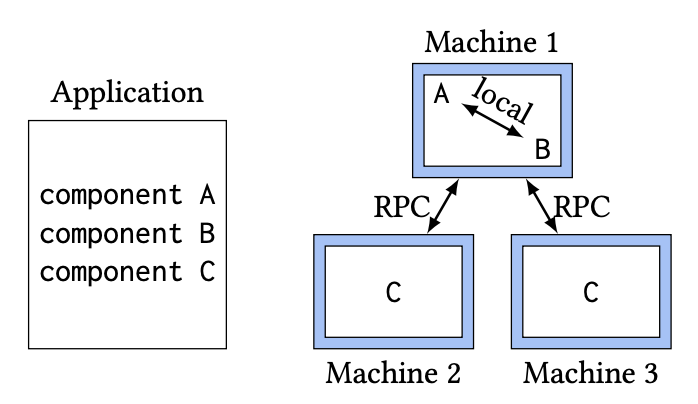
Some features of logimesh:
- The client supports both local calls and remote calls simultaneously, meaning that users can dynamically switch the calling method according to the context.
Usage
Add to your Cargo.toml dependencies:
= "0.1"
The logimesh::component attribute expands to a collection of items that form an component component.
These generated types make it easy and ergonomic to write servers with less boilerplate.
Simply implement the generated component trait, and you're off to the races!
Example
This example uses tokio, so add the following dependencies to
your Cargo.toml:
[]
= "service"
= "src/lib.rs"
...
[]
= { = "0.1" }
= "1.0"
= { = "1.0", = ["macros"] }
For a more real-world example, see logimesh-example.
First, let's set up the dependencies and component definition.
lib.rs file
extern crate logimesh;
// This is the component definition. It looks a lot like a trait definition.
// It defines one RPC, hello, which takes one arg, name, and returns a String.
This component definition generates a trait called World. Next we need to
implement it for our Server struct.
# extern crate logimesh;
#
# // This is the component definition. It looks a lot like a trait definition.
# // It defines one RPC, hello, which takes one arg, name, and returns a String.
#
#
use context;
use Codec;
/// This is the type that implements the generated World trait. It is the business logic
/// and is used to start the server.
;
server.rs file
extern crate tokio;
extern crate logimesh;
async
client.rs file
extern crate tokio;
extern crate logimesh;
extern crate anyhow;
use RandomBalance;
use FixedDiscover;
use ConfigExt;
use Endpoint;
use context;
use ;
async