# kdam
<p align="center">
<img src="https://img.shields.io/crates/d/kdam?style=flat-square">
<img src="https://img.shields.io/crates/v/kdam?style=flat-square">
<img src="https://img.shields.io/github/license/clitic/kdam?style=flat-square">
<img src="https://img.shields.io/github/repo-size/clitic/kdam?style=flat-square">
<img src="https://img.shields.io/tokei/lines/github/clitic/kdam?style=flat-square">
</p>
kdam is a port of [tqdm](https://github.com/tqdm/tqdm) library which is written in python. kdam has almost same features as tqdm with extra features included. kdam is also 4 times faster than tqdm. kdam has only one external dependency which [terminal-size](https://github.com/eminence/terminal-size).
Instantly make your loops show a smart progress meter. Just wrap any iterator with tqdm!(iterator) macro and you're done!
```rust
use kdam::tqdm;
fn main() {
for _ in tqdm!(0..100) {}
}
```
```
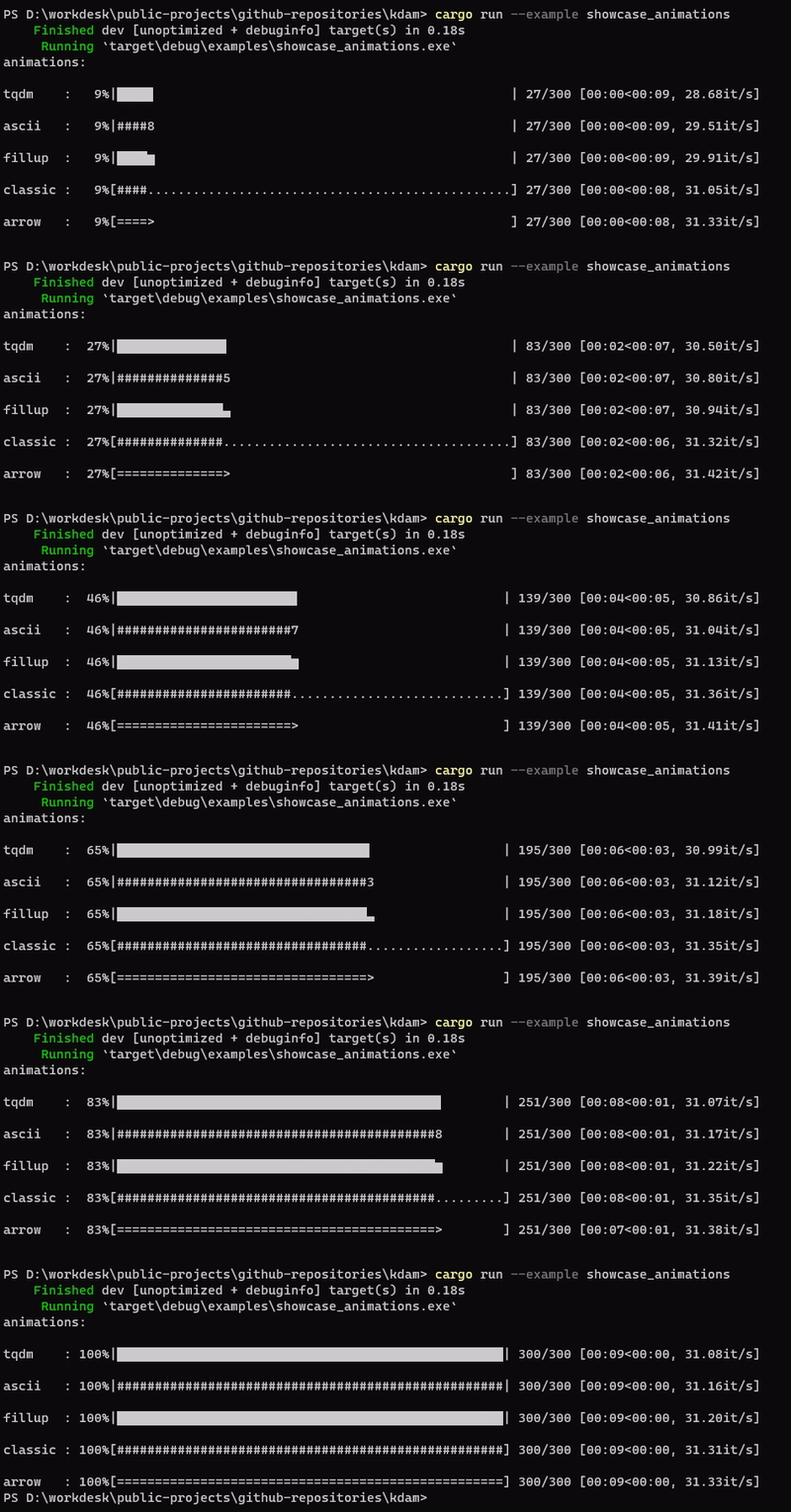
kdam also supports different animation styles. All available animations styles are:
[examples/showcase_animations.rs](https://github.com/clitic/kdam/blob/main/examples/showcase_animations.rs)
kdam also support [rich.progress](https://rich.readthedocs.io/en/latest/progress.html) style bars with customizable columns.
[examples/bar_rich.rs](https://github.com/clitic/kdam/blob/main/examples/bar_rich.rs)

[Fira Code](https://github.com/tonsky/FiraCode) is the first programming font to offer dedicated glyphs to render progress bars. kdam has an animation style to support it.
[examples/misc_fira_code.rs](https://github.com/clitic/kdam/blob/main/examples/misc_fira_code.rs)

## Installations
Add this to your Cargo.toml file.
```toml
[dependencies]
kdam = "0.1.2"
```
Or add from github main branch.
```toml
[dependencies]
kdam = { git = "https://github.com/clitic/kdam.git", branch = "main" }
```
## Usage
### Iterator Based
```rust
use kdam::tqdm;
fn main() {
let chars = ["a", "b", "c", "d"];
let mut charset = String::new();
for i in tqdm!(chars.iter()) {
charset += i;
}
assert_eq!(charset, "abcd");
}
```
### Manual
```rust
use kdam::tqdm;
fn main() {
let mut pb = tqdm!(total = 100);
for _ in 0..100 {
pb.update(1);
}
}
```
Another example without a total value. This only shows basic stats.
```rust
use kdam::tqdm;
fn main() {
let mut pb = tqdm!();
for _ in 0..10000000 {
pb.update(1);
}
pb.refresh();
}
```
```
10000000 [00:03, 2998660.35it/s]
```
## Examples
### Description And Additional Stats
Custom information can be displayed and updated dynamically on `kdam` bars with the `desc` and `postfix`.
```rust
use kdam::tqdm;
fn main() {
let mut pb = tqdm!(total = 10);
pb.refresh();
for i in 0..10 {
std::thread::sleep(std::time::Duration::from_secs_f32(0.5));
pb.set_description(format!("GEN {}", i));
pb.set_postfix(format!("str={}, lst={:?}", "h", [1, 2]));
pb.update(1);
}
}
```
```
### Nested Progress Bars
`kdam` supports nested progress bars. For manual control over positioning (e.g. for multi-processing use), you may specify `position=n` where `n=0` for the outermost bar, `n=1` for the next, and so on.
```rust
use kdam::tqdm;
fn main() {
for _ in tqdm!(0..4, desc = "1st loop".to_string(), position = 0) {
for _ in tqdm!(0..5, desc = "2nd loop".to_string(), position = 1) {
for _ in tqdm!(0..50, desc = "3rd loop".to_string(), position = 2) {
std::thread::sleep(std::time::Duration::from_secs_f32(0.0001));
}
}
}
eprint!("{}", "\n".repeat(3));
println!("completed!");
}
```
```
3rd loop: 0%|▎ | 0/50 [00:00<00:00, ?it/s]
```
### Writing Messages And Inputs
Since `kdam` uses a simple printing mechanism to display progress bars, you should not write any message in the terminal using `println!()` while a progressbar is open.
To write messages in the terminal without any collision with `kdam` bar display, a `.write()` method is provided. This message will print at bar output location, which is stderr by default.
```rust
use kdam::tqdm;
fn main() {
let mut pb = tqdm!(total = 10);
for i in 0..10 {
std::thread::sleep(std::time::Duration::from_secs_f32(0.1));
pb.update(1);
pb.write(format!("Done task {}", i));
}
}
```
```
Done task 0
Done task 1
Done task 2
Done task 3
Done task 4
Done task 5
Done task 6
Done task 7
Done task 8
Done task 9
Similarly `.input()` method can be called to store an user input.
```rust
use kdam::tqdm;
fn main() {
let mut pb = tqdm!(total = 10);
for i in 0..10 {
if i == 5 {
if pb.input("Break Loop [y/n]: ").unwrap() == "y\r\n" {
break;
}
}
pb.update(1);
}
}
```
```
Break Loop [y/n]: y
## License
© 2022 clitic
This repository is licensed under the MIT license. See LICENSE for details.