# hx
Futuristic take on hexdump.
[hx](https://github.com/sitkevij/hex) accepts a file path or stdin as input and outputs
a hexadecimal colorized view to stdout.
[hx](https://github.com/sitkevij/hex) with file path as input, outputting colorized hexadecimal:
```sh
$ hx tests/files/alphanumeric.txt
0x000000: 0x61 0x62 0x63 0x64 0x65 0x66 0x67 0x68 0x69 0x6a abcdefghij
0x00000a: 0x6b 0x69 0x6c 0x6d 0x6e 0x6f 0x70 0x71 0x72 0x73 kilmnopqrs
0x000014: 0x74 0x75 0x76 0x77 0x78 0x79 0x7a 0x30 0x31 0x32 tuvwxyz012
0x00001e: 0x33 0x34 0x35 0x36 0x37 0x38 0x39 0x0a 0x30 0x31 3456789.01
0x000028: 0x32 0x33 0x34 0x35 0x36 0x37 0x38 0x39 0x30 0x31 2345678901
0x000032: 0x32 0x33 0x34 0x35 0x36 0x37 0x38 0x39 0x30 0x31 2345678901
0x00003c: 0x32 0x33 0x34 0x35 0x36 0x37 0x38 0x39 23456789
bytes: 68
```
[hx](https://github.com/sitkevij/hex) with stdin as input, outputting colorized hexadecimal:
```sh
0x00000a: 0x6b 0x69 0x6c 0x6d 0x6e 0x6f 0x70 0x71 0x72 0x73 kilmnopqrs
0x000014: 0x74 0x75 0x76 0x77 0x78 0x79 0x7a 0x30 0x31 0x32 tuvwxyz012
0x00001e: 0x33 0x34 0x35 0x36 0x37 0x38 0x39 0x0a 0x30 0x31 3456789.01
0x000028: 0x32 0x33 0x34 0x35 0x36 0x37 0x38 0x39 0x30 0x31 2345678901
0x000032: 0x32 0x33 0x34 0x35 0x36 0x37 0x38 0x39 0x30 0x31 2345678901
0x00003c: 0x32 0x33 0x34 0x35 0x36 0x37 0x38 0x39 23456789
bytes: 68
```
[](https://crates.io/crates/hx "hx on crates.io")
[](https://docs.rs/hx "hx on docs.rs")
[](https://github.com/sitkevij/hex/actions)
## quick links
- [examples](#examples)
- [installation](#installation)
- [features](#features)
- [help](#help)
- [license](#license)
## examples
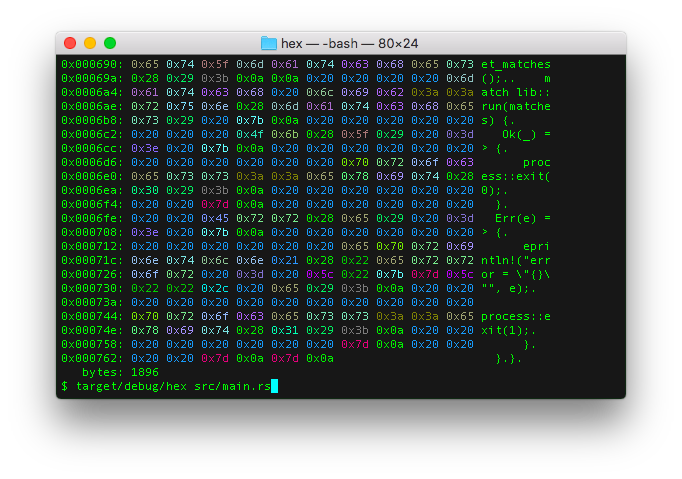
### lower hex format -fx
`$ hx src/main.rs`
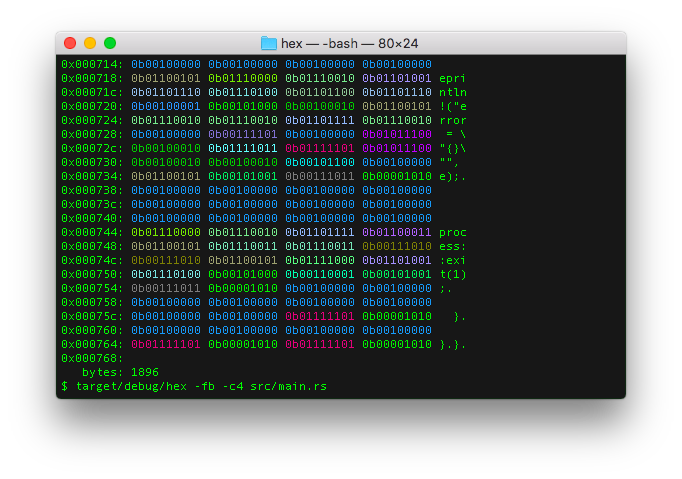
### binary hex format -fb
`$ hx -fb -c4 src/main.rs`
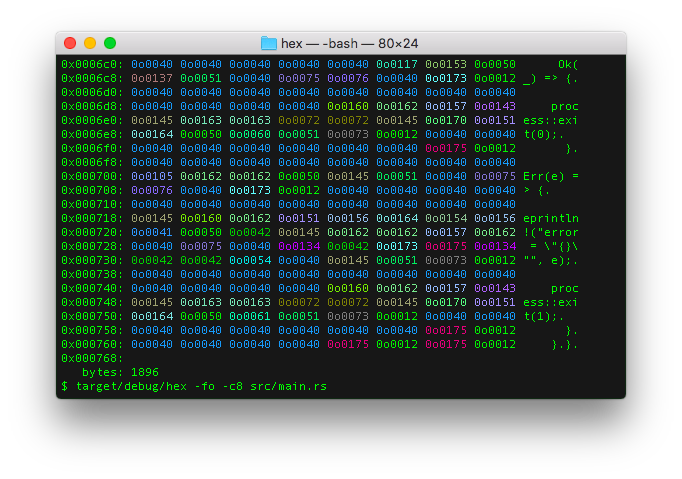
### octal hex format -fo
`$ hx -fo -c8 src/main.rs`
## installation
### packaging availability
`hx` is packaged and available for install on the following platforms:
[](https://repology.org/project/hx-hexdump/versions)
### crates.io install
If `cargo` is already installed, simply:
```sh
cargo install hx
```
### source install
From within the `hx` source code directory, simply execute:
```sh
make install
```
This will run the following `cargo` commands:
```sh
cargo build --release
cargo test --verbose --all -- --nocapture
cargo install --path .
```
Which will compile the release version, run tests and install release binary to `<USERDIR>/.cargo/bin/hx`.
If `<USERDIR>/.cargo/bin` is part of the `PATH` environment variable, `hx` should be able
executable anywhere in the shell.
### arch linux install
```sh
pacman -S hex
```
### debian install
Browse [the latest releases](https://github.com/sitkevij/hex/releases/latest) to choose `VERSION`
for use with this debian installation example:
```sh
VERSION=0.7.0 && curl -sLO "https://github.com/sitkevij/hex/releases/download/v$VERSION/hx_$VERSION-1_amd64.deb" && dpkg -i "hx_$VERSION-1_amd64.deb"
```
### guix install
```sh
guix install hex
```
In an isolated environment:
```sh
guix shell --container hex
```
### docker run
```sh
# stdin
# file input with parameters and NO_COLOR environment variable
echo "NO_COLOR=1" >docker_env_vars.ignore.txt &&
docker run -ti --env-file docker_env_vars.ignore.txt -v $(pwd)/README.md:/README.md sitkevij/hx:latest -fo -c8 /README.md
```
## features
### output arrays in `rust`, `c`, `golang`, `python`, `fsharp`, `kotlin`, `java`, or `swift`
`hx` has a feature which can output the input file bytes as source code arrays.
For example:
#### rust array: -ar
```sh
$ hx -ar -c8 tests/files/tiny.txt
let ARRAY: [u8; 3] = [
0x69, 0x6c, 0x0a
];
```
#### c array: -ac
```sh
$ hx -ac -c8 tests/files/tiny.txt
unsigned char ARRAY[3] = {
0x69, 0x6c, 0x0a
};
```
#### golang array: -ag
```sh
$ hx -ag -c8 tests/files/tiny.txt
a := [3]byte{
0x69, 0x6c, 0x0a,
}
```
#### python array: -ap
```sh
$ hx -ap -c8 tests/files/tiny.txt
a = [
0x69, 0x6c, 0x0a
]
```
#### kotlin array: -ak
```sh
$ hx -ak -c8 tests/files/tiny.txt
val a = byteArrayOf(
0x69, 0x6c, 0x0a
)
```
#### java array: -aj
```sh
$ hx -aj -c8 tests/files/tiny.txt
byte[] a = new byte[]{
0x69, 0x6c, 0x0a
};
```
#### swift array: -as
```sh
$ hx -as -c8 tests/files/tiny.txt
let a: [UInt8] = [
0x69, 0x6c, 0x0a
]
```
#### fsharp array: -af
```sh
$ hx -af -c8 tests/files/tiny.txt
let a = [|
0x69uy; 0x6cuy; 0x0auy
|]
```
### NO_COLOR support
`hx` will honor the NO_COLOR environment variable. If set, no color will be output to the terminal.
Rust `no_color` crate:
- <https://crates.io/crates/no_color>
- <https://github.com/sitkevij/no_color>
## help
```txt
hx
Futuristic take on hexdump, made in Rust.
USAGE:
hx [OPTIONS] [INPUTFILE]
<stdout> | hx [OPTIONS]
FLAGS:
-h, --help Prints help information
-V, --version Prints version information
OPTIONS:
-a, --array <array_format> Set source code format output: rust (r), C (c), golang (g), python (p), kotlin (k),
java (j), swift (s), fsharp (f) [possible values: r, c, g, p, k, j, s, f]
-t, --color <color> Set color tint terminal output. 0 to disable, 1 to enable [possible values: 0, 1]
-c, --cols <columns> Set column length
-f, --format <format> Set format of octet: Octal (o), LowerHex (x), UpperHex (X), Binary (b) [possible
values: o, x, X, b]
-u, --func <func_length> Set function wave length
-l, --len <len> Set <len> bytes to read
-p, --places <func_places> Set function wave output decimal places
ARGS:
<INPUTFILE> Pass file path as an argument, or input data may be passed via stdin
```
## license
MIT