
handlr-0.6.0 is not a library.
Manage your default applications with ease using handlr!
Features
- Set default handler by extension or mime-type
- Intelligent mime type detection from files based on extension and content
- Open multiple files at once
- Set multiple handlers for mime/extension and use rofi/dmenu to pick one
- List default associations
- Automatically removes invalid/wrong
.desktopentries frommimeapps.list - Helper commands like
launch,get --jsonfor your scripting needs - Unnecessarily fast (written in Rust)
- Single compiled binary with no dependencies
Usage
# Open a file/URL
# Set default handler for png files
# Set default handler based on mime
# List default apps
# Get the handler for a mime/extension
# Launch a handler with given path/URL
Compared to xdg-utils
- Can open multiple files/URLs at once
- Can have multiple handlers and use rofi/dmenu to pick one at runtime
- Far easier to use with simple commands like
get,set,list - Can operate on extensions, no need to look up or remember mime types
- useful for common tasks like setting a handler for png/docx/etc files
- Superb autocomplete (currently just fish), including mimes, extensions, and
.desktopfiles - Optional json output for commands like
get
Setting multiple handlers
-
Open
~/.config/handlr/handlr.tomland setenable_selector = true. Optionally, you can also tweak theselectorto your selector command (using e.g. rofi or dmenu). -
Add a second/third/whatever handler using
handlr add, for example
handlr add x-scheme-handler/https firefox-developer-edition.desktop
- Now in this example when you open a URL, you will be prompted to select the desired application.
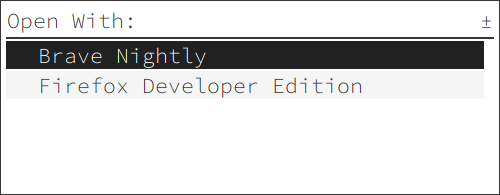
Screenshots
Installation
Arch Linux
Optionally you can also install xdg-utils-handlr to replace xdg-open:
Rust/Cargo
Binaries
- Download the latest release binary and put it somewhere in
$PATH - Download completions:
Attribution
Icons made by Eucalyp from www.flaticon.com
Cover photo by creativebloq.com