# gtcaca
Safe, idiomatic Rust bindings for [GTCaca], a libcaca-based terminal UI
toolkit written in C — think Wireshark-grade panels, tables, trees, charts and
a mind map, rendered in the terminal.
This is the high-level crate. It wraps the raw FFI in [`gtcaca-sys`] with widget
handles, builder-style constructors, closure key callbacks, and a `Widget`
trait that makes every widget paintable and focusable the same way. The whole
toolkit is single-threaded (one global context, one event loop), so the context
and every widget are `!Send`/`!Sync`.
## See it
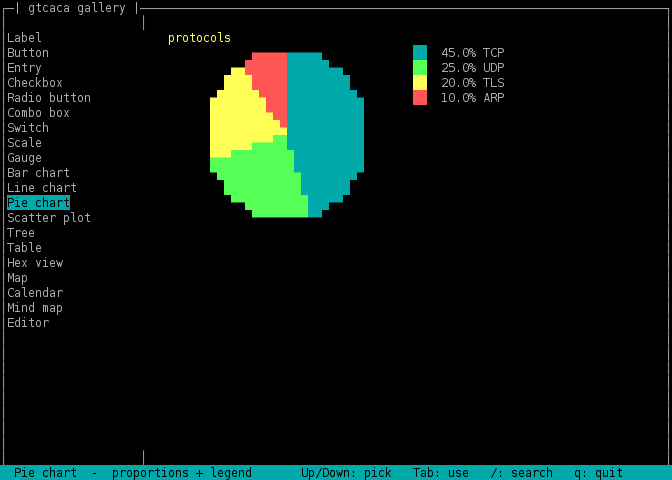
The `gallery` example — browse and drive every widget (`/` filters the list):
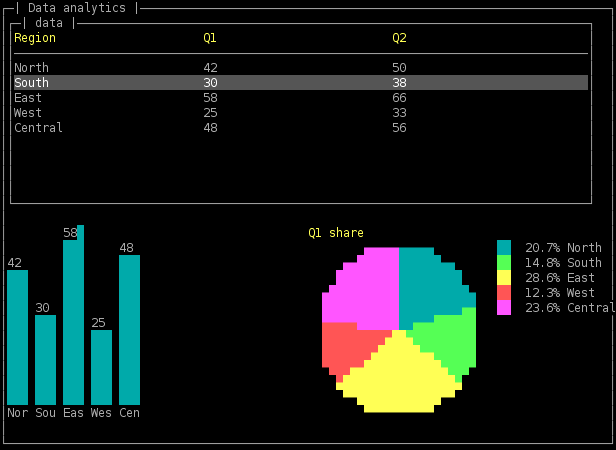
The `spreadsheet` tutorial — a table with a live histogram and pie chart:
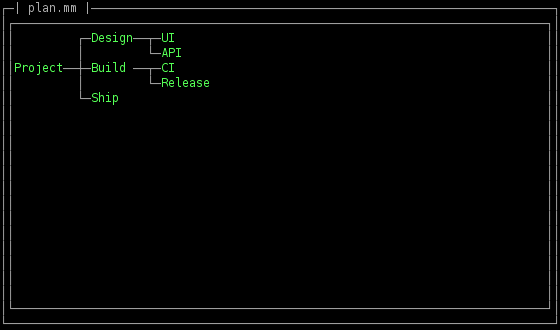
The `mindmap` tutorial — a FreeMind viewer/editor:
## Requirements
libcaca development files, found at build time via `pkg-config`:
| Debian/Ubuntu | `apt install libcaca-dev pkg-config` |
| Fedora/RHEL | `dnf install libcaca-devel pkgconf-pkg-config` |
| macOS | `brew install libcaca pkg-config` |
## Hello, world
```rust,no_run
use gtcaca::{key, Application, Button, Entry, Gtcaca, Label, Window};
fn main() -> Result<(), gtcaca::Error> {
let ctx = Gtcaca::init()?; // opens the terminal display
let app = Application::new(&ctx, "Demo");
let win = Window::fullscreen(&app, None);
Label::new(&win, "Name:", 5, 2);
let entry = Entry::new(&win, 12, 2, 20);
let quit = Button::new(&win, "Quit", 5, 4);
quit.on_key(|k| if k == key::RETURN { gtcaca::quit(); true } else { false });
ctx.run(); // blocking event loop
println!("you typed: {}", entry.text());
Ok(())
}
```
## Runnable examples
Run each in a real terminal:
| `cargo run --example hello` | The smallest app: window + a few widgets + `ctx.run()`. |
| `cargo run --example gallery` | Browse and drive **every** widget. Shows the uniform `Box<dyn Widget>` + `paint`/`send_key`/`set_focus` pattern and the built-in `/` list search. |
| `cargo run --example spreadsheet [file.csv]` | A data-analytics mini-app, commented block by block: a `Table` over a CSV, with a **histogram** (`Barchart`) and **pie chart** (`Piechart`) of a column. |
| `cargo run --example mindmap [file.mm]` | A **FreeMind** viewer/editor, block by block: parse `.mm` XML into a `Mindmap`, navigate/fold, edit via an `Entry` minibuffer, save back to XML. |
The `spreadsheet` and `mindmap` examples are written as tutorials — read them
top to bottom.
## The widgets
Every widget is created with `T::new(&parent, …)`, configured with setters, and
(in a custom loop) painted with `.paint()`. All implement the `Widget` trait,
which adds `send_key`, `set_focus`, `paint`, and `geometry`.
**Containers & layout** — `Application`, `Window` (`fullscreen` / `centered` /
`centered_fraction`, plus `content(margin)` for the inner rectangle), `Frame`,
`Separator`, `Expander`, `Tabs`.
**Inputs** — `Button`, `Entry`, `Checkbox`, `Radiobutton`, `Combobox`,
`Switch`, `Scale`, `Spinbutton`, `Textview`, `Editor`.
**Data** — `Table` (virtual, via a `TableModel`), `Tree` (via a `TreeModel`,
with `select` to sync from elsewhere), `Textlist` (with built-in `/` search),
`Hexview` (byte cursor + range highlight), `Mindmap` (FreeMind-style tree).
**Charts & analytics** — `Barchart` (histograms / counts), `Piechart` (round
pie or donut with legend), `Scatter` (auto-fitting x/y axes), `Linechart` (XY
series), `Sparkline` (inline trend), `Gauge` (single percentage),
`Segdisplay`, `Map`, `Calendar`.
**Dialogs & chrome** — `Menu`, `Statusbar`, `Dialog`, `Filechooser`, `Image`.
Colours for the chart/marker APIs are in the `color` module (`color::CYAN`,
…); special keys are in `key`.
## Two ways to run the loop
**Toolkit loop** — build widgets, register `on_key` closures, call `ctx.run()`.
Simplest for form-style apps (see `hello`).
**Custom loop** — drive it yourself for full control (the pattern carscal and
the tutorials use):
```rust,no_run
# use gtcaca::Widget;
# fn f(ctx: >caca::Gtcaca, table: &impl Widget) {
loop {
ctx.clear(); // wipe the canvas
table.paint(); // paint exactly the widgets you want …
ctx.flush(); // … and flush to the terminal
let Some(k) = gtcaca::poll_key(-1) else { continue }; // block for a key
match k {
k if k == b'q' as i32 => break,
_ => { table.send_key(k); } // route it to a widget
}
}
# }
```
`paint` + `clear`/`flush` let you show only what you choose (one selected
widget, say), where `ctx.redraw()` paints the whole widget list.
## Building a data view
`Table` and `Tree` are *virtual*: you implement a model and the widget pulls
cells/nodes on demand, so they scale to huge data without copying.
```rust,no_run
use gtcaca::{Table, TableModel, Window};
struct Csv(Vec<Vec<String>>);
impl TableModel for Csv {
fn row_count(&self) -> i64 { self.0.len() as i64 }
fn headers(&self) -> Vec<String> { vec!["A".into(), "B".into()] }
fn cell(&self, row: i64, col: i32) -> String {
self.0[row as usize][col as usize].clone()
}
}
# fn f(win: &Window) {
let table = Table::new(win, 0, 0, 40, 20, Box::new(Csv(vec![])));
# }
```
Summarise a column with a chart — a histogram and its proportions:
```rust,no_run
# use gtcaca::{Barchart, Piechart, color, Window};
# fn f(win: &Window) {
let values = [42.0f32, 30.0, 58.0, 25.0];
let labels = ["North", "South", "East", "West"];
let bars = Barchart::new(win, 0, 0, 40, 10);
bars.set_data(&values, &labels); // one labelled bar per value
bars.set_color(color::CYAN);
let pie = Piechart::new(win, 42, 0, 30, 10);
pie.set_data(&values, &labels); // the same numbers as slices
pie.set_title("share");
# }
```
## The full C API
Every wrapped widget is one call away from its raw functions, and the **entire**
C API is available (unsafe) through the re-exported [`gtcaca-sys`] FFI:
```rust
use gtcaca::ffi;
unsafe { /* call any gtcaca_* function directly */ }
```
## License
Public Domain (Unlicense), same as GTCaca.
[GTCaca]: https://github.com/stricaud/gtcaca
[`gtcaca-sys`]: https://crates.io/crates/gtcaca-sys