



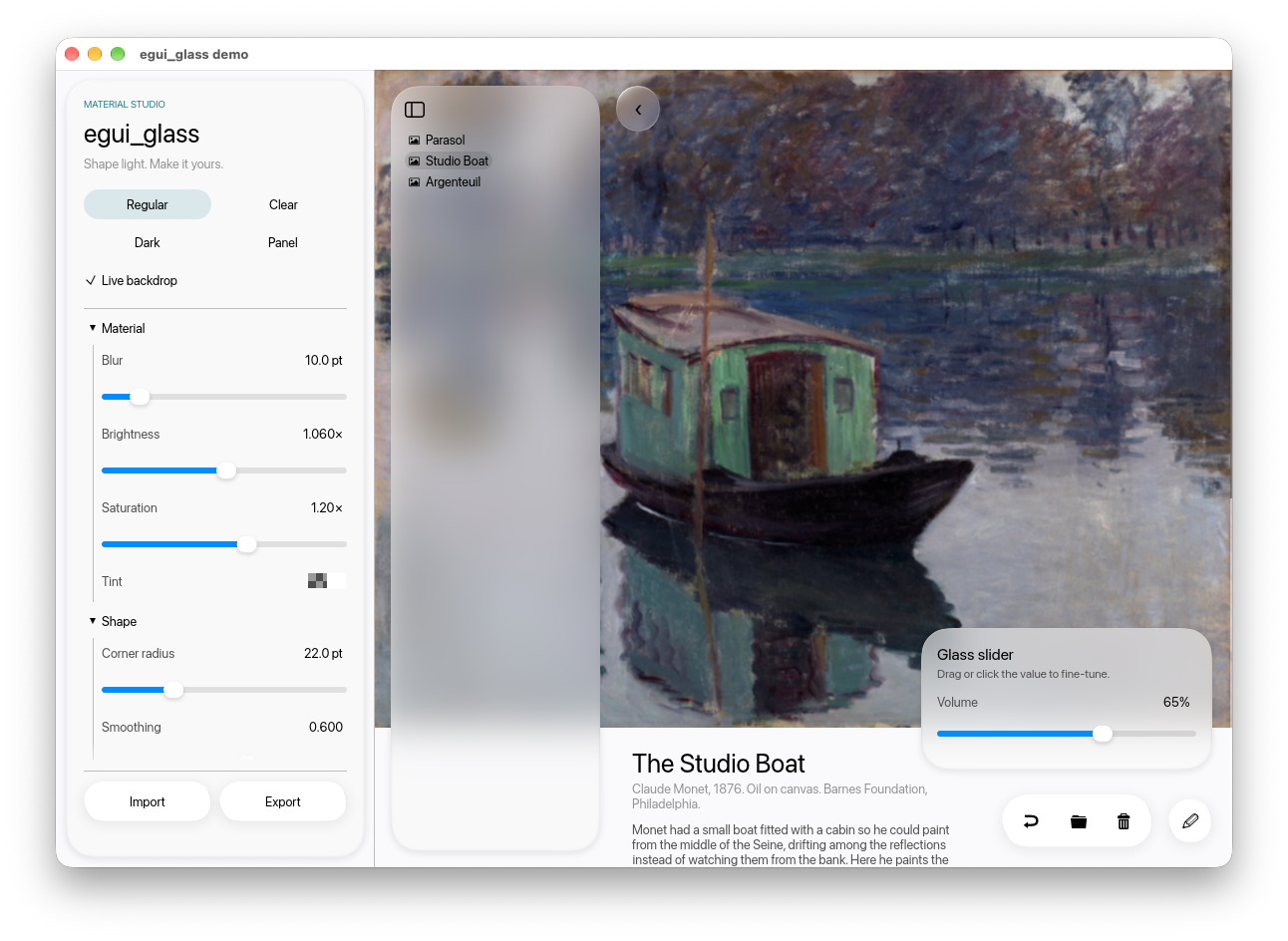
Glass surfaces for egui, inspired by Apple's Liquid Glass:
edge refraction, frosted blur, tint, and a thin bevel highlight, rendered on the GPU through
egui-wgpu. Includes containers, capsule buttons, glass sliders, toolbars, light/dark presets, and an optional
live backdrop for refracting egui content. No animation is provided.
Quick start
Requires Rust 1.92+, egui/eframe 0.35, and wgpu 29. Use the wgpu renderer; glow is unsupported.
The wayland and x11 features below enable Linux windowing. A wgpu-compatible graphics
adapter is required. Start with cargo new glass-app, replace its dependencies with the
following, put the Rust example in src/main.rs, and run cargo run. No assets or local
checkout of this repository are needed.
[]
= { = "0.35", = false, = ["accesskit", "default_fonts", "wgpu", "wayland", "x11"] }
= "0.35"
= "0.1.5"
use egui;
use ;
;
init runs once per renderer; set_backdrop uploads once or when the image changes;
show_backdrop runs before glass each frame. The 1 passed to init matches the default
MSAA setting (NativeOptions::multisampling = 0 means one sample). If you enable MSAA,
pass the same sample count to both. Keep the renderer alive for the lifetime of the UI.
Choose what the glass sees
| Backdrop | What appears through glass | Cost and use |
|---|---|---|
| Static image, as above | Only the registered image at that screen position | Upload once; useful for sidebars, cards and dialogs over a gradient or wallpaper |
LiveBackdrop |
Page content rendered by its closure, including text | Extra layout and GPU rendering every frame; useful for floating controls over changing content |
For example, if a log line is painted over a static wallpaper, glass over that line still
shows the wallpaper, not a blurred log line. Increasing blur does not change this.
Static glass is not OS window transparency and cannot sample the desktop or other apps.
For a live backdrop, store a LiveBackdrop in your app. Create it after init, before
set_backdrop or native texture registration. This is the replacement for the static
backdrop drawing step; keep glass outside the page closure:
// In the creation closure, after init (rs is the wgpu render state):
let live = new; // default fonts
// In App::ui, using the stored live value:
live.run;
new
.fixed_pos.constrain
.show;
The page closure runs twice: keep file writes, network calls, state transitions and other
side effects outside it. Create one live backdrop per renderer. For custom fonts, pass
Some(font_definitions) and keep them synchronized with the main context. Images in the
page must use textures registered with egui_glass::register_native_texture (set_backdrop
does this for its image); ordinary egui texture uploads are not automatically mirrored.
Add glass to an existing app
Use the initialization and dependencies above. Start with navigation surfaces or transient overlays; keep dense text and code on opaque surfaces when contrast matters. Glass does not replace your application's event handling or persistence.
Sidebar and opaque content
This code goes in App::ui. Draw one backdrop over the whole root UI before allocating
panels so every surface uses the same screen mapping. Transparent outer panel frames let
that backdrop show through. Glass supplies its own padding (16 points by default); avoid
adding a second padded frame unless you want both margins.
show_backdrop;
left
.default_size
.frame
.show;
default
.frame
.show;
Modal with scrolling and dismissal
Keep your existing modal open flag and action handling. Use Frame::NONE on the modal
and put glass inside it; the modal still supplies input blocking and click-away/Escape
dismissal. The inner ScrollArea scrolls the form, while its footer stays visible.
// In App::ui, after drawing the page. `open` is your &mut bool modal state.
if *open
Preserve your existing control theme
Glass::show and GlassToolbar::show apply flat visuals to child controls: transparent
idle fills, capsule corners, changed foreground and selection colours, and no widget
borders. This is local to their child UI. To retain your app's existing buttons, validation
colours and focus styling, snapshot the style before entering the container:
let app_style = ui.style.clone;
panel.show;
Choose a glass tint that suits the restored text colours; restoring a light theme on dark
glass also restores its dark text. Use ordinary egui controls inside glass containers.
GlassButton paints another glass surface, so use it on the backdrop rather than nesting
it inside Glass or GlassToolbar.
Materials and controls
| API / preset | Intended use |
|---|---|
Glass::default() / GlassStyle::regular() |
Small frosted cards, restrained bevel and halo |
Glass::panel() / GlassStyle::panel() |
Large sheets and sidebars with quiet edges |
GlassStyle::clear() |
Stronger lensing over rich imagery, little frost |
GlassStyle::dark() / panel_dark() |
Dark counterparts; pair with a dark backdrop |
GlassButton::new("Continue").show(ui) |
Standalone capsule action |
GlassToolbar::default().show(ui, closure) |
Toolbar with ordinary egui controls inside |
GlassSlider::new(&mut value, 0.0..=100.0).show(ui) |
Standalone slider with glass thumb and editable value |
paint_glass(ui, rect, &style) |
Custom surface; paint it before its foreground content |
Tune the material without changing your widget layout:
let style = GlassStyle ;
new.show;
Higher tint alpha mixes in more tint colour; a high white tint improves text contrast but
makes the backdrop less apparent. Blur and refraction are measured in logical points.
For dark UIs use a dark preset and a matching host theme/backdrop. For reduced transparency,
choose an ordinary opaque egui::Frame in your app instead of drawing glass.
Troubleshooting
| Symptom | Check |
|---|---|
No wgpu_render_state / no glass |
Enable eframe's wgpu feature and select Renderer::Wgpu; glow is unsupported |
Panic at set_backdrop or GPU sample-count error |
Call init first and match the renderer's MSAA count |
| Glass looks flat or white | Register a non-uniform backdrop, draw it before glass, and reduce tint alpha if needed |
| Text behind glass does not appear | Static glass sees only its image; use LiveBackdrop for page content |
| Background vanishes around panels | Opaque panel frames cover it; use Frame::NONE for those outer frames |
| Buttons or selection colours changed | Glass applies flat child visuals; use the style-preservation recipe above |
| Dialog padding doubled | Remove the modal's outer frame padding; give padding to Glass once |
| Floating area moves on its first frame | Use Area::constrain(false); your app then owns viewport placement/clamping |
| Page does not scroll beneath a floating overlay | egui sends wheel input to the top layer; keep scrolling content in that layer or explicitly route wheel input in your app |
| Images missing through live glass | Register their native textures with the library before drawing the live page |
| Headless tests have no GPU renderer | Exercise content using an opaque frame; verify glass rendering separately with wgpu |
Before adopting
This is a 0.1 library: suitable for experimenting with glass in native egui apps, with a small API that may evolve before 1.0. Evaluate rendering and interaction on your target devices.
- Static glass samples the registered image; it does not automatically capture widgets behind it.
LiveBackdroprenders page content again off screen, adding layout and GPU work each frame. - Library tests run in CI on Linux, macOS, and Windows. Demo builds are checked on macOS and Windows. These are build/test checks, not a GPU rendering certification; browser and mobile targets are not covered by CI.
GlassButtonsupports Tab navigation, Enter/Space activation, a visible focus outline, and screen-reader button names. Enable the host's AccessKit integration (as above), and use.accessible_name("Back")for icon-only buttons. An opaque/reduced-transparency fallback remains an application responsibility; check contrast against your actual backdrop.- There are no default crate features. Enable
features = ["serde"]to serializeGlassStyle.
Docs
- Guide — put glass into an existing app: backdrop, components, presets, dark theme, glass over live content.
- Reference — every function and
GlassStylefield, how the shader works, limits, the demo app, building the macOS app, publishing. - docs.rs — API docs.
- Contributing — development, bug reports, and release checks.
- Changelog — changes for the next release.
Demo
License
MIT. "Liquid Glass" is Apple's name for its design language; this is an independent reimplementation of the look and is not affiliated with Apple. See asset provenance for the demo images and branding; these assets are not included in the library crate.