
Please check the build logs for more information.
See Builds for ideas on how to fix a failed build, or Metadata for how to configure docs.rs builds.
If you believe this is docs.rs' fault, open an issue.
claude-code-transcripts-ingest


CLI that ingests every Claude Code transcript under ~/.claude/projects into a
DuckDB database, with a normalised schema suited for usage / cost analysis across
sessions, subagents, tool calls, and cache tokens. Ships with an embedded viewer
served over HTTP, plus cct report usage for cost breakdowns and
cct extract sessions for structured per-turn JSON dumps.
Installs the cct binary.
Install
The duckdb dependency is bundled (built from C++ sources), so the install is
self-contained but takes a minute or two the first time.
Quick start
Commands
cct ingest
cct ingest [-i <dir>] [-o <file>] [-j <jobs>] [--pricing <toml>] [--no-progress]
| Flag | Default | Meaning |
|---|---|---|
-i, --input-dir |
~/.claude/projects |
Directory scanned recursively for .jsonl |
-o, --output |
~/.local/share/cct/transcripts.duckdb ($XDG_DATA_HOME/cct/transcripts.duckdb) |
Output DuckDB file (overwritten each run) |
-j, --jobs |
0 (logical CPUs) |
Parallel worker threads |
--pricing |
— | TOML overriding the seeded model_pricing table |
--no-progress |
— | Silence per-second progress on stderr |
cct serve
cct serve [--db <file>] [--port <n>]
| Flag | Default | Meaning |
|---|---|---|
--db |
~/.local/share/cct/transcripts.duckdb ($XDG_DATA_HOME/cct/transcripts.duckdb) |
DB file to serve |
--port |
8766 |
Listen port |
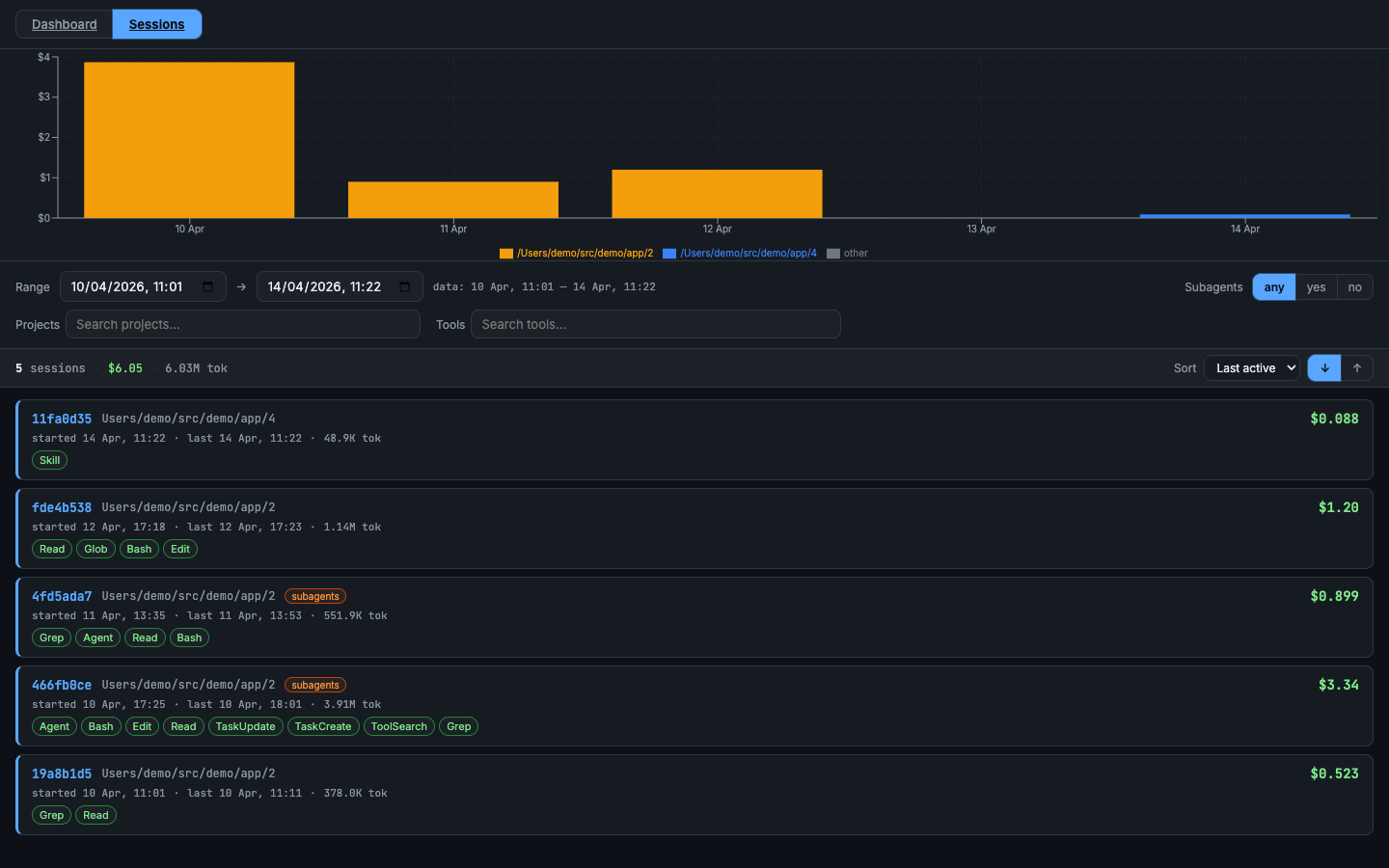
Sessions list
Every session at a glance — cost, tokens, tools used, subagent flag. Filter by project, tool, model, or cost range; sort by most recent or highest spend.
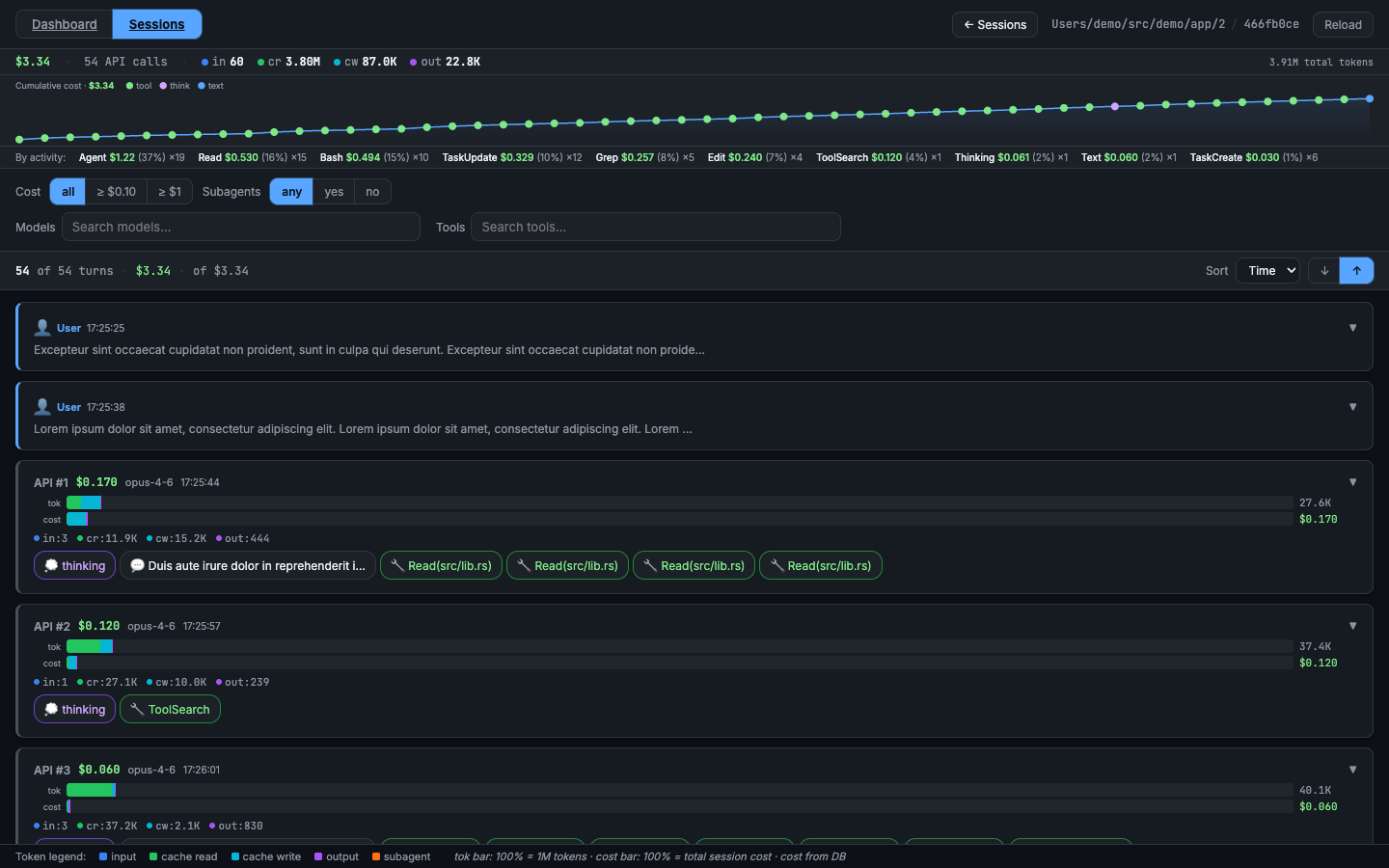
Transcripts
Browse by project → session → turn-by-turn timeline. Every assistant turn shows its exact cost: input, output, cache-read, and cache-creation tokens with the resulting dollar amount. Subagent calls expand inline so you can trace the full cost of any delegated task back to the turn that triggered it.
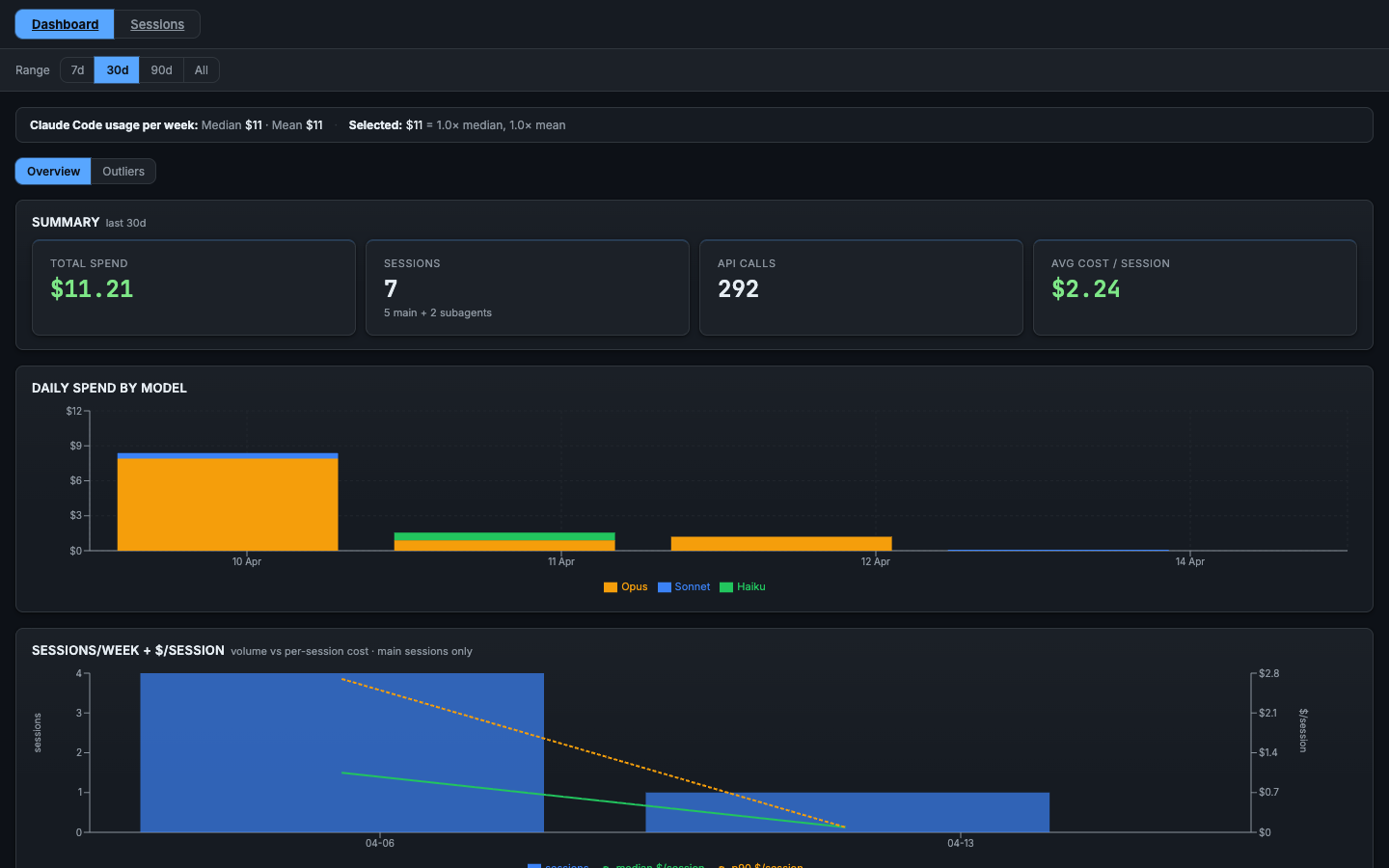
Dashboard
A multi-panel cost dashboard split into two sub-tabs. Switch between them with the Overview and Outliers buttons; the active tab is preserved in the URL (?sub=outliers) so you can bookmark or share a specific view.
Overview — general spend picture:
- Summary (total cost, token breakdown)
- Daily Spend by Model
- Sessions/Week + $/Session (volume vs per-session cost)
- Token-type Cost Split (main-chain vs sidechain)
- First-turn Cache-Creation Distribution (system-prompt size proxy)
- Model Breakdown
- Errors
Outliers — actionable panels for reducing spend:
- Top 1% Most-Expensive Turns (top 30 by cost, click to open session)
- Top Sessions (by cost, click to open in Transcripts)
- Context Size Distribution (peak tokens per session)
- Cache Invalidation Events
- Compaction Events
- Hour-of-Day Cost
- Artifact Leaderboards: Large Writes / Agent Prompts / Tool Results
- Top Reads by Size
- File Hotspots (files re-read across the most sessions)
- Bash Leaderboards
- MCP Tool Result Sizes
- Hook Frequency & Duration
- Skill Invocation Stats
- Agent Model Usage
- Cache Health
- Session Distribution (by turn count)
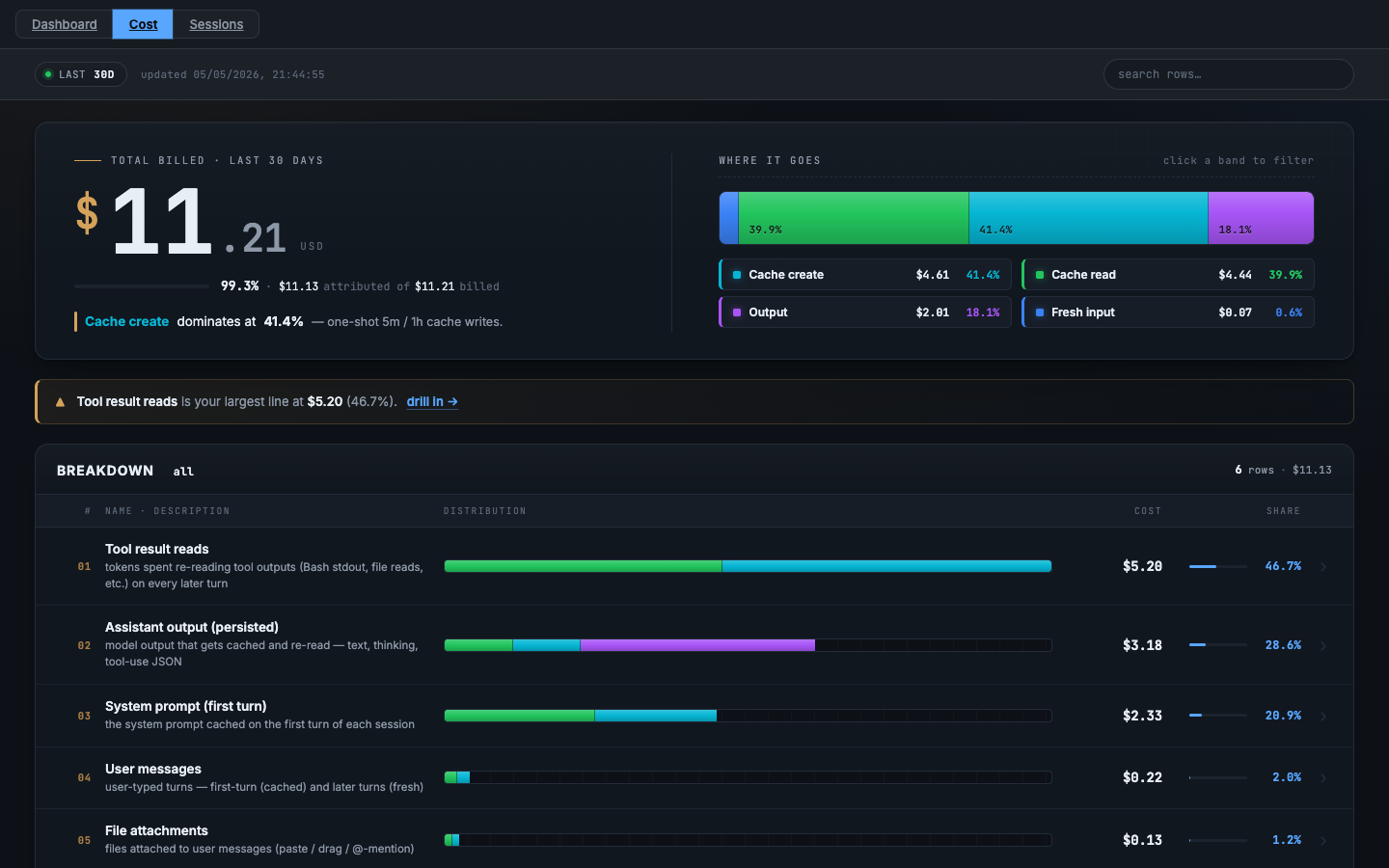
Cost (/cost)
Cumulative spend split by what's actually being billed: tool result reads, cached assistant output, system prompt, user messages, file attachments. Identifies which content category dominates your bill.
cct report usage
cct report usage [--db <file>] [--project <dir> | --all] [--no-subdirs]
                 [--from YYYY-MM-DD] [--to YYYY-MM-DD] [--json]
Token and cost breakdown by model, computed from assistant_entries_deduped. Default scope is the current working directory plus its subdirectory cwds (worktrees, sub-projects); narrow with --no-subdirs or widen with --all. Defaults to formatted text; --json emits a machine-readable structure.
| Flag | Default | Meaning |
|---|---|---|
--db |
~/.local/share/cct/transcripts.duckdb |
DB file to query |
--project |
current cwd | Project directory to filter on (matched against entries.cwd) |
--all |
— | Scan all projects (overrides --project and --no-subdirs) |
--no-subdirs |
— | Match only the project's exact cwd; skip worktree / subdirectory cwds |
--from, --to |
— | Inclusive date range (YYYY-MM-DD, UTC) |
--json |
— | Emit JSON instead of formatted text |
cct extract sessions
cct extract sessions [--db <file>] [--project <dir> | --all] [--no-subdirs]
                     [--session <id-or-prefix>] [--from YYYY-MM-DD] [--to YYYY-MM-DD]
Dumps structured per-turn session metadata as JSON: conversations grouped by slug, sessions inside each, turns inside each session, with tools / skills / errors / tokens and inlined subagent metadata (model, calls, tokens, tools, skills, errors). Always JSON; pipe to jq or feed to downstream analysis tooling.
| Flag | Default | Meaning |
|---|---|---|
--db |
~/.local/share/cct/transcripts.duckdb |
DB file to query |
--project |
current cwd | Project directory to filter on |
--all |
— | Scan all projects |
--no-subdirs |
— | Match only the project's exact cwd |
--session |
— | Filter to a specific session_id (or unique prefix) |
--from, --to |
— | Inclusive date range (YYYY-MM-DD, UTC) |
cct info
cct info [--db <file>]
Prints the DB path, file size, entry count, session count, and last ingest timestamp. Useful for confirming the DB location and freshness without opening DuckDB manually.
| Flag | Default | Meaning |
|---|---|---|
--db |
~/.local/share/cct/transcripts.duckdb ($XDG_DATA_HOME/cct/transcripts.duckdb) |
DB file to inspect |
cct update
cct update [--version <vX.Y.Z>] [-y|--yes]
Self-updates the running cct binary from the latest GitHub release for the current OS/arch. Pass --version to install or pin a specific version. Pass -y to skip the confirmation prompt.
Update notifications
cct does a background GitHub-releases check once every 24 hours and prints a banner on stderr if a newer release exists. The check is skipped when:
- stderr is not a TTY (e.g. piped output);
CCT_NO_UPDATE_CHECK=1is set; orCI=trueis set (the standard CI environment marker).
The cache file lives at $XDG_CACHE_HOME/cct/update_check.json (default ~/.cache/cct/update_check.json). Delete it to force a refresh.
Run cct --help / cct <subcommand> --help for the authoritative flag list.
Library
The transcript parser lives in claude-code-transcripts
and can be used standalone without DuckDB.
License
Dual-licensed under MIT OR Apache-2.0.