# assert2
All-purpose [`assert!(...)`](macro.assert.html) and [`check!(...)`](macro.check.html) macros, inspired by [Catch2](https://github.com/catchorg/Catch2).
There is also a [`debug_assert!(...)`](macro.debug_assert.html) macro that is disabled on optimized builds by default.
## Why these macros?
These macros offer some benefits over the assertions from the standard library:
* Use comparison operators inside the assertion instead of specialized macros: `assert!(1 + 1 == 2)`.
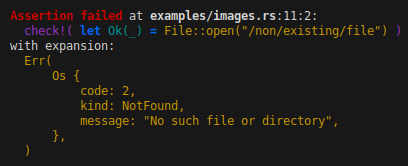
* Test pattern matches: `assert!(let Err(e) = File::open("/non/existing/file"))`.
* Use [let chains](https://blog.rust-lang.org/2025/06/26/Rust-1.88.0/#let-chains) (even with compilers older than Rust 1.88).
* See which part of a `&&` chain failed.
* Re-use captured variables from pattern matches in later code with `assert!(...)`.
* Perform multiple checks before panicking with `check!(...)`.
* Colored failure messages!
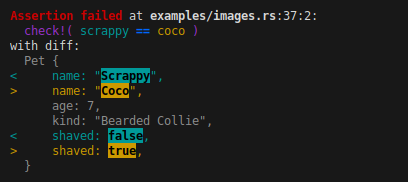
* Highlighted diffs between the Debug form of the expected and actual values!
The macros also accept additional arguments for a custom message, so it is fully compatible with `std::assert!(...)`.
This means that you can import the macro as a drop in replacement:
```rust
use assert2::assert;
```
## Examples
```rust
check!(6 + 1 <= 2 * 3);
```

----------
```rust
check!(scrappy == coco);
```
----------
```rust
check!((3, Some(4)) == [1, 2, 3].iter().size_hint());
```

----------
```rust
check!(let Ok(_) = File::open("/non/existing/file"));
```
----------
```rust
assert!(let Err(e) = File::open("/non/existing/file"));
check!(e.kind() == ErrorKind::PermissionDenied);
```

----------
```rust
check!(
let Err(e) = File::open("/non/existing/file")
&& e.kind() == ErrorKind::PermissionDenied
);
```

## `assert` vs `check`
The crate provides two macros: `check!(...)` and `assert!(...)`.
The main difference is that `check` is really intended for test cases and doesn't immediately panic.
Instead, it will print the assertion error and fail the test.
This allows you to run multiple checks and can help to determine the reason of a test failure more easily.
The `assert` macro on the other hand simply prints the error and panics,
and can be used outside of tests just as well.
Currently, `check` uses a scope guard to delay the panic until the current scope ends.
Ideally, `check` doesn't panic at all, but only signals that a test case has failed.
If this becomes possible in the future, the `check` macro will change, so **you should not rely on `check` to panic**.
## Difference between stable and nightly.
If available, the crate uses the `proc_macro_span` feature to get the original source code.
On stable and beta, it falls back to stringifying the expression.
This makes the output a bit more readable on nightly.
## Capturing variables
When you use the [`assert!(...)`](macro.assert.html) macro, any placeholders in `let` patterns are captured.
They will be made available in the calling scope as if they were a regular `let` binding.
This allows you to run additional checks on the captured variables.
For example:
```rust
assert!(let Ok(foo) = Foo::try_new("bar"));
check!(foo.name() == "bar");
assert!(let Err(Error::InvalidName(e)) = Foo::try_new("bogus name"));
check!(e.name() == "bogus name");
check!(e.to_string() == "invalid name: bogus name");
```
The [`check!(...)`](macro.check.html) can not do this, as code following the macro can still be executed, even if the check failed.
However, you can run multiple checks inside the same macro call using `let` chains:
```rust
check!(let Ok(foo) = Foo::try_new("bar") && foo.name() == "bar");
check!(
let Err(Error::InvalidName(e)) = Foo::try_new("bogus name")
&& e.name() == "bogus name"
&& e.to_string() == "invalid name: bogus name"
);
```
## Controlling the output format.
As an end-user, you can influence the way that `assert2` formats failed assertions by changing the `ASSERT2` environment variable.
You can specify any combination of options, separated by a comma.
The supported options are:
* `auto`: Automatically select the compact or pretty `Debug` format for an assertion based on the length (default).
* `pretty`: Always use the pretty `Debug` format for assertion messages (`{:#?}`).
* `compact`: Always use the compact `Debug` format for assertion messages (`{:?}`).
* `no-color`: Disable colored output, even when the output is going to a terminal.
* `color`: Enable colored output, even when the output is not going to a terminal.
For example, you can run the following command to force the use of the compact `Debug` format with colored output:
```shell
ASSERT2=compact,color cargo test
```
If neither the `color` or the `no-color` options are set,
then `assert2` follows the [clicolors specification](https://bixense.com/clicolors/):
* `NO_COLOR != 0` or `CLICOLOR == 0`: Write plain output without color codes.
* `CLICOLOR != 0`: Write colored output when the output is going to a terminal.
* `CLICOLOR_FORCE != 0`: Write colored output even when it is not going to a terminal.