
alphai-tui


Terminal dashboard for watching stocks: live quotes and charts next to AI-scored financial news, sentiment and SEC Form 4 insider activity. Built in Rust with ratatui.
What you get
-
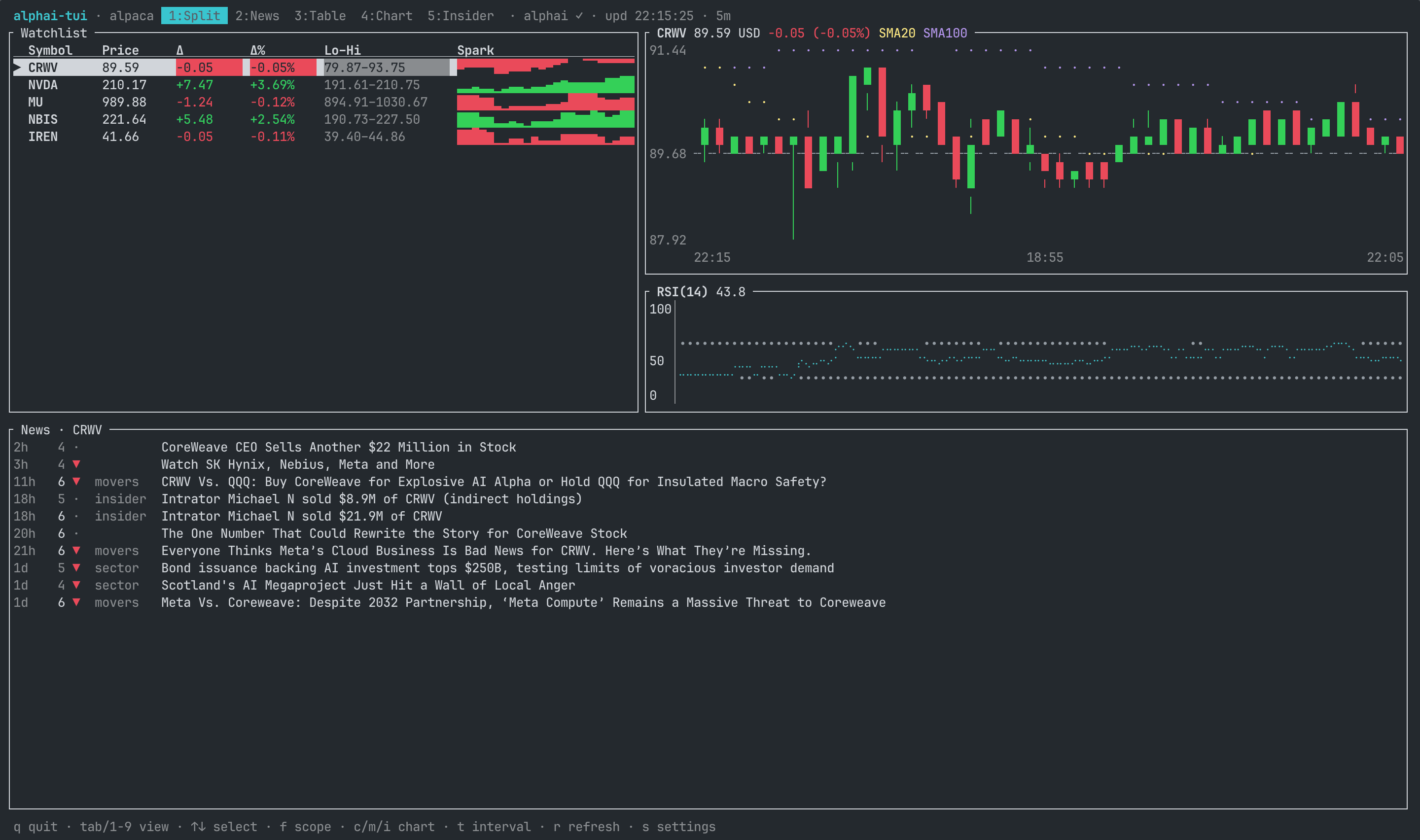
Split (the default view): watchlist and chart side by side in the top half, the news feed in the bottom half (hidden on very small terminals).
-
News: enriched articles for the selected ticker, the whole market or the 48-hour trending top 10 (
fcycles the three scopes), shown as a list next to a full article card with the complete AI analysis: price impact prediction with confidence, relevance and novelty scores, actionability, background context, key entities and a contrarian view.xflips the layout between side-by-side and list-over-card,vexpands the card to full screen, PgUp/PgDn scroll it. Pressing down on the last row loads the next page of the feed; the page size adapts to your plan automatically (10 per page, 50 on Pro keys). Market and trending scopes collapse syndicated reprints to one row per story and show how many outlets carry it (×7). Enter opens the article page on alphai.io; a settings toggle switches that to the original source site. A 7-day bullish/bearish rollup tops the ticker scope.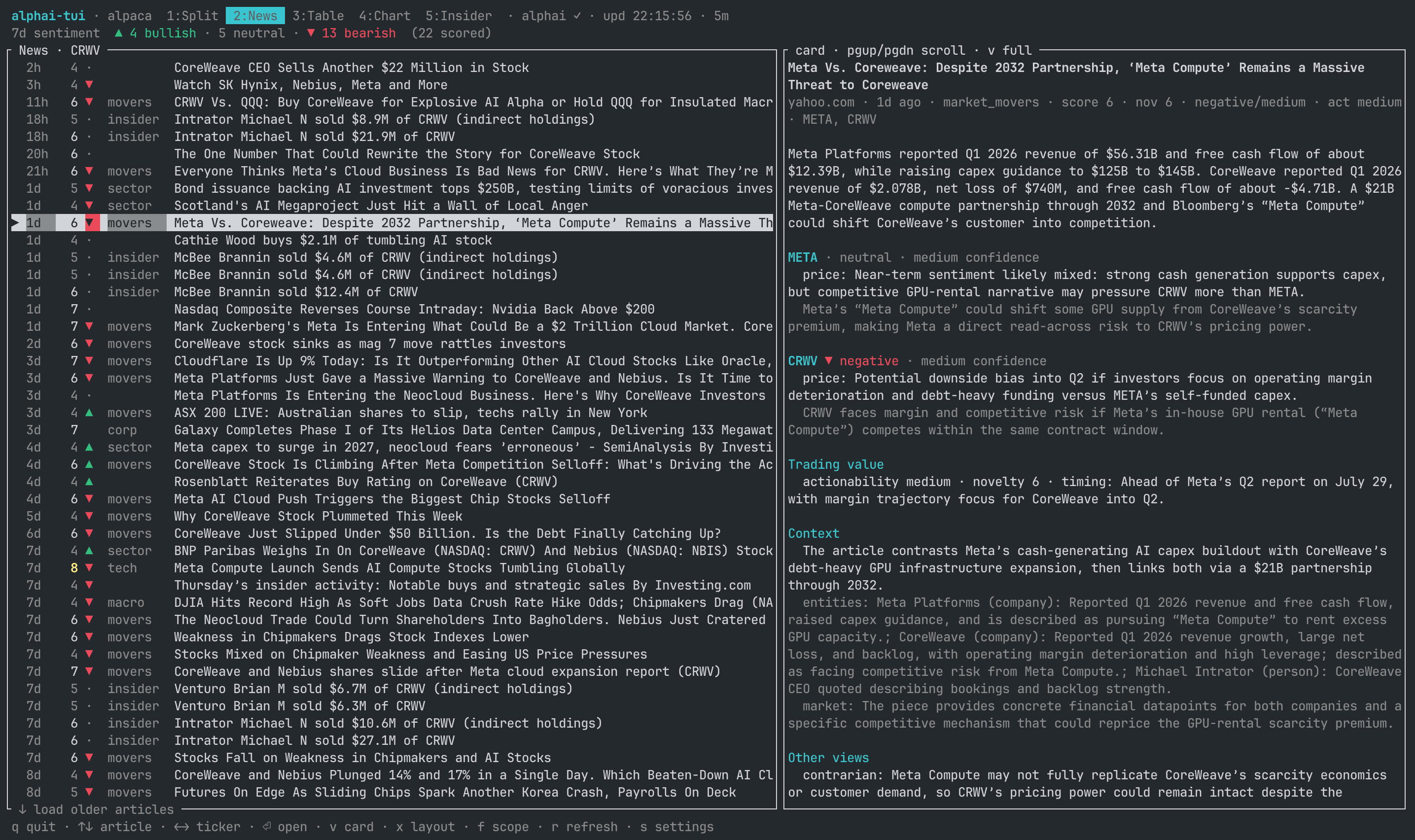
-
Table: watchlist with price, change, day range and unicode sparklines.
-
Chart: candlestick chart of the selected ticker at half-block resolution, with a previous-close reference line, SMA 20/100 overlays and an RSI(14) panel.
cswitches to the classic Braille line chart,manditoggle the indicators,tcycles interval presets on the fly. The client quietly fetches extra history beyond the visible window, so the SMA and RSI lines are fully drawn from the first candle on screen instead of waiting a hundred candles to warm up. -
Insider: SEC Form 4 activity for the selected ticker. A 30-day rollup (buys vs sells, dollar volumes, share of pre-arranged 10b5-1 plan trades, most active insiders with their transaction counts) above the stream of filing events. Each filing row carries a buy/sell glyph and a
D/Imarker for direct or indirect ownership. The stream pages like the news feed: down on the last row loads more.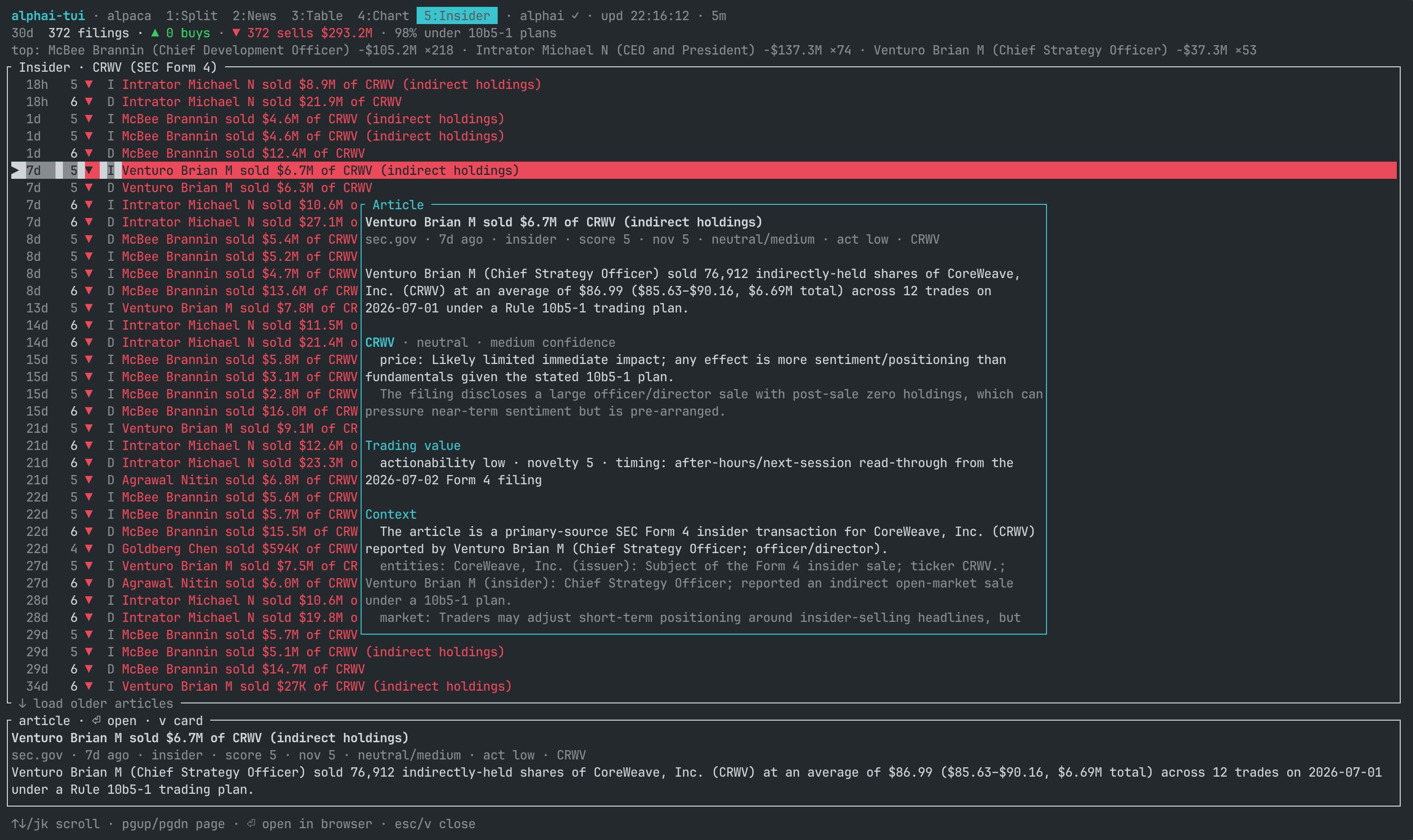
-
In-app settings (
s): pick the price source, paste API keys once and choose where Enter opens news articles. Everything is saved to a config file, so after the first run a barealphai-tuiis enough.
Prices work with no key at all (Yahoo). News, sentiment and insider views use the AlphaAI API and need a free key.
Install
With a Rust toolchain (1.85+):
Or straight from the repository:
Or from a clone:
Quick start
The first run opens the settings screen: pick a price source and paste your
AlphaAI key (get one free at alphai.io, Account >
API keys). Leave it empty if you only want quotes and charts. Your watchlist
and options persist in the config file, so next time plain alphai-tui works.
Options
| Flag | Default | Meaning |
|---|---|---|
-s, --source |
yahoo |
Price source: yahoo, finnhub or alpaca |
-e, --every |
15 |
Poll interval, seconds |
-r, --range |
1d |
History window: 1d 5d 1mo 3mo 6mo 1y 2y |
-i, --interval |
5m |
Candle size: 1m 2m 5m 15m 30m 60m 1d |
--once |
Print quotes to stdout and exit |
-r and -i set the startup window; the t key cycles preset combinations
for the session without persisting them.
CLI arguments win over the config file; the config file wins over built-in
defaults. API keys can also come from env vars, which win over the config:
ALPHAI_API_KEY, FINNHUB_API_KEY, APCA_API_KEY_ID, APCA_API_SECRET_KEY.
Keys
| Key | Where | Action |
|---|---|---|
Tab / 1..5 |
everywhere | switch view |
↑ ↓ / j k |
table, chart, split | select ticker |
↑ ↓ / j k |
news, insider | scroll articles |
← → / h l |
news, insider | switch ticker |
Enter / o |
news, insider | open article in browser |
v |
news, insider | fullscreen article card; scroll with ↑ ↓, Esc closes |
x |
news | flip the list/card layout: side-by-side or stacked |
PgUp PgDn |
news | scroll the article card pane |
↓ / j on the last row |
news, insider | load the next page of the feed |
f |
news, split | cycle news scope: selected ticker, whole market, trending |
c |
chart, split | toggle candlestick / line chart |
m |
chart, split | toggle SMA 20 and SMA 100 overlays |
i |
chart, split | toggle the RSI(14) panel |
t / T |
everywhere | cycle candle interval presets forward / back (5m 15m 60m 1d, each with a matching history window) |
r |
everywhere | refresh prices and the visible news view |
s |
everywhere | settings |
q / Esc / Ctrl-C |
everywhere | quit |
Data sources
Prices
-
yahoo: no API key, quote and candle history in one request, roughly 15 minutes delayed. Crypto and FX tickers work asBTC-USD,EURUSD=X. -
finnhub: needs a key (free at finnhub.io). Real-time-ish quotes; historical candles are premium-only there, so charts build up from quotes collected during the session and reset on restart. Range/interval switching withtdoes not apply to that synthetic history, and candles degrade to flat marks. Free tier is 60 req/min: keeptickers x (60 / --every)under 60. Crypto needs exchange-prefixed symbols (BINANCE:BTCUSDT). -
alpaca: needs a key id and secret (free at alpaca.markets). Realtime quotes from the IEX feed plus real historical bars, so charts are complete right after start instead of growing over the session. Crypto works in the usualBTC-USDform. Getting free keys:- Sign up at alpaca.markets. Email is enough; market data and paper trading need no KYC.
- The free Basic data plan is enabled by default.
- In the dashboard switch the environment to Paper (fine for data), then Home > API Keys > Generate. Copy the Key ID and the Secret; the secret is shown only once.
- Paste both in the settings screen (
s) or exportAPCA_API_KEY_IDandAPCA_API_SECRET_KEY.
Free plan notes: the IEX feed is realtime but thin (roughly 2 to 3 percent of market volume, so charts of illiquid names can be sparse), and the API allows 200 requests/min. The app makes 2 requests per ticker per poll: keep
tickers x 2 x (60 / --every)under 200.ALPACA_FEED=sipneeds a paid data plan;ALPACA_FEED=delayed_sipgives the full market with a 15 minute delay.
News, sentiment, insider
- AlphaAI: AI-enriched financial news feed. Every article carries validated tickers, a category, a deterministic 1 to 10 relevance score and a full per-ticker AI analysis (sentiment, price impact, confidence, novelty, actionability); insider rows are generated from SEC EDGAR Form 4 filings, one row per economic event. The free tier (no card) allows 20 requests/min and 100/day. The app is careful with that budget: it fetches only what the visible view needs (the trending scope is one extra request), caches each response for 5 minutes, loads further pages only when you ask for them, and the article card reuses data already fetched with the list. Feeds page 10 articles at a time (50 on Pro keys, detected automatically). Paging back past your plan's archive horizon (30 days on Free, 90 on Basic) shows an upgrade hint instead of older articles. Full API reference: alphai.io/developers.
Ticker forms follow the US/Yahoo convention (AAPL, BTC-USD, VOD.L),
which is also what AlphaAI uses. Finnhub-specific symbols like
BINANCE:BTCUSDT will not have news attached.
Config file
~/.config/alphai-tui/config.toml on Linux and macOS (%APPDATA% on
Windows), created by the settings screen with mode 0600 since it can hold
keys. Saving the settings also persists the watchlist on screen:
= "yahoo"
= ["AAPL", "MSFT", "NVDA", "BTC-USD"]
= 15
= "1d"
= "5m"
= "alphai" # where enter opens news: "alphai" or "original"
[]
= "ak_live_..."
= ""
= ""
= ""
Architecture
src/
  domain.rs      Quote, Candle, TickerData, Range/Interval
  config.rs      config file load/save (CLI > env > file > defaults)
  source/        DataSource trait + implementations
    yahoo.rs     Yahoo v8 chart endpoint (quote + history in one call)
    finnhub.rs   Finnhub /quote with synthetic session history
    alpaca.rs    snapshot + real historical bars (IEX/SIP feeds, crypto)
  alphai.rs      AlphaAI API client + demand-driven fetch task (TTL cache)
  indicators.rs  SMA and RSI (Wilder smoothing)
  poller.rs      fetches all symbols concurrently on a timer -> mpsc channel
  app.rs         App state + key handling + event loop + settings logic
  ui/            View trait + implementations
    table.rs     watchlist table
    chart.rs     candlestick + line chart, SMA overlays, RSI panel
    split.rs     table + chart
    news.rs      article list + sentiment rollup + detail pane
    insider.rs   Form 4 rollup + filing list
    article.rs   modal full-article card (AI analysis, context)
    settings.rs  modal settings overlay
Data flows one way: background tasks (price poller, AlphaAI fetcher) push
events over an mpsc channel into App::apply; views are stateless renderers
over &mut App. The UI never blocks on the network.
Adding a price source
Implement source::DataSource (one async fetch returning quote + candles)
in a new module and register it in source::make_source.
Adding a view
Implement ui::View (a stateless render over &mut App) as a unit struct
and add it to ui::VIEWS. Order in that array defines the 1..9 hotkeys.
Development
ALPHAI_API_KEY=ak_live_... Issues and PRs are welcome.
License
MIT. Not investment advice; data comes from third-party sources and can be delayed or wrong. Respect the terms of the data providers you enable.