
alphai-tui



A terminal stock dashboard with live quotes, charts, AI-scored news, SEC insider filings, earnings reads and a watchlist calendar. One Rust binary built on ratatui. Prices work without an account; news and filings use a free AlphAI key.

Install · Quick start · Screens · Keys · Sources · Configuration
Install
Choose a package manager:
Prebuilt binaries for macOS, Linux and Windows:
|
powershell -ExecutionPolicy Bypass -c "irm https://github.com/makeev/alphai-tui/releases/latest/download/alphai-tui-installer.ps1 | iex"
Archives and checksums are on the releases page.
x-cmd also supports x install alphai-tui.
The apt repository supports amd64 and arm64 on Ubuntu 22.04 / Debian 12 or newer:
|
&&
Standalone .deb files: apt repository.
To install the latest source, use cargo install --git https://github.com/makeev/alphai-tui, or run a clone:
Quick start
First run opens settings: choose a price source and optionally paste an
AlphAI key from Account > API keys.
Save keeps your settings and watchlist; next time, run alphai-tui alone.
Yahoo needs no key. Finnhub, Alpaca and Tiingo use their own keys.
Press 1–9 to switch views, a / d to add / remove tickers, s for
settings and ? for help. p saves a holding as qty avg_price; an empty
line clears it. Watchlist edits save immediately unless you supplied
command-line tickers; use Save in settings to keep those explicitly.
The screens
| Key | View | Contents |
|---|---|---|
1 |
Split | Full-width chart above the watchlist and news |
2 |
News | Scored stories, per-company AI analysis and the related price move |
3 |
Table | Watchlist quotes, day ranges, extended hours and sparklines |
4 |
Chart | Candles or line, SMA/EMA, volume, RSI and news markers |
5 |
Insider | SEC Form 4 trades, buy/sell rollup and filing cards |
6 |
Earnings | Filing verdict, metrics, comparisons, outlook and analysis |
7 |
Summary | A chart for every watchlist ticker |
8 |
Portfolio | Holdings, value, daily change and P&L |
9 |
Calendar | US macro releases and confirmed watchlist report dates |
The quote rail follows the selected ticker across views. It labels the
quote, currency, feed and trade time separately from the chart's last bar.
Settings, help, themes and refresh are available everywhere. Screenshots
below use dracula; the default theme follows your terminal.
The quote rail, in every view

The rail shows price, daily and extended change, feed delay, session and
next bell, holding P&L, day range, sparkline and other watchlist changes.
Year range and volume appear when available. Optional fields drop as the
terminal narrows; symbol and price remain. Disable it with
[ui] quote_rail = false; it hides automatically below 12 rows.
An event flag uses fresh cached dates: a confirmed ticker report within
seven ET calendar days, otherwise a high-importance macro event within
seven days. Estimated macro dates say est.; postponed and cancelled
events never flag. The rail does not fetch company dates itself.
1 Split: the default view
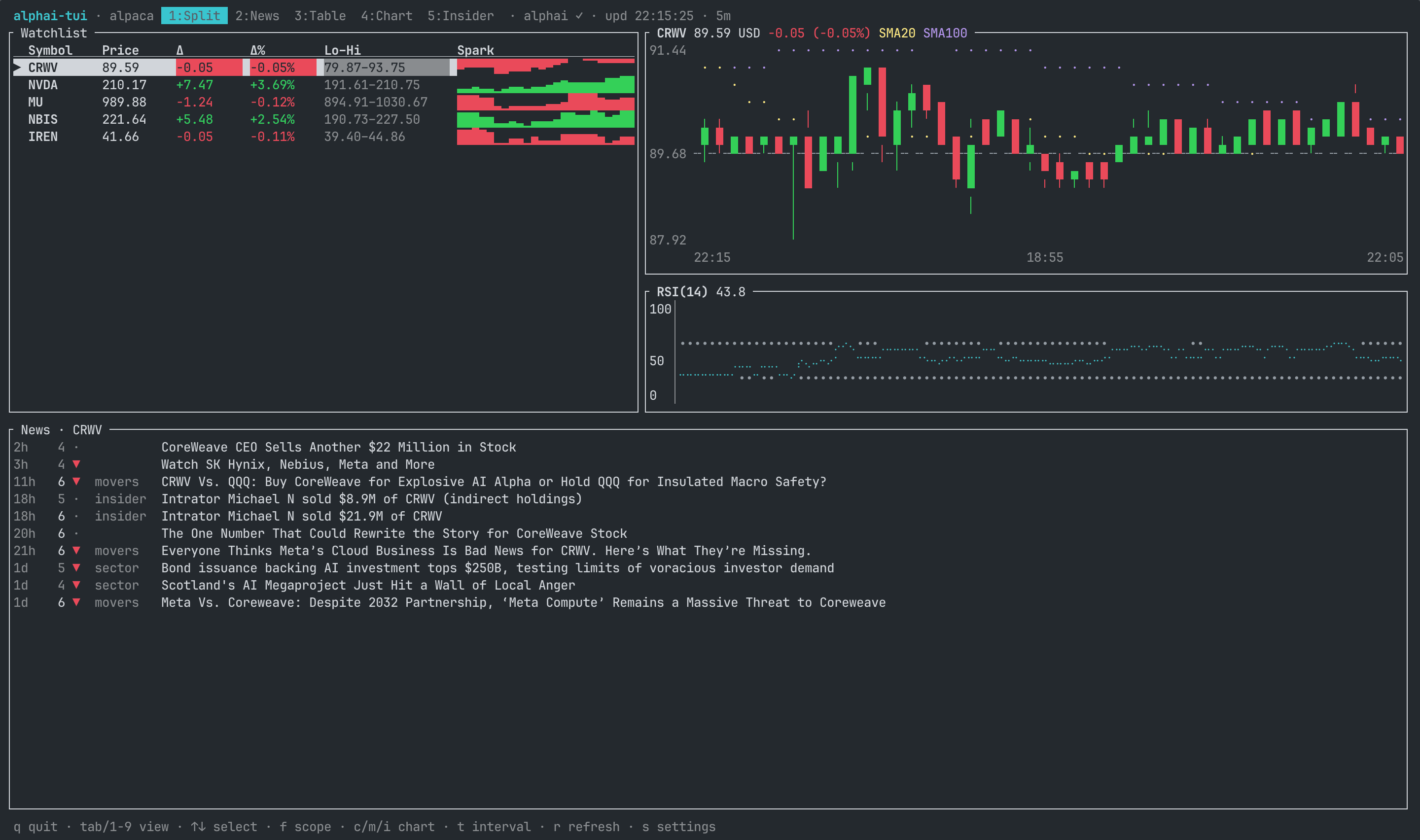
The chart gets the full width above the watchlist and feed. On very small terminals the feed hides, leaving the watchlist beside the chart.
2 News: the story and what it means
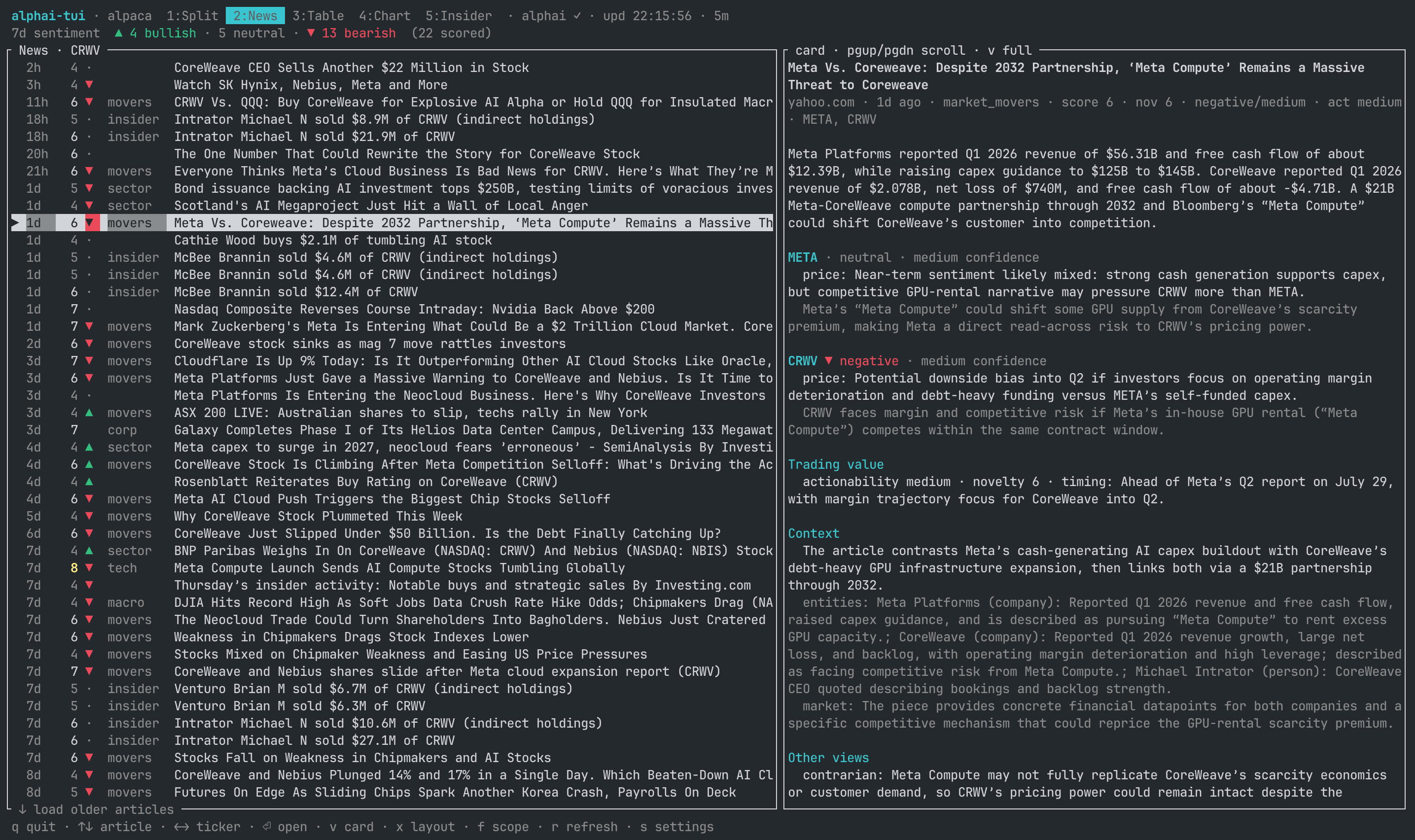
Cards lead with the selected company's AI price impact and explanation, then the summary and other companies. Analysis includes confidence, relevance, novelty, actionability, context, entities and a contrarian view. Ticker scope adds a seven-day bullish/bearish rollup.
News starts at relevance 7; + / - change the server-side filter. Ages
under 15 minutes stand out; ● marks arrivals until selected. New arrivals
go to the top, including stories published earlier but processed later.
Down on the last row loads another page.
At 120+ columns in ticker scope, the chart sits above the list beside the
card; the selected story is highlighted on the chart. Otherwise, list and
card sit side by side. x cycles chart, stacked and side layouts; settings
can save the choice. v reads the article under the chart in chart layout
or fullscreen elsewhere. Enter opens it in the browser.

f cycles ticker, market and the 48-hour trending top ten. Market scope
collapses reprints (×4 outlets), labels earnings filings 8-K / 6-K
and includes insider activity.
3 Table: the watchlist, full width
Price, daily change, day range and session sparkline for each ticker, plus holding figures where applicable. The extended-hours column appears only when at least one ticker has an extended print.
4 Chart: candles, averages, volume, RSI

Half-block candles or a Braille line, previous-close reference, 20/100
period SMA or EMA, matching volume bars and RSI(14). The title shows the
window / interval (initially 5d / 15m), extended feed and loading status.
Last bar identifies the newest candle's close, feed and start time;
price markers say quote, PRE, AH or bar. Hiding the rail restores
the quote, currency and daily change in the chart title.
t/Tcycle window-and-interval presets. Bars keep their interval at every width: narrow plots show the newest bars and saylast N of M bars, with the price axis fitted to them. Widen the terminal or choose a coarser interval to see more; bars are never merged just to fit.Etoggles extended candles, initially on, without hiding extended quotes. The title names the feed and toggle key; the footer explains unavailable cases: daily charts, crypto, non-US listings or Finnhub.ntoggles cached news marks:▲bullish,▼bearish,◆neutral, brighter for higher relevance. The border names the selected or freshest story. Marks cost no requests and appear after Split or News loads that ticker's feed.- Pre-market is warm, after-hours cool; price, volume and RSI share session columns and a time grid. Indicators fetch warm-up history. Aggregation never mixes sessions or feeds. US intraday sessions include half-day 13:00 closes and 17:00 after-hours closes; crypto trades 24/7.
- Axes prioritize opening/closing bells and put dates on a second row.
timezone = "exchange"means ET for US stocks, local time elsewhere;localandutcare alternatives. Future US labels skip closed sessions, weekends and holidays, including DST.session_shadingandtime_gridcan be disabled.
A timestamped quote updates only a bar of the same source, interval and session. A regular close cannot rewrite a pre-market bar, nor an IEX quote a delayed SIP bar. Extended prints appear even at 0% change; a new premarket retires the previous after-hours print.
5 Insider: what the people inside the company did
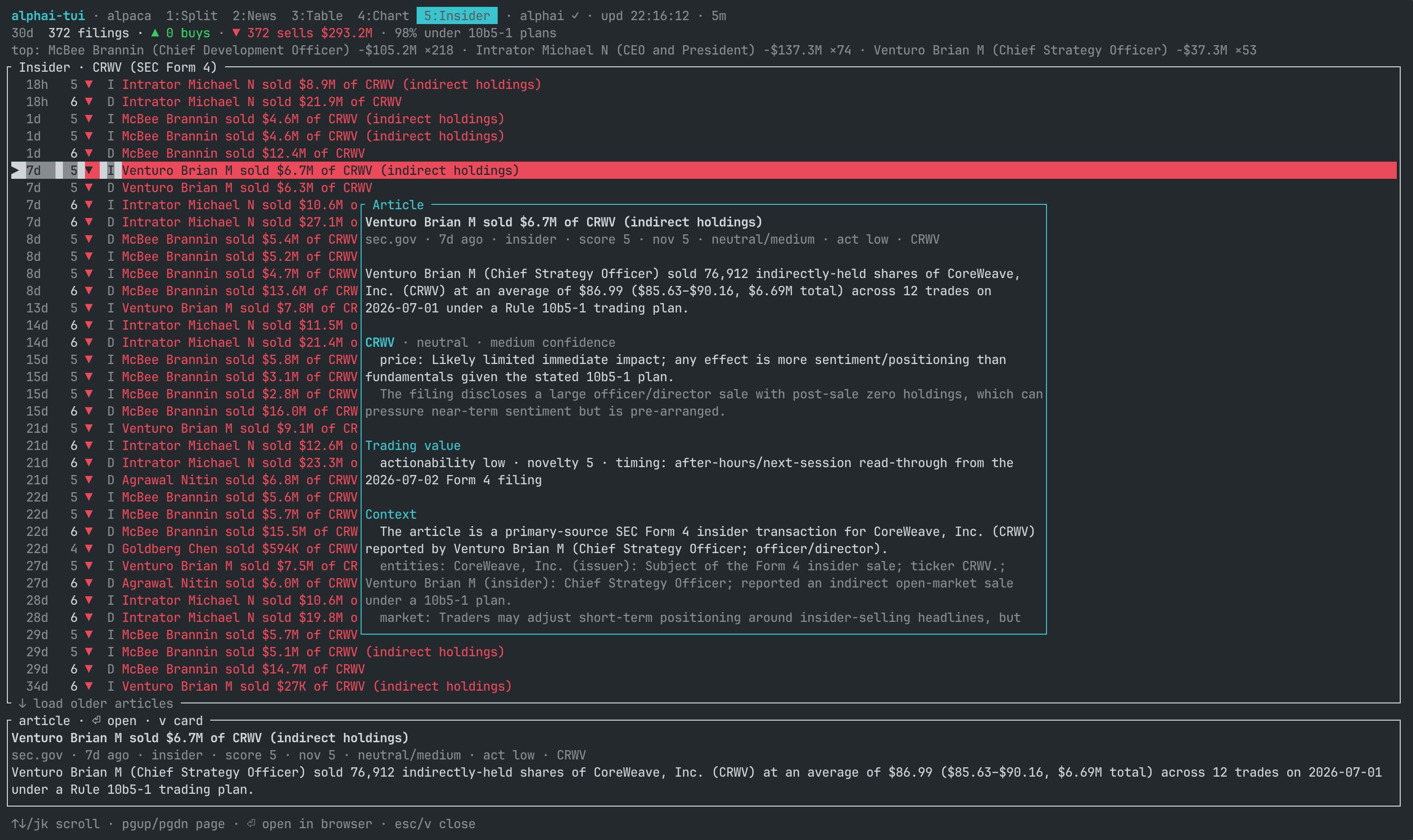
A 12-month rollup covers buys, sells, dollar volumes, 10b5-1 plans and the
most active insiders. The ledger shows transaction date, side, value,
owner and plan; unknown dates stay ?, and legacy rows without an owner
keep their headline. Only the side carries buy/sell color.
Cards lead with company, owner, trade value, plan, stake change and tranche count, then shares, price, code, ownership, late-filing status and the separately labelled AI read. Trade side follows the filing, not sentiment.
The chart places events by date on a log dollar scale: ▲ buys, ▼
sales, hollow ▽ sales back to the issuer; planned trades are dimmed and
the selected filing inverted. Weekly dollar bars sit below. g cycles
3 months, 12 months and off; v toggles the card; + / - filter trade size.
6 Earnings: the filing, read

The company's own 8-K item 2.02 or foreign issuer's 6-K: verdict, summary, metrics against prior quarter/year, segments, outlook, concerns and analysis. Figures are checked against the filing and retain its values, reporting periods and currency; only units are shortened.
← / → switch tickers; older reads follow the latest. If no read exists,
the view says so and shows the next confirmed report date, when known.
The footer lists the next US macro releases.
7 Summary: the whole watchlist at once

One chart per ticker, sized to the terminal. ↑ / ↓ select cards and
page through a watchlist larger than the screen.
8 Portfolio: what you hold and what it did

Quantity, average cost, last price, value, daily P&L, total P&L and portfolio
weight, with totals. p edits and immediately saves a holding. Positions
outside the watchlist are still polled; missing prices show as pending.
Holdings also appear in Table and the rail.
Valuation uses extended prices when available, independently of E; an
extended Last has a *. Premarket Day starts at the latest regular
close; after-hours Day includes both regular and extended moves. There
is no currency conversion: multi-currency totals say mixed currencies.
9 Calendar: what is scheduled
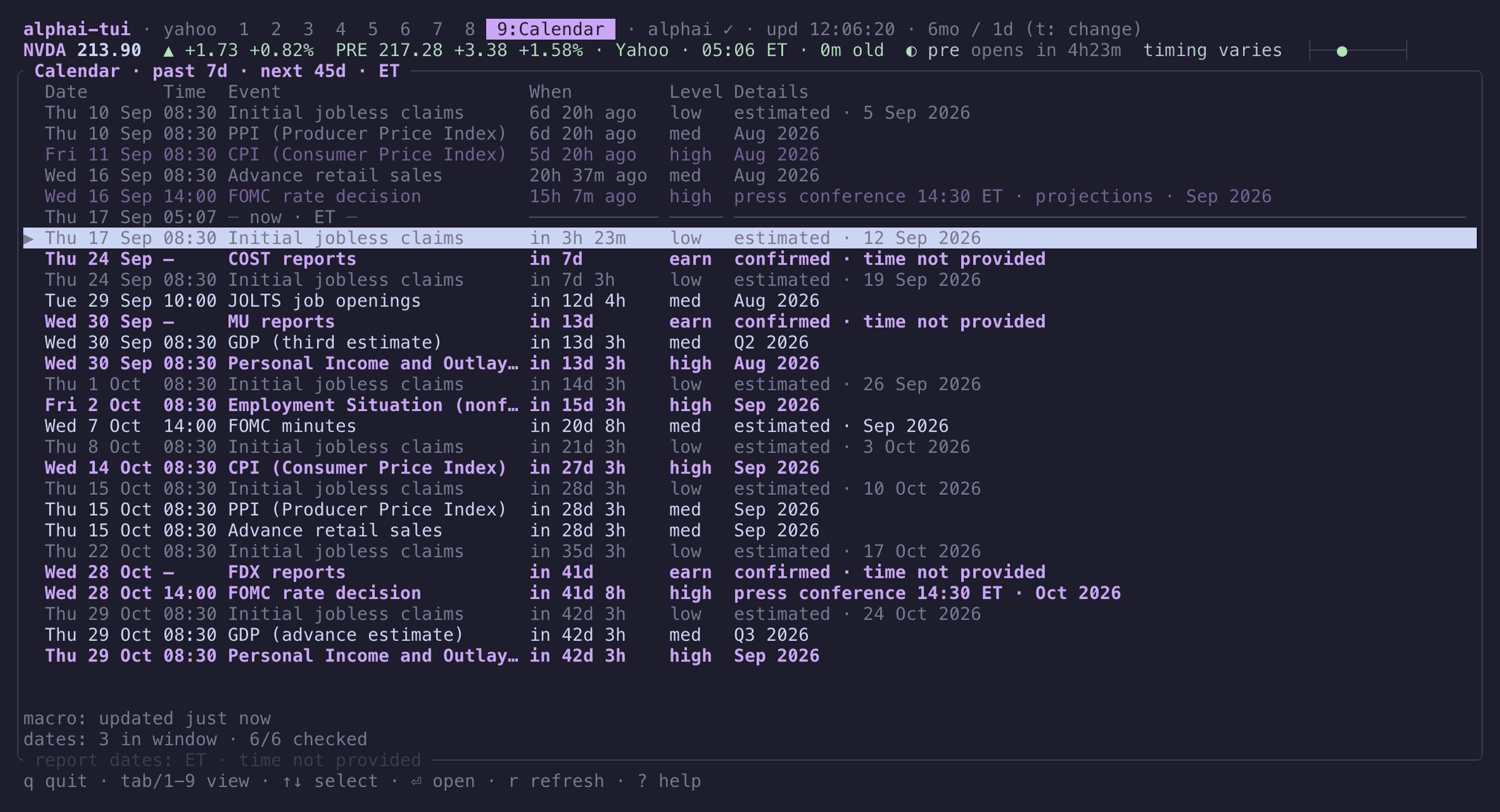
An agenda from seven days ago to 45 days ahead. Selection starts at the
first upcoming event and survives updates; a now line separates past
from future. Long names get up to 48 columns. Event importance carries the
color; estimated, postponed and cancelled survive narrow layouts.
Enter opens a macro source or the company's Earnings view, which may
still show the previous quarter. This is a schedule, with no actual,
forecast or previous macro figures. Macro times follow the chart timezone;
company dates remain ET with no time because the API confirms only the day.
Coverage is partial: a missing date is unconfirmed, and historical company
rows are limited to dates still cached.
While Calendar is open, company checks run at least four seconds apart.
Progress distinguishes unconfirmed, unchecked and failed dates. Failed
macro updates keep successful rows labelled as cached. r refreshes macro
and retries missing, stale or failed company dates; fresh successful dates
stay cached. Recheck one fresh date with r in its Earnings view. Access
or rate-limit errors pause the sweep until a manual retry.
Everywhere: help, settings, themes

? shows current keys and their config action names. s groups settings
into prices, API keys, news and look, with explanations for the selected
row; Save includes the displayed watchlist. } / { cycle themes, z
hides header/footer, and r refreshes prices and visible data.
How it compares
tickrs emphasizes charting and options; ticker offers richer position accounting. alphai-tui adds scored news and filings beside the price.
| alphai-tui | tickrs | ticker | |
|---|---|---|---|
| Charts | candles, line, SMA/EMA, RSI, volume | line, candle, kagi, volume | none |
| Watchlist | chart grid, table, sparklines | summary pane | quote table |
| Analysed news / Form 4 / earnings | yes, with chart markers | no | no |
| Extended hours | price and candles | candles | price |
| Options chain | no | yes | no |
| Positions | quantity and average price | quantity and average price | lots, groups, currencies |
| Script output | text, JSON | no | CSV, JSON |
| Sources | Yahoo, Finnhub, Alpaca, Tiingo | Yahoo | Yahoo, Coinbase |
| Outage handling | cached start, automatic source switch | no | no |
| Edit watchlist in app | yes | yes | no |
| Rebind keys | any action | vim keys | no |
All three use Yahoo, which can throttle by IP; alphai-tui can switch to a keyed source. It does not offer tickrs' options/kagi charts or ticker's cost-basis lots and currency conversion.
Options
| Flag | Default | Meaning |
|---|---|---|
-s, --source |
yahoo |
Price source: yahoo, finnhub, alpaca or tiingo |
-e, --every |
15 |
Poll interval, seconds (also a settings row, applied live) |
-r, --range |
5d |
History window: 1d 5d 1mo 3mo 6mo 1y 2y |
-i, --interval |
15m |
Candle size: 1m 2m 5m 15m 30m 60m 1d |
--theme |
default |
Color preset, e.g. catppuccin-mocha (also a key and a settings row) |
--bare |
off | Start without the header and footer, for a tmux pane (z toggles it live) |
--once |
Print quotes to stdout and exit | |
--json |
Print those quotes as JSON instead of a text table (implies --once) |
|
--earnings TICKER |
Print the latest earnings read to stdout and exit (needs an AlphAI key; one request) | |
--config |
Use an alternate config file (Save writes back to it) |
-r / -i set the startup window; t / T cycle [chart] presets
without persisting the change. CLI options override config, which overrides
defaults. API-key environment variables override [keys]:
ALPHAI_API_KEY, FINNHUB_API_KEY, APCA_API_KEY_ID, APCA_API_SECRET_KEY,
TIINGO_API_KEY.
Quotes as JSON
--json emits an array in requested-symbol order, or the saved watchlist
when no symbols are given. Source, range and interval options still apply.
Warnings go to stderr. Missing optional fields are omitted; failed symbols
retain a row as {"symbol":"AAPL","error":"…"}. The exit code stays 0
for per-symbol failures, so check error.
Regular change is from the previous close; extended change is from the
regular session's close. Held tickers add position: qty, avg_price,
cost, valuation price (including extended hours), value, pnl, plus
pnl_pct and day_pnl when calculable.
|
|
|
|
| &&
For a status bar, save a wrapper as ~/bin/quote-bar and make it executable:
#!/bin/sh
|
set -g status-interval 60
set -g status-right '#(~/bin/quote-bar)'
Each run costs one request per symbol on Yahoo/Finnhub, two on Alpaca; Tiingo uses one or two for the list plus up to three per ticker. Allow at least a minute between status-bar runs on Yahoo to reduce IP throttling; use a keyed source for more frequent updates.
Keys
| Key | Where | Action |
|---|---|---|
Tab / 1..9 |
everywhere | switch view |
↑ ↓ / j k |
table, chart, split | select ticker |
a |
everywhere | add ticker (Enter confirms, Esc cancels) |
d |
everywhere | remove the selected ticker (the last one stays) |
p |
everywhere | save holding as qty avg; empty input clears it |
↑ ↓ / j k |
news, insider | scroll articles |
↑ ↓ / j k |
earnings | scroll the read |
↑ ↓ / j k |
calendar | select event |
← → / h l |
news, insider, earnings | switch ticker |
Enter / o |
news, insider | open article in browser |
Enter / o |
earnings | open the read on alphai.io |
Enter / o |
calendar | open macro source or the company's Earnings view |
v |
news, insider | read article (↑ / ↓ scroll, Esc closes); Insider toggles the side card when it fits |
E |
everywhere | toggle extended candles; explain when unavailable |
x |
news | cycle chart, stacked and side layouts |
PgUp PgDn |
news | scroll the article card pane |
PgUp PgDn |
earnings | page through the read |
PgUp PgDn |
calendar | move ten events |
↓ / j on the last row |
news, insider | load the next page of the feed |
f |
news, split | cycle news scope: selected ticker, whole market, trending |
+ / - |
news, insider, split | change filter: news relevance (default 7), insider trade size (4) |
g |
insider | cycle the trades chart window: 3 months, 12 months, off |
c |
chart, split | toggle candlestick / line chart |
m |
chart, split | toggle the two moving average overlays |
e |
chart, split | switch SMA / EMA |
i |
chart, split | toggle the RSI(14) panel |
b |
chart, split | toggle the volume panel |
n |
chart, split | mark the ticker's cached news on the candles |
t / T |
everywhere | next / previous window-and-interval preset ([chart] presets) |
r |
everywhere | refresh prices and visible data; Calendar refetches macro and retries missing, stale or failed dates |
z |
everywhere | toggle bare mode (hide header/footer) |
} / { |
everywhere | next / previous color preset (session-only until Save) |
s |
everywhere | settings |
? |
everywhere | help overlay: every action with its current keys |
q / Esc / Ctrl-C |
everywhere | quit |
A tmux workspace
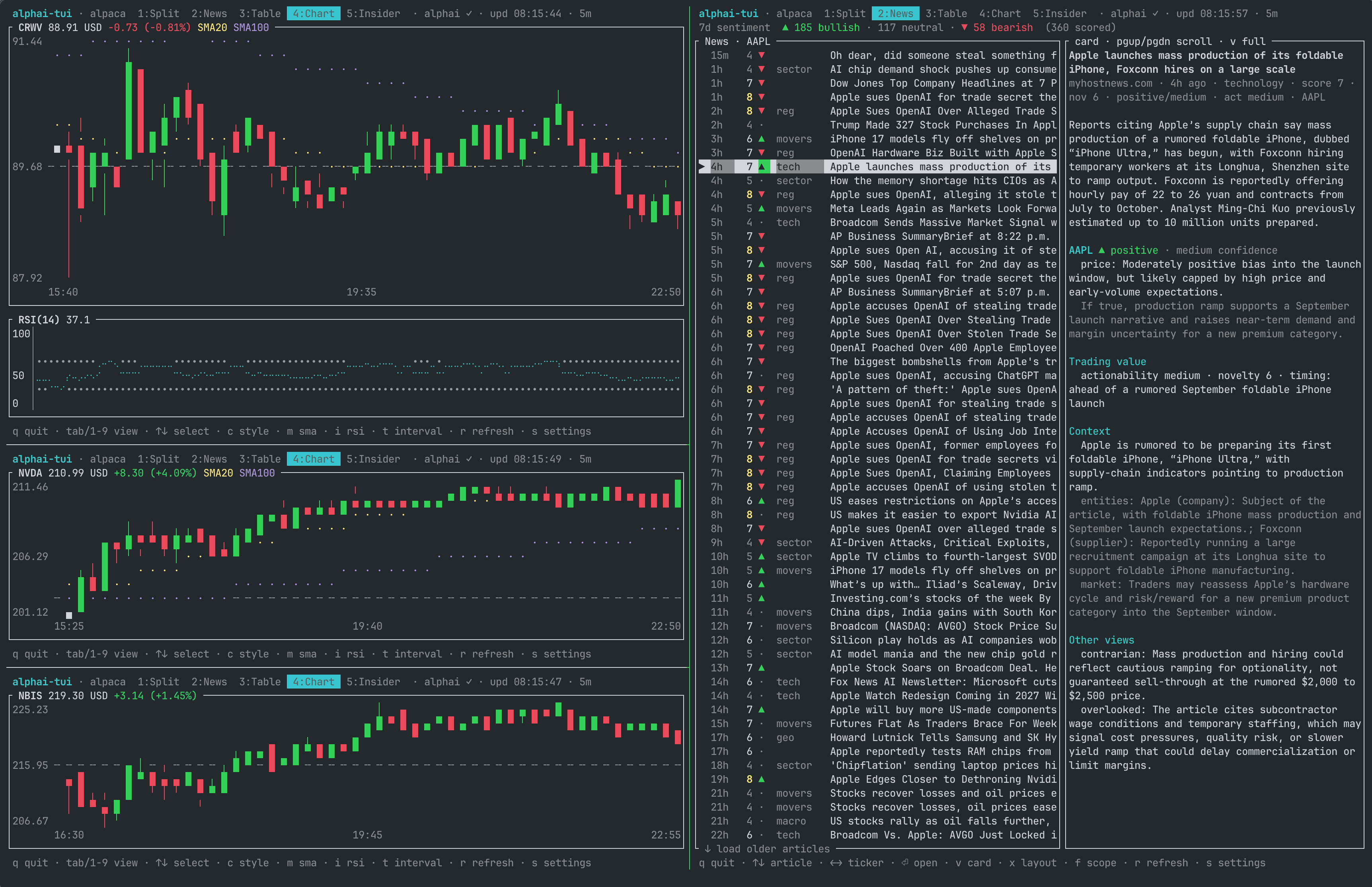
Run an instance per pane in tmux, zellij, screen or your terminal's splits:
Choose 4 in chart panes and 2 in a news pane. --bare hides header and
footer while keeping the quote rail; z toggles it, [ui] bare = true
persists it. borders = "none" gives panels gutters instead of frames.
Instances share a config file (last Save wins) and the AlphAI key's request
budget, so configure once and account for every pane using news or filings.
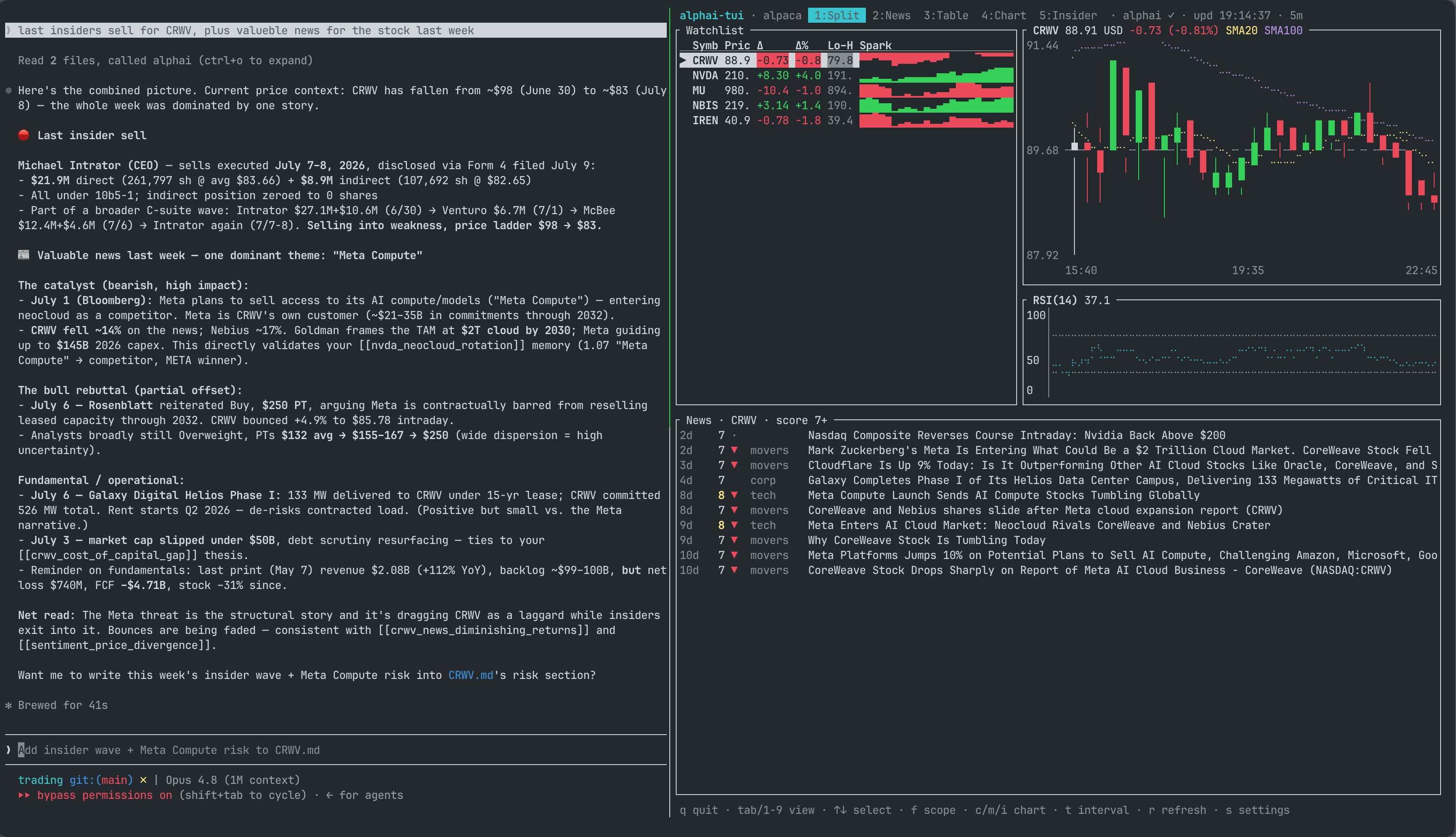
An agent such as Claude Code can run beside the dashboard with the AlphAI MCP server for sourced research using the same news, sentiment and insider data.
Data sources
Prices
| Source | Credentials | Coverage and chart data |
|---|---|---|
yahoo |
none | Stocks, crypto (BTC-USD), FX (EURUSD=X); history, extended hours, year range and market volume |
finnhub |
API key | Regular-session quotes; charts accumulate during this run |
alpaca |
Key ID + secret | US stocks and crypto (BTC-USD); live IEX quotes and historical bars |
tiingo |
API key | US stocks, ETFs, mutual funds (daily only) and crypto; IEX intraday, consolidated daily bars |
Yahoo: quote and intraday history share one request. Timing varies by exchange; extended prints use trade timestamps. Daily charts may make an extra cached intraday request to timestamp an extended quote.
Finnhub: free historical candles are unavailable, so chart history
resets on restart, candles become flat marks, and interval presets do not
apply. No year range, volume or native extended quote. Crypto uses
exchange-prefixed symbols such as BINANCE:BTCUSDT, which have no AlphAI
news. The free limit is 60 requests/min; one request per ticker per poll.
Startup/settings warn when your watchlist and interval exceed it.
Alpaca: create a free Basic account, switch to Paper, then Home > API
Keys > Generate. Market data/paper trading need no KYC. Save the once-shown
secret and Key ID in settings or APCA_API_KEY_ID / APCA_API_SECRET_KEY.
- Free IEX is realtime but covers roughly 2–3% of market volume; illiquid
names may have sparse charts. Its extended session is 08:00–17:00 ET on
normal days. Regular quotes/bars stay IEX;
autoborrows consolidated extended data as described below. - With extended candles on, intraday volume uses consolidated bars for
both sessions. The latest 15 minutes have no volume until delayed data
arrives. With extended candles off, volume is labelled
IEX only. IEX totals are never presented as whole-market volume. - Daily charts use consolidated daily bars for range/volume, retaining
the current day's live IEX close. This adds one request/ticker/minute;
on refusal, daily IEX bars remain labelled
IEX only. ALPACA_FEED=delayed_sipuses consolidated quotes/bars delayed 15 minutes;sipneeds a paid realtime subscription. Delayed snapshots usefeed=delayed_sip; history usesfeed=sipending 15 minutes ago. After the opening bell, the delayed PRE print stays labelled until regular data arrives.- Basic allows 200 requests/min. Polling costs two requests/ticker, plus up to two/ticker/minute for borrowed SIP extended data. Budget warnings include that allowance. Preset changes can refill caches. Initial extended history may fetch up to three extra pages (roughly two weeks per page) to reach the IEX window; refreshes fetch only the newest page.
Tiingo: no non-US listings, indices or FX. Intraday IEX trades
08:00–17:30 ET. Quotes use IEX's reference price; IEX last trades require a
separate exchange agreement since February 2025. Intraday volume is
labelled IEX only, with no quote volume until the official close and
consolidated volume arrive. Daily history is consolidated and split adjusted.
An open intraday chart retains the last after-hours print beside the
close overnight. With extended_source = "same", that print's time comes
from its traded bar, not the request.
One quote request covers the watchlist (two with crypto); bars refresh once/minute/ticker, daily history every 15 minutes. Between refreshes, live prices update the last candle; new candles have no volume yet. Free limits are 50 requests/hour and 1,000/day, suitable for a few tickers every few minutes; the default 15-second quote polling alone costs 240/hour. Power allows 10,000/hour. The key does not identify the plan, so there is no advance budget warning; quota errors can trigger source fallback.
Pre and after hours
IEX is a single venue with sparse extended trading; Finnhub has no extended
quotes. extended_source (settings: Pre/after hours) chooses the feed:
| Setting | Behavior |
|---|---|
auto (default) |
For IEX/Finnhub, borrow consolidated Alpaca SIP delayed 15m when keys exist, with Yahoo fallback if unavailable or missing the session; otherwise use Yahoo. Yahoo and Alpaca SIP keep their own feed. |
same |
Use the price source's own extended data, with no borrowing requests. |
alpaca |
Always consolidated SIP; requires Alpaca keys, with no Yahoo fallback. |
yahoo |
Always Yahoo; keyless and closer to realtime, subject to IP blocks. |
Borrowed prints take priority when they cover the current session. The
rail/chart label their feed and age; regular prices keep their chosen
source. Each ticker/window caches results for 60 seconds, costing about
two Alpaca requests or one Yahoo request/ticker/minute. Empty or failed
refreshes keep displayed session data without failing the price poll.
A Yahoo IP block pauses borrowing across the watchlist for 30 minutes.
Extended quotes remain visible with E off.
When a source stops answering
- Quotes/candles load from
<cache dir>/alphai-tui/quotes.jsonwhile the first poll runs, labelledcached … ago. The cache is written at most once/minute; entries older than a week or for a different range/interval are ignored. Cache roots:~/.cacheon Linux,~/Library/Cacheson macOS. - Yahoo
429means an IP block that can last tens of minutes or over an hour. The app advises switching sources and does not retry that response. - After all tickers fail for 45 seconds, the app switches to another source
with available credentials, retaining displayed data and announcing the
switch. It never automatically switches back or revisits a source that
failed this session.
sswitches manually;source_fallback = falsedisables automatic switching. The header names the active source.
News, sentiment, insider
AlphAI supplies validated tickers, categories, 1–10 relevance and per-ticker AI analysis; SEC Form 4 rows represent economic events. Free keys need no card and allow 20 requests/minute and 100/day.
| Data | Fetch / cache behavior at the default TTL |
|---|---|
| News and Insider | Only visible feeds; 5-minute cache; trending adds one request |
| Feed refresh | One incremental request, preserving loaded pages and selection |
| Filtering / paging | Server-side filter; at most one request per + / - press; pages on demand |
| Article cards / insider chart | Reuse loaded data; insider rollup/chart come with page one; g costs nothing |
| Earnings | One request/ticker while visible, cached 1 hour; includes all reads and next confirmed date |
| Macro calendar | Shared across views and rail; one request per 6 hours |
| Calendar company dates | Same earnings response, cached 6 hours; checks at least 4 seconds apart while Calendar is open |
[ui] alphai_ttl_secs controls these intervals: news uses the base,
Earnings ×12, macro/company dates ×72. At the 30-second minimum,
Calendar refreshes every 36 minutes. At the default, keeping Calendar
open for 24 hours costs about 44 requests for ten companies or 104 for
25, before other activity. Longer lists need a longer TTL. There is no
daily quota limiter, restarting clears these caches, and the four-second
sweep pace does not limit other requests or processes sharing the key.
Manual refresh adds requests as described under Calendar; errors wait for
manual retry while successful cached rows remain.
Pages contain 20 articles, or 50 for automatically detected Pro keys.
Archive limits (Free: 30 days, Basic: 90) show an upgrade hint. Symbols use
US/Yahoo forms (AAPL, BTC-USD, VOD.L).
Full API reference.
Configuration
Linux/macOS: ~/.config/alphai-tui/config.toml; Windows:
%APPDATA%\alphai-tui\config.toml. Settings creates it with mode 0600 on
Unix because it can contain keys. --config PATH changes the file used
for both loading and saving.
Every entry is optional. Invalid [ui], [chart], [theme] or
[keybindings] values warn and retain that entry's default; invalid TOML
falls back for the whole file. UI/chart options below set startup defaults;
keyboard changes are session-only unless saved through settings.
= "yahoo"
= ["AAPL", "MSFT", "NVDA", "BTC-USD"]
= 15
= "5d" # startup history window
= "15m" # startup candle size; t cycles the chart presets live
= "alphai" # where enter opens news: "alphai" or "original"
= true # switch source when this one stops answering
= "auto" # pre and after hours: auto | same | alpaca | yahoo (also a settings row)
[]
= "ak_live_..."
= ""
= ""
= ""
= ""
[]
= "split" # split | news | table | chart | insider | earnings | summary | portfolio | calendar
= true # the price line under the tabs
= false # start with no header and no footer (--bare, z)
= "chart" # chart | stacked | side (also a row in the settings screen)
= "ticker" # ticker | market | trending
= "rounded" # frame lines: rounded | plain, or none for tinted panels (also a settings row)
= 7 # minimum relevance score in news feeds, 1 to 10
= 4 # insider feed filter; the score tracks trade size
= "3m" # insider trades chart window at start: 3m | 12m | off
= 300 # news/sentiment/insider cache lifetime, 30 to 86400
[]
= "candles" # candles | line
= true # moving average overlays visible at start
= "sma" # sma | ema, both using the periods below
= true # RSI panel visible at start
= true # volume panel visible at start
= true # draw pre and post market candles; Shift+E toggles live
= "exchange" # exchange (ET for US stocks), local, utc
= true # warm pre-market / cool after-hours backgrounds
= true # vertical grid shared by price, volume and RSI
= true # mark the ticker's cached news on the candles
= 20 # 2 to 250
= 100 # 2 to 250; also sizes the history warm-up
= 14 # 2 to 100
= 20 # free space right of the newest candle, 0 to 50
= [ # the combos the t and T keys cycle
["1d", "5m"],
["5d", "15m"],
["1mo", "60m"],
["6mo", "1d"],
["1y", "1d"],
]
# What you hold, one entry per ticker. The p key writes these for you and
# saves them here immediately; editing them by hand works just as well.
# A ticker listed here is polled even when it is not on the watchlist.
[[]]
= "AAPL"
= 12
= 182.31
[[]]
= "BTC-USD"
= 0.25
= 58200
Positions accept fractional quantities and negative quantities for shorts.
avg_price is average unit cost; there is no lot ledger, so update the
average yourself when adding to a holding. p saves immediately.
Colors
[]
= "catppuccin-mocha"
Presets: default, catppuccin-mocha, catppuccin-macchiato,
catppuccin-frappe, catppuccin-latte, dracula, gruvbox-dark,
gruvbox-light, nord. } / { cycle live, --theme NAME selects one
for a run, and settings previews/saves it.
Color presets expect 24-bit color; catppuccin-latte and gruvbox-light
expect a light terminal. default follows ANSI terminal colors without a
panel tint; session_shading = false also removes RGB session backgrounds.
Panels use rounded frames by default (plain is also available);
[ui] borders = "none" uses tinted surfaces and gutters. Settings changes
this live.
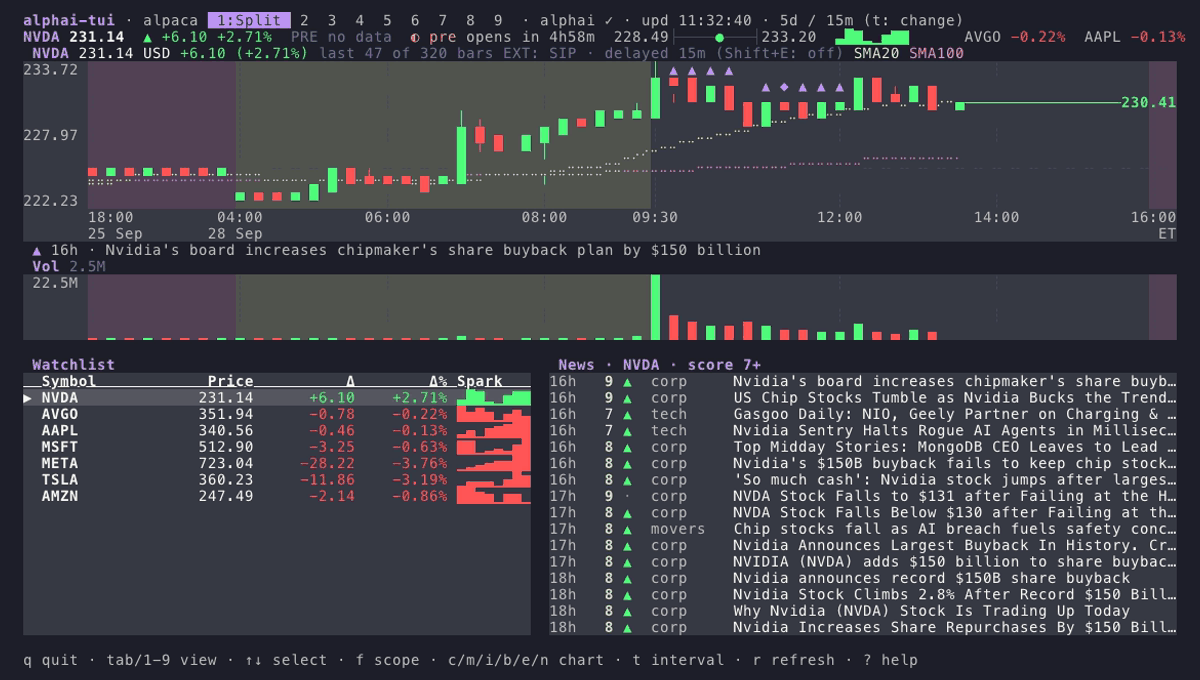
Each terminal below uses its matching palette; default follows the terminal.
[theme] overrides individual slots on top of a preset. Colors accept
case-insensitive ANSI names (light-blue, grey, reset), #RRGGBB, or
ANSI-256 indices as strings ("245"). Unknown colors, slots or presets
warn and retain defaults. These are the default slots:
[]
= "cyan" # header title, active tab, overlay borders, headings
= "black" # text on the active tab
= "green" # price up: candles, deltas, sparklines
= "red" # price down
= "gray" # unchanged / no data
= "green" # bullish sentiment, insider buys
= "red" # bearish sentiment, insider sells
= "red" # error messages
= "yellow" # notices and the editing highlight
= "yellow" # relevance score 8 to 10
= "yellow" # fast moving average overlay
= "magenta" # slow moving average overlay
= "cyan" # RSI line
= "darkgray" # previous close and RSI 30/70 reference lines
= "reset" # panel frames; reset keeps the terminal's foreground
= "reset" # body text on tinted panels; reset keeps the terminal's foreground
= "reset" # sources, ages, axis labels, key hints; reset means the terminal's dim
= "reset" # separators and inactive text; reset means the terminal's dim
= "reset" # background of the cursor row; reset means reverse video
= "reset" # panel background (borders = "none"); reset paints none
Presets supply their own secondary text, selection and surface colors.
pre_market_bg / post_market_bg also accept these formats; "reset"
uses the terminal background. Borderless session bands are shaded relative
to the panel surface so regular, pre-market and after-hours stay distinct.
Custom keybindings
Each listed action replaces its default keys; unlisted actions keep theirs:
[]
= "ctrl-q"
= ["enter", "w"]
= "]"
= "["
Syntax: [ctrl-][alt-][shift-]<base>. Base is a character or esc,
enter, tab, backtab, space, up, down, left, right, home, end, pgup, pgdn,
backspace, delete, insert, f1–f12. shift-t means T;
shift-tab means backtab.
Actions: quit, next_view, prev_view, settings, help, refresh,
up, down, left, right, page_up, page_down, open, card,
cycle_scope, cycle_layout, score_up, score_down, insider_chart,
chart_style, toggle_sma, toggle_rsi, toggle_volume, news_markers,
ma_type, next_preset, prev_preset, next_theme, prev_theme,
toggle_bare, add_ticker, remove_ticker, position, extended_hours.
? shows their current bindings.
Reserved: Ctrl-C, Esc, view digits 1–9, and settings-form keys.
Invalid/reserved keys, unknown actions and conflicting bindings warn and
fall back safely. Footer hints follow the actual bindings.
Not configurable on purpose
Page sizes, the two-second poll floor and chart warm-up factors are fixed
to protect free-tier budgets. Debug overrides remain environment-only:
ALPACA_FEED, ALPHAI_API_URL, ALPACA_DATA_URL, YAHOO_CHART_URL,
TIINGO_API_URL.
Architecture
src/
  domain.rs      Quote, Candle, TickerData, Range/Interval
  config.rs      config file load/save (CLI > env > file > defaults)
  source/        DataSource trait + implementations
    registry.rs  the one place a new source registers; CLI, settings and keys derive from it
    http.rs      shared client builder, JSON fetching and error helpers
    yahoo.rs     Yahoo v8 chart endpoint (quote + history in one call)
    finnhub.rs   Finnhub /quote with synthetic session history
    alpaca.rs    snapshot + real historical bars (IEX/SIP feeds, crypto)
    tiingo.rs    one IEX quote request per poll, cached IEX bars and daily history, crypto
  alphai.rs      AlphAI API client + demand-driven fetch task (TTL cache)
  keymap.rs      semantic actions + the key table (footer hints derive from it)
  theme.rs       semantic color palette ([theme] overrides)
  indicators.rs  SMA, EMA and RSI (Wilder smoothing)
  poller.rs      fetches all symbols concurrently on a timer -> mpsc channel
  app.rs         App state, event loop, key handling
    app/feeds.rs     feed cache and every AlphAI request-budget guard
    app/settings.rs  settings overlay state, rows derived from the registry
  ui/            View trait + implementations
    table.rs     watchlist table
    chart.rs     candlestick + line chart, SMA overlays, volume and RSI panels
    split.rs     table + chart
    news.rs      article list + sentiment rollup + detail pane
    insider.rs   Form 4 rollup + filing list
    insider_chart.rs  log-scale trades scatter + weekly dollar bars
    earnings.rs  structured earnings read + the schedule line
    calendar.rs  watchlist agenda, report-date progress and event flags
    article.rs   modal full-article card (AI analysis, context)
    settings.rs  modal settings overlay
Background price/AlphAI tasks send events through an mpsc channel to
App::apply. Views render state without network calls; AlphAI budget
guards live in app/feeds.rs.
Adding a price source
- Implement
source::DataSource::fetch(quote plus candles) insrc/source/, usingsource/http.rshelpers. For batched quotes, implementbegin_cycleto receive the whole symbol list first; see Tiingo. - Add a
SourceInfotosource/registry.rs: id, aliases, settings hint, credentials and constructor. CLI help, settings, key persistence and env overrides derive from this entry; registry tests cover it. - Document the source here.
Adding a view
- Implement
ui::Viewas a unit struct undersrc/ui/: render over&mut App, add aViewId, footer hints and capability methods (feed_shown,navigates_articles,has_chart_panel,shows_earnings,shows_calendar) for shared keys and demand-driven fetching. - Register in
ui::VIEWS; order defines tabs and1–9hotkeys.
Development
ALPHAI_API_KEY=ak_live_... ALPHAI_API_KEY=ak_live_... CI tests on Linux, macOS and Windows and checks clippy/rustfmt; live API tests are opt-in. See CHANGELOG.md for releases. Issues and PRs are welcome.
License
MIT. Not investment advice; third-party data can be delayed or wrong. Respect the terms of enabled providers.