<div align="center">
<img src="https://raw.githubusercontent.com/lanegrid/agtrace/main/docs/images/agtrace-icon.png" width="96" alt="agtrace logo">
<h1>agtrace</h1>
<p><strong>The Observability Layer for AI Coding Agents.</strong></p>
<p>
Real-time telemetry and session forensics for Claude Code, Codex, and Gemini.
Track context window usage, compaction behavior, and regressions —
<strong>locally</strong>, with <strong>zero overhead</strong>.
</p>
[](https://www.npmjs.com/package/@lanegrid/agtrace)
[](https://crates.io/crates/agtrace)
</div>
---
## 📉 The Problem: No Observability for Context Compaction
Modern AI coding agents rely on context window compaction by design. It is a standard mechanism across Claude Code, Codex, and Gemini.
The problem is not that compaction happens.
The problem is that you cannot:
- observe *when* compaction occurs
- measure *how much* context was discarded
- correlate compaction with regressions, hallucinations, or sudden behavioral shifts
In practice, we are running a lossy, stateful system without logs, metrics, or traces for its most critical state transition.
## ⚡ The Solution: agtrace
**agtrace** adds the missing observability layer to AI coding agents.
By normalizing provider logs and exposing real-time context usage and compaction behavior, agtrace makes agent state transitions inspectable and debuggable — without sending sensitive data to the cloud.
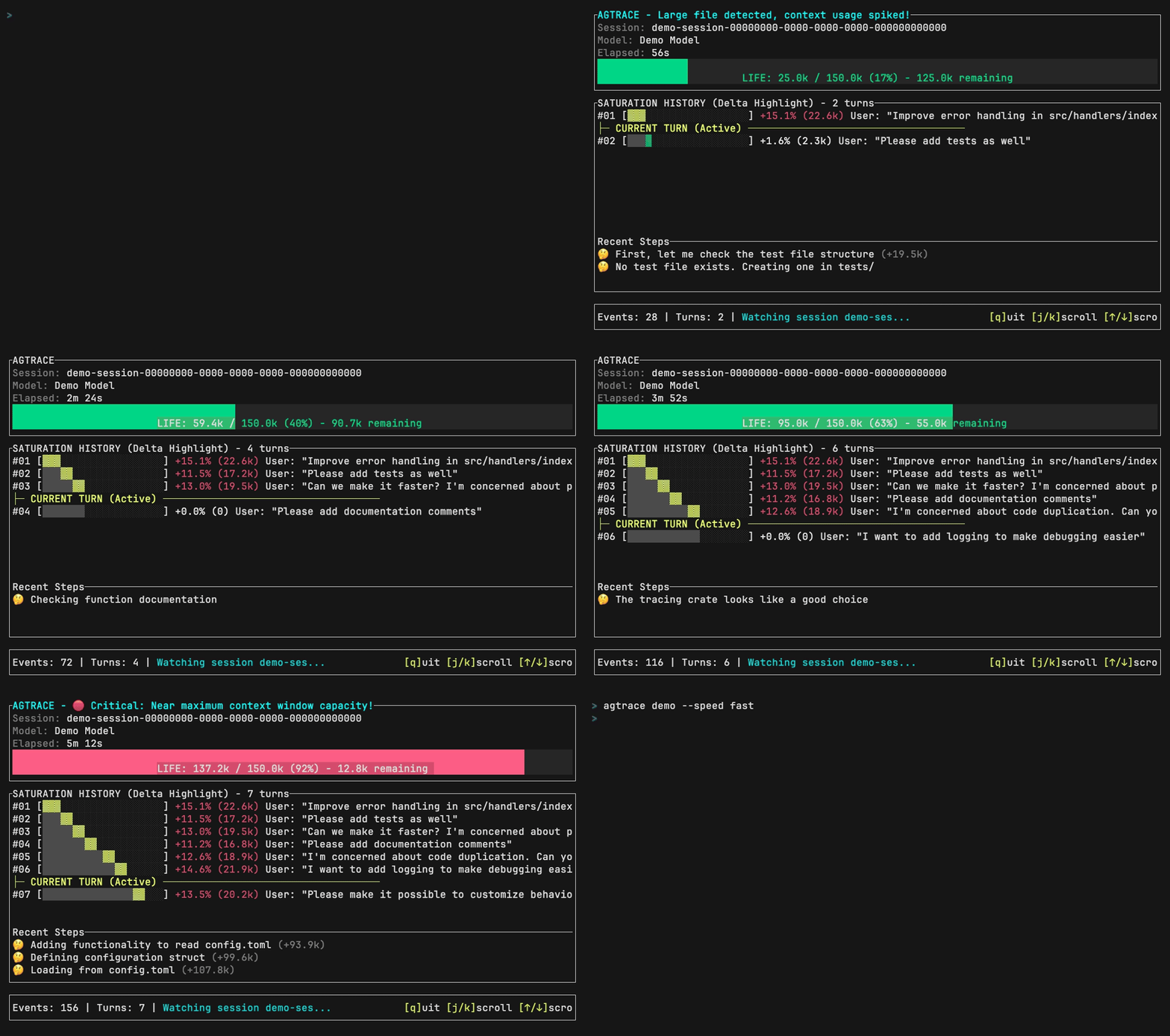
*Live demo of `agtrace watch` — real-time session monitoring*
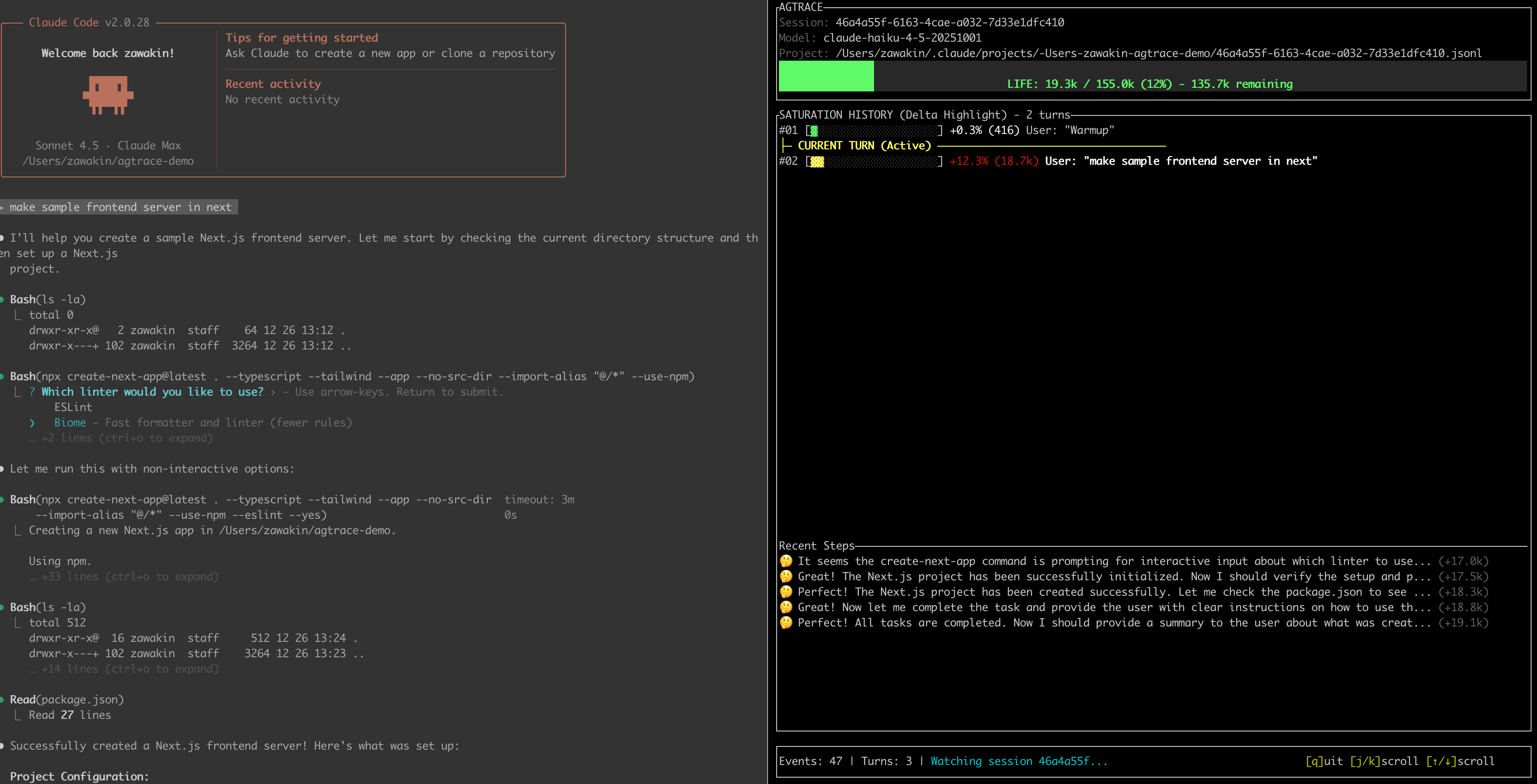
*The dashboard showing context usage, current turn, and token costs*
---
## ✨ Key Features
### 1) Live Telemetry (`watch`)
A TUI dashboard that visualizes the health of your active session:
- remaining context window (before compaction pressure)
- current turn and recent activity
- token/cost telemetry (where available)
### 2) Provider Normalization
Whether you use **Claude Code**, **Codex**, or **Gemini**, agtrace converts their events into a consistent internal format so you can reason about sessions the same way across providers.
### 3) Local-Only by Default
Agent logs often contain sensitive code and secrets. **agtrace runs 100% locally** and reads directly from local log files (e.g., `~/.claude`). No data is sent to the cloud.
### 4) Always-On Session Tracking
Keep `watch` running — it automatically detects new sessions and follows the latest one.
### 5) Session Forensics (“Lab”)
Investigate agent behavior across history:
- search across thousands of past sessions
- analyze tool usage patterns
- inspect raw provider events when debugging schema changes (`--raw`)
### 6) High-Performance, Minimal Footprint
Built in **Rust**, agtrace is designed to run continuously without slowing down your machine while you work with heavyweight AI agents.
### 7) Instant Log Analysis
Parse and grep through gigabytes of JSONL logs quickly. The schema-on-read approach plus Rust performance makes historical analysis fast and practical.
---
## 📦 Installation
For best performance and easy access to `watch`, install globally.
### via npm (Recommended)
```bash
npm install -g @lanegrid/agtrace
```
### via npx (no installation)
If you prefer not to install globally, run via `npx`.
*Note: In the examples below, replace `agtrace` with `npx @lanegrid/agtrace`.*
```bash
npx @lanegrid/agtrace@latest init
```
### via Cargo (Rust)
```bash
cargo install agtrace
```
---
## 🚀 Quick Start
### 0) Initialize Once (Global)
Run `agtrace init` **once** on your machine.
This creates local configuration and caches under `~/.agtrace`.
It does **not** modify any project directory, and you do **not** need to run it per project.
```bash
agtrace init
```
### 1) Open Your Project Directory (CWD matters)
`agtrace` scopes monitoring by the **current working directory (cwd)**.
To ensure `agtrace` can locate and follow the right session logs, run it from the **same working directory** where your AI coding agent is started.
```bash
cd /path/to/your/project
```
### 2) Start `watch` (either order works)
In one terminal pane (from the project directory), run:
```bash
agtrace watch
```
`watch` can be started before or after your AI coding agent.
* If no active session exists yet, it stays in **waiting mode** (or opens the latest session if available).
* When a new session starts, agtrace detects the new logs and **automatically switches** to it.
* You do **not** need to restart `agtrace watch` per session.
### 3) Start Your AI Coding Agent (Same CWD)
In another terminal (same project directory), launch your agent:
```bash
# Example: Claude Code
claude
# Or Codex, Gemini, etc.
```
That’s it. No integration required — `watch` follows sessions by monitoring logs scoped to your current working directory.
**`watch` surfaces:**
* context window usage
* compaction pressure / behavior (where detectable)
* turns and recent activity
* token/cost telemetry (where available)
### 4) Analyze Past Sessions
```bash
# List recent sessions
agtrace session list
# Inspect a specific session (context usage, turns, models)
agtrace session show <session_id>
```
### 5) Advanced: The Lab
Debug agent interactions or search for specific patterns, e.g. “When did the agent try to write to `package.json`?”:
```bash
# Find all file write operations across history
agtrace lab grep "write_file" --json
# Inspect a raw provider event (useful for debugging schema changes)
agtrace lab grep "mcp" --raw --limit 1
```
---
## 🧭 CWD-Scoped Monitoring
agtrace uses your current working directory (cwd) as the scope boundary for log discovery and session tracking.
To monitor a different project, run `agtrace watch` from that project's directory.
---
## 🏗️ Architecture
agtrace is designed around **pointer-based indexing** and **schema-on-read**:
1. **No Data Duplication**
agtrace does not copy your massive log files. It indexes metadata and points to the original logs.
2. **Resilient to Schema Drift**
Provider log schemas change frequently. agtrace parses logs at read time, so schema updates are less likely to corrupt or invalidate historical indexes.
3. **Project Isolation**
Sessions are scoped by cwd/project boundaries and grouped by a project root hash to keep workspaces clean and prevent cross-project mixing.
---
## 🤝 Supported Providers
* **Claude Code** (Anthropic)
* **Codex** (OpenAI)
* **Gemini** (Google)
---
## 📜 License
Dual-licensed under the MIT and Apache 2.0 licenses.