# Inscribe
[](https://crates.io/crates/inscribe)
[](https://github.com/tesserato/Inscribe/blob/main/LICENSE)
**Inscribe brings your markdown documents to life by executing designated code blocks and optionally embedding their output back in the generated document.**
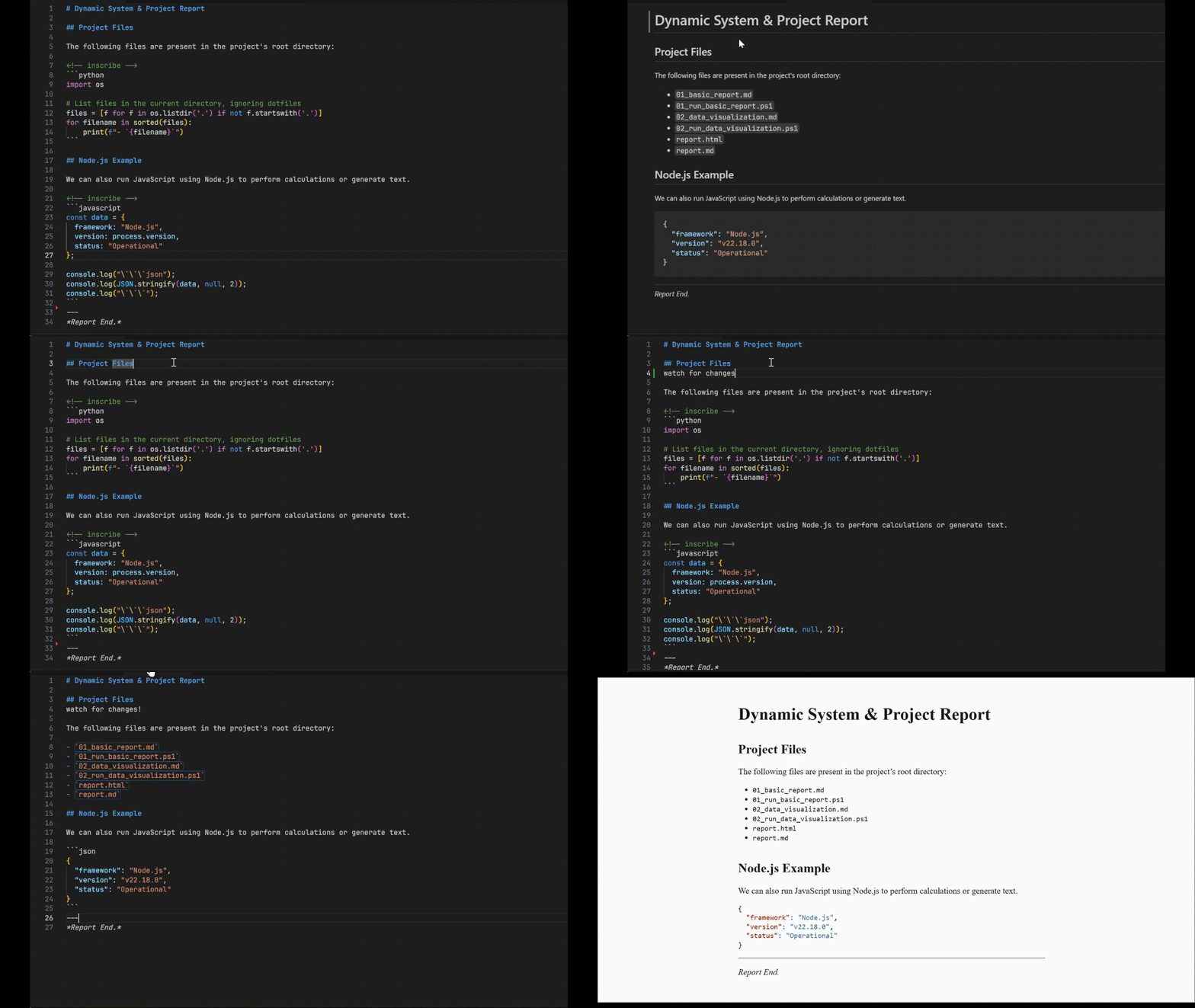
It's a powerful command-line preprocessor that lets you create dynamic, self-updating documentation, tutorials, and reports. Turn static files into living documents where code examples and their outputs are always in sync.

---
## Table of Contents
- [Inscribe](#inscribe)
- [Table of Contents](#table-of-contents)
- [What is Inscribe?](#what-is-inscribe)
- [Key Features](#key-features)
- [Getting Started](#getting-started)
- [Installation](#installation)
- [Usage](#usage)
- [Core Concept: The `<!-- inscribe -->` tag](#core-concept-the----inscribe----tag)
- [Basic Example](#basic-example)
- [Command-Line Processing](#command-line-processing)
- [Live Reloading with Watch Mode](#live-reloading-with-watch-mode)
- [Integrating with Other Tools using `--on-finish`](#integrating-with-other-tools-using---on-finish)
- [Advanced Features](#advanced-features)
- [Inline Code Execution](#inline-code-execution)
- [Customizing Language Runners](#customizing-language-runners)
- [How It Works](#how-it-works)
- [Supported Languages](#supported-languages)
---
## What is Inscribe?
Inscribe is a tool for literate programming and dynamic document generation. It parses a markdown file, looks for specially marked code fences, executes the code within them, and *inscribes* the standard output of the code back into the document.
This means your code examples, command outputs, and generated values are always up-to-date, transforming your markdown from a static description of code into a document that is verifiably correct and dynamically generated.
## Key Features
- **Execute Code Fences:** Run code from various languages directly within your markdown.
- **Multi-Language Support:** Built-in runners for Python, JavaScript/Node, Ruby, Shell (`bash`, `sh`), and more.
- **Customizable Runners:** Easily define custom commands for any language (e.g., use `python3.11` instead of `python`).
- **Inline Code Execution:** Run and replace short, inline code snippets for dynamic text.
- **File Watching:** Automatically reprocess your document whenever the source file changes for a seamless workflow.
- **Post-Processing Hooks:** Run any command (like a static site generator or `pandoc`) after a file is successfully processed.
- **Standard I/O:** Works seamlessly with `stdin` and `stdout` for easy integration into Unix pipelines.
- **Stateful Execution:** Code blocks of the same language share a single runtime session, allowing variables and state to persist from one block to the next.
## Getting Started
### Installation
Ensure you have the Rust toolchain installed. You can then install `inscribe` directly from Crates.io:
```bash
cargo install inscribe
```
## Usage
### Core Concept: The `<!-- inscribe -->` tag
To make a code block executable, just place an HTML comment `<!-- inscribe -->` directly before it. Inscribe will find these tags, run the code that follows, and replace the code block with its output.
### Basic Example
**1. Create a markdown file (`report.md`):**
````markdown
# System Report
Here is a report of the current system status. This document was generated on <!-- inscribe -->`sh date`.
### Disk Usage
The current disk usage is:
```sh
### Python Output
And here is a list generated by Python:
```python
for i in range(3):
print(f"- Item number {i+1}")
```
````
**2. Run Inscribe:**
```bash
inscribe report.md -o README.md
```
**3. Check the result (`README.md`):**
````markdown
# System Report
Here is a report of the current system status. This document was generated on Sun Oct 29 10:30:00 UTC 2023.
### Disk Usage
The current disk usage is:
/dev/vda1 100G 25G 75G 26% /
### Python Output
And here is a list generated by Python:
- Item number 1
- Item number 2
- Item number 3
````
### Command-Line Processing
Inscribe is a flexible command-line tool.
```bash
# Process a file and print to stdout
inscribe input.md
# Process a file and write to an output file
inscribe input.md --output output.md
inscribe input.md -o output.md
# Read from stdin and write to stdout
cat input.md | inscribe > output.md
```
### Live Reloading with Watch Mode
For a fast feedback loop, especially when writing tutorials or live documentation, use `--watch`. Inscribe will process the file once, then re-process it automatically every time you save a change to the source file.
```bash
# Watch a file for changes and reprocess automatically
inscribe input.md -o output.md --watch
# Console Output:
# ✅ Successfully generated 'output.md'
#
# 👀 Watching for changes in 'input.md'. Press Ctrl+C to exit.
```
### Integrating with Other Tools using `--on-finish`
The `--on-finish` flag lets you chain commands, creating powerful processing pipelines. Inscribe provides `{{input}}` and `{{output}}` placeholders for your command. This is perfect for static site generators or tools like Pandoc.
```bash
# After processing docs.md, run pandoc to create a PDF
inscribe docs.md -o temp.md --on-finish "pandoc {{output}} -o final.pdf"
# Run a simple echo command after completion
inscribe README.md -o out.md --on-finish "echo '✅ New README generated!'"
```
## Advanced Features
### Inline Code Execution
For short, single-line outputs, you can use inline code blocks. Inscribe will use the language of the most recent *fenced* code block to determine how to run it.
````markdown
<!-- inscribe -->
```sh
# This sets the context to 'sh' for the next inline block
```
The current date is <!-- inscribe -->`date -u +%Y-%m-%d`.
````
After processing, this becomes:
```markdown
The current date is 2023-10-29.
```
### Customizing Language Runners
You can override the default command for a language or define a new one. This is useful for specifying interpreter versions or custom runtimes. These definition tags are invisible in the final output.
The syntax is a special HTML comment: `<!-- inscribe <language> command="..." -->`.
````markdown
# Using a specific Python version
```python
import sys
print(sys.version)
```
# Using a custom language runner
```my-lisp
(format t "Hello from Lisp!~%")
```
````
## How It Works
Inscribe uses an efficient three-pass system to process your documents:
1. **Collection Pass:** It scans the entire document once, identifying all custom runner definitions and finding every code block marked with `<!-- inscribe -->`. Code blocks are grouped together by language.
2. **Execution Pass:** For each language, it executes all of its code blocks in a single batch process, minimizing the overhead of starting new processes. The outputs are captured.
3. **Replacement Pass:** It rebuilds the document, replacing the original code blocks with the captured output from the execution pass.
## Supported Languages
`inscribe` comes with the following runners configured by default:
- `python`
- `bash`
- `sh`
- `javascript` / `node`
- `ruby`
You can add any other language with the [custom runner syntax](#customizing-language-runners) shown above.