Expand description
A Ratatui widget set for friendly prompts and input flows. Part of the tui-widgets suite by Joshka.






GitHub Repository · API Docs · Examples · Changelog · Contributing
§Installation
cargo add ratatui tui-prompts crossterm§Usage
Pick a prompt type, keep its state, and render it inside your UI.
§Text Prompt
Code
use ratatui::Frame;
use ratatui::layout::{Constraint, Direction, Layout, Rect};
use tui_prompts::{Prompt, TextPrompt, TextRenderStyle, TextState};

struct App<'a> {
    username_state: TextState<'a>,
    password_state: TextState<'a>,
    invisible_state: TextState<'a>,
}

impl<'a> App<'a> {
    fn draw_ui(&mut self, frame: &mut Frame) {
        let (username_area, password_area, invisible_area) = split_layout(frame.area());

        TextPrompt::from("Username").draw(frame, username_area, &mut self.username_state);

        TextPrompt::from("Password")
            .with_render_style(TextRenderStyle::Password)
            .draw(frame, password_area, &mut self.password_state);

        TextPrompt::from("Invisible")
            .with_render_style(TextRenderStyle::Invisible)
            .draw(frame, invisible_area, &mut self.invisible_state);
    }
}

fn split_layout(area: Rect) -> (Rect, Rect, Rect) {
    let rows = Layout::default()
        .direction(Direction::Vertical)
        .constraints([
            Constraint::Length(1),
            Constraint::Length(1),
            Constraint::Length(1),
        ])
        .split(area);
    (rows[0], rows[1], rows[2])
}
Store a prompt if its configuration is reused across frames.
use ratatui::Frame;
use ratatui::layout::Rect;
use tui_prompts::{Prompt, TextPrompt, TextState};

struct App<'a> {
    prompt: TextPrompt<'a>,
    state: TextState<'a>,
}

impl App<'_> {
    fn draw_ui(&mut self, frame: &mut Frame, area: Rect) {
        (&self.prompt).draw(frame, area, &mut self.state);
    }
}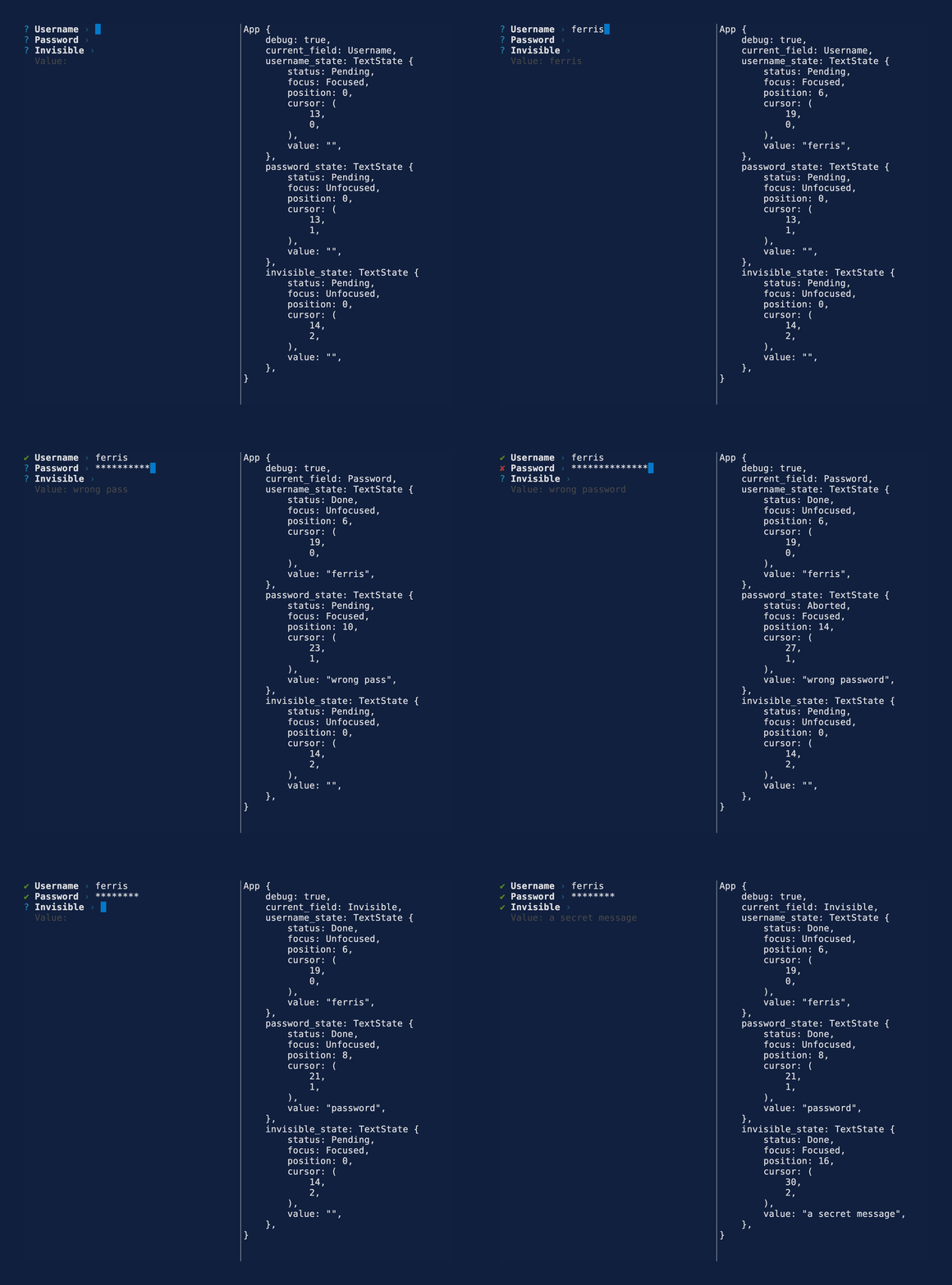
See the text example for more details.
§Select Prompt
SelectPrompt renders one focused option from an ordered list. Keep a SelectState beside
the prompt, render the prompt each frame, and route key events to the state. Up and Down move
the focused option, Enter completes the prompt, and Escape or Ctrl+C aborts it.
use std::borrow::Cow;

use crossterm::event::KeyEvent;
use ratatui::Frame;
use ratatui::layout::Rect;
use tui_prompts::{Prompt, SelectPrompt, SelectState};

struct App {
    language_state: SelectState,
}

impl App {
    fn draw_ui(&mut self, frame: &mut Frame, area: Rect) {
        let label = Cow::Borrowed("Language");
        let options = ["Rust", "Zig", "Go"].into();
        SelectPrompt::new(label, options).draw(frame, area, &mut self.language_state);
    }

    fn handle_key_event(&mut self, key_event: KeyEvent) {
        self.language_state.handle_key_event(key_event);
    }
}
See the select example for an interactive selection flow.
§Soft Wrapping
Text is automatically character wrapped to fit in the render area.
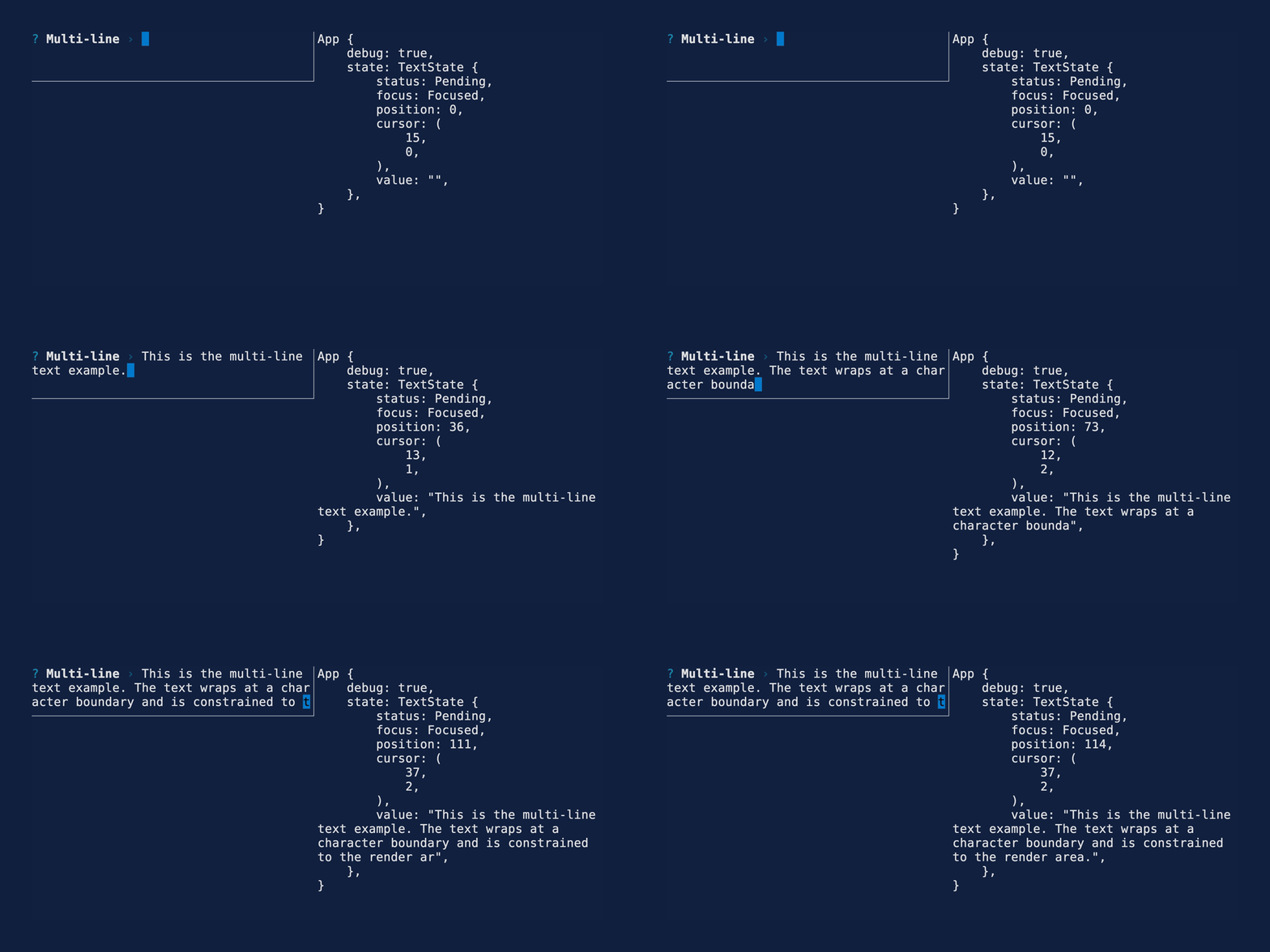
See the multi line example for more details.
§Features
- Text prompt
- Password prompt
- Invisible prompt
- Readline / emacs style Key Bindings
- Crossterm backend
- Soft wrapping single lines
- Multi-line input
- Scrolling
-
More prompt types:
- Number
- Confirm
- List
- Toggle
- Select
- Multi-select
- Autocomplete
- Autocomplete multi-select
- Date
- Bracketed paste
- Validation
- Default initial value
- Custom style
- Themes
- Custom formatting
- Backend agnostic keyboard event handling
- Customizable key bindings
-
Handle more advanced multi-key bindings e.g.
^[band^[f - Prompt chaining
§Key Bindings
| Key | Action |
|---|---|
| Home, Ctrl+A | Move cursor to beginning of line |
| End, Ctrl+E | Move cursor to end of line |
| Left, Ctrl+B | Move cursor one character left |
| Right, Ctrl+F | Move cursor one character right |
| Backspace (Delete on Mac), Ctrl+H | Delete character before cursor |
| Delete (Fn+Delete on Mac), Ctrl+D | Delete character at cursor |
| Ctrl+K | Delete all characters from the cursor to the end of line |
| Ctrl+U | Delete the entire line |
| Up, Down | Move the focused select option |
| Enter | Complete the prompt |
| Escape, Ctrl+C | Abort the prompt |
§More widgets
For the full suite of widgets, see tui-widgets.
Modules§
Structs§
- Select
Option - A selectable value rendered by a
SelectPrompt. - Select
Option List - An ordered list of selectable values for a
SelectPrompt. - Select
Prompt - A prompt widget for choosing one option from a list.
- Select
State - The state for a
SelectPrompt. - Text
Prompt - A prompt widget that displays a message and a text input.
- Text
State
Enums§
- Focus
State - The focus state of a prompt.
- Status
- The result of a prompt.
- Text
Render Style