pub struct TestBackend { /* private fields */ }Expand description
A backend that can be used for tests.
When asserting equality, it is recommended to use TestBackend::assert_eq or
assert_backend_snapshot instead of assert_eq.
Implementations§
Source§impl TestBackend
impl TestBackend
Sourcepub fn new_with_layout(size: Size, layout: Layout) -> Self
pub fn new_with_layout(size: Size, layout: Layout) -> Self
Creates a new TestBackend with the cursor starting at the offsets given by the layout.
Sourcepub fn from_lines(lines: &[&str], size: Size) -> Self
pub fn from_lines(lines: &[&str], size: Size) -> Self
Creates a new TestBackend from the lines. There must be <= size.height lines, and
<= size.width chars per line.
It is not necessary to fill the lines so that it matches the dimensions of size exactly. Padding will be added to the end as required.
§Panics
It panics if there are more than size.height lines or more than size.width chars per
line.
Sourcepub fn reset_with_layout(&mut self, layout: Layout)
pub fn reset_with_layout(&mut self, layout: Layout)
Clears all the cells and moves the cursor to the offsets given by the layout.
Source§impl TestBackend
impl TestBackend
Sourcepub fn write_to_backend<B: Backend>(&self, backend: B) -> Result<()>
pub fn write_to_backend<B: Backend>(&self, backend: B) -> Result<()>
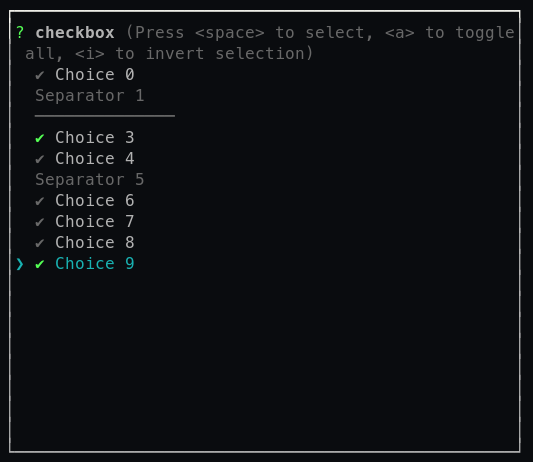
Writes all the cells of the TestBackend to the given backend.
A screenshot of what the printed output looks like:
Sourcepub fn write_to_buf<W: Write>(&self, buf: W) -> Result<()>
Available on crate features crossterm or termion only.
pub fn write_to_buf<W: Write>(&self, buf: W) -> Result<()>
crossterm or termion only.Writes all the cells of the TestBackend with the default backend (see get_backend).
A screenshot of what the printed output looks like:
Trait Implementations§
Source§impl Backend for TestBackend
impl Backend for TestBackend
Source§fn enable_raw_mode(&mut self) -> Result<()>
fn enable_raw_mode(&mut self) -> Result<()>
Source§fn disable_raw_mode(&mut self) -> Result<()>
fn disable_raw_mode(&mut self) -> Result<()>
Source§fn hide_cursor(&mut self) -> Result<()>
fn hide_cursor(&mut self) -> Result<()>
Source§fn show_cursor(&mut self) -> Result<()>
fn show_cursor(&mut self) -> Result<()>
Source§fn get_cursor_pos(&mut self) -> Result<(u16, u16)>
fn get_cursor_pos(&mut self) -> Result<(u16, u16)>
Source§fn move_cursor_to(&mut self, x: u16, y: u16) -> Result<()>
fn move_cursor_to(&mut self, x: u16, y: u16) -> Result<()>
Source§fn move_cursor(&mut self, direction: MoveDirection) -> Result<()>
fn move_cursor(&mut self, direction: MoveDirection) -> Result<()>
direction.Source§fn scroll(&mut self, dist: i16) -> Result<()>
fn scroll(&mut self, dist: i16) -> Result<()>
Source§fn set_attributes(&mut self, attributes: Attributes) -> Result<()>
fn set_attributes(&mut self, attributes: Attributes) -> Result<()>
attributes removing ones which were previous applied.Source§impl Clone for TestBackend
impl Clone for TestBackend
1.0.0 · Source§fn clone_from(&mut self, source: &Self)
fn clone_from(&mut self, source: &Self)
source. Read moreSource§impl Debug for TestBackend
impl Debug for TestBackend
Source§impl Display for TestBackend
Available on crate features crossterm or termion only.
impl Display for TestBackend
crossterm or termion only.Source§impl PartialEq for TestBackend
impl PartialEq for TestBackend
Source§fn eq(&self, other: &Self) -> bool
fn eq(&self, other: &Self) -> bool
Visual equality to another backend. This means that if the cells of both backends were rendered on a terminal, they would look the same. It however does not mean, that the hidden scrollback buffer is the same, or the current attributes are the same, or event the cursor position if it is hidden.
Source§impl Write for TestBackend
impl Write for TestBackend
Source§fn write(&mut self, buf: &[u8]) -> Result<usize>
fn write(&mut self, buf: &[u8]) -> Result<usize>
Source§fn flush(&mut self) -> Result<()>
fn flush(&mut self) -> Result<()>
Source§fn is_write_vectored(&self) -> bool
fn is_write_vectored(&self) -> bool
can_vector)1.0.0 · Source§fn write_all(&mut self, buf: &[u8]) -> Result<(), Error>
fn write_all(&mut self, buf: &[u8]) -> Result<(), Error>
Source§fn write_all_vectored(&mut self, bufs: &mut [IoSlice<'_>]) -> Result<(), Error>
fn write_all_vectored(&mut self, bufs: &mut [IoSlice<'_>]) -> Result<(), Error>
write_all_vectored)impl Eq for TestBackend
Auto Trait Implementations§
impl Freeze for TestBackend
impl RefUnwindSafe for TestBackend
impl Send for TestBackend
impl Sync for TestBackend
impl Unpin for TestBackend
impl UnwindSafe for TestBackend
Blanket Implementations§
Source§impl<T> BorrowMut<T> for Twhere
T: ?Sized,
impl<T> BorrowMut<T> for Twhere
T: ?Sized,
Source§fn borrow_mut(&mut self) -> &mut T
fn borrow_mut(&mut self) -> &mut T
Source§impl<T> CloneToUninit for Twhere
T: Clone,
impl<T> CloneToUninit for Twhere
T: Clone,
Source§impl<W> DetectColors for Wwhere
W: Write,
impl<W> DetectColors for Wwhere
W: Write,
Source§impl<W> DetectCursorPos for Wwhere
W: Write,
impl<W> DetectCursorPos for Wwhere
W: Write,
Source§impl<T> ExecutableCommand for T
impl<T> ExecutableCommand for T
Source§fn execute(&mut self, command: impl Command) -> Result<&mut T, Error>
fn execute(&mut self, command: impl Command) -> Result<&mut T, Error>
Executes the given command directly.
The given command its ANSI escape code will be written and flushed onto Self.
§Arguments
-
The command that you want to execute directly.
§Example
use std::io::{Write, stdout};

use crossterm::{Result, ExecutableCommand, style::Print};

 fn main() -> Result<()> {
     // will be executed directly
      stdout()
        .execute(Print("sum:\n".to_string()))?
        .execute(Print(format!("1 + 1= {} ", 1 + 1)))?;

      Ok(())

     // ==== Output ====
     // sum:
     // 1 + 1 = 2
 }
Have a look over at the Command API for more details.
§Notes
- In the case of UNIX and Windows 10, ANSI codes are written to the given ‘writer’.
- In case of Windows versions lower than 10, a direct WinAPI call will be made.
The reason for this is that Windows versions lower than 10 do not support ANSI codes,
and can therefore not be written to the given
writer. Therefore, there is no difference between execute and queue for those old Windows versions.
Source§impl<W> IntoRawMode for Wwhere
W: Write,
impl<W> IntoRawMode for Wwhere
W: Write,
Source§fn into_raw_mode(self) -> Result<RawTerminal<W>, Error>
fn into_raw_mode(self) -> Result<RawTerminal<W>, Error>
Source§impl<T> QueueableCommand for T
impl<T> QueueableCommand for T
Source§fn queue(&mut self, command: impl Command) -> Result<&mut T, Error>
fn queue(&mut self, command: impl Command) -> Result<&mut T, Error>
Queues the given command for further execution.
Queued commands will be executed in the following cases:
- When
flushis called manually on the given type implementingio::Write. - The terminal will
flushautomatically if the buffer is full. - Each line is flushed in case of
stdout, because it is line buffered.
§Arguments
-
The command that you want to queue for later execution.
§Examples
use std::io::{Write, stdout};

use crossterm::{Result, QueueableCommand, style::Print};

 fn main() -> Result<()> {
    let mut stdout = stdout();

    // `Print` will executed executed when `flush` is called.
    stdout
        .queue(Print("foo 1\n".to_string()))?
        .queue(Print("foo 2".to_string()))?;

    // some other code (no execution happening here) ...

    // when calling `flush` on `stdout`, all commands will be written to the stdout and therefore executed.
    stdout.flush()?;

    Ok(())

    // ==== Output ====
    // foo 1
    // foo 2
}
Have a look over at the Command API for more details.
§Notes
- In the case of UNIX and Windows 10, ANSI codes are written to the given ‘writer’.
- In case of Windows versions lower than 10, a direct WinAPI call will be made.
The reason for this is that Windows versions lower than 10 do not support ANSI codes,
and can therefore not be written to the given
writer. Therefore, there is no difference between execute and queue for those old Windows versions.