pub struct Canvas { /* private fields */ }Expand description
Implements functions to draw 2D and 3D features, including poly-lines and Bezier curves
Examples
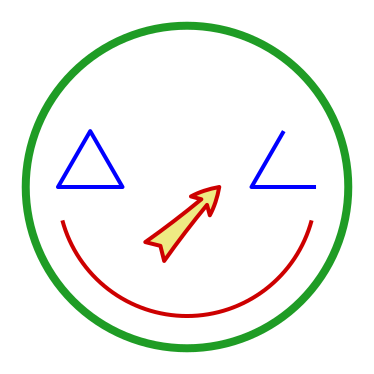
Drawing functions with polyline set by an array
use plotpy::{Canvas, Plot};

fn main() -> Result<(), &'static str> {
    // canvas object and common options
    let mut canvas = Canvas::new();
    canvas.set_line_width(3.0).set_edge_color("#cd0000").set_face_color("#eeea83");

    // draw arc
    canvas.draw_arc(0.5, 0.5, 0.4, 195.0, -15.0);

    // draw arrow
    canvas.set_arrow_scale(50.0).set_arrow_style("fancy");
    canvas.draw_arrow(0.4, 0.3, 0.6, 0.5);

    // draw circle
    canvas.set_face_color("None").set_edge_color("#1f9c25").set_line_width(6.0);
    canvas.draw_circle(0.5, 0.5, 0.5);

    // draw polyline
    canvas.set_line_width(3.0).set_edge_color("blue");
    let a = 0.2;
    let c = f64::sqrt(3.0) / 2.0;
    let p = &[[0.1, 0.5], [0.1 + a, 0.5], [0.1 + a / 2.0, 0.5 + a * c]];
    let q = &[[0.9, 0.5], [0.9 - a, 0.5], [0.9 - a / 2.0, 0.5 + a * c]];
    canvas.draw_polyline(p, true);
    canvas.draw_polyline(q, false);

    // add canvas to plot
    let mut plot = Plot::new();
    plot.set_hide_axes(true)
        .set_equal_axes(true)
        .set_range(-0.05, 1.05, -0.05, 1.05)
        .add(&canvas);

    // save figure
    plot.save("/tmp/plotpy/doc_tests/doc_canvas.svg")?;
    Ok(())
}
Cubic Bezier and use of begin/end functions
use plotpy::{Canvas, Plot, PolyCode, StrError};

fn main() -> Result<(), StrError> {
    // codes
    let data = [
        (3.0, 0.0, PolyCode::MoveTo),
        (1.0, 1.5, PolyCode::Curve4),
        (0.0, 4.0, PolyCode::Curve4),
        (2.5, 3.9, PolyCode::Curve4),
        (3.0, 3.8, PolyCode::LineTo),
        (3.5, 3.9, PolyCode::LineTo),
        (6.0, 4.0, PolyCode::Curve4),
        (5.0, 1.5, PolyCode::Curve4),
        (3.0, 0.0, PolyCode::Curve4),
    ];

    // polycurve
    let mut canvas = Canvas::new();
    canvas.set_face_color("#f88989").set_edge_color("red");
    canvas.polycurve_begin();
    for (x, y, code) in data {
        canvas.polycurve_add(x, y, code);
    }
    canvas.polycurve_end(true);

    // add canvas to plot
    let mut plot = Plot::new();
    plot.add(&canvas);

    // save figure
    plot.set_range(1.0, 5.0, 0.0, 4.0)
        .set_frame_borders(false)
        .set_hide_axes(true)
        .set_equal_axes(true)
        .set_show_errors(true);
    plot.save("/tmp/plotpy/doc_tests/doc_canvas_polycurve.svg")?;
    Ok(())
}
See also integration tests in the tests directory
Implementations
sourceimpl Canvas
impl Canvas
pub fn new() -> Self
sourcepub fn draw_arc<T>(&mut self, xc: T, yc: T, r: T, ini_angle: T, fin_angle: T) where
T: Display,
pub fn draw_arc<T>(&mut self, xc: T, yc: T, r: T, ini_angle: T, fin_angle: T) where
T: Display,
Draws arc (2D only)
sourcepub fn draw_arrow<T>(&mut self, xi: T, yi: T, xf: T, yf: T) where
T: Display,
pub fn draw_arrow<T>(&mut self, xi: T, yi: T, xf: T, yf: T) where
T: Display,
Draws arrow (2D only)
sourcepub fn draw_circle<T>(&mut self, xc: T, yc: T, r: T) where
T: Display,
pub fn draw_circle<T>(&mut self, xc: T, yc: T, r: T) where
T: Display,
Draws circle (2D only)
sourcepub fn polycurve_begin(&mut self) -> &mut Self
pub fn polycurve_begin(&mut self) -> &mut Self
Begins drawing a polycurve (straight segments, quadratic Bezier, and cubic Bezier) (2D only)
Warning
You must call Canvas::polycurve_add next, followed by Canvas::polycurve_end when finishing adding points. Otherwise, Python/Matplotlib will fail.
sourcepub fn polycurve_add<T>(&mut self, x: T, y: T, code: PolyCode) -> &mut Self where
T: Display,
pub fn polycurve_add<T>(&mut self, x: T, y: T, code: PolyCode) -> &mut Self where
T: Display,
Adds point to a polycurve (straight segments, quadratic Bezier, and cubic Bezier) (2D only)
Warning
You must call Canvas::polycurve_begin first, otherwise Python/Matplotlib will fail. Afterwards, you must call Canvas::polycurve_end when finishing adding points.
sourcepub fn polycurve_end(&mut self, closed: bool) -> &mut Self
pub fn polycurve_end(&mut self, closed: bool) -> &mut Self
Ends drawing a polycurve (straight segments, quadratic Bezier, and cubic Bezier) (2D only)
Warning
This function must be the last one called after Canvas::polycurve_begin and Canvas::polycurve_add. Otherwise, Python/Matplotlib will fail.
sourcepub fn draw_polycurve<'a, T, U>(
&mut self,
points: &'a T,
codes: &[PolyCode],
closed: bool
) -> Result<(), StrError> where
T: AsMatrix<'a, U>,
U: 'a + Display,
pub fn draw_polycurve<'a, T, U>(
&mut self,
points: &'a T,
codes: &[PolyCode],
closed: bool
) -> Result<(), StrError> where
T: AsMatrix<'a, U>,
U: 'a + Display,
Draws polyline with straight segments, quadratic Bezier, or cubic Bezier (2D only)
Note: The first and last commands are ignored.
sourcepub fn polyline_3d_begin(&mut self) -> &mut Self
pub fn polyline_3d_begin(&mut self) -> &mut Self
Begins adding points to a 3D polyline
Warning
This function must be followed by Canvas::polyline_3d_add and Canvas::polyline_3d_end, otherwise Python/Matplotlib will fail
sourcepub fn polyline_3d_add<T>(&mut self, x: T, y: T, z: T) -> &mut Self where
T: Display,
pub fn polyline_3d_add<T>(&mut self, x: T, y: T, z: T) -> &mut Self where
T: Display,
Adds point to a 3D polyline
Warning
This function must be called after Canvas::polyline_3d_begin and must be followed by Canvas::polyline_3d_end, otherwise Python/Matplotlib will fail.
sourcepub fn polyline_3d_end(&mut self) -> &mut Self
pub fn polyline_3d_end(&mut self) -> &mut Self
Ends adding points to a 3D polyline
Warning
This function must be called after Canvas::polyline_3d_begin and Canvas::polyline_3d_add, otherwise Python/Matplotlib will fail.
sourcepub fn draw_polyline<'a, T, U>(&mut self, points: &'a T, closed: bool) where
T: AsMatrix<'a, U>,
U: 'a + Display,
pub fn draw_polyline<'a, T, U>(&mut self, points: &'a T, closed: bool) where
T: AsMatrix<'a, U>,
U: 'a + Display,
Draws polyline (2D or 3D)
sourcepub fn draw_grid(
&mut self,
xmin: &[f64],
xmax: &[f64],
ndiv: &[usize],
with_point_ids: bool,
with_cell_ids: bool
) -> Result<(), StrError>
pub fn draw_grid(
&mut self,
xmin: &[f64],
xmax: &[f64],
ndiv: &[usize],
with_point_ids: bool,
with_cell_ids: bool
) -> Result<(), StrError>
Draws a 2D or 3D grid
Input
xmin, xmax– min and max coordinates (len = 2 or 3 == ndim)ndiv– number of divisions along each dimension (len = 2 or 3 == ndim)
sourcepub fn set_edge_color(&mut self, color: &str) -> &mut Self
pub fn set_edge_color(&mut self, color: &str) -> &mut Self
Sets the edge color (shared among features)
sourcepub fn set_face_color(&mut self, color: &str) -> &mut Self
pub fn set_face_color(&mut self, color: &str) -> &mut Self
Sets the face color (shared among features)
sourcepub fn set_line_width(&mut self, width: f64) -> &mut Self
pub fn set_line_width(&mut self, width: f64) -> &mut Self
Sets the line width of edge (shared among features)
sourcepub fn set_arrow_scale(&mut self, scale: f64) -> &mut Self
pub fn set_arrow_scale(&mut self, scale: f64) -> &mut Self
Sets the arrow scale
sourcepub fn set_arrow_style(&mut self, style: &str) -> &mut Self
pub fn set_arrow_style(&mut self, style: &str) -> &mut Self
Sets the arrow style
Options:
- “
-” – Curve : None - “
->” – CurveB : head_length=0.4,head_width=0.2 - “
-[” – BracketB : widthB=1.0,lengthB=0.2,angleB=None - “
-|>” – CurveFilledB : head_length=0.4,head_width=0.2 - “
<-” – CurveA : head_length=0.4,head_width=0.2 - “
<->” – CurveAB : head_length=0.4,head_width=0.2 - “
<|-” – CurveFilledA : head_length=0.4,head_width=0.2 - “
<|-|>” – CurveFilledAB : head_length=0.4,head_width=0.2 - “
]-” – BracketA : widthA=1.0,lengthA=0.2,angleA=None - “
]-[” – BracketAB : widthA=1.0,lengthA=0.2,angleA=None,widthB=1.0,lengthB=0.2,angleB=None - “
fancy” – Fancy : head_length=0.4,head_width=0.4,tail_width=0.4 - “
simple” – Simple : head_length=0.5,head_width=0.5,tail_width=0.2 - “
wedge” – Wedge : tail_width=0.3,shrink_factor=0.5 - “
|-|” – BarAB : widthA=1.0,angleA=None,widthB=1.0,angleB=None - As defined in https://matplotlib.org/stable/api/_as_gen/matplotlib.patches.FancyArrowPatch.html
sourcepub fn set_text_color(&mut self, color: &str) -> &mut Self
pub fn set_text_color(&mut self, color: &str) -> &mut Self
Sets the text color
sourcepub fn set_text_align_horizontal(&mut self, option: &str) -> &mut Self
pub fn set_text_align_horizontal(&mut self, option: &str) -> &mut Self
Sets the text horizontal alignment
Options: “center”, “left”, “right”
sourcepub fn set_text_align_vertical(&mut self, option: &str) -> &mut Self
pub fn set_text_align_vertical(&mut self, option: &str) -> &mut Self
Sets the text vertical alignment
Options: “center”, “top”, “bottom”, “baseline”, “center_baseline”
sourcepub fn set_text_fontsize(&mut self, fontsize: f64) -> &mut Self
pub fn set_text_fontsize(&mut self, fontsize: f64) -> &mut Self
Sets the text font size
sourcepub fn set_text_rotation(&mut self, rotation: f64) -> &mut Self
pub fn set_text_rotation(&mut self, rotation: f64) -> &mut Self
Sets the text rotation
sourcepub fn set_alt_text_color(&mut self, color: &str) -> &mut Self
pub fn set_alt_text_color(&mut self, color: &str) -> &mut Self
Sets the alternative text color
sourcepub fn set_alt_text_align_horizontal(&mut self, option: &str) -> &mut Self
pub fn set_alt_text_align_horizontal(&mut self, option: &str) -> &mut Self
Sets the alternative text horizontal alignment
Options: “center”, “left”, “right”
sourcepub fn set_alt_text_align_vertical(&mut self, option: &str) -> &mut Self
pub fn set_alt_text_align_vertical(&mut self, option: &str) -> &mut Self
Sets the alternative text vertical alignment
Options: “center”, “top”, “bottom”, “baseline”, “center_baseline”
sourcepub fn set_alt_text_fontsize(&mut self, fontsize: f64) -> &mut Self
pub fn set_alt_text_fontsize(&mut self, fontsize: f64) -> &mut Self
Sets the alternative text font size
sourcepub fn set_alt_text_rotation(&mut self, rotation: f64) -> &mut Self
pub fn set_alt_text_rotation(&mut self, rotation: f64) -> &mut Self
Sets the alternative text rotation
sourcepub fn set_stop_clip(&mut self, flag: bool) -> &mut Self
pub fn set_stop_clip(&mut self, flag: bool) -> &mut Self
Sets the flag to stop clipping features within margins
Trait Implementations
sourceimpl GraphMaker for Canvas
impl GraphMaker for Canvas
sourcefn get_buffer<'a>(&'a self) -> &'a String
fn get_buffer<'a>(&'a self) -> &'a String
Returns the text buffer with Python3 commands
sourcefn clear_buffer(&mut self)
fn clear_buffer(&mut self)
Clear the text buffer with Python commands
Auto Trait Implementations
impl RefUnwindSafe for Canvas
impl Send for Canvas
impl Sync for Canvas
impl Unpin for Canvas
impl UnwindSafe for Canvas
Blanket Implementations
sourceimpl<T> BorrowMut<T> for T where
T: ?Sized,
impl<T> BorrowMut<T> for T where
T: ?Sized,
const: unstable · sourcefn borrow_mut(&mut self) -> &mut T
fn borrow_mut(&mut self) -> &mut T
Mutably borrows from an owned value. Read more