pub struct Surface { /* private fields */ }Expand description
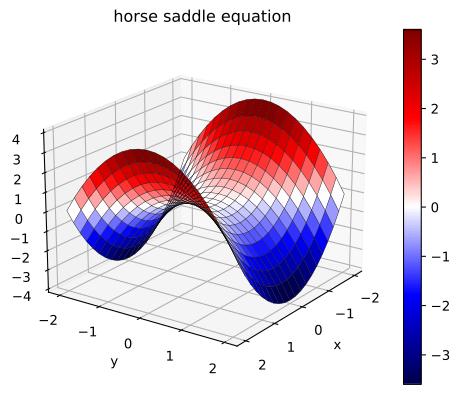
Generates a 3D a surface (or wireframe, or both)
Example
use plotpy::{Plot, StrError, Surface};
use russell_lab::generate3d;

fn main() -> Result<(), StrError> {
    // generate (x,y,z) matrices
    let n = 21;
    let (x, y, z) = generate3d(-2.0, 2.0, -2.0, 2.0, n, n, |x, y| x * x - y * y);

    // configure and draw surface + wireframe
    let mut surface = Surface::new();
    surface.set_colormap_name("seismic")
        .set_with_colorbar(true)
        .set_with_wireframe(true)
        .set_line_width(0.3);

    // draw surface + wireframe
    surface.draw(&x, &y, &z);

    // add surface to plot
    let mut plot = Plot::new();
    plot.add(&surface)
        .set_title("horse saddle equation") // must be after add surface
        .set_camera(20.0, 35.0); // must be after add surface

    // save figure
    plot.save("/tmp/plotpy/doc_tests/doc_surface.svg")?;
    Ok(())
}
See also integration tests in the tests directory
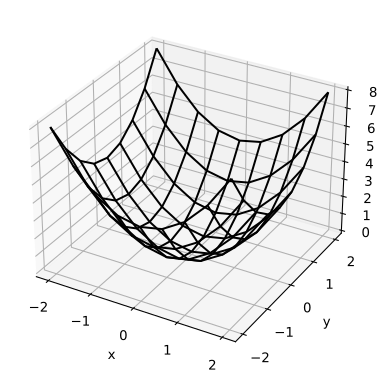
Output from some integration tests:
Implementations
sourceimpl Surface
impl Surface
sourcepub fn draw<'a, T, U>(&mut self, x: &'a T, y: &'a T, z: &'a T) where
T: AsMatrix<'a, U>,
U: 'a + Display,
pub fn draw<'a, T, U>(&mut self, x: &'a T, y: &'a T, z: &'a T) where
T: AsMatrix<'a, U>,
U: 'a + Display,
sourcepub fn set_row_stride(&mut self, value: usize) -> &mut Self
pub fn set_row_stride(&mut self, value: usize) -> &mut Self
Sets the row stride
sourcepub fn set_col_stride(&mut self, value: usize) -> &mut Self
pub fn set_col_stride(&mut self, value: usize) -> &mut Self
Sets the column stride
sourcepub fn set_with_surface(&mut self, flag: bool) -> &mut Self
pub fn set_with_surface(&mut self, flag: bool) -> &mut Self
Sets option to generate surface
sourcepub fn set_with_wireframe(&mut self, flag: bool) -> &mut Self
pub fn set_with_wireframe(&mut self, flag: bool) -> &mut Self
Sets option to generate wireframe
sourcepub fn set_colormap_index(&mut self, index: usize) -> &mut Self
pub fn set_colormap_index(&mut self, index: usize) -> &mut Self
Sets the colormap index
Options:
- 0 – bwr
- 1 – RdBu
- 2 – hsv
- 3 – jet
- 4 – terrain
- 5 – pink
- 6 – Greys
>6 – starts over from 0
sourcepub fn set_colormap_name(&mut self, name: &str) -> &mut Self
pub fn set_colormap_name(&mut self, name: &str) -> &mut Self
Sets the colormap name
Options:
bwrRdBuhsvjetterrainpinkGreys- see more here https://matplotlib.org/stable/tutorials/colors/colormaps.html
sourcepub fn set_with_colormap(&mut self, flag: bool) -> &mut Self
pub fn set_with_colormap(&mut self, flag: bool) -> &mut Self
Sets option to use a colormap
sourcepub fn set_with_colorbar(&mut self, flag: bool) -> &mut Self
pub fn set_with_colorbar(&mut self, flag: bool) -> &mut Self
Sets option to draw a colorbar
sourcepub fn set_colorbar_label(&mut self, label: &str) -> &mut Self
pub fn set_colorbar_label(&mut self, label: &str) -> &mut Self
Sets the colorbar label
sourcepub fn set_number_format_cb(&mut self, format: &str) -> &mut Self
pub fn set_number_format_cb(&mut self, format: &str) -> &mut Self
Sets the number format for the labels in the colorbar (cb)
sourcepub fn set_solid_color(&mut self, color: &str) -> &mut Self
pub fn set_solid_color(&mut self, color: &str) -> &mut Self
Sets a solid color for the surface (disables colormap)
sourcepub fn set_line_color(&mut self, color: &str) -> &mut Self
pub fn set_line_color(&mut self, color: &str) -> &mut Self
Sets the color of wireframe lines
sourcepub fn set_line_style(&mut self, style: &str) -> &mut Self
pub fn set_line_style(&mut self, style: &str) -> &mut Self
Sets the style of wireframe line
Options:
- “
-”, “:”, “--”, “-.”
sourcepub fn set_line_width(&mut self, width: f64) -> &mut Self
pub fn set_line_width(&mut self, width: f64) -> &mut Self
Sets the width of wireframe line
sourceimpl Surface
impl Surface
sourcepub fn draw_cylinder(
&mut self,
a: &[f64],
b: &[f64],
radius: f64,
ndiv_axis: usize,
ndiv_perimeter: usize
) -> Result<(), StrError>
pub fn draw_cylinder(
&mut self,
a: &[f64],
b: &[f64],
radius: f64,
ndiv_axis: usize,
ndiv_perimeter: usize
) -> Result<(), StrError>
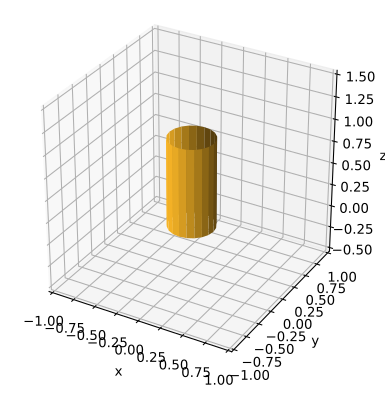
Draws a cylinder
Input
a– first point on the cylinder (centered) axisb– second point on the cylinder (centered) axisradius– the cylinder’s radiusndiv_axis– number of divisions along the axis (≥ 1)ndiv_perimeter– number of divisions along the cross-sectional circle perimeter (≥ 3)
Example
use plotpy::{Plot, StrError, Surface};
use std::path::Path;

fn main() -> Result<(), StrError> {
    // configure and draw surface
    let mut surface = Surface::new();
    let a = &[0.0, 0.0, 0.0];
    let b = &[0.0, 0.0, 1.0];
    surface.set_solid_color("#fcb827")
           .draw_cylinder(a, b, 0.25, 1, 20)?;

    // add surface to plot
    let mut plot = Plot::new();
    plot.add(&surface);

    // save figure
    plot.set_range_3d(-1.0, 1.0, -1.0, 1.0, 0.0, 1.0)
        .set_equal_axes(true)
        .save("/tmp/plotpy/doc_tests/doc_cylinder.svg")?;
    Ok(())
}
See also integration tests in the tests directory
sourcepub fn draw_plane_nzz(
&mut self,
p: &[f64],
n: &[f64],
xmin: f64,
xmax: f64,
ymin: f64,
ymax: f64,
nx: usize,
ny: usize
) -> Result<(Matrix, Matrix, Matrix), StrError>
pub fn draw_plane_nzz(
&mut self,
p: &[f64],
n: &[f64],
xmin: f64,
xmax: f64,
ymin: f64,
ymax: f64,
nx: usize,
ny: usize
) -> Result<(Matrix, Matrix, Matrix), StrError>
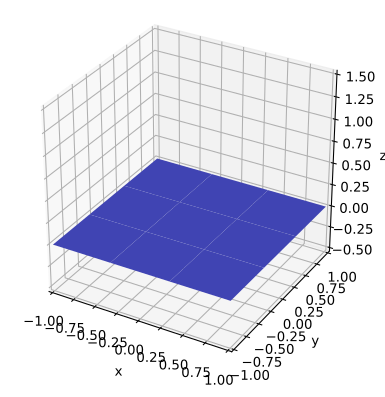
Draws a plane that has a normal vector with a non-zero z (nzz) component
The plane may be perpendicular to z if n = (0,0,1)
Input
p– (len=3) point on planen– (len=3) normal vectorxminandxmax– limits along xyminandymax– limits along ynx– number of divisions along x (must be ≥ 2)ny– number of divisions along y (must be ≥ 2)
Output
x,y,z– the coordinates of all points as in a meshgrid
Example
use plotpy::{Plot, StrError, Surface};
use std::path::Path;

fn main() -> Result<(), StrError> {
    // configure and draw surface
    let mut surface = Surface::new();
    let p = &[0.0, 0.0, 0.0];
    let n = &[0.0, 0.0, 1.0];
    surface.set_solid_color("#5359e9")
           .draw_plane_nzz(p, n, -1.0, 1.0, -1.0, 1.0, 3, 3)?;

    // add surface to plot
    let mut plot = Plot::new();
    plot.add(&surface);

    // save figure
    plot.set_range_3d(-1.0, 1.0, -1.0, 1.0, 0.0, 1.0)
        .set_equal_axes(true)
        .save("/tmp/plotpy/doc_tests/doc_plane_nzz.svg")?;
    Ok(())
}
See also integration test in the tests directory.
sourcepub fn draw_hemisphere(
&mut self,
c: &[f64],
r: f64,
alpha_min: f64,
alpha_max: f64,
n_alpha: usize,
n_theta: usize,
cup: bool
) -> Result<(Matrix, Matrix, Matrix), StrError>
pub fn draw_hemisphere(
&mut self,
c: &[f64],
r: f64,
alpha_min: f64,
alpha_max: f64,
n_alpha: usize,
n_theta: usize,
cup: bool
) -> Result<(Matrix, Matrix, Matrix), StrError>
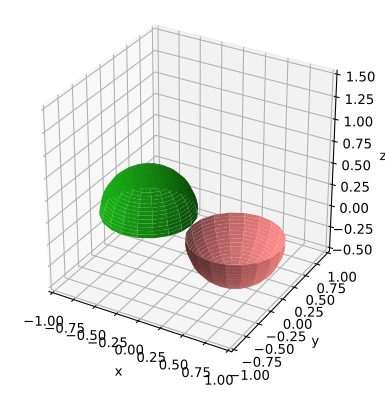
Draws a hemisphere
Input
c– (len=3) center coordinatesr– radiusalpha_min– min α angle in [-180, 180) degreesalpha_max– max α angle in (-180, 180] degreesn_alpha– number of divisions along α (must be ≥ 2)n_theta– number of divisions along θ (must be ≥ 2)cup– upside-down; like a cup
Output
x,y,z– the coordinates of all points as in a meshgrid
Example
use plotpy::{Plot, StrError, Surface};
use std::path::Path;

fn main() -> Result<(), StrError> {
    // draw hat
    let mut hat = Surface::new();
    let c = &[-0.5, 0.0, 0.0];
    hat.set_solid_color("#17af14")
       .draw_hemisphere(c, 0.5, -180.0, 180.0, 20, 20, false)?;

    // draw cup
    let mut cup = Surface::new();
    let c = &[0.5, 0.0, 0.0];
    cup.set_solid_color("#ff8787")
       .draw_hemisphere(c, 0.5, -180.0, 180.0, 20, 20, true)?;

    // add surfaces to plot
    let mut plot = Plot::new();
    plot.add(&hat).add(&cup);

    // save figure
    plot.set_range_3d(-1.0, 1.0, -1.0, 1.0, 0.0, 1.0)
        .set_equal_axes(true)
        .save("/tmp/plotpy/doc_tests/doc_hemisphere.svg")?;
    Ok(())
}
See also integration test in the tests directory.
sourcepub fn draw_superquadric(
&mut self,
c: &[f64],
r: &[f64],
k: &[f64],
alpha_min: f64,
alpha_max: f64,
theta_min: f64,
theta_max: f64,
n_alpha: usize,
n_theta: usize
) -> Result<(Matrix, Matrix, Matrix), StrError>
pub fn draw_superquadric(
&mut self,
c: &[f64],
r: &[f64],
k: &[f64],
alpha_min: f64,
alpha_max: f64,
theta_min: f64,
theta_max: f64,
n_alpha: usize,
n_theta: usize
) -> Result<(Matrix, Matrix, Matrix), StrError>
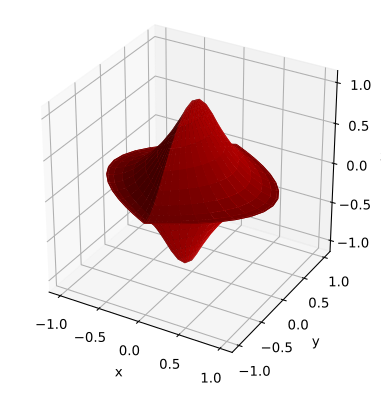
Draws a superquadric (includes sphere, super-ellipsoid, and super-hyperboloid)
Input
c– (len=3) center coordinatesr– (len=3) radiik– (len=3) exponents (must all be ≥ 0)alpha_min– min α angle in [-180, 180) degreesalpha_max– max α angle in (-180, 180] degreestheta_min– min θ angle in [-90, 90) degreestheta_max– max θ angle in (-90, 90] degreesn_alpha– number of divisions along α (must be ≥ 2)n_theta– number of divisions along θ (must be ≥ 2)
Output
x,y,z– the coordinates of all points as in a meshgrid
Reference: https://en.wikipedia.org/wiki/Superquadrics
Example
use plotpy::{Plot, StrError, Surface};
use std::path::Path;

fn main() -> Result<(), StrError> {
    // configure and draw surface
    let c = &[0.0, 0.0, 0.0];
    let r = &[1.0, 1.0, 1.0];
    let k = &[1.0, 2.0, 0.5];
    let mut surface = Surface::new();
    surface.set_solid_color("#cd0000")
        .draw_superquadric(c, r, k, -180.0, 180.0, -90.0, 90.0, 40, 20)?;

    // add surface to plot
    let mut plot = Plot::new();
    plot.add(&surface);

    // save figure
    plot.set_equal_axes(true)
        .save("/tmp/plotpy/doc_tests/doc_superquadric.svg")?;
    Ok(())
}
See also integration test in the tests directory.
sourcepub fn draw_sphere(
&mut self,
c: &[f64],
r: f64,
n_alpha: usize,
n_theta: usize
) -> Result<(Matrix, Matrix, Matrix), StrError>
pub fn draw_sphere(
&mut self,
c: &[f64],
r: f64,
n_alpha: usize,
n_theta: usize
) -> Result<(Matrix, Matrix, Matrix), StrError>
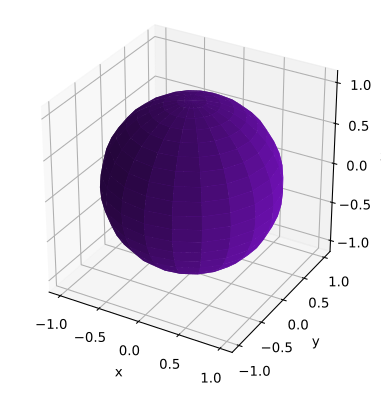
Draws a sphere
Input
c– (len=3) center coordinatesr– radiusn_alpha– number of divisions along α (must be ≥ 2)n_theta– number of divisions along θ (must be ≥ 2)
Output:
x,y,z– the coordinates of all points as in a meshgrid
Example
use plotpy::{Plot, StrError, Surface};
use std::path::Path;

fn main() -> Result<(), StrError> {
    // configure and draw surface
    let mut surface = Surface::new();
    let c = &[0.0, 0.0, 0.0];
    surface.set_solid_color("#7812c3")
           .draw_sphere(c, 1.0, 20, 20)?;

    // add surface to plot
    let mut plot = Plot::new();
    plot.add(&surface);

    // save figure
    plot.set_equal_axes(true)
        .save("/tmp/plotpy/doc_tests/doc_sphere.svg")?;
    Ok(())
}
See also integration test in the tests directory.
Trait Implementations
sourceimpl GraphMaker for Surface
impl GraphMaker for Surface
sourcefn get_buffer<'a>(&'a self) -> &'a String
fn get_buffer<'a>(&'a self) -> &'a String
Returns the text buffer with Python3 commands
sourcefn clear_buffer(&mut self)
fn clear_buffer(&mut self)
Clear the text buffer with Python commands
Auto Trait Implementations
impl RefUnwindSafe for Surface
impl Send for Surface
impl Sync for Surface
impl Unpin for Surface
impl UnwindSafe for Surface
Blanket Implementations
sourceimpl<T> BorrowMut<T> for T where
T: ?Sized,
impl<T> BorrowMut<T> for T where
T: ?Sized,
const: unstable · sourcefn borrow_mut(&mut self) -> &mut T
fn borrow_mut(&mut self) -> &mut T
Mutably borrows from an owned value. Read more